Go RBAC and permission libraries for B2B products
Go RBAC and permission libraries for B2B products: compare roles, policy checks, and team workflows so rules stay clear before they spread.
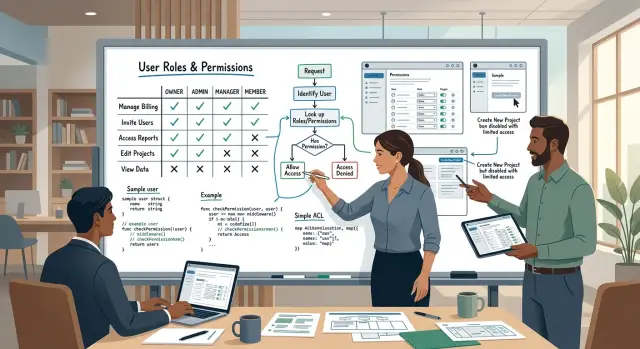
Table of Contents
Why permissions get messy fast
Permission logic rarely breaks all at once. It spreads a little at a time. One check lands in an HTTP handler, another goes into a background job, and a third ends up in the UI to hide a button.
That feels fine early on. A B2B product might start with two simple rules: admins can do everything, members can do less. Then the first bigger customer asks for a sales manager who can view all deals, but only edit deals in one region. A finance lead can approve refunds, but not change billing settings. An account owner can invite users, but not see audit logs.
Now the old if user.IsAdmin() check stops being enough.
The mess grows because each part of the product answers the same question in its own way. The API checks one rule. The UI guesses another. A scheduled job runs with broad access because nobody wants it to fail at 2 a.m. Soon the system has several versions of the truth.
The result is expensive in boring, painful ways:
- users see buttons they cannot use
- support gets tickets about "missing" access
- engineers patch edge cases in random files
- one rushed exception creates a security hole
Hardcoded role checks also age badly in B2B SaaS permissions. Enterprise customers almost always want exceptions. They want custom roles, team scopes, temporary access, and rules that depend on account, project, region, or plan. If your rules live inside handlers, every new deal turns into a code change.
This is usually when teams start searching for Go RBAC and permission libraries. The library matters, but the bigger problem is drift. If the team does not share one clear model, the same rule keeps reappearing in new places with slight differences.
A good setup gives everyone the same map. Product can name roles clearly. Engineers can check permissions the same way in APIs, jobs, and services. Support can explain access without guessing. That consistency prevents a lot of small bugs before they turn into customer-facing problems.
Start with the access model
Most permission problems start before you pick a library. They start when the product team says "admin, member, viewer" and calls it done. That works for a while, then someone asks for one small exception, and the rules start leaking into handlers, background jobs, and support scripts.
Pure roles are fine when people with the same role can do almost the same things everywhere. A small B2B product with three roles and one shared workspace can live with that. It is easy to explain to customers, and easy for support to reason about.
Action-based permissions fit better when the product has more than a few sensitive actions. Think of actions like view invoices, approve payouts, export data, manage API keys, or invite users. In that model, roles still exist, but roles are just bundles of permissions. That takes a bit more setup, but it usually stays cleaner once the product grows.
Scope matters just as much as the role itself. In many B2B SaaS permissions setups, the same person needs different access at different levels:
- account scope for billing, SSO, and company-wide settings
- workspace scope for projects, data, and member invites
- team scope for day-to-day work inside a smaller group
If you skip scope, you get odd rules fast. A user may need to edit records in one workspace, view another, and manage billing for the whole account. One flat role cannot express that well.
Temporary access is where simple RBAC starts to crack. A finance lead may need export rights for one week. A contractor may need access to one customer workspace and nowhere else. A support engineer may need time-limited access to debug a problem. If those cases matter, add grants with scope and expiry instead of creating another permanent role.
A simple rule works well: choose the smallest model that covers your current product and the next few obvious exceptions. If three roles and one scope handle almost every case, keep it simple. If you already say "except for this team" or "except during onboarding," move to permissions plus scope before the rules spread.
How Go libraries usually differ
Most Go permission libraries solve the same problem in three very different ways. They either use fixed roles, named permissions, or policy rules that the app evaluates at runtime.
The first group is the easiest to read. You define roles like admin, manager, or viewer as enums or constants, then check them in code. This works well when each role has a clear meaning and your product only has a few plans, teams, or account types.
Permission maps sit in the middle. Instead of asking "is this user an admin?", the code asks "can this user edit invoices?" or "can this user invite teammates?" That gives you more control, and it usually ages better when sales, support, and enterprise customers start asking for exceptions.
Policy engines go further. They evaluate rules such as user role, team, resource owner, account status, or tenant settings in one place. They can save you from hardcoded checks, but they also add more moving parts, more setup, and more chances for a rule to look right while doing the wrong thing.
A rough way to compare them:
- Enum roles are fast to build and easy to follow, but they get rigid fast.
- Permission maps give cleaner checks at the handler or service level, but someone still has to maintain the mapping.
- Policy engines handle messy B2B SaaS permissions better, especially for tenant-specific rules, but they need stronger test discipline.
Where rules live
Some libraries keep rules in Go code. That is the easiest setup for version control, code review, and refactoring. The downside is that every rule change needs a deploy.
Other setups store rules in config files or a database. That can help when operations or support teams need to adjust access without waiting for a release. It also creates a new problem: you now need change tracking, safe defaults, and a clear way to roll back a bad rule.
A mixed model is common in B2B products. Core rules stay in code, while customer-specific exceptions live in data. That split is practical, but only if your team agrees on which layer owns what.
Testing and debugging
Testing changes a lot across these options. Enum roles are easy to test with a few table-driven cases. Permission maps need broader coverage because one new permission can affect several pages, background jobs, and API routes.
Policy engines need the most care. You will want tests for rule priority, allow versus deny behavior, and edge cases like suspended users or cross-tenant access. Debugging also gets harder. When a user gets blocked, the team needs to see which rule fired, which input matched, and why deny won over allow.
If your team cannot explain a failed permission check in a minute or two, the library is probably too clever for your current product stage.
A simple B2B example
Imagine a B2B app with many customer workspaces. One company has sales, finance, and support teams, and each team works in its own workspace. That setup looks simple until someone asks who can invite users, who can export data, and who can see invoices.
A clean starting point is five actors:
- Owner controls the whole account and can do rare actions like transfer ownership.
- Admin manages people and settings across the account.
- Manager runs one team or one workspace.
- Member does day to day work inside assigned areas.
- Billing handles plans, invoices, and payment details.
Now map actions to those roles. The owner can invite users, export data, edit account settings, and view invoices. An admin can usually invite users and edit most settings, but you may block ownership changes or payment method updates. A manager can invite people into their own workspace and export data from that workspace, but should not touch company billing. A member can work with records they own or records their team shares, but they should not edit account settings. The billing role can view invoices and update payment details, but should not read customer data.
Scope changes the answer
The same action can be allowed in one place and blocked in another. A manager might export leads from the sales workspace and fail the same check in the finance workspace. That means your rule is not just role plus action. It is role, action, and scope.
In Go authorization patterns, this often turns into checks like: can this user edit settings for this workspace, or for the whole account? "Edit workspace settings" and "edit account settings" sound close, but they should be separate permissions. "View invoices" usually belongs to the account scope, while "invite user" may belong to either account or workspace scope, depending on your product.
One exception is temporary support access. Say a customer opens a ticket because reports look wrong. You may grant a support engineer read-only access to one workspace for two hours. That access should expire on its own, and it should block exports, billing, and member management.
This small example shows why permission checks in Go get messy when teams skip the model step. If your library can answer "who can do what, where, and for how long" without extra if statements in every handler, the model is probably solid.
Pick a team workflow that holds up
Most permission problems start as naming problems. If the product says "workspace admin", the API says "owner", and support says "manager", people will make the wrong call. The same goes for actions. Pick one name for each action and keep it everywhere, from UI copy to policy code.
With Go RBAC and permission libraries, the hard part is usually not the check itself. The hard part is getting product, support, and engineering to use the same words. A boring, shared permission table fixes more confusion than another helper function.
Make the rules readable
Keep one plain-language table that anyone on the team can read. Product managers should be able to review it without opening code, and support should be able to answer customer questions from the same source.
A simple table usually needs only a few columns:
- role name
- action name
- scope, such as own records, team, or all accounts
- allowed or denied
- notes for plan limits or special cases
That table should answer real questions in one line. For example: "Billing admin can export invoices for their team, but cannot change subscription plans." If a PM wants to change that rule, they update the table first. Engineers then update tests and policy code to match it.
Support teams benefit right away. When a customer asks, "Why can this user invite teammates but not delete a project?" support should not need a developer to explain it. They should look up the role, the action, and the scope, then reply with a clear reason.
Keep exceptions on a short leash
Role changes and one-off exceptions need owners. If everyone can edit roles, permission logic drifts fast.
Set a simple approval path:
- product defines new roles and actions
- engineering maps them to code and tests
- a limited admin group can approve exceptions
- each exception gets an owner and end date
Temporary access should stay temporary. If sales or support asks for a special case, write down who approved it and when it expires. Otherwise "just for this customer" turns into permanent behavior, and support tickets pile up later.
Small teams do well with this approach because it removes guesswork. One role name, one action name, one table, one approval path. That is usually enough to keep permission rules from spreading into random handlers and side checks.
How to add checks without scattering them
Permission logic gets messy when each handler makes its own decision. One route checks a role name, another checks an account flag, and a third forgets the rule entirely. If you are comparing Go RBAC and permission libraries, this part matters more than the library API.
Start by naming the things people act on. In a B2B product, that usually means resources such as invoices, workspaces, members, or reports. Then name the actions, like view, edit, export, or delete. Last, set the scope: own record, team, company, or all customers for internal staff.
Put those rules into one permission matrix before you write code. A simple table often catches bad assumptions early. You may find that "manager" can edit invoices in one team but should not export all invoices across the company. That is much easier to fix in a matrix than after rules spread through twenty handlers.
Once the matrix is clear, add one authorization layer close to your business logic. Keep handlers thin. Let them parse the request, load the user, and call something like an auth service or policy checker. That layer should answer one question: "Can this user do this action on this resource in this scope?" When every endpoint asks the same layer, your rules stay in one place.
Tests should cover both yes and no cases for every role. Teams often test the happy path and skip denials, then support finds the holes first. A small set of table tests goes a long way because permission bugs are usually boring and predictable.
When you deny an action, log enough detail so someone can explain it later. Include:
- user or account ID
- role or policy name used
- resource and action
- scope or tenant context
- reason for denial
That log saves real time when a customer asks why one manager can archive a project and another cannot. It also makes policy changes safer, because you can see which rules people hit in practice.
Mistakes that create support tickets
Many teams blame their Go RBAC and permission libraries when support starts piling up, but the library is rarely the real problem. Trouble starts when business rules and authorization rules get mixed together. "Can edit invoices" is an access rule. "Can edit invoices only before they are locked and only for their own region" mixes access with product logic, and that usually ends up buried in one handler.
Role names cause a lot of pain too. Teams often create roles like "sales", "finance", or "ops" because those names feel familiar. A year later, each team does six different things, and the role stops making sense. Roles work better when they map to actions people need, such as viewing reports, approving refunds, or managing billing.
Special cases often hide in odd places. A web handler blocks an action, but the import script still runs it. A cron job sends reports to users who lost access last week. An admin tool skips the same check because "only staff use it." Users do not care which path caused the mistake. They just see data they should not see, or they get blocked from work they should be allowed to do.
Background work needs the same permission model as the main app. Imports, exports, sync jobs, support consoles, and internal scripts often sit outside the normal request flow. That gap creates some of the worst tickets because the bug feels random. One customer can update an account from the dashboard but not through a CSV import. Another loses access in the UI but still gets scheduled emails with restricted data.
Audit logs matter just as much. Sooner or later, someone asks, "Who changed this role?" If you do not log role changes, support has to guess. Security has to guess too. Record who changed access, what changed, when it changed, and which account it touched.
A better setup keeps permission checks in one place and calls that code from handlers, jobs, imports, and admin tools. That sounds boring, and boring is good here. Oleg Sotnikov often guides teams toward this kind of setup in Fractional CTO work because it cuts strange permission bugs before customers trip over them.
What a real permission setup looks like
Most B2B SaaS permissions break when teams rely on broad roles alone. A role gets you part of the way, but real products also need action, resource, scope, and sometimes an expiry time.
Whatever Go authorization patterns you pick, each rule should answer the same question: who can do what, to which record, in which account, and for how long.
A practical model
Many teams keep each permission simple and explicit:
- subject: user or team
- action: view, edit, invite, download
- resource: deal, invoice, billing, HR note
- scope: workspace, account, project, record
- expires_at: optional end time
That model holds up well when the product grows.
Picture one customer workspace with four people. The sales manager can edit deals because that is part of the job. They can change stage, amount, owner, or notes on a deal. They still cannot open billing settings or update payment methods, because money controls belong somewhere else.
The finance user needs a different slice. They can view and download invoices, but only for one account. If the same company has five accounts, this user should not drift across all of them by default. Scope matters as much as the action.
A workspace admin often manages access, not private data. They can invite users, remove users, and change seats or team roles. That does not mean they can read HR notes, salary comments, or internal people records. If your app stores sensitive fields, treat them as a separate resource with separate rules.
Support access should stay temporary. During an incident, support staff may need read access to a single account, a few settings, and audit logs for two hours. After that, the access should end on its own. Manual cleanup sounds fine until someone forgets.
This is where permission checks in Go stay readable. Instead of sprinkling custom if statements across handlers, the app asks one consistent question before each sensitive action. Teams debug faster, audits make sense, and support tickets drop because users see the same rule everywhere.
Quick checks before you ship
Permission bugs rarely look dramatic. More often, one customer cannot open a page, one manager can edit the wrong record, or support has no clear answer when access fails.
If you use Go RBAC and permission libraries, run a short review before each release. It saves a lot of cleanup later.
- A new developer should find the full rule set in one place. If access rules live in handlers, middleware, templates, and random service methods, nobody trusts the result.
- Support should see why a check failed. "Denied" is not enough. They need a plain reason such as missing workspace role, wrong account, or object owner mismatch.
- You should add a new role without touching ten handlers. If every new role means copy-paste edits across the codebase, the model is already too spread out.
- Tests should cover every scope you sell to customers. In B2B SaaS permissions, that usually means account scope, workspace scope, and object scope.
- Logs should show who changed roles, what changed, and when. Without that trail, role bugs turn into long Slack threads and guesses.
One small test tells you a lot: ask a teammate who did not build the permission system to answer a basic support question. For example, "Why can Dana view the invoice list but not export one invoice from Workspace B?" If they cannot trace the answer in a few minutes, your setup still has blind spots.
This is also where many teams learn that policy checks and audit logs belong together. A clean rule engine helps developers decide access. A clean audit trail helps humans explain it after the fact. You need both before customers do the testing for you.
What to do next
Choose one access model now, even if it feels a bit plain. A simple model with a few rough edges is better than a mix of roles, flags, and one-off exceptions. That is where many Go RBAC and permission libraries start to feel harder than they should.
Write the model in plain language. Keep it short. Describe who can do what, where each rule lives, and who can approve a change. If support cannot explain a permission to a customer in one minute, the model is already too hard.
Then do a small review with the people who will live with it every day:
- engineering checks where the rule runs and how it stays consistent
- product checks whether the rule matches the plan customers actually buy
- support checks the odd cases that usually turn into tickets
That meeting does not need slides or a long spec. A shared doc and a few real customer examples are enough. For example, ask one simple question: can a manager edit billing, invite users, and view another team’s data, or only some of that? If the room gives three different answers, fix the wording before you touch more code.
Do not migrate every permission check at once. Start with the noisy ones first: onboarding blockers, billing actions, admin access, and data that crosses team boundaries. Move those checks into one consistent path. After that, the rest gets easier because the team has a pattern to copy.
If your product already has checks spread across handlers, middleware, and SQL filters, a second opinion can save weeks of cleanup later. Oleg Sotnikov reviews roles, service boundaries, and team workflow for startups and small businesses before the model hardens. The useful outcome is usually simple: fewer surprise rules, fewer support tickets, and a permission model the whole team can explain the same way.


