Go job queue libraries for reliable background work
Compare Go job queue libraries for email, imports, and reports, with simple guidance on retries, visibility, dead jobs, and failure handling.
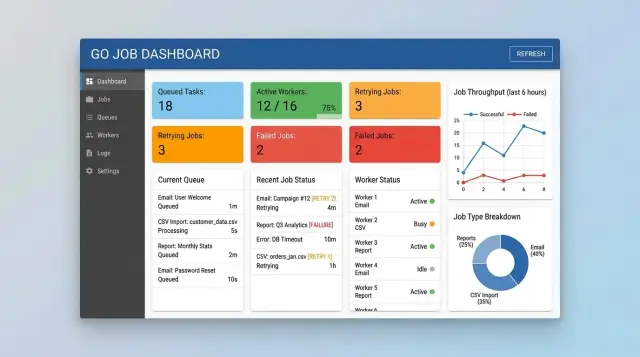
Table of Contents
Why background work needs a queue
A web request should finish fast. If it waits for a large CSV import, a batch of emails, or a report that takes 40 seconds to build, the user sits through a spinner and hopes nothing times out.
A queue fixes that. The app accepts the request, stores a job, and returns right away. A worker picks up the job in the background and keeps going even if the user closes the tab.
This shows up in ordinary product work all the time. A signup flow sends a welcome email. An admin uploads a file with 50,000 rows. A manager requests a monthly report with heavy queries and file generation. None of that work belongs inside a normal page load.
Slow work is only part of the problem. Repeated work is often worse. If the same email job runs twice, people get duplicate messages. If an import runs twice, you can create duplicate records or overwrite clean data with stale values. If a report reruns after a partial failure, the team may download the wrong file and trust bad numbers.
A queue gives you control over that risk. Good Go job queue libraries let you retry when a worker crashes, delay a job when another system is down, and record what happened on each attempt. You can see which jobs are waiting, which ones failed, and which ones keep coming back.
That changes daily operations. When email delivery slows down or imports start failing on one file format, the team can spot the pattern early instead of hearing about it from users. The goal is simple: finish the work, retry the right failures, and make broken jobs easy to find and fix.
Decide what a job means before you pick a library
Before you compare Go job queue libraries, decide what a job actually is in your app. A queue can only track the data you give it. Weak job data leads to messy retries, duplicate work, and support questions nobody can answer.
Start with the job record. For email, you usually need the recipient, template name, attempt count, last error, and scheduled run time. For an import, you may need the file ID, who uploaded it, how many rows passed, and where it failed. For report generation, store the report type, filters, output format, and the user who requested it.
A few decisions make the rest much easier:
- Decide which fields every job must keep, even after failure.
- Set retry limits by job type, not one global limit for everything.
- Mark which errors should stop retries right away.
- Decide who needs job status: developers, support, ops, end users, or some mix.
Retries need judgment. An email job can retry a few times if the provider times out. A CSV import with bad column names should fail once and stop. A monthly report that dies because a database connection dropped can retry later, but a report request with missing input should fail fast.
Be strict about permanent failure. If the input is broken, the template is missing, or the user no longer has access, more retries just waste time. Mark those jobs clearly and store the reason in plain language.
Visibility affects the choice more than most teams expect. If customers need to see "queued," "running," or "failed," choose a library that makes status easy to query. If only developers care, logs may be enough for the first version. Small teams often skip this part, then regret it the first time jobs fail in production and everyone wants answers immediately.
What to compare in Go queue libraries
Many Go job queue libraries look fine when every job succeeds. The differences show up when a worker crashes, Redis restarts, or one bad import retries all night.
Storage is the first big choice. Redis-backed queues are usually quick to add and fast under heavy write volume. Postgres-backed queues often feel simpler to operate because app data and jobs live in one system. That can make backups, restores, and local development less messy.
The right choice depends on your team. If you already run Redis and know how to monitor it, Redis may feel natural. If you want fewer moving parts and your job volume is moderate, Postgres is often calmer.
How workers claim and retry jobs
Check how a library claims a job and what happens if the worker dies halfway through. A good queue marks the job as in progress, prevents two workers from doing the same work, and puts the job back after a timeout if nobody finishes it.
Retry rules matter just as much. Email sends, CSV imports, and report generation fail for different reasons, so you want per-job retry limits, backoff between attempts, and a clear final state when the queue gives up.
Delayed jobs are another place where details matter. You may need to send an email in 15 minutes, retry an import chunk in an hour, or run a report overnight. The library should schedule that cleanly without noisy polling loops.
Visibility is what keeps problems small. A dashboard helps, but readable logs and a clear failed-job list can be enough. You should be able to see status, error message, retry count, and next run time without spending 20 minutes in application logs.
Redis-based options many Go teams try first
Many Go teams start with Redis because it is easy to add, fast enough for common background work, and already familiar if the team uses it for caching or short-lived data.
Asynq is often the first serious option when a team wants Redis and a clean operator experience. Its built-in web UI matters more than it seems at first. When an import fails at 2 a.m. or a report job keeps retrying, someone can open the dashboard, inspect the queue, and act instead of guessing from logs.
gocraft/work feels smaller and simpler. If your team wants a light mental model and does not need many queue features on day one, it can work well. A product that only sends receipts, welcome emails, and a few daily summaries may not need much more than workers, retries, and scheduling.
Machinery fits a different style. It leans toward a broader task queue model, so it can make sense when a team expects more complex workflows or already thinks in terms of task routing and async execution. That flexibility can help, but it also adds more pieces to learn and run.
A practical rule of thumb helps here. Pick Asynq if you want Redis, solid defaults, and a UI people will actually use. Pick gocraft/work if you want the lightest setup and your jobs are simple. Pick Machinery if your team already understands task queue patterns and expects more involved flows.
The final choice usually has more to do with operations than feature lists. A team that checks dashboards and retries failed jobs every day often gets more from Asynq. A small team that wants fewer concepts may move faster with gocraft/work. If your team already runs busy Redis systems and does not mind more setup, Machinery can feel natural.
That is the part people skip. The library has to match how your team behaves when jobs fail, not how it looks in a benchmark.
Postgres-first options for teams that want fewer moving parts
If your app already runs on Postgres, a Postgres-backed queue can be the simpler choice. You keep one database, one backup plan, and one place to inspect work. For many Go teams, River is the first library worth checking when they want background jobs without adding Redis immediately.
This approach works especially well when jobs and business data should change together. Imagine a customer uploads a CSV file and your app creates an import record, stores metadata, and queues follow-up work. With Postgres, you can write the record and the job in one transaction. Either both happen or neither does. That avoids awkward cases where the data exists but no worker ever gets the job.
Plain SQL is another reason teams like this route. Support staff do not always need a separate dashboard to answer simple questions. They can check whether an email job is still pending, whether a report failed three times, or whether an import is stuck behind a retry. If your team is comfortable with SQL, that visibility is hard to beat.
A Postgres-first queue usually fits when your app already depends heavily on Postgres, you want transactional job creation, your support team uses SQL for day-to-day checks, and your background load is steady rather than extreme.
There is a trade-off. One database now handles app reads, app writes, and job traffic. That is often fine for email sending, scheduled reports, and moderate import work. It gets less comfortable when you push very high worker throughput or lots of short jobs with frequent retries. Before you commit, run a small load test with realistic job volume and failure patterns. If the database starts fighting user traffic, the simpler stack stops feeling simple.
Visibility and failure handling change the choice
Background work looks simple until a job fails at 2 a.m. An email never goes out, an import stops halfway through, or a report keeps retrying until it clogs the queue. That is where the gap between decent and frustrating libraries becomes obvious.
A queue is easier to trust when you can see each job move through clear states. You want to know what is waiting, what is running, what failed, and what got retried. If the library only tells you "something went wrong," you will spend too much time guessing.
The last error message matters more than many teams expect. If an email job failed because the SMTP server timed out, that points to one fix. If an import failed because row 8,421 had bad data, that points to another. Save the latest error with the job record, and keep the retry count, timestamps, and duration next to it. When someone asks, "Why did this fail again?" you should have an answer in seconds.
Stuck jobs need alerts of their own. A report that usually finishes in 40 seconds should not sit in "running" for 25 minutes without anyone noticing. Good failure handling is not only about retries. It is also about detecting work that never finishes, jobs that retry too often, and workers that stop pulling new jobs.
History helps too, but too much history turns into noise. Keep enough records to spot patterns, such as the same customer import failing every Monday or one report type timing out after each release. Drop old success records sooner than failure records, and archive details if you need them for audits.
This is also where architecture work spills into operations. Oleg Sotnikov often focuses on that boundary in Fractional CTO work at oleg.is, especially when teams are trying to make AI-heavy or production systems easier to run. Reliability usually comes from clear failure states and sane retry rules, not from one clever setting.
A simple example with email, imports, and reports
Imagine a small SaaS product with three jobs that should never run inside the user request: a welcome email after signup, a CSV import after upload, and a monthly report that may take a minute or two to build.
The welcome email is the simplest case. When a user creates an account, the app stores a job with the user ID, template name, attempt count, and last error. If the email provider times out, the worker retries after a short delay. If the provider says the address is invalid, the worker stops retrying and marks the job failed.
CSV imports need more care. One giant job for a 50,000-row file is a bad bet because one crash can force the whole file to restart. Split the file into smaller chunk jobs, such as 500 rows each, and track them under one parent import record.
If one chunk fails because of a temporary database error, retry that chunk only. If the file header is wrong or the column mapping is broken, fail the parent import right away and stop the rest. That rule works well in general: retry temporary faults, stop on input errors.
Report generation follows the same pattern. When a user requests a sales report, the app should return immediately and place the work in the queue. The worker builds the file, stores it, and only then creates a separate email job to send the download notice.
That last detail matters. If report creation fails, the email job should never run. If the report succeeds but the email provider times out, retry the email without rebuilding the report.
Whatever Go job queue libraries you compare, make sure they let you inspect the current state, the attempt count, the next retry time, the last error message, the relationship between parent and child work, and which jobs need manual review. Those details save hours when users ask, "Did my import finish?" or "Why did I get the same email twice?"
How to choose a library step by step
Pick the library that fits the stack you already run. The bad choice is often the one that adds a new system your team cannot debug when a worker stops at 2 a.m. If your team already knows Postgres and wants fewer services, stay close to that. If Redis is already in production and your team can monitor memory, persistence, and queue depth, Redis can work well.
Do not test every feature at once. Start with one job type and make it boring. Email is usually the easiest place to begin because the flow is simple and the result is easy to verify.
A good rollout looks like this:
- Match the queue to your current tools and on-call habits.
- Build one small trial, such as a welcome email job with visible states.
- Add retry rules before launch, with a clear split between temporary and permanent failures.
- Make jobs idempotent so a retry does not send the same email twice or create the same report twice.
- Crash a worker on purpose and confirm that the job returns to the queue after the lease or timeout expires.
After that, move to imports or report generation. Those jobs take longer and fail in messier ways. A small trial will tell you very quickly whether the library gives you enough visibility into attempts, errors, and stuck jobs. That matters more than a long checklist of features you may never use.
Mistakes that cause stuck or repeated jobs
Queues usually fail in boring ways. Those are often the most painful failures because they create silent repeats, missing work, or jobs that sit forever.
One common mistake is treating every error the same. A lost database connection and a bad CSV file should not get the same retry plan. If an email provider times out, retrying makes sense. If the recipient address is invalid, retries only waste worker time and clog the queue. Good systems mark some errors as permanent, retry transient ones with backoff, and move hopeless jobs to a failed state people can inspect.
Duplicate work is the next trap. Timeouts make this worse. A worker may finish an import, fail to report success, and then run the same job again. That is how teams send the same email twice or generate the same monthly report twice. Give each job a stable identity and make handlers safe to run again. For imports, store a batch ID. For emails, store a send token. For reports, lock on report type and date range.
Visibility beats guesswork
If failures live only in worker logs, you will notice them late. Logs help during debugging, but they are a bad control panel. Keep job status somewhere visible: queued, running, done, failed, retrying. Count retries. Record the last error. Alert when a job stays in running too long or when a queue grows faster than workers can drain it.
Long jobs need extra care. A report that runs for 25 minutes without a heartbeat often looks dead, so another worker may pick it up. Set time limits, update progress, and split heavy work into smaller steps when you can. An import with 500,000 rows is much safer in chunks than as one giant job.
Most teams avoid stuck-job problems with a few habits: classify errors, make jobs safe to run twice, expose status outside logs, and set deadlines for long-running work.
Quick checks before you ship
A queue can look fine in local tests and still fall apart on a busy Monday. Test it with real work: a welcome email, a CSV import, and a report job that takes longer than expected.
A short review catches most problems early:
- Follow one job from queued to running to done, then force a failure and trace that too.
- Break a job on purpose, then retry it and discard it. Both actions should feel safe and boring.
- Run the same job twice. If that creates duplicate emails, double imports, or two copies of the same report, you need an idempotency check before launch.
- Ask a teammate to explain the setup in a few minutes. They should be able to name the queue, the worker, the retry rule, and where failures show up.
That last check matters more than many teams admit. Some libraries look great until the first odd failure lands at 2 a.m. If the setup is hard to explain, it will be hard to run under pressure.
Keep the safety rules simple. Use a unique business ID for each import, record whether an email already went out, and make report generation overwrite or version its output in a predictable way. Then test one failure path before release, not after.
If your team can see every state, retry or discard without fear, and survive a duplicate run, the queue is probably ready for production.
What to do next
Start with a short inventory of every background task you already have, or plan to add soon. Include welcome emails, import jobs, report generation, cleanup work, and anything that talks to another service. Most teams skip this step, then patch retry rules later when jobs start failing in production.
For each job, write down what starts it, what success and failure look like, how many times it should retry, how long it can run, and when a person should review it instead of retrying again. That simple note will tell you more than a feature grid for Go job queue libraries.
Next, run one real pilot this week. Do not use a toy job. Pick something that matters, such as an email queue, a CSV import, or a monthly report. Real traffic will show you where duplicates can happen, which failures are safe to retry, and whether your team can actually see stuck jobs before users complain.
Use the pilot to answer the storage question. Redis is often easier to start with and usually feels fast for background jobs in Go. Postgres is often the better fit when your team already trusts it, wants fewer moving parts, and prefers one place to inspect both data and jobs. The better option is the one your team can debug without stress.
Before you roll the queue out more widely, add basic visibility. You want a simple view of running jobs, failed jobs, retry counts, and job age. If an import has been stuck for 40 minutes, someone should know.
If the queue decision is tied to a bigger architecture or automation question, getting an outside review can save time. Oleg Sotnikov at oleg.is works with startups and small teams as a Fractional CTO, which is useful when queue design, infrastructure, and broader software delivery choices all depend on each other.
Frequently Asked Questions
Why should I use a job queue at all?
Use a queue when the work takes longer than a normal page load or talks to another system that may fail. Your app can accept the request, save a job, and return fast while a worker sends the email, imports the file, or builds the report in the background.
Should I pick Redis or Postgres for my queue?
Start with the system your team already runs well. Choose Redis if you already monitor it and want a fast, familiar queue. Choose Postgres if you want fewer services, moderate job volume, and one place for app data and jobs.
Which Redis-based Go library should I try first?
Asynq fits many teams because it gives you solid defaults and a UI that helps when jobs fail. gocraft/work works well for simple jobs and a lighter setup. Machinery makes more sense if your team already likes task queue patterns and expects more complex flows.
When does a Postgres-first queue make more sense?
River makes sense when your app already leans on Postgres and you want job creation to happen in the same transaction as your business data. That setup helps with imports and other flows where the record and the queued work must appear together or not at all.
How many times should a job retry?
Treat retries by job type, not with one rule for everything. Retry timeouts, dropped connections, and short provider outages. Stop right away when the input is wrong, the email address is invalid, the template is missing, or the user no longer has access.
How do I stop duplicate emails, imports, or reports?
Give every job a stable business ID and make the handler safe to run again. For email, keep a send token. For imports, keep a batch or chunk ID. For reports, lock on report type and date range so a retry does not create the same file twice.
What data should I store with each job?
Store the fields that help you answer real support questions. Keep the job type, payload, status, attempt count, last error, scheduled run time, and who started it. For imports and reports, also keep the parent record so you can trace progress from one place.
What is the best way to handle large CSV imports?
Break a large import into smaller chunk jobs and track them under one parent import record. Retry only the chunk that hit a temporary failure. If the file header or column mapping is wrong, fail the parent import and stop the rest.
What visibility do I need before I ship?
Before production, make status easy to see outside worker logs. You want queued, running, done, failed, and retrying states, plus the last error, retry count, next run time, and job age. Add alerts for stuck running jobs and queues that grow faster than workers clear them.
What should I test before I put a queue in production?
Run one real job end to end, then break it on purpose. Crash a worker, force a timeout, retry a failed job, discard one, and run the same job twice. If your team can explain where jobs live, how retries work, and how to inspect failures, you are in good shape.


