Go file upload libraries for storage and large downloads
Go file upload libraries can save time when you need streaming uploads, multipart parsing, S3-style storage, and safe large downloads.
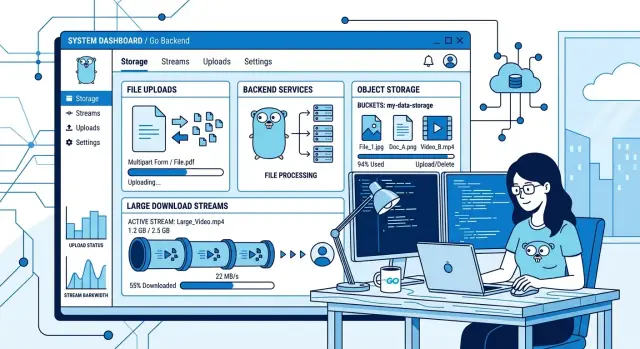
Table of Contents
Why file handling gets hard fast
A file upload looks easy in a demo. A form posts a small image, your Go handler reads it, and the file lands on disk. That works when the file is 2 MB, the network is fast, and one person is testing it.
Real traffic changes the math. A 500 MB video, weak hotel Wi-Fi, or ten users uploading at once can turn a simple handler into a memory problem. If your code reads the whole body before writing anything out, RAM disappears fast. On a small server, that can slow the whole app or crash it.
Slow networks make things worse. Uploads do not fail only because of bad code. They fail because users switch tabs, mobile data drops, proxies time out, or the client sends data much more slowly than you expected. A request that looked harmless in local testing can stay open for minutes. If your server does not stream data and enforce sensible limits, long uploads pile up.
Storage choice changes the handler too. Writing to local disk is simple, but it ties the app to one machine. Object storage like S3 works better for many products, yet it changes the flow. You might validate metadata in your Go app and then stream the file out. Or you might skip the app path and let the client upload directly with a signed request.
These decisions connect to each other. Bigger files push you toward streaming instead of buffering. Unstable networks push you toward resumable uploads or retry-friendly flows. Object storage often leads to multipart uploads and background jobs. Privacy or compliance rules can add virus scans, access checks, or temporary staging.
Many products start with "just upload the file." A few weeks later they need progress tracking, hard limits, retries, and cloud storage. That jump happens sooner than most teams expect.
Start with the Go standard library
Before adding a dependency, use what Go already gives you. For many upload endpoints, the standard library is enough, and fewer moving parts usually means fewer bugs.
net/http covers the request and response side. mime/multipart lets you read form parts as a stream instead of pulling the whole request into memory. io.Copy moves bytes from the request to a temp file or storage writer without building one giant buffer first. http.MaxBytesReader rejects bodies that are too large before they cause trouble.
That is a strong default stack: net/http for the endpoint, mime/multipart for form parts, io.Copy for streaming, and http.MaxBytesReader for body limits.
A lot of articles jump straight to third-party packages. Sometimes that makes sense. But if your upload path is basic, the standard library can stay the right choice even in production.
Frameworks that keep handlers readable
When people ask about Go file upload libraries, they often mean the framework around net/http, not the multipart parser itself. The actual upload work still comes from Go. The difference is how much boilerplate you write and how readable the handler stays six months later.
Chi fits teams that like plain Go. It stays close to net/http, so request limits, multipart parsing, temp files, and streaming logic stay visible. That control helps when you need to debug a broken 2 GB upload late on a Friday.
Gin gives you more helpers. That is handy for avatar uploads, CSV imports, or small admin tools where shorter handlers save time. Just do not let the nicer API hide the real work. You still need body limits, content checks, storage error handling, and cleanup.
Echo sits between the two. Its handlers are compact, but you still feel close to the request. Many teams like that balance.
The best framework is usually the one your team already knows. Switching routers just for uploads rarely pays off. If the team can read the code, test it, and fix it quickly, that is usually enough.
Pick the storage client that matches the bucket
Once the file leaves your app, the storage client shapes the rest of the flow. Pick the client that matches your provider, then keep the path short: validate what you need, stream the data out, and save the result.
For Amazon S3, aws-sdk-go-v2 is the safest default. It also works with many S3 compatible services if you set the endpoint and signing rules correctly. That matters for small teams because the same client can cover AWS today and another S3 provider later.
minio-go is a good fit when you run MinIO yourself or use a service that behaves the same way. It is direct, easy to test locally, and lighter to work with than the full AWS stack.
For Google Cloud Storage, use cloud.google.com/go/storage. For Azure Blob Storage, use azblob. In both cases, the native client usually causes fewer surprises than trying to force an S3 wrapper over everything.
A simple mapping works well: aws-sdk-go-v2 for S3 and many S3 compatible buckets, minio-go for MinIO setups and local testing, cloud.google.com/go/storage for Google Cloud Storage, and azblob for Azure Blob Storage.
Streaming straight to the bucket is often the right move. It keeps memory steady, avoids temp file cleanup, and stops large uploads from filling local disk. But do a few checks before the copy starts. Enforce the size limit, decide on the object name, and set content type or metadata if you need them. Rejecting a file after a 20-minute upload is a bad experience.
Retries need care too. Small requests are easy to replay. A half-finished 5 GB stream is not. For large files, multipart upload support matters because the client can resend only the failed parts instead of starting over.
Large downloads need their own path
Large downloads fail for the same reason large uploads fail: the server treats them like small files. If you read the whole object into memory, skip Content-Length, or ignore range requests, users notice right away.
http.ServeContent is usually the best first choice in Go. It handles range requests, cache headers, and partial responses for you. Browsers can pause and resume without extra code on your side. It works best with sources that can seek, such as an os.File or another io.ReadSeeker.
If the file is on local disk, keep the path boring. Open it, set the headers you know, and let http.ServeContent do the rest.
If the file is in object storage, the right pattern depends on your access rules. For public files or temporary private downloads, it is often better to let the storage service send the bytes directly after your app checks access. If you must proxy the file through Go, stream it. Do not buffer it first.
Headers matter more than people think. Set Content-Length when you know the exact size, because progress bars depend on it. Set Content-Type from saved metadata or detect it once and store the result. Add Content-Disposition when you want a clean download name, such as attachment; filename=\"invoice-042.pdf\".
Range support needs extra attention with object storage. Many storage readers are streams, not seekable readers. That means http.ServeContent cannot jump to an arbitrary offset unless you translate the incoming Range header into a matching range request to storage. If resume support matters, test that early.
A few checks catch most download bugs:
- Pause and resume in the browser.
- Cancel halfway through and confirm your app closes the upstream reader.
- Try a slow connection and watch memory use.
- Compare the final file size with the stored size.
- Test odd filenames and see what the browser saves.
If users download large files often, keep your app out of the data path whenever you can. Your server should decide who gets access, not spend all day moving gigabytes.
A simple upload flow
A good upload flow keeps memory flat and fails early. The safest pattern is still straightforward: reject oversized requests, stream each multipart part, validate fast, write the bytes to stable storage, then save a record you can use later.
Start with a hard cap on the request body. http.MaxBytesReader is the usual choice because it stops one bad client from eating RAM or filling a disk.
Then parse the multipart body as a stream. Handle one part at a time. As each file part arrives, check the field name, reject empty filenames, and inspect the content type. Do not trust the browser header on its own if the type matters. Read the first bytes too.
Check size during the copy, not only at the end. Clients lie. Count bytes as they arrive and stop the moment the file crosses your limit.
After that, write the stream somewhere stable. A small app can save to a temp file and move it later. An app that uses S3 or another bucket can stream straight to object storage with a predictable, unique object name.
Before returning success, save metadata in your database. Keep it boring: file ID, original filename, stored object path or bucket key, MIME type, size, and checksum. Return the file ID to the client, not the full storage path. That gives you room to reorganize storage later without breaking anything.
This is the kind of upload path Oleg Sotnikov often helps small teams put in place: simple, cheap to run, and much harder to break under real traffic.
What breaks uploads in production
Upload bugs usually stay hidden until a real user sends a 400 MB file over a weak connection. Local tests pass. Then memory jumps, disks fill up, and unfinished objects pile up in storage.
The most common mistake is buffering the whole file in memory. It feels easy, but it falls apart as soon as a few users upload at the same time. Stream the body, set size limits, and copy in chunks.
Trusting the file extension is another classic bug. A file named "report.pdf" might be an image, a zip, or garbage. Treat the filename as a hint, not proof. Check content type, inspect the first bytes when needed, and validate before you trigger virus scanning, image processing, or storage rules.
Temp files cause quieter damage. Many handlers write to disk during parsing and forget cleanup when the request fails halfway through. A week later, the server has thousands of orphaned files. If you use temporary storage, delete it on every error path and after every successful handoff.
Canceled contexts need real handling. Users close tabs. Mobile networks drop. Proxies time out. When the request context ends, your code should stop reading, stop uploading to storage, and stop any background work tied to that request. If it keeps running, you waste CPU and leave partial objects behind.
Retries need judgment too. A short network blip or a transient 5xx response might deserve another attempt. Bad credentials or an invalid bucket name do not. Libraries help with the plumbing, but they do not choose retry rules for you.
A blunt test catches most of this: upload a large file, cancel it halfway through, then inspect memory, temp storage, and the bucket. If anything is left behind, production will make it worse.
A realistic setup for a small product
A small SaaS that accepts 500 MB video files does not need a fancy media pipeline on day one. A thin Go API, S3 compatible storage, and one worker are often enough.
Keep the upload path short. The API checks auth, creates a database record, parses the multipart request, and streams the file straight to object storage. It should not hold the whole video in RAM. It should not save a full temp copy unless you have a hard reason.
One practical setup looks like this:
- The Go API handles auth, metadata, and multipart parsing.
- The API streams the file to an S3 compatible bucket with
aws-sdk-go-v2orminio-go. - A worker runs after upload completion and creates thumbnails, transcodes video, or extracts metadata.
- Downloads support HTTP range requests so weak connections can resume.
That split works because each part has one job. The API accepts and tracks uploads. Storage keeps the large files. The worker does the heavy CPU work afterward.
For downloads, range support matters more than many teams expect. If a user loses signal at 420 MB, they should resume from that point. If your Go service proxies downloads, pass the Range header through and stream the response. Do not read the object into memory first.
Be strict about upload completion. Mark the file as "uploaded" only after object storage confirms the write. Then enqueue the worker job. If you queue work too early, workers start on unfinished files and failures pile up fast.
This is close to the infrastructure style Oleg uses in Fractional CTO work at oleg.is: simple Go services, S3 compatible storage, background workers, and tight cost control instead of extra layers.
Checks before release
An upload feature can look fine in local testing and still break in its first week with real users. The last test pass should be a little mean. Push limits, break the network, and see how the system behaves when the happy path disappears.
If you are comparing packages, this part matters as much as the API. A tidy handler is nice. Predictable behavior under stress matters more.
Test the failures people actually hit:
- Send a file larger than the limit. The app should reject it early and avoid writing partial junk to disk or storage.
- Start an upload and cut the connection halfway through. Make sure temp files, multipart state, and unfinished object uploads get cleaned up.
- Run several uploads at once and watch memory use. If RAM spikes, something is buffering too much.
- Review bucket permissions and retention settings before launch. Bad rules can expose private files or keep test data for months.
- Try large downloads on a phone over weak Wi-Fi. Resume support, range requests, and sensible timeouts matter there.
A simple example proves the point. A team tests on fiber with one user and 20 MB files. Production starts, and someone uploads a 2 GB video from a train, loses signal twice, retries three times, and expects the app to pick up where it left off. If your cleanup code leaks one temp file per failed attempt, disks fill up faster than anyone expects.
Watch logs while you test. Look for canceled requests, slow writes, retry storms, and storage errors that only appear under parallel load. Then check the user experience too. People should get a plain error message, not a spinner that never ends.
Release is close when failures start to look boring. That usually means the system is doing the right thing.
What to do next
Start with the standard library. For many teams, net/http, mime/multipart, io, and os are enough for a solid first version. Add extra libraries only when you hit a real limit, such as resumable transfers, direct S3 uploads, or stricter request handling.
Do not start with a big rewrite. Pick one upload route, one storage target, and one size limit. Get that working end to end before you compare more packages.
A short next-step list is enough:
- Build one normal-path test that uploads a file and confirms it lands in storage.
- Build one failure test with a cut connection, bad content type, or oversized file.
- Write down rules for max size, request timeout, temp file cleanup, and retries.
- Test what happens when the client cancels halfway through.
Keep those rules close to the code. If uploads larger than 50 MB go straight to object storage, write that down. If temp files must disappear within 10 minutes, write that down. If the server rejects files without a known content type, write that down. Clear rules save time when a bug shows up months later.
For a small product, simple usually wins: one web service, one object store, clear limits, and plain logs. You can add background jobs, multipart chunking, or CDN support later if traffic proves you need them.
If you want a second opinion on the storage and upload path, Oleg Sotnikov at oleg.is advises startups and small teams on architecture, infrastructure, and practical AI development workflows. That kind of review can help you keep the design small now and avoid cleanup work later.
Frequently Asked Questions
Do I need a third-party library for file uploads in Go?
No. Start with Go’s standard library first. net/http, mime/multipart, io.Copy, and http.MaxBytesReader handle many real upload endpoints well.
Add a package only when you hit a real need, like direct bucket uploads, resumable transfers, or a storage provider client.
Should I switch to Gin, Chi, or Echo just for uploads?
Probably not. Router changes rarely fix upload problems. Most issues come from buffering, weak limits, bad cleanup, or storage flow.
Pick the framework your team already reads fast. Chi keeps things close to net/http, Gin gives you more helpers, and Echo sits in the middle.
How do I stop large uploads from eating server memory?
Stream the request instead of reading the whole file into RAM. Set a hard body limit with http.MaxBytesReader, then copy bytes out as they arrive.
Also test parallel uploads. One large file may look fine, while five at once can expose hidden buffering.
Should I save uploads to local disk or object storage?
Use local disk when the app is small, runs on one machine, and files stay modest. Move to object storage when you need cheaper growth, better durability, or more than one app server.
For many products, object storage wins early because it keeps uploads off your app disk and makes future scaling easier.
Which Go storage client should I pick?
Match the client to the storage you actually use. aws-sdk-go-v2 fits Amazon S3 and many S3-compatible services, minio-go works well for MinIO, cloud.google.com/go/storage fits Google Cloud Storage, and azblob fits Azure Blob Storage.
That path keeps the code simpler and avoids odd behavior from wrapper layers.
How should I validate file size and type?
Check size during the copy, not only at the end. Treat the filename and browser content type as hints, then inspect the first bytes when the type matters.
Save plain metadata too, like original name, MIME type, byte size, checksum, and the stored object name. That makes later checks and downloads much easier.
What usually breaks file uploads in production?
Memory spikes, orphaned temp files, half-finished bucket objects, and uploads that never stop after the user leaves. Those bugs often hide in local testing because small files and fast networks do not stress the path.
A weak connection and one big file expose them fast.
How do I handle canceled uploads and cleanup?
Watch the request context and stop work as soon as it ends. Close readers, stop the copy, and delete temp files or partial objects right away.
If you ignore canceled requests, you burn CPU, fill storage, and leave junk behind for the next incident.
What is the right way to serve large downloads in Go?
For local files, http.ServeContent is a strong first choice. It handles range requests and helps browsers pause and resume.
If storage holds the file, let the bucket serve it directly when your access rules allow that. If your app must proxy the download, stream it and pass range support through instead of buffering the whole object.
Do I need resumable or multipart uploads from day one?
No. Start with a simple streaming upload path unless users already send very large files over shaky networks. Many small products do fine without resumable uploads at first.
Add multipart or resumable flow when retries start wasting too much time or bandwidth. That upgrade pays off most for large videos and long mobile uploads.


