Go feature flag libraries for safe rollouts in small apps
Go feature flag libraries help small teams roll out changes with less risk. Compare in-code flags, remote config, and tracked approvals.
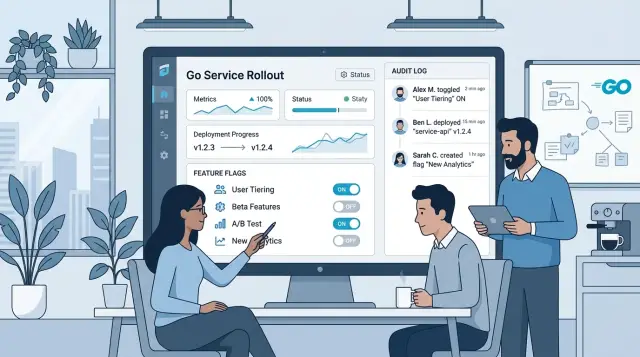
Table of Contents
Why small products need feature flags
A small product can feel stable until one release touches the wrong path. A tiny signup change can cut new accounts. A payment tweak can block checkouts. A background job can flood support with "why did this happen?" messages before the team has even had coffee.
That is why feature flags matter so much for small teams. When you have three engineers, or one founder still writing code at night, you do not have room for long incident calls. You need a fast off switch. If a new feature starts throwing errors or confusing users, you turn it off and buy time.
Rollback helps, but it is often too blunt. A full rollback can remove unrelated fixes, delay other work, or force another deploy in the middle of a stressful hour. Flags give you a smaller tool for a smaller problem. You can ship code, keep it dark, then expose it to a few users, one account, or just your own team first.
That changes how you release software. Instead of asking, "is this perfect enough for everyone?" you ask, "who should see this first?" That is a safer question.
The value gets obvious fast. A new onboarding screen hurts conversion and you switch back in seconds. A pricing change works for test accounts but breaks tax logic for real customers. A heavier search feature slows the app and support starts hearing about timeouts.
This is why Go feature flag libraries are useful even in modest apps. You do not need a giant release platform to get safer rollouts. You need control over exposure, a quick way to stop damage, and a habit of testing changes on a small slice of traffic before everyone sees them.
For a small product, that habit can protect revenue, cut support noise, and make releases much less stressful.
Three ways to handle flags
Small teams usually end up with one of three setups. They hardcode a flag in the app, they pull values from a remote config service, or they keep a clear record of every flag change. Each option solves a different problem, and each one asks for a different amount of discipline.
An in-code flag keeps the decision close to the feature. A boolean in a config file or a small check in a handler often works well when one developer owns releases and the team can deploy quickly. It is easy to read, easy to test, and hard to misuse. The downside is just as simple: if you want to turn something off, you usually need a deploy.
Remote config moves the switch outside the binary. You can change behavior without shipping new code, which makes staged rollouts much easier. That matters when you want to enable a feature for one customer, a small percentage of traffic, or only your internal team first. Most Go libraries cover this well. The trade-off is extra overhead. You need somewhere to store flags, rules for caching, and a fallback plan if the config service fails.
Change tracking is less flashy, but it saves a lot of confusion. Once more than one person can flip a flag, you need a record of who changed it, when they changed it, and why. That record can live in a database table, an admin log, or a Git-backed config file. Without it, teams start guessing. A bug appears, somebody notices a flag changed, and half an hour disappears into Slack.
A simple summary looks like this:
- In-code flags keep overhead low and stay easy to see in code.
- Remote config gives you faster control in production.
- Change tracking tells you what happened when things go wrong.
For a small product, the lightest option usually wins at first. Then the product grows, releases slow down, and remote control starts paying for itself. The moment flags touch pricing, access, or user data, a clean change record stops being optional.
When simple in-code flags fit
Many small apps do not need a full remote flag system. If a feature changes rarely and one team controls every deploy, a constant in code, an env var, or a small config file is often enough. In plenty of cases, adding one more tool creates more work than the flag itself.
This approach fits short experiments and low-risk rollouts. If you want to release a new signup form to everyone after a week of testing, a simple ENABLE_NEW_SIGNUP setting is easy to review, easy to test, and easy to ship through the deploy process you already trust.
A simple setup usually works when the same small team writes code and handles releases, the flag changes only during a deploy, you do not need per-customer or per-region targeting, and the flag will disappear soon after the test ends. It also helps if the app has only a handful of active flags.
Env vars and config files are a good middle ground. They keep the flag out of business logic, but they still stay under the deploy team's control. For a small Go service, that is often enough. You can keep staging and production separate without bringing in a dashboard, SDK, or extra network calls.
The catch is clutter. In-code flags look harmless at first, then pile up. Six months later, nobody remembers which ones still matter. Old flags make code harder to read and create strange edge cases during testing. Keep the count low. If a rollout ends, remove the flag and the old branch right away.
This path breaks down when you need finer control. If one customer should see a feature and another should not, code constants get awkward fast. If product, support, or sales needs to change access without a deploy, you have outgrown the simple version.
A boring rule works well here: if the flag changes only with releases, keep it simple. If it changes during the day, for different users, or under approval rules, move to remote config.
When remote config makes sense
Remote config starts paying off when a redeploy feels too slow or too risky. If a new checkout step fails for 3% of users, you want to switch it off in seconds, not wait for a build, a deploy, and a few nervous minutes of log watching.
It also helps with staged rollouts. You can turn a feature on for staff first, then beta users, then 5% of production traffic. That gives you real usage data without exposing everyone at once. For small apps, that is often enough. You do not need a large release system to get safer launches.
A good remote config setup should still behave predictably when the config service has a bad day. Your Go service needs a local default for every flag. If the remote value never arrives, the app should keep working in a known state.
Caching matters just as much. Many teams store the last known value in memory or on disk so the service can keep using it during brief outages. That avoids random behavior where one instance gets a flag value and another falls back to something else.
Remote config is usually worth it when at least two of these are true:
- You may need to disable a feature outside normal deploy hours.
- You want to expose changes to staff, beta users, or a small percentage first.
- A bad release could affect payments, signups, or another sensitive path.
- You run more than one service or more than one app instance.
- Support needs a fast, low-risk way to contain an issue.
The weak spot is stale data. Some tools refresh every few seconds, others every few minutes. That difference matters more than the marketing copy. Check how the tool handles retries, refresh failures, and expired cache entries. If the config server times out, your app should not hang while waiting for a flag value.
Among Go feature flag libraries, I would rather pick a plain tool with clear defaults and cache behavior than a clever one packed with rules nobody will maintain. Small products usually do better with fewer moving parts, as long as the flag can change fast when it needs to.
How to keep a clear change record
A flag is easy to add. The messy part starts later, when checkout errors appear and nobody remembers who moved a rollout from 10% to 100%. Small teams hit this problem quickly because the same person often ships code, edits config, and answers support.
A clear record should answer the same questions every time someone changes a flag: who changed it, when they changed it, what the old value was, what the new value is, and why they made the change.
That sounds basic, but it saves real time during incidents. If you use in-code flags, Git history covers part of the story. It usually does not tell you why someone made an urgent change, or whether they planned to roll it back later. With remote config for Go services, keep the note next to the flag change so nobody has to dig through chat.
Many flag tools store timestamps and user names, but they do not always capture the reason for the edit. If your tool skips that part, add a required note field in your admin page or change script. One short sentence is enough. "Enable for 20% after support volume stayed flat" is useful. "Update flag" is not.
Some changes need approval, even in a very small product. I would require a second person for pricing or discount rules, billing behavior, access control, account limits, and anything that can lock users out.
Keep the process light. A small team can save approvals in Git, in the config store, or in a simple internal tool. The point is not paperwork. The point is having a readable audit trail when something goes wrong.
After a bad rollout, read the change log before you do anything else. Compare the old and new values, check the note, and line up the timing with the incident. You will often find the bad assumption faster than by staring at charts alone. The same log also makes cleanup easier, because stale flags and forgotten experiments stand out right away.
How to add flags step by step
Start with the paths that can hurt customers if they break. In most small apps, that means signup, checkout, account access, billing, and any write to customer data. If a change can block money or lock people out, put a flag there before you ship it.
Name each flag so the purpose is obvious on day one and still obvious three months later. Names like checkout_v2 or new_signup_form work because they tell you what changes when the flag flips. Names like test_flag or rollout_1 create confusion fast.
Pick the safe default before you wire the new path. Most teams should default to false, which keeps the old behavior live until the new path proves itself.
A clean rollout usually follows this order:
- Add the flag and keep the old path as the default.
- Log or measure every flag decision that sends traffic to the new code.
- Enable it for internal users first.
- Expand to a small user group, then a larger one.
- Remove the flag after the rollout is stable.
Logs and metrics are not optional. Track how often users hit the new path, whether error rates change, and whether requests get slower. If you already use dashboards, add one view for the flagged path before anyone outside the team sees it.
Set a removal date when you create the flag, not later. Old flags leave extra branches in the code, extra cases in tests, and extra doubt during incident reviews. A short note in the ticket or code comment is enough: owner, ship date, and removal date.
A small example makes this real. Say a Go app ships a new signup form behind new_signup_form. The team turns it on for staff accounts first, watches errors and drop-off, then opens it to 10% of users. If signups fall or support tickets rise, they switch it off in seconds and fix the form without rolling back the whole release.
A realistic rollout example
A small SaaS team rewrites its signup flow in a Go service. The old flow still works, so they ship both paths in one release and put the new one behind a flag called signup_v2. They choose remote control for one reason: if something goes wrong, they can turn it off without waiting for a new deploy.
They start with staff accounts only. Everyone on the team creates test users, checks email delivery, tries weak passwords, and makes sure the first login works. Support joins too, because support often spots confusing wording before engineers do. By the end of the day, they catch a bad redirect and fix it before any real visitor sees it.
The next step is small on purpose. They open the new flow to 5% of new visitors and keep 95% on the old path. Most Go feature flag libraries can handle that kind of percentage rollout, but the habit matters more than the tool.
They watch a short list of signals:
- signup errors in the Go service
- drop-off between form steps
- support messages about missing emails or broken forms
- time until the first successful login
They also keep a clear change record. When someone raises the rollout from staff-only to 5%, they log who changed it, when they changed it, and why. That note sounds dull, but it saves time later when the team tries to explain a spike in errors.
On day three, mobile signup errors jump high enough to worry them. The team switches the flag off at once. New visitors go back to the old path in seconds. After that, engineers trace the issue to a validation bug on a specific browser, fix it, and try the 5% rollout again.
After a full week with steady numbers and no odd support trend, they move everyone to the new flow. Then they delete the old code path and remove the flag. That last step matters. A flag that stays forever turns into clutter, and clutter causes mistakes.
Mistakes that trip small teams
Small teams rarely get hurt by the first flag. They get hurt by the fifth one that never went away. Old flags sit in code for months, people forget which side is the default, and every release turns into a guessing game.
Cleanup has to start on day one. When you add a flag, give it an owner, a reason, and a date to review or remove it. If nobody owns it after the release, it becomes part of the code by accident.
Scope causes another problem. One flag starts as "show the new checkout" and soon it changes pricing, validation, emails, and admin screens too. When one switch controls too many paths, you cannot tell what actually failed. Keep each flag tied to one change that you can explain in a sentence.
Names do more work than most teams think. A flag called test2, temp_flag, or new_flow_final helps nobody. A month later, even the person who added it may need to search commits to remember what it does. Clear names save time and stop bad guesses.
Even with simple Go libraries, discipline matters more than tooling. A small team stays safer when each flag answers four questions:
- What behavior changes when it turns on?
- Who owns it?
- When will the team remove it?
- How do you roll it back fast?
Teams also create confusion by flipping several risky flags at once. If errors jump after release, you lose clear cause and effect. Turn on one risky change at a time when possible. It is slower for an hour and faster for the rest of the week.
The last mistake is easy to miss: teams test the new path and skip the old one. Then rollback fails when they need it most. Before release, run both states and make sure the "off" path still works. If a flag has no owner, no cleanup date, and no rollback test, it should not ship.
Quick checks before rollout
A flag is only useful if you can trust it under pressure. Five minutes of checking before release can save hours of cleanup later.
Whatever tool you use, the same basics apply. The flag should fail safely, the team should know who is in charge, and you should be able to prove what changed if something goes wrong.
Before launch, check the default value first. If the flag service fails, times out, or returns nothing, your app should fall back to the safer path. Flip the flag off in staging or a test setup before launch day. Many teams test the new path and forget to test the rollback path.
Make sure logs or metrics tell you which branch users hit. If requests go through the old path for some users and the new path for others, you need to see that quickly. Pick one person to own the rollout window. That person watches errors, decides whether to pause, and makes the call if you need to turn the flag off.
Cleanup matters more than most small teams expect. Old flags pile up fast, and each one makes the code harder to read. Before you ship, decide when you will remove the flag if the release goes well. Put that date or condition in the ticket, not in someone's memory.
A clear change record also saves time when people ask, "Who approved this?" You do not need a heavy process. A simple ticket, release note, or pull request comment is enough if it shows the flag name, the rollout window, the owner, and the approval.
It also helps to write down the removal trigger. It might be "delete after one week with no errors" or "remove after all users move to the new path." If nobody can tell who signed off, the rollout is already too loose.
Small products do not need a big ceremony. They do need a clean fallback, a tested off switch, visible traffic paths, one owner, and a plan to delete the flag once its job is done.
What to do next
If you want safer releases, do not start by putting flags around half your codebase. Pick one feature that can hurt revenue, support load, or data quality if it goes wrong. A new checkout step, sync job, or pricing rule is enough. One careful rollout teaches more than ten flags added in a rush.
For many small apps, the best first move is the lightest setup that solves a real problem. If one developer ships a few times a week, in-code flags may be enough. If other people need to change behavior without a deploy, remote config starts to make sense. Among Go feature flag libraries, the best option is often the plain one your team will still maintain six months from now.
Write your rules before you add the second or third flag. Keep them short and strict:
- Give each flag a clear name that says what changes.
- Assign one owner who decides when the flag can be removed.
- Set a review date so temporary flags do not turn permanent.
- Record who changed the flag, when, and why.
That last point matters more than most teams expect. A clear record saves time when a release goes sideways at 6 p.m. You do not want to guess whether the bug came from a deploy, a config switch, or both.
If you want an outside review, Oleg Sotnikov at oleg.is helps startups and small teams tighten release processes, clean up architecture, and add practical controls without turning the stack into a mess. That kind of advice is useful when the product is growing, but the team still needs to keep tools and costs under control.
Start with one flag, one owner, and one removal date. If that works cleanly, add the next flag only when the product actually needs it.
Frequently Asked Questions
Do small apps really need feature flags?
Yes, if a release can hurt signup, checkout, billing, or account access. A flag gives you a fast off switch, so you can stop damage in seconds instead of rolling back the whole release.
When is a simple in-code flag enough?
Use an in-code flag when the same small team handles code and deploys, the flag changes only during releases, and you plan to remove it soon. An env var or small config file often works fine for short, low-risk tests.
When should I switch to remote config?
Move to remote config when you need to change behavior without a deploy. It fits staged rollouts, staff-only access, per-customer control, and fast shutdowns during an incident.
What should my app do if the flag service fails?
Keep a local default for every flag and make that default the safer path. Cache the last known value so your app keeps running if the config service slows down or drops out.
Do I need a record of every flag change?
Yes, once more than one person can change flags or a flag touches pricing, billing, access, or user data. A simple record with who changed it, when, and why saves time when you trace an incident.
Which features should I put behind flags first?
Start with the paths that can block money, lock users out, or damage customer data. New signup flows, checkout changes, billing logic, and risky background jobs make good first candidates.
How should I name a feature flag?
Pick a name that says exactly what changes, like signup_v2 or new_checkout. Skip vague names like test_flag or temp2, because nobody remembers what they do a month later.
What is a good rollout process for a flagged feature?
Ship the new code with the old path still on, turn the flag on for staff first, then open it to a small group or percentage. Watch errors, speed, and support messages before you expand further.
When should I remove a feature flag?
Delete it as soon as the rollout proves stable and everyone uses the new path. Old flags pile up fast, make tests harder, and leave extra branches that confuse future releases.
What mistakes cause the most trouble with feature flags?
Teams usually get in trouble when they keep old flags, let one flag control too many changes, or flip several risky flags at once. They also forget to test the off path, which breaks rollback when they need it most.


