Go cron libraries: simple schedulers vs distributed jobs
Compare Go cron libraries with distributed schedulers, learn where each job should live, and avoid duplicate runs, missed jobs, and messy ownership.
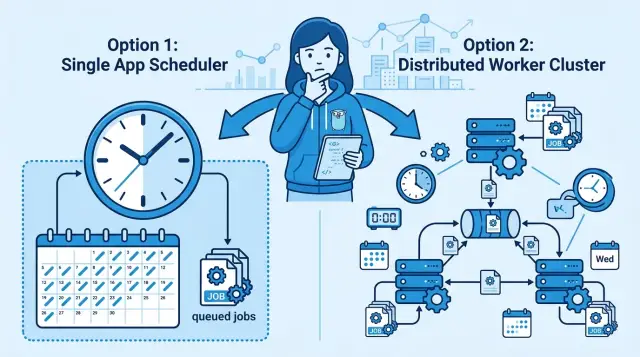
Table of Contents
Why this decision causes trouble
Scheduling problems rarely start with the library. They start when the same job can run from three places at once: inside the web app, inside a worker, or from server cron. A team adds one quick fix, then another, and six months later nobody knows which version is the real one.
The trouble gets worse when people pick a tool before they name the cost of failure. A nightly cleanup job, a billing retry, and a payroll export should not get the same treatment. If nobody asks, "What happens if this runs late, never runs, or runs twice?" the choice becomes guesswork.
A late run and a missed run are different problems. If a report arrives 15 minutes late, most customers will shrug. If a renewal charge never happens, revenue disappears. If a tax export runs twice, someone spends Friday afternoon fixing records by hand.
Duplicate runs create the ugliest failures because they look harmless at first. One extra email annoys users. Two invoice charges create refunds and support work. A duplicated data sync can overwrite fresh records with stale ones, and that mess is harder to spot than a job that simply failed.
Small SaaS teams often drift into the same setup. The web app sends reminder emails on startup. A background worker checks the same reminders every minute. The server still has an old cron entry from an earlier version. Now ownership is fuzzy. When every service can start jobs, nobody really owns retries, logs, or alerts. Product thinks engineering owns it. Engineering thinks ops owns it. Ops assumes the app handles it.
That is why scheduler debates feel bigger than they look. The real issue is not which Go package is best. The real issue is deciding where time-based work belongs, who is allowed to trigger it, and how much damage one bad run can cause.
Teams that skip that decision usually get the same result: jobs scattered across the stack, silent duplicates, and a lot of "I thought the other service did that."
What a simple in-process scheduler does well
Most schedulers in this group run inside the same Go process as your API, worker, or admin app. That makes them easy to understand. You deploy one service, and the schedule comes with it.
This setup works best for small jobs that stay close to the app itself. Think expired session cleanup, cache refresh, pruning temp data, or sending a daily summary email. These tasks usually do not need their own service. They just need to run on time and stay easy to maintain.
When the app starts, the scheduler starts too. When the app stops, the jobs stop. That sounds obvious, but it helps in day-to-day work. The job uses the same config, logs, metrics, and deploy cycle as the rest of the service, so your team has fewer moving parts to watch.
It also keeps the code path short. The schedule, the business logic, and the data access layer live in one codebase. If a cleanup task needs the app's database settings or cache client, you do not have to wire those pieces through a separate system.
Simple schedulers are strongest when one running instance clearly owns the job. If you have one backend process, or one worker that you know is the owner, the model stays clean. There is little confusion about who should run the task.
A good fit is a short job that is safe to retry, uses the same database or cache as the app, and causes only minor pain if one run gets missed. This approach also makes local development easier. You can run the app on your laptop and watch the task fire without setting up extra services.
The tradeoff is simple. You get less coordination, but much less complexity. For many background jobs, that is the better deal. If a task is small, tied to one service, and does not need cross-instance locking, an in-app scheduler is usually the cleanest place to put it.
When a distributed scheduler makes sense
A distributed scheduler makes sense when your Go app runs in more than one replica and you need one shared owner for each job. If every replica has the same cron entry, each one may fire it. That is how teams end up with duplicate emails, repeated billing runs, or cleanup jobs that step on each other.
Restarts and deploys push many teams toward the same answer. A schedule that lives inside the app process disappears when that process stops. If a pod restarts right before a job should run, you can miss the run and never notice until someone asks where the report went.
Stored job state helps. The scheduler can keep the next run time, mark a job as started, and recover after a crash. You stop guessing whether the task ran, half ran, or never started.
Retries are another reason to move beyond a simple cron package. Failed jobs often need their own rules: wait 30 seconds, try again, then back off for five minutes, then stop after a set number of attempts. That logic does not belong next to request handling.
Once a task matters to customers or money, teams also want a clear record of each run. Logs alone are rarely enough. People want to see when a job started, how long it ran, whether it failed, and what happened on the last retry without digging through raw app output.
Long tasks are often the final tipping point. A job that imports data for 20 minutes or rebuilds search indexes should not compete with the web app for memory, CPU, and database connections. Put that work on workers, and the app can keep serving requests without random slowdowns.
If your jobs are small, local, and easy to rerun, keep them simple. If they need coordination, history, and durability, give them a scheduler that owns them outside the web app.
How to choose where a job should live
Start with the job itself, not the library. Most teams compare packages too early, before they write down what the job does, when it should start, and how long it may run.
A two-line note is often enough: "send invoices at 02:00 UTC, usually takes 4 minutes, may take 20 on month end." That small step clears up more than another hour of reading docs.
Before you place the job anywhere, answer five blunt questions:
- What triggers it: a clock, a user action, or an event from another system?
- How long does it run in normal conditions and in the worst case?
- What breaks if it runs twice?
- What breaks if it misses one run?
- Can one process own it without confusion during deploys, restarts, or scaling?
If running twice is mostly harmless, app cron is often fine. A cache refresh, a daily summary email with duplicate protection, or cleaning old temp files usually fits that bucket.
If a second run charges a card twice, creates duplicate payouts, or sends the same report to every customer, treat that as a real risk. In that case, you need idempotency, locking, or a system that gives one worker clear ownership.
Missed runs matter just as much. Some jobs can wait until the next cycle with no real damage. Others cannot. If you skip payroll export or fail to pull partner data before a cutoff, a simple in-process scheduler starts to look fragile.
Single ownership is the dividing line many teams miss. If your app runs on one process and stays that way, keeping the schedule inside the app is easy to maintain. If you run multiple replicas, autoscale, or restart often, you need a stronger answer to "who runs this job exactly once?"
A small SaaS example makes this clear. Nightly cleanup of expired sessions can live inside the app. Generating customer invoices should usually move to a queue worker or workflow system, where retries, locks, and audit history are easier to control.
A simple rule works well. Use app cron for small internal tasks with low risk if skipped or repeated. Use a queue worker when jobs may pile up, run for a while, or need retries. Use a workflow tool when the job has many steps, approvals, timeouts, or recovery rules.
Teams often save real time by keeping simple schedules simple and moving only the risky jobs out. That split keeps the codebase calmer, and it gives each task a home that matches its failure cost.
A simple example from a small SaaS team
A five-person SaaS team has one Go app, a Postgres database, and two app replicas behind a load balancer. Every night at 01:00, they send invoice reminder emails to customers with unpaid bills. They start with one of the usual Go schedulers inside the web app because it feels easy and the job looks small.
It works on staging. Production gets weird fast.
Each replica runs the same scheduler, so both replicas pick up the 01:00 task. Half the customers get two emails. A few get one email from replica A and another from replica B a few seconds later, which looks sloppy and creates support tickets.
The team could try locks inside the app, but email delivery is already a business process, not app housekeeping. It needs one clear owner, retry rules, and a record of what happened. So they move "send invoice emails" into a worker queue. The scheduler only enqueues work once, and one worker claims each email job. If a worker crashes, another worker can retry without guessing whether the email already went out.
They do not move everything out of the app. A small cache cleanup task still runs inside each replica because duplicate runs do no harm. If both replicas clear old cache entries, nothing breaks. That job is local, cheap, and easy to reason about.
At the end of the month, they have a different task: close the finance period, generate reports, and notify accounting if something fails. That flow touches money and deadlines. They put that work in a durable workflow engine, not in the web app and not in the simple queue. The workflow keeps state, survives restarts, and shows which step failed.
After that split, the system gets easier to live with. The app handles small local chores. The queue owns repeatable business jobs like emails. The workflow handles rare finance work that cannot disappear or run twice.
That is usually the practical line between simple in-process schedulers and distributed job systems. If a job can run twice and nobody cares, keep it close to the app. If one run must mean one run, give it a real owner.
How the common Go options differ
The biggest split is simple: some schedulers run inside one Go app, and some run outside it with shared state. That changes how they behave when a process restarts, a deploy rolls out, or two servers try to run the same job.
Among local schedulers, robfig/cron is the plain choice. It fits jobs like clearing a cache every hour, sending one internal report each morning, or syncing a small table on a schedule. It is small, familiar, and easy to read. The tradeoff is just as plain: if your app stops, the schedule stops too.
go-co-op/gocron sits in the same local category, but many teams find it easier to work with day to day. The API is friendlier for intervals, tags, and job management. If you want timed jobs inside one service without much setup, it is often easier to live with than lower-level cron syntax.
Asynq is a different kind of system. It uses Redis, queues work, supports retries, and handles delayed jobs well. That makes it useful for email sending, image processing, webhook retries, and other background jobs that should survive app restarts. If you need distributed jobs without building your own queue logic, this is where things start to feel safer.
Temporal sits even higher. It is not just a scheduler. It tracks workflow state step by step and can recover long-running processes after failures. If a job spans hours or days, waits for outside events, or has many branches, Temporal makes sense. For a nightly cleanup task, it is too much.
A plain system cron job still has a place. For host chores like rotating logs, backing up a database dump, or renewing a certificate, OS cron is often the cleanest option. It keeps machine tasks outside the app, where they usually belong.
A quick way to think about the common options:
robfig/cron: one process, simple schedules, low setupgo-co-op/gocron: one process, friendlier API, local timed workAsynq: Redis-backed jobs, retries, delayed tasks, many workersTemporal: stateful workflows, recovery, long business processes- system cron: server maintenance and host-level scripts
If a small SaaS team needs to send a daily summary email, robfig/cron or gocron may be enough. If that same team needs retryable payment follow-ups across several workers, Asynq is a better fit. If the flow includes approvals, timeouts, and recovery after a crash, use Temporal.
Mistakes teams make
Teams often treat scheduled work as an afterthought. That is why small choices around schedulers turn into duplicate emails, missed reports, and billing jobs that fire at the wrong time.
One common mistake is running the same business-critical job in every app replica. A scheduler inside one process feels fine in development, then production adds three or four replicas and every instance starts the same task. If that job charges cards, renews plans, or closes invoices, the damage is immediate. For anything that must run once, pick a single runner or move the work to a system that coordinates ownership.
Another mistake is hiding retry logic inside the job body. A team writes code that catches an error, sleeps, retries a few times, and then keeps going. It looks harmless, but now the retry rules live in random functions instead of one clear place. You lose visibility, backoff gets messy, and failures stretch far past the schedule window. Keep retries close to the scheduler or queue policy, not buried deep in business code.
Cron also gets used for work that really belongs in a queue. If a task fans out to thousands of emails, generates PDFs, or calls slow third-party APIs, a cron trigger should only enqueue work. It should not run the whole batch itself. Long jobs overlap with the next run, pile up after outages, and make timing unpredictable.
Time causes more bugs than teams expect. "Run at 2:00 AM" sounds clear until daylight saving time skips that hour or repeats it. Global products hit this fast. A report for New York, Berlin, and Sydney does not share one clean midnight. Store the intended time zone, decide what should happen on DST changes, and test those dates on purpose.
The last mistake is skipping idempotency checks on write actions. Schedulers retry. Processes restart. Networks fail halfway through a request. If the same job can create the same invoice, send the same payout, or apply the same credit twice, the job is not safe yet.
Before you add any schedule, write down three things: who runs it, what happens if it runs twice, and whether cron should trigger work or only place it in a queue.
Quick checks before you add a new schedule
Most scheduling bugs start before anyone writes code. A team adds a timer, ships it, and only later notices that nobody decided who owns the run, what happens on restart, or how to tell if the job is healthy.
Before you pick a package, pin down ownership first. One job should have one owner. If the API service, a worker, and a manual script can all kick off the same task, duplicate runs stop being an edge case and become normal behavior.
Then ask a blunt question: if this job runs twice, what breaks? Some work is easy to repeat, like rebuilding a cache or refreshing analytics. Some work is not, like charging a card, sending a renewal email, or creating the same invoice twice. If a second run can hurt users or money, add a lock, a dedupe check, or an idempotency rule before you add the schedule.
Visibility matters more than most teams expect. You do not need a huge dashboard on day one, but you do need to record the last success, the last failure, and a short error message. Without that, a missed job stays invisible until a customer asks why nothing happened.
Deploys and restarts deserve their own check. An in-process scheduler stops when the app stops. If you deploy during the minute a job should run, that run may vanish. For low-stakes work, that may be fine. For billing, reporting, or anything tied to a date, you usually need catch-up logic.
Retries are a separate decision, not part of the timer itself:
- Use the schedule to decide when work starts.
- Use retry logic inside the job for short-lived failures.
- Keep a failed run visible instead of silently trying forever.
- Set a limit so one bad dependency does not pile up work.
If a job needs one owner, safe duplicate handling, visible history, and reliable catch-up after restarts, write those rules down before you code. If you cannot answer them in a few lines, the job probably needs more than a basic timer in one service.
What to do next
Start with a plain inventory. Most teams already run more scheduled work than they think: cleanup scripts, invoice reminders, retry loops, report exports, cache refreshes, and quiet "temporary" jobs that became permanent. Put every task in one document with four facts: what it does, how often it runs, what breaks if it fails, and who owns it.
Then sort each task by where it belongs. Keep it in app cron if the job is small, safe to miss once, and tied closely to one service. Put it in a worker queue if the job can pile up, needs retries, or takes long enough to block other work. Move it into a workflow or distributed scheduler if it touches several systems, needs strong tracking, or must run once across many instances.
Do not rebuild everything at once. Pick the jobs with the most risk first. Good candidates are tasks that send money, change customer data, trigger external APIs, or run twice when two app instances start. A small SaaS team can fix a lot by moving just two or three of those jobs out of the web app and leaving the harmless ones alone.
Write the rules down in the repo, not in Slack or in someone's head. Keep them short. For example: "report emails stay in the worker queue," "billing jobs never run in app memory," and "every scheduled job has one named owner." That kind of rule saves time during reviews because engineers stop arguing about each new case from scratch.
If your setup already feels messy, a short architecture review can save weeks of cleanup later. Oleg Sotnikov offers this kind of Fractional CTO help through oleg.is, with a focus on practical system design and lean operations. For scheduling, that usually means fewer moving parts, clearer ownership, and jobs that run where they should.
Frequently Asked Questions
Is a simple Go cron library enough for my app?
Yes, if one app process clearly owns the job and a missed or duplicate run causes little harm. Jobs like cache cleanup, temp file pruning, or session cleanup usually fit well inside the app because they stay close to the same config, logs, and database code.
When should I stop using an in-app scheduler?
Move beyond app cron when you run more than one replica, when the job touches money or customer data, or when you need retries and run history. At that point, you need one clear owner and stored state so restarts and deploys do not make jobs disappear or run twice.
Why do duplicate runs happen in multi-replica apps?
Every replica will try to fire the same schedule unless you add locking or move the work elsewhere. That often leads to duplicate emails, repeated billing attempts, or cleanup jobs that fight each other. If a job must run once, do not let every app instance own it.
Should cron run the whole task or just enqueue work?
For long or high-volume work, let the schedule enqueue jobs instead of doing the whole batch itself. A queue gives you retries, backoff, and worker ownership, and it keeps the web app from spending CPU and memory on background work.
What should I ask before I choose a scheduler?
Start by naming the cost of failure. Ask what happens if the job runs late, never runs, or runs twice. That answer tells you more than package docs do, because it shows whether you need a simple timer, a queue, or a workflow engine.
How should I handle retries for scheduled jobs?
Keep retry rules near the queue or scheduler, not buried inside business code. Set a small retry limit, use backoff, and record each failure so someone can see what happened. Silent retry loops waste time and make outages harder to spot.
When does system cron still make sense?
Use system cron for machine chores like log rotation, certificate renewal, or backup scripts. Keep those tasks outside the app unless the app truly owns the logic. That split keeps host work simple and app code cleaner.
How do I avoid time zone and daylight saving bugs?
Store the job's intended time zone and test daylight saving dates on purpose. A job set for 2:00 AM can skip a day or run twice when the clock changes, so you need a clear rule for what your app should do on those dates.
Do I need a queue like Asynq or a workflow tool like Temporal?
Pick a queue when the job repeats the same unit of work, like emails, webhooks, or image processing, and you need retries. Pick a workflow tool when the job has many steps, waits for outside events, or needs durable state across a long process.
What should I fix first if my schedules already feel messy?
Make one inventory of every scheduled task first. Write down what each job does, how often it runs, what breaks if it fails, and who owns it. Then move the risky jobs out of the web app first, especially anything that charges money, changes customer data, or runs on every replica.


