Go authentication libraries: JWT, sessions, and OAuth
Go authentication libraries can solve very different jobs. This guide shows when to use JWT, sessions, and OAuth in apps, tools, and B2B SaaS.
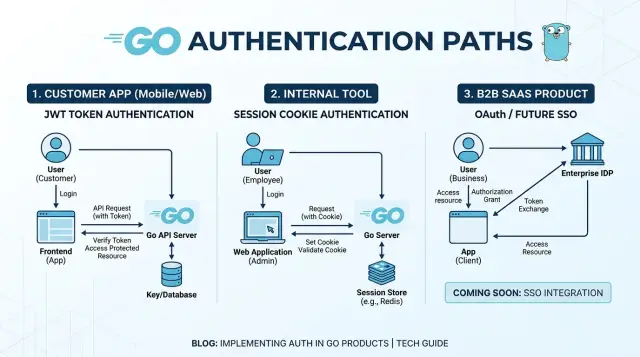
Table of Contents
Why auth choices get messy fast
Most teams start with one goal: let people sign in. Things get messy when "people" becomes three different groups. Customers want a fast login with as little friction as possible. Employees need controlled access inside one company. B2B buyers often ask for SSO before they sign a contract.
One setup rarely fits all three.
A customer app usually cares about speed and convenience. People forget passwords, switch devices, and expect login to work smoothly on the web and on mobile. That pushes teams toward email links, social login, refresh tokens, or token-based API access.
An internal tool is different. The users already belong to the company, so the team may prefer server-side sessions, short timeouts, and simple role checks. A plain cookie-based login can work well because the browser is the main client and the company controls the environment.
B2B software gets complicated even faster. One customer accepts email and password. Another wants Google Workspace. A larger client requires OpenID Connect or SAML with strict domain rules. At that point, auth stops being just a login screen problem. It affects user records, tenant settings, onboarding, and support.
The client type matters too. Browsers work nicely with secure cookies. Mobile apps usually need token flows because the app talks to APIs directly. API products may need signed JWTs, service accounts, or machine-to-machine OAuth.
That is why Go authentication libraries can feel confusing at first. A JWT package can be perfect for API access and still do nothing for browser sessions. A session library can feel clean in an admin dashboard and become awkward once mobile clients and enterprise SSO enter the picture.
What JWT, sessions, and OAuth actually do
JWT, sessions, and OAuth often get mixed together because they all show up during login. They solve different problems.
A JWT is a signed token that carries a small set of claims, such as a user ID, role, or expiry time. The server verifies the signature and checks that the token was not changed. That makes JWT in Go a common fit for APIs, mobile apps, and service-to-service calls where stateless auth helps.
A server-side session works the other way around. The browser keeps only a session ID in a cookie, while the actual login state stays on the server. If you need clean logout, cookie-based web login, or tighter control over active users, sessions are usually calmer and easier to reason about. Many internal tools and admin panels work better with sessions than with JWTs.
OAuth solves a different problem. It lets one app ask another system for permission. That is why it powers social login, delegated access, and many "Sign in with Google" flows. OpenID Connect builds on OAuth and adds identity, so your app can verify who the user is. SAML covers a similar need in many larger companies that still use older enterprise identity systems.
The overlap is what confuses teams. A user can sign in through OAuth, your app can verify identity with OIDC, and then you can keep them logged in with a server-side session. Or a mobile app can use OAuth for login and then send JWT access tokens to your API. The pieces fit together, but they are not the same thing.
JWT packages in Go
Among Go authentication libraries, JWT packages do one narrow job: they create and verify signed tokens. That makes them useful for mobile backends, API products, and service-to-service calls where a browser session cookie is the wrong fit.
For many apps, golang-jwt/jwt is enough. It signs tokens, parses them, and reads basic claims such as user ID, role, audience, and expiry. If your customer app logs a user in once and then sends an access token with each API request, this package usually keeps things simple.
lestrrat-go/jwx fits a different job. Use it when you need JWK support, stricter validation rules, or rotating signing keys. That shows up more often in B2B products with SSO plans, because external identity providers publish keys and token metadata that your app needs to verify correctly.
The split is pretty practical. Use golang-jwt/jwt when you sign your own tokens and the claims are straightforward. Use lestrrat-go/jwx when you need to consume JWK sets or handle more complex token rules.
A quick example makes the difference clearer. Imagine a SaaS product with a mobile app, an admin API, and a few internal services. The mobile app can use a short-lived JWT to call the API. Internal services can verify the same token, or a separate service token. If you later add enterprise SSO, jwx becomes more useful because token verification gets stricter and signing keys can change outside your system.
JWT in Go is easy to misuse because people treat it like a complete login system. It is not. Logout is clumsy unless you track revoked tokens on the server, and a stolen token keeps working until it expires.
Short token life helps a lot. Many teams keep access tokens brief, sometimes just a few minutes, and store refresh logic or session state on the server. That gives you faster revocation and fewer surprises.
Session packages in Go
For admin panels, staff dashboards, and internal tools, sessions are usually the simplest choice. The browser keeps a session cookie, and the app keeps the login state on the server. That gives teams a clear way to expire access, revoke a session, and avoid packing user data into a token.
In Go, alexedwards/scs is a good default for this style of login. It is easy to reason about, and it fits products where people sign in through a browser and stay active for a while. A support dashboard, finance back office, or internal ops tool usually benefits more from sessions than JWTs.
Cookie settings matter more than most teams expect. Set the cookie scope as narrowly as you can, use HttpOnly, use Secure in production, and choose an expiry that matches the job. A short idle timeout makes sense for an admin area. A longer lifetime may be fine for a lower-risk internal tool.
Storage affects day-to-day behavior too. Memory is fine for local development and simple single-instance apps. Redis works well when you run multiple app instances and need shared session state. SQL can also make sense if your app already depends on a database and you want fewer moving parts.
You will still see gorilla/sessions in older projects. That is normal. If the app works, do not rewrite everything at once. Add a small auth layer first, keep new work out of the old session code, and move routes one group at a time. That kind of migration is boring, which is usually a good sign.
For B2B products, sessions still matter even when SSO sits in front of them. OAuth or SAML gets the user in. The session keeps them signed in across page loads and gives you a simpler way to handle logout, timeout, and browser state.
OAuth and SSO packages in Go
Most Go teams should treat OAuth and SSO as a login layer, not a full auth system. One package starts the sign-in flow, another verifies who the user is, and sometimes a third helps when an enterprise customer asks for a different protocol.
For customer apps and internal tools, golang.org/x/oauth2 is the usual starting point. It handles the redirect flow, state value, token exchange, and refresh tokens for providers such as Google, GitHub, and Microsoft. If you want users to click "Sign in with Google," this package fits that job well. It stays close to the protocol, which is good when your team wants control.
When you need to trust user identity, add coreos/go-oidc. OAuth gets you access tokens, but OpenID Connect gives you an ID token with user claims such as email, subject, and issuer. go-oidc verifies that token correctly. That matters in B2B products, where one mistake in token checks can let the wrong user into the wrong account.
If speed matters more than control, goth can help. It wraps common provider logins behind a simpler interface, so it works well for early prototypes, admin panels, and small products that need social login quickly. I would not start there for a product with strict tenant rules or custom SSO logic, because the abstraction can get in your way later.
crewjam/saml matters mostly for B2B SaaS. Many larger companies still use SAML through Okta, Entra ID, or older identity systems. If your product starts with Google or Microsoft OAuth login, that is fine. But if your sales process includes larger companies, plan for SAML before the first big deal depends on it.
A rough package map looks like this: use x/oauth2 for provider login flows, go-oidc for ID token verification, goth for fast social login prototypes, and crewjam/saml when enterprise buyers ask for SAML SSO.
This is where many Go auth stacks split into two tracks: fast login for users, and stricter SSO support for buyers with IT rules.
How to choose without overbuilding
Start with the sign-in surface, not the package list. A browser app usually works best with a server-side session and a cookie. A mobile app, CLI, or public API usually needs bearer tokens because those clients do not handle browser cookies the same way.
Then decide who owns identity. If users only sign in with an email and password you manage, keep it local. If people expect Google or Microsoft login, add OAuth. If you sell to companies, plan early for Okta, Microsoft Entra ID, or Google Workspace, even if your first release does not include SSO.
Many teams get stuck because they write handlers first and auth rules second. Pick the rules up front. With sessions, decide where session data lives. A signed cookie can be enough for a small internal tool. Redis or a database makes more sense if you need logout everywhere, tighter control, or multiple app instances.
With JWT in Go, make a few boring choices before you write code: who signs tokens, how long access tokens live, whether you will use refresh tokens, how you will rotate keys, and how you will revoke access when needed. None of that is exciting, but it saves rework.
It also helps to think in product types. A customer web app often starts with sessions. An internal admin tool often works better with your company identity provider, so nobody manages another password. A B2B SaaS product should leave room for both first-party login and company SSO, because one larger customer can ask for it much sooner than expected.
Keep your app code separate from provider details. Store a local user record, then map external identities to it. That small boundary gives you room to add SSO later without rewriting half the app.
Three products, three different auth stacks
Three products can need three very different auth stacks, even if the team writes all of them in Go.
A customer app often needs two modes at once. On the website, email and password login usually works best with a server-side session and an HttpOnly cookie. A package like alexedwards/scs fits that job well. If the same product also has a mobile app, the API often needs JWT access tokens, so golang-jwt/jwt becomes useful for signing and checking tokens. The split is practical: cookies for browser logins, JWTs for mobile calls.
An internal tool is usually simpler. If only company staff use it, Google login through golang.org/x/oauth2 may be enough, and a session cookie can hold user state after the callback. In that setup, you often do not need JWTs at all. The browser talks to the same Go server, the server keeps the session, and the team signs in with one click.
A B2B SaaS product changes again. Early on, local email login plus sessions is often the right move because it ships fast and keeps support work low. When larger customers ask for SSO, you can add OIDC with coreos/go-oidc for providers like Okta or Entra ID. If a buyer insists on older enterprise setups, crewjam/saml may enter the picture.
Package choice usually follows the product model more than the language. Customer apps often need sessions for the web UI and JWTs for mobile API calls. Internal tools usually do well with company OAuth login plus sessions. B2B SaaS products often start with local login and add OIDC or SAML when enterprise deals make the extra work worth it.
That is why Go authentication libraries rarely come as one perfect package. Most teams do better with two small, clear pieces than one oversized auth setup.
What to check before you adopt a package
A package can look fine in a demo and still cause pain a month later. Before you put auth in a real app, read the repo like a buyer, not a fan.
Start with maintenance. Check how often the package gets updates, whether open issues pile up, and whether security fixes land quickly. Docs matter just as much. If the README skips common cases such as token expiry, cookie settings, or provider setup, your team will fill the gaps with guesswork.
Look closely at the request flow too. Some packages fit neatly into standard middleware chains. Others hide too much state, push odd context patterns, or return errors that are hard to map to clear HTTP responses. That gets annoying fast when you need to tell the difference between an expired token, a missing session, and a bad signature.
Storage options deserve the same attention. A small internal tool might survive with in-memory sessions for a while. A customer app usually needs something shared across instances, such as Redis or SQL, so logins keep working after a deploy or restart. If the package only supports one store, or makes custom stores painful, take that as a warning.
Then check the parts teams forget until launch day. Can you rotate refresh tokens without writing half the flow yourself? Can users log out on one device or all devices? Does token expiry handling feel clear and predictable? Can you revoke sessions or tokens after a password reset or role change?
For B2B products with SSO plans, think one step ahead. Even if you start with email login today, choose a package that will not fight you when you add Google, Microsoft, or SAML later. Swapping auth foundations after customers onboard is the sort of cleanup nobody enjoys.
Mistakes teams make early
Many teams choose auth in the wrong order. They start with token storage, add social login, and only later ask how users, roles, and tenants should work. That usually leads to rework.
A common mistake is putting JWTs in browser local storage because it feels easy. It is easy, but it also gives any injected script a direct path to the token. For a normal web app, an HttpOnly cookie is usually the safer default. Tokens still make sense for APIs, mobile apps, or service-to-service calls, but they should not be the browser default just because a package made them simple to issue.
Another problem starts when teams mix identity and permissions in one layer. Login answers "who is this user?" Permissions answer "what can this user do?" If both live inside one big middleware chain or one oversized token, every role change turns into auth work. A support user, an admin, and a billing contact may all sign in the same way, but they should not share the same access rules.
Teams also add OAuth too soon. If the first version only needs email login, password login, or magic links for an internal tool, adding Google and Microsoft on day one can waste time. The setup is manageable, but callback handling, account linking, and edge cases still eat hours. Many products do better with plain login first and OAuth after users ask for it.
The most expensive mistake usually appears later: ignoring tenant rules until the first SSO customer arrives. Then a company asks for domain restrictions, user provisioning, or separate admin controls for each workspace, and the app has nowhere clean to store those rules. If you build a B2B product, decide early where tenant membership, domains, roles, and identity provider settings will live, even if SSO comes later.
A short mental checklist helps: decide where browser credentials will live, keep permissions separate from login state, leave room for tenant rules before enterprise sales start, and add OAuth when the product truly needs it.
Checks before you ship
Auth usually breaks in the boring paths, not the happy path. A login screen can look fine in staging and still fail the first time a real customer logs out in one tab, refreshes in another, or gets locked out after an SSO switch.
Run a short release test that covers the paths people hit under stress. Make sure logout fully clears the active session, cookies, and refresh path, and test it in two browser tabs. Make sure admins can revoke access quickly. If someone leaves a team, their access should end now, not after a long token lifetime. Make sure one customer can use SSO while everyone else keeps email and password login. And make sure your team can test expiry, refresh, and failed login paths on purpose instead of waiting for them to happen.
If you use JWT in Go, long-lived access tokens cause some of the worst surprises. Keep access tokens short, and put revocation control in refresh tokens or a server-side session store. That gives admins a clean way to shut off access without waiting.
For Go session management, check cookie settings in a real browser, not just unit tests. Secure, HttpOnly, SameSite, and domain rules decide whether login feels solid or flaky. Internal tools often fail here because the team only tests on localhost.
OAuth flows in Go need one more check: tenant choice. In SSO for B2B SaaS, one company may want Okta or Google Workspace while smaller customers do not. Your login flow should route that one tenant to SSO without forcing every other tenant into the same setup.
A simple test case works well: create one normal user, one expired session, one revoked admin, and one SSO tenant. If your app handles those four cleanly, you are much closer to a safe launch.
What to do next
Start with a plain inventory. Most auth mistakes begin when teams treat every user the same, even though customers, staff, and enterprise admins often need different login paths. A small customer app may only need email login or magic links. An internal tool may work well with Google or Microsoft login. A B2B product often starts with one provider and later needs OIDC or SAML.
Before you compare Go authentication libraries, write down who needs to sign in, where they sign in, what you need over the next 12 months, and what you may add later. That usually tells you more than a package comparison table. If you run a customer app, Go session management often beats a token-heavy design. If your product has public APIs, use JWT in Go where it solves a real problem. If larger companies are already in your pipeline, leave room for SSO now, even if you delay the full rollout.
Put the migration path on one page. Note where identities live, how roles work, how sessions expire, and how an enterprise customer would connect later. That short document can save weeks of rework.
If you want a second opinion, Oleg Sotnikov at oleg.is can review your auth stack, SSO plan, and product architecture in a focused CTO consultation. That kind of review usually finds one of two problems quickly: the team built too much too early, or skipped one decision that will hurt when the first enterprise deal lands.
Frequently Asked Questions
Should I use JWT or sessions for a regular web app?
For a normal browser app, start with server-side sessions and an HttpOnly cookie. You get simpler logout, clearer timeout rules, and less risk than storing tokens in the browser.
Use JWTs when a mobile app, CLI, or another service calls your API directly.
When does JWT make sense in a Go app?
JWTs fit APIs, mobile clients, and service-to-service calls. They work best when the client sends a bearer token on every request and your server needs fast stateless checks.
They do not solve logout well on their own, so keep access tokens short and control refresh or revocation on the server.
Do I need OAuth if users just log in with email and password?
No. If you manage email and password yourself, you do not need OAuth just to let users sign in.
Add OAuth when users expect Google, GitHub, or Microsoft login, or when another system should handle identity for you.
What session package should I start with in Go?
alexedwards/scs is a solid starting point for browser sessions in Go. It stays simple and works well for admin panels, staff tools, and web apps that keep login state on the server.
Pick Redis or SQL for storage when you run more than one app instance or need shared session state after deploys and restarts.
Which JWT package should I pick in Go?
If you sign and verify your own tokens with simple claims, use golang-jwt/jwt. It covers the common API case without much overhead.
Reach for lestrrat-go/jwx when you need JWK support, stricter token checks, or rotating signing keys from external identity providers.
When should I add OIDC or SAML to a B2B product?
Add OIDC when a company wants SSO through providers like Okta, Google Workspace, or Microsoft Entra ID. OIDC fits many modern B2B SSO setups and works well with coreos/go-oidc plus golang.org/x/oauth2.
Bring in SAML when a buyer requires it. crewjam/saml usually enters the stack because the customer uses older enterprise identity tooling.
Can I still use sessions if my app supports SSO?
Yes. SSO gets the user through the identity provider, and your app can still keep a local session after the callback. That usually makes browser behavior, logout, and timeout handling much easier.
This setup works especially well for dashboards and other web apps that reload pages often.
Where should I store auth data in the browser?
Store browser login state in secure cookies, not in local storage. An HttpOnly cookie blocks injected scripts from reading the credential, which makes the normal web setup safer.
For APIs and mobile apps, tokens still make sense because those clients do not use browser cookies the same way.
What should I test before I ship auth?
Check the boring paths before release. Test logout in two tabs, expired sessions, revoked access, refresh flow, and tenant-specific SSO routing.
Also verify real cookie settings in a browser. Secure, HttpOnly, SameSite, and domain scope often cause launch-day issues.
Is it normal to use both sessions and JWT in one product?
Yes, and many products should. A common split uses sessions for the web UI and JWTs for mobile or public API calls.
Keep one local user record in your app and map each login method to it. That makes future SSO work much easier.


