GitLab runners: spot instances vs reserved VMs for busy teams
GitLab runners: spot instances vs reserved VMs for busy teams. Compare queue time, cache misses, recovery steps, and where each setup fits.
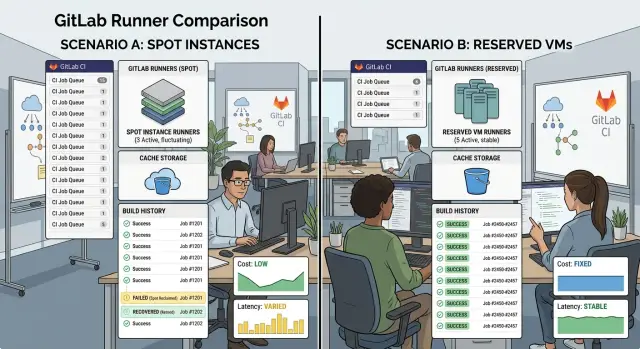
Table of Contents
Why this choice affects teams that build all day
Teams that ship code all day feel runner problems almost immediately. A build that starts 6 minutes late can waste more time than a build that runs 30 seconds slower. People stop, wait for feedback, switch tabs, lose context, and come back later. That drag spreads through reviews, merges, hotfixes, and release prep.
Most teams notice queue time before they notice raw build speed. The reason is simple: a slow job still feels manageable if it starts right away. A job that sits in line feels broken, even when the build itself is fast. If ten developers push changes throughout the day, small delays turn into hours of lost time and a release that keeps slipping.
That is why the GitLab runners: spot instances vs reserved VMs choice matters more for busy teams than for occasional builds. Spot capacity can look cheap on paper, but interruption risk shows up at the worst time: a full queue before lunch, a canceled job during a release, or a cold runner that has to pull everything again. Reserved VMs usually cost more per hour, but they often give steadier starts and fewer surprises.
Cache misses make the problem worse. When a runner disappears, it often takes its local cache with it. Then a routine pipeline starts downloading dependencies, rebuilding layers, and recreating artifacts that already existed an hour earlier. A job that should take 4 minutes turns into 12, and nothing meaningful changed in the code.
The real cost is not just the cloud bill. Teams also pay in recovery work. Someone has to retry jobs, check logs, rerun failed stages, and figure out whether a failure came from the code or the runner. For a team that builds all day, that extra handling can wipe out the savings from cheaper compute.
A good decision balances price, stable queue time, and how much manual cleanup your team can tolerate when jobs fail halfway through.
How spot instances and reserved VMs differ in practice
Spot instances save money because cloud providers sell spare capacity at a discount. The catch is simple: the provider can take the machine back with little warning. A build may stop halfway through a Docker pull, a test run, or an artifact upload. If your team pushes code all day, those interruptions show up fast in queue time and reruns.
Reserved VMs cost more, but they stay available. Your runner does not need to appear and disappear every time demand changes. That makes the workday smoother, especially when developers expect a build to start right after a commit.
Startup delay and cache behavior
A fresh spot runner often starts cold. It boots, installs tools, pulls base images, restores caches, and only then starts the job. Even when autoscaling works well, those first minutes add up. Ten short jobs on cold machines can feel slower than two long jobs on a steady VM.
Reserved VMs usually keep local state longer. Docker layers, package files, and build outputs often stay on disk between jobs. That means fewer cache misses and fewer full downloads. When the same project builds many times a day, warm caches save more time than most teams expect.
Interrupted jobs hurt caches too. If a spot machine disappears before it uploads a new cache, the next job may miss again and repeat the same work. One interruption can slow several builds after it.
What teams notice first
Most teams notice the same pattern. Spot runners look cheap on paper but feel uneven during busy hours. Reserved VMs feel predictable because they start jobs faster and fail less often. Recovery is also simpler on stable machines because logs, temp files, and local artifacts are still there when someone checks the failure.
Spot instances for CI can still make sense. They fit batch work, nightly jobs, and large test suites that can retry without much pain. Reserved VMs for CI fit steady daytime traffic, release pipelines, and teams that lose real time when developers wait.
That is why this decision is rarely about price alone. It is about whether your team prefers lower cost with more interruptions, or steadier builds with fewer surprises.
What to measure before you decide
Price is the easy part. The harder part is seeing where your team actually loses time when pipelines run all day.
If you only compare monthly compute cost, you can choose the cheaper option and still slow everyone down. A runner that costs less but adds five minutes of waiting before every build can burn more engineering time than it saves.
Before you decide, track a few numbers and split them by hour and by pipeline stage. Measure average queue time for each hour of the workday so you can see the normal daily pattern. Measure p95 queue time during the busiest hours, because averages hide the painful cases. Count cache hits and misses for large jobs, especially dependency installs, Docker layer reuse, and big test suites. Record how often engineers rerun failed jobs. Then separate build, test, and deploy stages, because they fail for different reasons and react differently to interruptions.
A simple example shows why this matters. Say a team pushes code all day and the average queue time looks fine at 40 seconds. That sounds harmless. But from 10 a.m. to 2 p.m., the p95 jumps to 6 minutes because new spot instances take time to appear. At the same time, big build jobs lose their cache more often, so each rerun pulls dependencies again. The average hides both problems.
You should also note why jobs fail. Separate runner eviction, startup delay, cache miss, network pull timeout, and real test failure. If you mix them together, spot instances can look worse than they are, or reserved VMs can look cleaner than they are.
Teams that run CI all day usually get enough signal from one week of clean data. That is often long enough to show whether the pain comes from queue spikes, cold caches, or rebuilds after interrupted jobs.
A realistic example from a busy team
A seven-person product team ships code from morning to evening. They push small fixes, UI tweaks, test updates, and short backend changes all day. Most pipelines start with a quick app build and test job that takes about 4 minutes when a runner is ready.
A few times each day, someone also triggers a longer container image job that runs for 12 to 15 minutes. Those longer jobs matter because they hold a runner much longer than the small app builds.
On reserved VMs, the day feels boring in a good way. Two runners stay warm, the cache stays local, and most jobs start within 20 to 40 seconds. A developer pushes a small change, checks another task, and comes back to a finished pipeline.
By lunch, the team has run dozens of jobs. Queue time stays low because the machines are already there. Even when two people push at once, the wait usually stays short.
On spot instances, the same team gets a less steady day. Early in the morning, everything looks fine because cheap capacity is easy to get. Around 11 a.m., three developers push within ten minutes, then a long image build grabs the only warm runner. Two small app builds sit in queue for 6 minutes.
That does not sound terrible on its own. But one person waits to merge, another delays a review, and a third pushes a follow-up fix before the first pipeline clears. Small delays start piling up.
After lunch, one runner comes up on a fresh spot VM. The app build still needs only 4 minutes, but the cache is gone, so dependency downloads add 3 more. One GitLab cache miss is easy to shrug off. Four cache misses across the day can add 12 extra minutes, and that is before you count queue time.
Then the expensive delay hits. A 14-minute image build loses its spot VM at minute 11. The team retries the job, waits for another runner, and pulls layers again on a new machine. One interruption can waste 15 to 20 minutes.
By the end of the day, the team may ship the same code on both setups. The difference is how the day feels. Reserved VMs cost more, but the work keeps moving. Spot instances can save money, yet busy teams often give back part of that savings in queue time, cache misses, and retries.
How to test both options step by step
When teams compare GitLab runners: spot instances vs reserved VMs, the only fair test is a boring one. Use one active project, freeze the pipeline, and change only the runner type. If you edit jobs, cache keys, or base images during the test, you will mix infrastructure results with pipeline changes.
Pick a repo that builds all day, not a side project that runs a few jobs in the afternoon. You need normal team traffic, normal merge requests, and the usual mix of quick builds and heavier jobs. A quiet week hides queue problems.
Set up a fair test
Run spot runners for one full workweek, then run reserved VMs for the next full workweek. Keep the machine size, region, runner tags, and cache rules as close as possible. If you use self-hosted GitLab runners, keep the same cache backend and registry too.
Try to choose two normal weeks. Do not test spot runners during a release push and reserved VMs during a slow period. If workload changes a lot, repeat the test later and compare both rounds.
For both weeks, write down the same things every day: average queue time, the worst queue spikes during busy hours, cache miss rate on large jobs, recovery time after an interrupted job, the number of manual retries, and failures caused by infrastructure rather than code.
Track recovery, not just speed
A fast runner is not enough if it disappears mid-build. Each time a spot instance drops, note what happened next. Did GitLab retry the job on its own? Did someone need to clear a stuck runner, restart a pipeline, or rebuild the cache? Count the minutes until the team can work normally again.
Use one simple log for both weeks. A spreadsheet is fine. Record the time, the job name, whether the cache was hit or missed, and how long people waited. Short notes help more than perfect dashboards.
At the end, compare cost with lost time. A cheaper runner can still cost more if developers spend 20 minutes waiting three or four times a day. That trade-off is usually where the answer becomes obvious.
Recovery steps when jobs fail mid-build
When a build dies halfway through, speed matters more than perfection. Busy teams lose time twice: first on the failed job, then on the pileup behind it.
Start with one question: did the runner stop before or after the cache upload and artifact upload steps? That tells you whether you can recover quickly or need a full rebuild. If the job finished compile steps, uploaded artifacts, and then lost the runner during a later stage, you can often rerun only the failed stages instead of the whole pipeline.
First triage
A quick check saves a lot of wasted compute. Look at the last successful log lines. Confirm whether artifacts exist for the failed pipeline. Check whether the cache was uploaded or only restored. Then see whether the runner disappeared or the job itself failed.
If artifacts still exist, rerun only the failed test, package, or deploy stage. Teams often rerun everything out of habit. That is expensive, and it pushes queue time up for everyone else.
Cache misses need a different response. After a large miss, do not trust random branch caches to fix themselves. Rebuild the cache from one known branch, usually main or a dedicated build branch, then let new jobs pull from that clean base. That works better than letting ten developers create ten slightly different caches in parallel.
Keep one stable reserved runner online for urgent releases, even if most of your fleet uses spot instances. You do not need many. One dependable machine can carry a hotfix, a customer patch, or a release candidate while the cheaper runners recover.
Who owns the incident
During work hours, one person should own runner issues. That person checks logs, cancels duplicate retries, and decides whether to fail over to the stable runner. Without a clear owner, three people start poking at the same broken pipeline and make the queue worse.
A calm recovery process beats heroic debugging. For teams that build all day, that usually means selective reruns, clean cache rebuilds, and one runner you trust when the clock is ticking.
Common mistakes that skew the result
Teams often compare GitLab runners: spot instances vs reserved VMs with a test that looks fair on paper but is uneven in practice. Small changes during the test can bend the numbers enough to send you to the wrong setup.
One common mistake is changing machine sizes between test weeks. If your spot runner uses 8 vCPUs this week and your reserved VM uses 4 next week, you are no longer comparing pricing models. You are comparing different levels of compute. The faster box will hide queue problems, shorten job time, and make cache downloads feel less painful.
Cache changes ruin plenty of tests too. If someone tweaks cache keys, cache paths, or retention rules halfway through, your GitLab cache misses jump for reasons that have nothing to do with spot interruptions or reserved capacity. A team might think spot instances caused slower builds when the real issue was a new cache key that forced every job to rebuild dependencies.
Average build time also hides the part developers actually feel. A job that usually finishes in 6 minutes but sometimes waits 12 minutes in queue will still look fine on an average chart. Busy teams should watch p95 queue time, cache hit rate, and how often jobs restart after interruption. Those numbers show the rough edges.
Cold starts after quiet periods distort the result too. A runner pool can look great during a packed afternoon and still feel slow at 8:30 a.m. when the first push lands after a quiet night. Spot runners often need time to boot, register, pull images, and warm caches. If you skip those hours in your review, you miss a real daily pain point.
The most expensive mistake is putting release jobs on the cheapest runner type just because it lowers cost per minute. Release pipelines, database migrations, signing steps, and deploy jobs need boring reliability. If a spot interruption hits during a release, the recovery work can cost more than weeks of savings.
A fair comparison keeps a few things fixed: the same machine size and image, the same cache keys and artifact rules, the same job mix, including morning cold starts, and separate tracking for normal jobs and release jobs. If you keep changing the test while you run it, the result will only reflect the noise.
Quick checks before you commit
Before you pick between spot instances and reserved VMs for GitLab runners, look at your last two weeks of pipelines, not one unusually good day. Teams that build all day often blame cost first, but the real problem is usually timing and cache behavior.
Start with queue patterns. If your queue grows at roughly the same hours every weekday, your demand is predictable. That usually favors reserved VMs because they are already there when developers push code at 9 a.m., after lunch, or before the end of the day.
Then open a few slow jobs and see where the minutes go. If most of the time disappears into dependency downloads, image pulls, and setup steps, spot capacity can hurt more than it seems. Every fresh machine starts cold, and cold machines miss caches more often.
Warm Docker layers can change the result a lot. If your builds depend on large base images or heavy toolchains, a stable VM often saves several minutes on every run. If your jobs are small, stateless, and finish fast, spot runners are easier to live with.
Release work needs a stricter standard. Ask a plain question: can your team accept a failed job during a release and just rerun it without stress? If the answer is no, keep release pipelines on reserved machines, even if the rest of the team uses spot instances. An interruption during normal branch work is annoying. An interruption during a hotfix is much worse.
One stable fallback runner often covers the worst cases. It does not need to carry every pipeline. It just needs enough disk for caches and enough capacity to take urgent jobs when spot runners disappear or start cold too often.
A simple rule helps. If queue time is your main pain, reserved VMs usually win. If idle cost is the bigger pain and your jobs recover easily, spot runners can work. If you sit in the middle, use both: spot for routine builds, one reserved runner for releases, protected branches, and anything the team cannot afford to rerun.
What to do next
Do not start with every repo. Pick the busiest pipeline first, the one that runs all day and annoys people when it slows down. That gives you real data quickly, especially around queue time, cache misses, and how often a failed job needs manual cleanup.
A practical split works for many teams. Put interruptible test jobs on spot runners first. Keep reserved VMs for release jobs, image builds, and anything that depends on warm caches or must finish on schedule. If a spot instance disappears during a flaky integration test, you lose a few minutes. If it disappears during a release build, you lose trust.
Keep the trial short and strict. Move only one busy pipeline for one to two weeks. Send unit tests, linting, and non-blocking checks to spot runners. Keep deploys, tagged releases, and cache-heavy builds on reserved VMs. Track queue time, retry rate, cache hit rate, and time to recover. Write down every manual step people take after an interrupted job.
The result should end in one rule the whole team can remember. Make it plain: "Spot runners for jobs we can retry. Reserved VMs for jobs we cannot delay and jobs that need stable caches." If engineers still have to guess, the setup is too messy.
Recovery matters more than many teams expect. A cheap runner is not cheap if a developer spends 20 minutes clearing locks, warming caches, or restarting a broken deploy. Busy teams feel that cost every day.
If you want an outside review, Oleg Sotnikov at oleg.is can assess your runner setup, cache plan, and failure recovery process as a Fractional CTO. That kind of review helps when the team has already tested both options but the numbers still feel noisy. Sometimes a few changes in runner rules, cache layout, or job grouping are enough to cut waiting time without adding much spend.
Frequently Asked Questions
Should a busy team choose spot runners or reserved VMs?
For teams that run pipelines all day, reserved VMs usually win. They start jobs faster, keep caches warm, and cut retries. Use spot runners when you want lower spend and your team can accept interruptions.
When do spot instances make sense for GitLab CI?
Spot runners fit work you can retry without much pain. Nightly jobs, non-blocking test suites, and background builds often work well there. They fit less well for release jobs, hotfixes, or cache-heavy builds.
Why does queue time matter more than raw build speed?
Because people feel waiting before they feel slow execution. A build that starts right away often feels fine, even if it runs a bit longer. A build that sits in line breaks flow, delays reviews, and slows merges.
How do cache misses change the cost trade-off?
A cache miss turns a normal job into a larger one. The runner has to pull dependencies, rebuild layers, and recreate files you already had earlier. That extra work can erase the savings from cheaper compute.
What should we measure before we decide?
Track queue time by hour, p95 queue time during busy periods, cache hit rate on large jobs, manual retries, and recovery time after an interruption. Split build, test, and deploy stages so you can see where the pain starts.
How long should we test spot and reserved runners?
Run each setup for a full workweek on the same active project. Keep machine size, region, cache rules, and job mix as close as you can. If your workload changes a lot, repeat the test later and compare both rounds.
Should release pipelines run on spot runners?
No, not by default. Release pipelines need steady starts and fewer surprises. If a release cannot wait for a retry, keep it on a reserved runner.
What is a practical mixed setup?
A simple split works well for many teams. Send interruptible tests and non-blocking jobs to spot runners, then keep one reserved runner for releases, protected branches, image builds, and urgent fixes. That setup lowers cost without making the whole day uneven.
How should we recover when a job fails mid-build?
Start by checking whether the runner died before or after cache and artifact uploads. If artifacts exist, rerun only the failed stage. If the cache broke, rebuild it from one stable branch instead of letting many branches create different caches at once.
When should we get outside help with our runner setup?
Bring in outside help when your test data looks noisy or the team keeps arguing about runner issues. A fresh review of runner rules, cache layout, and job grouping often clears up the problem faster than more guesswork.


