GitLab preview apps without Kubernetes for branch testing
GitLab preview apps without Kubernetes let product and QA open real branch builds, test changes early, and remove old instances with cleanup jobs.
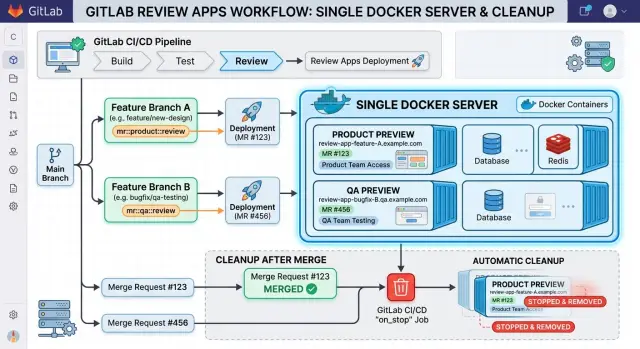
Table of Contents
Why shared staging causes problems
A single staging site looks simple at first. There is one place to deploy, one URL to share, and one environment for everyone. Then two branches land on it on the same day and the confusion starts.
A shared staging app mixes changes that were never meant to live together. One developer updates checkout, another changes account settings, and QA ends up testing both at once. When a bug appears, nobody knows which branch caused it. The team spends time separating commits instead of checking the actual change.
It also slows QA in a very normal way: people wait in line. If staging can hold only one branch at a time, every deploy becomes a small negotiation. Someone says, "Don't touch staging, I'm testing." Someone else says, "I just need five minutes." Those five minutes add up all day.
Product teams hit a different problem. They often review the wrong build without realizing it. A designer asks to see branch A, opens staging, and branch B has already replaced it. Feedback gets messy because comments no longer match what the developer shipped.
The questions are always the same: Is this a new bug or an old one? Did QA test the latest branch or an earlier deploy? Did product approve the right version? Did another change break this after review?
Shared staging turns simple questions into guesswork because the environment keeps moving. Even when everyone means well, the app changes under their feet.
A small example makes it obvious. Imagine a team with three active branches: a pricing change, a login fix, and a new onboarding step. QA tests the pricing branch in the morning. By lunch, the login fix is on staging. In the afternoon, product checks onboarding there. By the end of the day, each person saw a different app, but everyone talks as if they tested the same one.
That is why preview apps help so much. Each branch gets its own temporary copy, so QA and product can test the branch they actually care about.
How GitLab environments work without Kubernetes
You do not need a cluster to give every branch its own testable version. GitLab preview apps without Kubernetes are just CI jobs, temporary environments, and a Docker host that can run containers on demand.
When someone opens or updates a merge request, GitLab can start a pipeline job for that branch. The job builds the app image, picks a unique name for the preview, and starts a container for that branch on your server.
GitLab then records that running instance as an environment. In the merge request, the team sees a clear button or URL for the preview, so product and QA can open the branch without asking a developer to deploy it by hand.
The basic flow
A simple setup usually looks like this:
- GitLab detects a merge request pipeline.
- The review job builds a Docker image for that branch.
- The job starts a preview container with its own environment name.
- GitLab shows the environment URL in the merge request.
- A separate stop job removes the preview later.
That is the whole model. GitLab tracks the environment state, while Docker runs the app.
The environment name often looks like review/feature-login or something close to it. That makes it easy to see which preview belongs to which branch, and it gives you a clean way to connect the start job and the stop job.
The stop job matters more than many teams expect. Without it, old containers keep running, ports stay busy, and disk space slowly disappears under unused images and volumes. A good stop job shuts down the container, removes its network or temporary data if needed, and marks the environment as stopped in GitLab.
This approach works well for small teams because it stays simple. One host, one pipeline, one preview per branch. If you already run Docker in production or for internal tools, the jump to Docker review apps is small.
What to prepare on the Docker host
Start with one Docker host that can handle several branch builds at once without slowing to a crawl. Preview apps do not live long, but they still pull images, start services, write logs, and use disk. If the host is already tight on RAM or storage, product and QA will end up testing random failures instead of the branch.
For GitLab preview apps without Kubernetes, one clean and boring server is often enough. Give it a predictable setup: Docker, a reverse proxy if you want branch URLs, and a place for logs and temporary data. Keep the host separate from production if you can. That avoids awkward surprises when a test branch eats memory or fills the disk.
Pick a naming rule before the first review app goes live. Teams usually choose either branch based URLs or a fixed port range. A pattern like review-<branch-slug> is easy to read in GitLab and easy to clean up later. If names drift, cleanup jobs miss things and old containers pile up.
Secrets need a home outside the image. Put them in GitLab CI variables, host level env files, or another secret store you already trust. Do not bake API keys, database passwords, or mail credentials into the container image. The image should stay reusable. The secrets should change per environment.
Decide early how each preview will handle data and limits. That means knowing where the database comes from, whether uploaded files go to a temp volume or object storage prefix, how outbound email gets blocked or redirected, how much CPU and RAM one preview can use, and how many previews may run at the same time.
Be careful with databases. A shared database looks easy, but it causes branch collisions fast, especially when someone changes a schema. A small seeded database per preview is usually safer. For files, use disposable storage. For email, send messages to a mailbox catcher or turn delivery off.
Set hard limits on the host. Cap memory, CPU, and disk growth. One busy branch should not crowd out six others. Do that up front and the rest of the review flow stays boring, which is exactly what you want.
Build the review flow step by step
Start with the pipeline trigger. Run the deploy flow on merge request events, not on every branch push in every context. When a merge request opens or gets new commits, GitLab should rebuild the review app and update the same branch environment.
A practical order is simple. Build an image for the branch and give it a readable tag, such as the branch slug plus the short commit SHA. Push or store that image where the Docker host can pull it. Start or refresh the app on the review server with Docker Compose or plain Docker, using a branch specific project or container name. Then tell GitLab the environment name and branch address so people can open it from the merge request. Finally, add a matching stop job and an auto-stop time so old previews do not sit there for weeks.
The image tag matters more than many teams expect. If you tag everything as latest, people lose track of what they are testing. A tag like review-feature-login-a1b2c3d makes the branch obvious and gives you a clean rollback point if a deploy breaks.
For runtime, keep it boring. Docker Compose is often enough because it can create the container, network, and named volumes in one command. Plain Docker also works if your app is small. The goal is consistency: each branch should start the same way every time, and a new commit should replace the old app instead of creating a second copy.
GitLab should also know that this is a real environment. Set the environment name to something like review/feature-login and register the branch address. Then product and QA can open the exact build tied to the merge request, not some shared staging server that changed an hour ago.
The stop job closes the loop. Wire it to merge request close and merge events, and add a timeout of one or two days for branches that people forget. That job should stop containers, remove the Compose project or container set, and delete temporary volumes if the app created them. Skip cleanup and disk usage grows fast, container names collide, and old review apps confuse everyone.
Give each branch its own address and data
Raw branch names make bad environment names. They can be long, they often include slashes, and they break hostnames at the worst time. Using the merge request ID instead, such as review-482, is usually cleaner. Keep that same ID in the container name, database name, and cleanup job.
That one choice removes a lot of noise. Product, QA, and developers all talk about the same preview with one short label, and GitLab environments stay easy to scan.
Each preview needs its own address. A subdomain usually feels better than random ports because people can open it without checking a spreadsheet. mr-482.preview.example.com is easier to remember than :41082, though a port per review still works if you want the simplest possible setup on one Docker host.
The address should point to one branch only. If two merge requests share a URL, people test the wrong thing and report bugs that do not exist anymore.
Data isolation matters just as much as the URL. If a review app writes to shared staging data, one test can ruin the next one. For anything beyond read only checks, give each preview its own small disposable database and name it with the same merge request ID.
Keep it tiny. Most branches do not need a full production copy. A small Postgres container with a fresh schema is enough for form submissions, account flows, and admin changes. When the merge request closes, delete the app and the database together.
Seed only the records QA actually uses. A few users, one active subscription, one expired subscription, a couple of orders, and maybe one awkward edge case usually cover most branch testing. Loading a giant dump slows startup, wastes disk, and makes every review app feel heavier than it should.
If merge request 482 changes checkout logic, spin up review-482, attach db-review-482, publish it at mr-482.preview.example.com, and seed two products and three test users. QA can place orders and retry failures without touching anyone else's work.
Turn off anything that talks to the outside world. Review apps should not send real emails, charge cards, create invoices, or fire live webhooks. Set mailers to log mode, use sandbox payment settings, and point webhook targets to a local mock or disable them for preview environments.
That keeps branch testing safe. People can click around like real users, write data, and break things without filling inboxes, billing test cards, or waking up another system at midnight.
Set cleanup jobs that actually clean up
A review app only helps when it disappears on time. If old previews stay alive for days, they eat disk, leave old branch data behind, and make your Docker host messy fast.
Start with an auto-stop time in GitLab environments. Pick a short window that matches how your team works. For many teams, one to three days is enough. If a branch still needs review, someone can reopen or redeploy it.
A stop job should remove everything the branch created, not just the container. Teams often delete the app container and forget the rest. That is how hosts fill up even when "nothing is running."
Clean these in one job:
- the app container
- the branch volume or database volume
- the custom Docker network
- temporary build files copied to the host
- branch specific proxy config or DNS record
If you use Nginx or another reverse proxy, remove the matching rule when the environment stops. If you create DNS entries per branch, delete those too. Otherwise, product or QA may open an old subdomain and think the preview still reflects the latest branch.
Image cleanup needs a separate schedule. Do not attach heavy image pruning to every branch stop, because that can slow active work. Run a scheduled job once a day or a few times a week to remove unused images, stopped containers, and dangling build cache. That keeps Docker review apps from taking over the server.
Suppose a branch named checkout-copy-fix gets merged on Tuesday. By Wednesday, the stop job should remove its container, drop its temp volume, delete its proxy file, reload the proxy, and record the result. No leftovers. No guessing.
Do not hide cleanup errors. If volume removal fails or the proxy reload breaks, write that to logs and show it in GitLab job output. A failed cleanup job is not minor. One or two failures can leave enough junk behind to break the next deploy.
Check disk usage on a schedule too. When a host reaches 80% or 90%, act early. Cleanup works best as routine maintenance, not as a weekend rescue.
A simple review cycle for product and QA
A shared staging server can turn one small feature into a team problem. Preview apps fix that by giving each branch its own temporary copy of the product, so people can test one change without stepping on someone else's work.
Picture a product manager opening a merge request for a new signup flow. The pipeline starts, builds the branch, and launches a Docker review app on the host. A few minutes later, GitLab adds the environment address to the merge request, and the team can open the real screens in a browser.
That matters because product and QA do not need to guess from screenshots or read through code comments. They can click through the signup form, try weak passwords, test bad email formats, and check what happens when a field is left empty. If the branch also changes copy, layout, or form rules, they see all of it in one place.
A normal review cycle is straightforward. Product checks the new flow and leaves notes in the merge request. QA tests the happy path and the messy cases, like duplicate emails or missing fields. The developer fixes the issues and pushes a new commit. GitLab updates the same environment instead of creating a new one, and the team rechecks the branch at the same address.
Using the same preview URL helps more than people expect. Comments stay tied to one running version of the feature, and nobody has to wonder which build QA tested yesterday. That saves time, especially when a branch needs two or three small fixes before it is ready.
This is where GitLab preview apps without Kubernetes feel practical rather than fancy. The team gets real branch testing with Docker, a normal server, and a workflow that is easy to understand.
When the team merges the branch, GitLab can stop and remove the preview app automatically. The container goes away, the temporary data disappears if you designed it that way, and the server gets its disk space and ports back. The next branch starts clean.
Mistakes that waste time and disk space
The fastest way to ruin confidence in review apps is to let branches share state. If two previews write to one database, QA tests one fix and product sees records from another branch. Then nobody knows whether the bug lives in the code or in leftover data.
Give each branch its own database, volume prefix, and container name. Even a small temporary Postgres database or a branch specific schema is better than one shared store for every preview. Isolation uses a bit more disk, but shared data wastes far more time.
Port conflicts cause a different kind of mess. Hard coded ports look fine when one branch runs, then the next branch fails because port 3000 or 5432 is already taken. In GitLab preview apps without Kubernetes, a reverse proxy with branch based hostnames usually works much better than fixed host ports.
Teams also forget to clean up. A branch gets merged, but its containers, networks, images, and volumes stay on the Docker host for weeks. Disk fills slowly, then builds start failing at the worst time. Add a stop job for each environment, and run a scheduled cleanup job as backup because people miss things and pipelines fail.
Secrets deserve the same care. Preview apps should never load production API keys, real payment credentials, or live email settings. Use a separate secret set with tight limits. If someone exposes a preview by mistake, you want a small problem, not a security incident.
Scheduled tasks create side effects that are easy to miss. A review app may look harmless in the browser while a cron job sends email, imports data, or calls external APIs in the background. One branch can flood a mailbox or create junk records in another system before anyone notices.
A simple setup avoids most of this:
- Generate names from the branch slug or merge request ID for containers, volumes, and databases.
- Route each branch through one proxy instead of assigning fixed host ports.
- Add an explicit stop job and a nightly prune job.
- Use preview only secrets with low privileges.
- Disable cron jobs, workers, outbound email, and webhooks unless the test needs them.
If a preview app feels cheap to create, it should feel just as cheap to remove. That is what keeps branch testing clean and the Docker host usable.
Quick checks and next steps
A preview app is only useful if people can trust it. Before your team starts using GitLab preview apps without Kubernetes every day, test the flow on one fresh branch and one branch that just got merged.
Keep the checks simple:
- Open the preview in a desktop browser, then shrink to a phone sized view or test on a real phone. Look for broken layouts, hidden buttons, and slow first loads.
- Create one test record, edit it, and delete it. That path catches a lot of branch issues fast, especially bad migrations, broken forms, and missing permissions.
- Look at the container status, recent logs, and disk usage on the Docker host.
- Merge or close the branch and confirm the stop job removes the container, network, and any temporary data.
- Repeat the same flow with one more branch. If the second run leaves the host clean, the process is probably solid.
Keep the test small. Product and QA do not need a full regression pass on every branch. They need enough confidence to say, "Yes, this branch behaves like the feature request" or "No, send it back."
It also helps to track two numbers for a week: how long a preview takes to appear and how much disk space old previews leave behind. If one branch takes 90 seconds and another takes 12 minutes, the problem is usually in the image build, seed step, or cleanup job.
The next step is simple. Pick one active feature, run the flow with real teammates, and fix the rough edges they hit in the first few days. That is usually when the branch testing workflow stops being theoretical and starts becoming useful.
If your team wants help setting this up cleanly, Oleg Sotnikov at oleg.is works with startups and small businesses on GitLab, Docker, CI/CD, and lean infrastructure. That kind of outside review can be useful when you want preview apps that stay simple instead of turning into another system to babysit.
Frequently Asked Questions
Why is one shared staging environment a problem?
Because shared staging mixes unrelated changes. QA, product, and developers stop looking at the same build, and bug reports turn into guesswork.
Do I need Kubernetes to run GitLab preview apps?
No. GitLab can create preview apps with normal CI jobs, a Docker host, and a stop job. That setup gives each merge request its own temporary app without running a cluster.
What should I set up on the Docker host first?
Start with one separate Docker host that has enough RAM, CPU, and disk for several previews at once. Add Docker, a reverse proxy if you want subdomains, and a clean place for logs and temp data.
How does GitLab keep each preview tied to the right branch?
GitLab should use one environment name per merge request, such as review/482, and update that same environment on every new commit. That keeps the URL, container name, and cleanup flow tied to one branch.
Should every preview app have its own database?
Yes, most teams should give each preview its own small database or schema. Shared data causes collisions fast, especially when one branch changes tables or test data.
What is the simplest way to give each preview app its own URL?
A subdomain per merge request usually feels easiest, like mr-482.preview.example.com. People can remember it, open it from the merge request, and test one branch without checking ports.
What should the cleanup job delete?
Remove everything that branch created. Stop the app container, delete temp volumes or databases, remove custom networks, clean proxy rules, and mark the environment as stopped in GitLab.
How long should a preview app stay online?
For many teams, one to three days works well. That gives product and QA time to review the branch without letting old previews sit on the server for a week.
What mistakes usually break preview apps?
Teams usually run into shared databases, fixed host ports, forgotten cleanup, and live secrets. Turn off real email, payments, webhooks, and cron jobs unless the test truly needs them.
When should a small team ask for help with this setup?
Bring in outside help when previews take too long to start, disk keeps filling up, cleanup fails, or the team keeps testing the wrong build. A short review of GitLab, Docker, CI/CD, and naming rules can save a lot of time later.


