GitLab parent-child pipelines for multi-service releases
GitLab parent-child pipelines help teams release several services from one repo without copy-paste YAML, blocked deploys, or another CI tool.
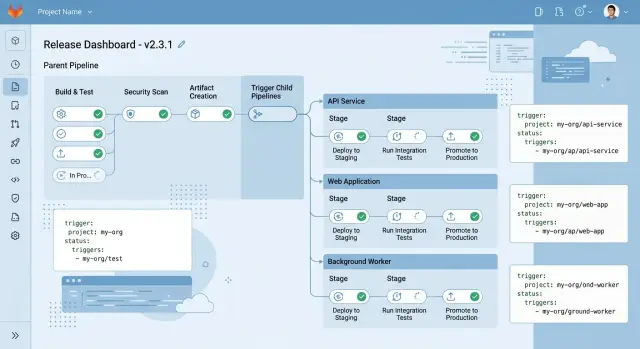
Table of Contents
Why one big pipeline becomes a problem
One pipeline feels clean when a repo has two or three services. Then the product grows. Now that same pipeline has to build an API, a worker, a web app, background jobs, and a few internal tools. A tiny change in one place can trigger work everywhere else.
That slows teams down in a very ordinary way. If the billing worker needs a quick fix, people still wait for web tests, mobile packaging, and checks that have nothing to do with billing. Ten extra minutes does not sound serious, but across several releases a day it turns into hours of wasted time.
The CI file usually becomes the next problem. Teams start with one shared setup, then copy parts of it to handle exceptions. One service needs a different image. Another needs different deploy rules. A third needs extra test data. A few months later, nobody is sure which block is the original and which one was patched later. Two jobs can look almost identical and still behave differently.
This drift hits monorepos especially hard. One service may use the latest deploy steps while another still runs an older copy that skips a check or uses stale variables. Fixing it means editing the same logic in several places. Miss one copy and the trap stays in the repo.
The bigger issue is the release bottleneck. One failed job can block everyone, even when the failure is in a service nobody touched. A flaky UI test can hold up an urgent API patch. A packaging issue in an internal tool can delay a customer facing fix. At that point the pipeline stops protecting releases and starts creating traffic.
The warning signs usually show up early:
- teams rerun pipelines just to get around unrelated failures
- small changes sit behind long test stages
- deploy rules drift a little from one service to another
- people release less often because the process feels risky
That last point matters. When all services share one release schedule, the fastest team moves at the pace of the slowest one. A service that is ready today waits for another that is still in review. Teams start batching changes together, and those larger releases are harder to debug.
Startups hit this wall all the time. One repo and one pipeline feel simple at first. Later, that simplicity turns out to be fake. The code is centralized, but day to day work fills up with waiting, drift, and blocked releases.
What parent-child pipelines change
A parent pipeline is the small pipeline at the top. It checks what changed, sets shared variables, runs a few checks that apply to everyone, and decides which service pipelines should run.
A child pipeline is a separate pipeline for one service or one part of the repo. It has its own jobs, rules, and deploy path. The web app can build and ship without dragging the worker, API, and admin panel through the same flow.
That changes the shape of your CI. Instead of one long file trying to handle every case, you keep the parent light and move service logic into smaller child files. The repo still stays together, but releases stop acting like one train where every car has to move at once.
In a typical monorepo, that might mean separate pipelines for the web app, API, background worker, and docs site. If only the docs change, only the docs pipeline runs. If the API changes, the API pipeline can test, build an image, and deploy to its environment without waiting for unrelated jobs.
The rules also get easier to read. You keep conditions close to the service they belong to. The web pipeline can react to changes in services/web, while the worker pipeline can react only to services/worker and scheduled jobs.
Shared checks still belong somewhere. The parent pipeline is a good place for repo level linting, security checks, or version setup before it triggers child pipelines. You get one control point for common work and separate tracks for each service release.
That is the real benefit. You keep one repo for code, permissions, and history, but each service ships on its own schedule. For most teams, that is the reason to use a monorepo in the first place.
The practical wins are simple. You cut a lot of copied YAML, and failures are easier to read. When a pipeline breaks, you can usually see which service failed and why without digging through pages of unrelated jobs.
When this setup makes sense
Parent-child pipelines make sense when several services live in one repository but do not behave like one app. A shared repo is useful for code reuse, common libraries, and one place to review changes. Trouble starts when every push wakes up the same huge pipeline, even if only one service changed.
The pain gets worse when teams release on different schedules. Maybe the API ships twice a week, the admin app ships once a day, and a worker changes only every few weeks. If one pipeline controls all of them, small updates wait behind unrelated jobs. People also start arguing about who owns the CI file because every service wants slightly different rules.
This structure also helps when some checks belong in one central place. The parent can handle lint rules, security scans, version rules, and branch logic. Each child pipeline can then run service tests and deploy steps that make sense only for that service. You keep common rules together without forcing every app into the same release flow.
Picture a monorepo with four services: web, API, billing worker, and internal admin. The web team wants fast deploys after UI changes. The billing worker needs extra tests and tighter release timing. Parent-child pipelines let both happen without copying the whole CI file four times.
It is still the wrong choice for some teams. If one simple pipeline already works, keep it. If you have one small product, one release rhythm, and a short CI file that people understand, extra layers only add moving parts. This setup helps when services have real differences, not when a team wants a more impressive diagram.
A good fit usually has a few clear traits:
- one repo contains several deployable services
- different services ship at different times
- some checks should stay in one central pipeline
- teams need clearer ownership of build and deploy logic
If your CI file still fits on one screen and nobody hates touching it, you probably do not need this yet. If it has turned into a long chain of copied rules and exceptions, the split usually pays off quickly.
How to set it up step by step
Start with the smallest parent file you can manage. In most repos, the parent should do three things: decide what changed, run a few shared checks, and trigger the right child pipelines. Keep it short on purpose. If the parent grows into another giant .gitlab-ci.yml, you have rebuilt the same problem under a new name.
Put shared checks in the parent. Linting for common code, a basic test pass, and simple policy checks belong there because every service depends on them. That removes duplicate YAML and stops the same job from running three or four times in different service pipelines.
Then create one child pipeline file for each service. If your monorepo has api, worker, and web, give each one its own file and let that file own its build, test, and deploy jobs. Release logic stays close to the service itself. A team working on the worker should not need to edit the web release pipeline.
Use rules based on paths so a docs edit does not wake up every deploy job in the repo. A simple folder map is often enough. Changes under services/api/ should trigger the API child. Changes under services/web/ should trigger the web child.
Pass release data down from the parent every time. Branch name, tag, commit SHA, and release labels should travel as variables into each child pipeline. That gives every service the same source of truth. If you cut a tag like v1.8.0, each child should read that exact value instead of inventing its own version string.
Test this with one service before you roll it out across the repo. Pick the service with the simplest release path and make that one solid first. Check the pipeline graph, confirm the variables arrive in the child, and make sure the child runs only when its files change.
Once that first service works, copy the structure instead of copying the whole file. Reuse the pattern, keep service rules local, and resist the urge to centralize every small detail. That is usually the point where multi service releases stay clean instead of sliding back into YAML sprawl.
How to share versions and settings
If every child pipeline invents its own variables, releases get messy fast. One service deploys v1.8.2, another uses the raw commit SHA, and a third calls the same environment production instead of prod. The parent pipeline should decide shared values once and pass them down.
A small set of variables is enough for most teams:
VERSIONfor the release numberIMAGE_TAGfor the container tagSTAGEfor the target environment, such asstagingorprodREGIONfor location, such asusoreu
Keep those names the same everywhere. That matters more than people expect. If one child uses ENV, another uses TARGET, and a third uses DEPLOY_ENV, nobody knows what is correct without opening three YAML files.
For image tags, let the parent compute the value once and send it to each child in the trigger job. Then every service builds, tests, and deploys against the same release label. Rollbacks get easier too because the whole release points to one clear version instead of a mix of tags.
Store shared defaults in one place. In GitLab, that often means a common CI file with default variables, naming rules, and a few sane fallbacks. Each service can still add its own settings, but the base values should live in one file that everyone can find quickly.
Environment names deserve the same discipline. Pick one format and keep it boring. dev, staging, and prod work well. If you also deploy by region, use something just as plain, such as staging-us and prod-eu. When names match across services, approvals, logs, and deploy history are much easier to read.
Try not to build clever variable chains. If VERSION comes from APP_VERSION, unless that is empty, then RELEASE_VERSION, unless a tag exists, people will guess wrong. Compute shared values in the parent and pass them down clearly. Child pipelines should use those values, not reinterpret them.
A simple release example
Imagine one repo with three folders: web/, api/, and worker/. The team ships all three from the same codebase, but they do not want every change to run one huge release pipeline.
With parent-child pipelines, the parent does the shared work once. It can run a secret scan, a dependency check, and any validation that applies to the whole repo. After that, it decides which child pipelines to start based on what changed.
A small setup might look like this:
stages:
  - checks
  - triggers

security_checks:
  stage: checks
  script:
    - ./ci/run-security-checks.sh

web_release:
  stage: triggers
  trigger:
    include: web/.gitlab-ci.yml
  rules:
    - changes:
        - web/**/*

api_release:
  stage: triggers
  trigger:
    include: api/.gitlab-ci.yml
  rules:
    - changes:
        - api/**/*

worker_release:
  stage: triggers
  trigger:
    include: worker/.gitlab-ci.yml
  rules:
    - changes:
        - worker/**/*
Now picture three ordinary days in that repo.
A designer updates a checkout page in web/. The parent runs the shared security checks once, then starts only the web child pipeline. GitLab builds the front end, runs web tests, and deploys the web app. The API and worker stay idle.
Later, a backend developer changes api/. That commit starts only the API child pipeline. It can run contract tests, database migration checks, build the container, tag the release, and deploy the API without touching the web release flow.
The split helps most when a small fix cannot wait. If the team patches a retry bug in worker/, the worker pipeline can test and ship that hotfix right away. Nobody waits for a slow web test suite that has nothing to do with the change.
This is where multi service releases stop feeling tangled. Each service keeps its own pace, but the repo still has one clear entry point. The parent gives you shared control. The child pipelines give each service room to move.
Mistakes that create confusion
Most problems with parent-child pipelines start with good intentions. A team wants each service to release on its own, but the setup grows messy fast enough that nobody trusts what will run.
The first mistake is copying the same child pipeline file for every service and changing a few lines in each one. That feels fast on day one. A month later, one service uses newer rules, another still has old tags, and a third deploys with a slightly different script. Drift like that wastes hours because the YAML looks similar enough to fool people.
A better pattern is simple. Keep one shared template for common release steps, then keep each service file thin. The service file should describe what is unique about that service, not repeat the whole release process.
Another common mistake is triggering every child pipeline on every commit. That turns a clean monorepo into a noisy one. If someone edits docs or changes only the billing service, the API, worker, and admin app should stay asleep. Once every commit starts everything, people stop paying attention to pipeline results.
Teams also get stuck when they mix shared rules and service rules in the same place. Then a basic question becomes hard to answer: did this child run because the branch matched, because files changed, or because a global rule fired? Keep shared behavior in one file. Keep service conditions next to the service trigger.
Release logic becomes hard to follow when it disappears into too many include files. Two layers can be fine. Five usually are not. If people need ten minutes to find where tags, environments, or release branches are decided, the setup is too buried.
Variable names can create their own mess. Passing vague values like VERSION, NAME, TARGET, and ENV between parent and child pipelines invites mistakes. Use names that tell the truth: SERVICE_NAME instead of NAME, SERVICE_VERSION instead of VERSION, DEPLOY_ENV instead of ENV, and IMAGE_TAG instead of TAG.
Clear names cut down on bad releases. When each rule, file, and variable has one job, the process stops feeling mysterious and starts feeling routine.
Quick checks before you roll it out
This setup works best when the boundaries are obvious. If people need to guess which file runs which service, the configuration will drift.
Start with ownership. Each service should have its own child pipeline file, and the file name should match the service closely enough that nobody needs a map. If billing ships on its own, give it its own CI file. If three services still share one child file, you probably have not split them far enough.
Path rules need a sanity check too. Teams often write neat changes rules and forget that the folder names changed months ago. Compare every rule with the actual repo structure. One missed path means a service does not build when it should. One sloppy path wakes up unrelated jobs and burns runner time.
Keep the parent small. Let it run only checks that apply to everyone, such as basic linting, shared security checks, or validation for the whole repo. If the parent starts owning service tests and deploy logic, you are back to one big pipeline with extra ceremony.
Before rollout, review a few basics:
- every service has one clear child pipeline entry point
- path rules match current repo folders
- shared checks stay in the parent
- tags, image versions, and release names follow one rule
- failures in one child do not block unrelated services by accident
Version flow deserves extra care. Decide once how tags move from parent to child pipelines and keep that rule consistent. If one service reads a Git tag, another reads a manual variable, and a third builds its own version string, people will stop trusting releases.
Do one pilot commit that touches two services and one shared file. You should see shared checks run once, the right child pipelines start, variables pass through cleanly, and unrelated work stay out of the way. If that does not happen, fix the rules before anyone depends on them.
What to do next
Pick one service and test the idea where the pain is loudest. Do not start with the cleanest or smallest app just because it feels safer. Start with the service that slows everyone down, breaks the main pipeline most often, or ships far more often than the rest.
That kind of pilot gives you a useful before and after comparison. If parent-child pipelines are a good fit, you should see less waiting, fewer unrelated reruns, and fewer arguments about who owns a failed job.
A simple rollout plan usually works better than a full CI rewrite:
- choose the noisiest service first
- record current pipeline time, failure rate, and rerun count
- move only that service into a child pipeline
- compare the numbers after one or two release cycles
Keep the comparison plain. If the old path took 28 minutes and the new one takes 11 for the same service, that says enough on its own.
Write down naming rules early. Teams get confused fast when one project uses SERVICE_NAME, another uses APP, and a third uses MODULE. The same goes for job names. If every deploy job has a different label, people waste time hunting through pipeline graphs.
A short note in the repo is usually enough. Define how you name child pipelines, deploy jobs, environments, version variables, and release tags. Keep it simple. New team members should understand it in a couple of minutes.
If you need a second opinion on where to split the parent pipeline or how to keep GitLab runners and deploy infrastructure lean, Oleg Sotnikov at oleg.is does this kind of Fractional CTO and startup advisory work. That can help when the CI file has grown into a real bottleneck and the team wants a cleaner plan before touching production.
One good pilot beats a full migration plan. Get one service shipping cleanly, then repeat the pattern only where it clearly earns its keep.
Frequently Asked Questions
What is a GitLab parent-child pipeline?
A parent pipeline handles the shared work at the top of the flow. It checks what changed, sets shared variables, and starts the right child pipelines. Each child pipeline then owns the build, test, and deploy steps for one service.
When should I replace one big pipeline with parent-child pipelines?
Split the pipeline when one repo contains several deployable services and one change keeps waking up unrelated jobs. If people wait on tests for apps they did not touch, rerun pipelines because of flaky jobs in other services, or argue over one huge CI file, the split usually helps.
Should I use this setup for a single small app?
No. If one small pipeline already works and your team understands it, keep it. Parent-child pipelines help when services ship on different schedules or need different rules, not when a simple setup already does the job.
How do I make only the changed service run?
Use path-based rules:changes in the parent pipeline. Point each trigger at the folders that belong to one service, such as web/**/* or api/**/*, so GitLab starts only the child pipeline for files that changed.
What should I keep in the parent pipeline?
Keep repo-wide checks there, such as shared linting, security scans, branch rules, and version setup. Leave service tests, image builds, and deploy logic inside the child pipeline so the parent stays small.
How do I share versions and environment settings across child pipelines?
Let the parent compute values like VERSION, IMAGE_TAG, and DEPLOY_ENV once, then pass them into each child pipeline as variables. That keeps every service on the same release label and makes rollbacks easier to follow.
Can one failed child pipeline block other services?
It can, if you wire the rules badly. In most setups, each child should fail or pass on its own so a broken worker job does not stop an urgent API fix. Check your trigger and dependency rules before rollout.
How do I avoid copy-paste YAML drift?
Do not copy full pipeline files for every service. Keep common steps in a shared template, then keep each child file thin and focused on what makes that service different.
What is the safest way to roll this out?
Start with one noisy service, not the whole repo. Move that service into a child pipeline, compare build time and reruns for a release or two, then repeat the pattern only where it saves time and confusion.
What mistakes cause the most confusion with this setup?
Teams usually run into trouble when they trigger every child on every commit, bury rules across too many include files, or use vague variable names like ENV and TAG. Keep file ownership obvious, keep names plain, and keep the parent short.


