GitLab monorepo release patterns for growing teams
GitLab monorepo release patterns help teams use tags, service maps, and change scopes so each release stays easy to read as the repo grows.
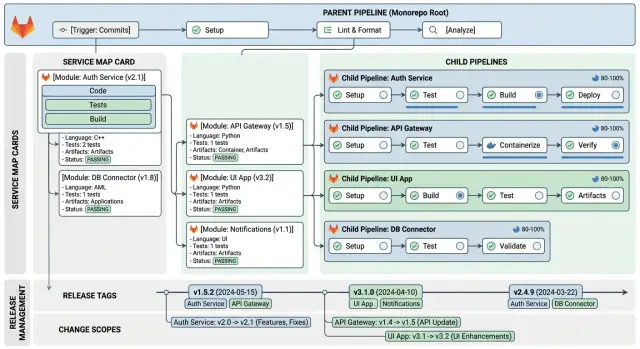
Table of Contents
Why releases get confusing in one repo
A monorepo looks clean at first. Everything lives in one place, and that feels easier to manage than a pile of separate repositories. Then the team grows, the release pace picks up, and one merge starts touching several parts of the system at once.
A single commit might update the API, change a shared library, tweak the billing worker, and adjust a deployment script. That is normal in a monorepo. The trouble starts when the release note says only v2.14.0 and nothing else. People can see that something shipped, but they cannot tell what changed in each service.
That gap wastes time fast. Product asks whether the customer portal went out. Support asks if a bug fix reached production. Engineers open commit logs, scan pipeline runs, and message each other just to answer a basic question: what shipped, and where?
Version numbers make this worse when teams treat the whole repo like one app. One number can hide ten changes with very different levels of risk. A tiny fix in one service sits next to a schema change in another, yet the release label makes them look the same.
Rollbacks get messy for the same reason. If nobody can see the full blast radius, people hesitate. Should the team roll back the whole repo or only one service? Did a shared package break two downstream apps or just one? Those decisions get slow when release history reads like a blur.
Picture a repo with auth, billing, and notifications. Friday's release includes a new login rule, a tax fix, and a retry change for failed emails. By Monday, billing has a problem. Without clear tags, change scopes, or a map of dependencies, the team digs through merges instead of fixing the issue.
That is why release patterns matter in a GitLab monorepo. As the repo grows, teams need releases that explain themselves, not just pipelines that turn green.
Start with a service map
A monorepo gets confusing when nobody agrees on what lives where. Before you think about parent-child pipelines, tags, or change scopes, write down the repo structure in plain language.
A service map does not need to be fancy. It is just a small document that tells the team which folders belong to which service, package, or shared code area. When a folder changes, people should know who cares about it without guessing.
For each entry, keep four things clear:
- the service or package name
- the folders that belong to it
- the owner, whether that is one person or one team
- the shared folders it depends on
Ownership matters more than most teams expect. If a release includes changes in a shared library, someone needs to decide whether that affects one service, five services, or the whole repo. If ownership is fuzzy, release notes turn into detective work.
Folder matching saves time in CI too. A parent pipeline can only send work to the right child pipeline if the team already knows that services/payments/ affects one service, packages/ui/ affects several apps, and infra/ affects deployment rather than app code. Without that map, every release feels bigger than it is.
Keep the map close to the repo and update it when the structure changes. Add new workers to the map on the day they appear. If a shared folder splits in two, update the affected services right away. If a package gets renamed, fix the map before anyone starts using the new name in CI.
It is boring work. It also pays off quickly. Teams stop arguing about scope, owners catch risky changes earlier, and release tags make sense because everyone uses the same names for the same parts of the repo.
Split work with parent and child pipelines
One big pipeline gets noisy fast when a single repo holds many services. The cleaner approach is simple: let the parent pipeline decide what changed, then start child pipelines only for the services that need work.
The parent pipeline should handle the cheap, shared checks first. It can inspect changed paths, confirm branch or tag rules, and run repo-wide jobs such as lockfile checks or a quick validation of common build scripts. You run those once, not once per service.
After that, the parent pipeline creates one child pipeline for each affected service. If a commit touches api/ and worker/, GitLab starts two child pipelines and ignores everything else. That alone makes the release view easier to read.
A clean split is usually enough:
- The parent pipeline checks changed folders and release rules.
- The parent runs shared checks once.
- Each affected service gets its own child pipeline.
- Each child pipeline owns that service's tests, build, and deploy steps.
Failures become much easier to read. If payments breaks, the payments child pipeline fails. Search stays green and out of the story. That sounds minor, but it saves real time on release day.
Keep service logic inside the child pipeline, even when the jobs look similar. Tests, image builds, migrations, and deploy steps belong close to the service they change. Shared logic still has a place, but it belongs in reusable templates, not in one giant parent file packed with every rule in the repo.
For growing teams, this is one of the most useful monorepo patterns in GitLab. You keep one top-level view for control and a smaller pipeline for each service. The repo can grow, and the release process still makes sense to the people reading it.
Set up the flow step by step
Start by freezing the names in your repo. Each service needs one clear name, one folder, and one label that stays the same everywhere. If a service lives in services/billing, call it billing in the service map, in pipeline job names, and in release tags. Teams get confused when one app has three names depending on where they look.
A small service map in YAML or JSON is enough. It can list each service, its folder, and the child pipeline file it uses. The parent pipeline reads that map, checks changed paths, and decides which child pipelines to start. That keeps the logic in one place instead of scattering rules across many CI files.
Path rules should stay narrow. Match the service folder first, then add shared areas only when they really affect that service. If libs/auth changes and both api and admin use it, say that in the map. If every shared folder triggers every service, the whole setup stops being useful.
The order matters. Lock service names and folder paths before you write CI rules. Add path rules next. Generate child pipeline jobs from the service map instead of hand-writing them in several places. Then test the flow on a branch with a few small commits before you create the first real tag.
That branch testing catches most mistakes early. Make one commit that changes a single service. Make another that touches a shared folder. The parent pipeline should trigger only the child jobs you expect. If it starts everything, your scopes are too broad. If it skips a service that changed, your path rules are too tight.
Approval rules matter too. Put the owner for each release tag in a short file in the repo. One person approves billing-*, another approves api-*, and a backup owner steps in when needed. Even in a small team, writing this down saves time and avoids arguments when release day gets busy.
Use tags that say what shipped
Good tags remove a lot of guesswork. They should answer one question fast: what changed, and where?
Pick one format early and keep it plain. A tag should be easy to read in a commit list, easy to sort, and easy to say out loud in chat. Dates work well for repo-wide releases. Semantic versions work well for service releases when each service has its own version history.
A few simple examples:
repo-2026.04.13.1for a full repo releasebilling-v1.12.0for one serviceauth-v2.0.0for one service with its own version lineweb-v0.9.5for a frontend app in the same repo
Keep repo-wide tags and service tags separate. That one rule prevents a lot of confusion later. A repo tag tells you the state of the whole monorepo at one moment. A service tag tells you one part is ready to ship, even if nothing else changed.
Put the service name in every service tag. Do not rely on folder names, branch names, or release notes to fill in the blanks. If someone sees v1.7.3, they should not have to ask, "for which service?" But search-v1.7.3 is clear right away.
Breaking changes need one extra clue. Keep the tag name simple, then add a short note in the annotated tag or release note. "BREAKING: payment callback payload changed" is enough. People who maintain another service, a mobile app, or an outside integration will spot the risk before they deploy.
A small team with three services can get by without this for a while. Then six months pass, release speed picks up, and nobody remembers whether v2.3.1 came from API, web, or worker. Clear tags save that time every week.
Define change scopes before each release
Releases get hard to read when teams group changes by who worked on them. Group them by service instead. "Payments API", "admin app", and "email worker" tell people far more than "backend" or "frontend" ever will.
That simple shift helps everyone. Engineers know what to test. Product knows what changed. Support can see where a problem might come from if something goes wrong after deploy.
Each scoped change should also say what kind of change it is. Code, config, schema, and docs do not carry the same risk. A config update may need new secrets. A schema change may force a deploy order. Docs changes usually do not affect runtime at all.
A short scope note often beats a long changelog. Name the service, the change type, any shared package involved, and a rollout note if more than one service must move together.
Shared libraries need extra care. If one internal package affects five services, call that out as its own scope item. Otherwise, a small helper update can look harmless in the tag and still change behavior across half the repo.
Coordinated rollout notes matter just as much. If one service starts sending a new event shape, another service needs to understand it before you flip traffic. The same goes for database migrations, feature flags, queue formats, and auth changes. Write the order down while you prepare the release, not after something breaks.
Good scope notes sound plain. "Catalog service - schema and code. Run migration before deploy." Or: "Shared auth library - affects API and admin app. Deploy both in the same window." That is enough for a growing monorepo. It keeps release tags readable and saves the team from reading commit history under pressure.
A simple example with three services
Picture one repo with three parts: a web app, a billing service, and a shared auth module. The code lives together, but each part ships on its own schedule. That is where a sensible GitLab release setup starts to feel clear instead of messy.
A small web change should stay small. If a developer fixes the checkout layout in the web app and touches only apps/web, the parent pipeline checks the service map, sees the scope is web, and starts only the web child pipeline. Billing and auth do nothing.
Now take a billing bug. Maybe invoice tax rounding is wrong in one country, and the fix lives only in services/billing. The pipeline runs the billing tests, builds the billing artifact, and the team creates a tag such as billing-v1.8.2. They do not create a repo-wide tag, because the repo did not ship as one unit. That small choice avoids a lot of confusion later.
Shared code needs a different rule. If someone updates the auth module in libs/auth, the service map should already say which services depend on it. In this example, both the web app and billing use that auth code, so the parent pipeline starts two child pipelines together: web and billing.
The release note should reflect that shared scope instead of pretending there were two unrelated releases. Something this short is enough:
- Scope: auth update
- Web: token refresh fix at login
- Billing: session validation fix during payment
That tells the team one thing changed in shared code, and two services shipped because of it. You can read it months later and still understand why both tags exist.
Mistakes that make releases hard to read
Most unreadable releases come from naming, not code. The pipeline can pass, the services can deploy, and people still walk away unsure about what changed.
The fastest way to create noise is to tag every commit. At first it feels tidy. A week later you have a pile of tags that differ by one small fix, one docs change, or one rerun of the same child pipeline. Nobody wants to read that history. A release tag should mark something people can understand and talk about, not every push.
Names create the next mess. If your release note says apps/api-v2/internal instead of billing service, readers have to decode the repo before they can decode the release. Folder paths help CI rules. They do not help product managers, support staff, or developers working in another area. Use service names in tags, notes, and dashboards. Keep folder paths in pipeline config where they belong.
Shared code causes a quieter but more stubborn problem. In a monorepo, common packages often sit between several services. When nobody owns that shared code, teams argue about whether a release belongs to auth, billing, or platform. That argument usually starts after something breaks. Give shared parts an owner and a release label before that happens.
Scope labels can ruin release notes too. If "minor" means "small UI change" this week and "safe backend change" next week, the label is useless. The same goes for labels like "infra", "internal", or "ops" when teams apply them loosely. Parent-child pipelines work better when scope names stay plain and consistent.
Readable releases usually share a few traits: one tag for one release event, service names that match how people talk about the system, clear ownership for shared modules, and scope labels with one stable meaning.
Once tags, service maps, and scopes drift apart, every release feels bigger and murkier than it is.
Quick checks before you cut a release
A release gets messy when the tag says one thing and the diff says another. Before you push a tag, compare the changed paths with your service map and ask a simple question: which services actually changed?
Read the diff, not just the merge request title. A service tag should point to files, configs, and tests that belong to that service. If changes hit a shared package, common schema, or deployment template, add every dependent service to the release scope. Then read the release note the way someone in support or product would read it. Use the service names people already use in daily work, not folder shortcuts or old codenames.
It is also worth checking rollback steps for each tagged service before the release goes live. Know which image, config, feature flag, or migration you would reverse. That review only takes a few minutes, and it saves far more time when something breaks late in the day.
A quick example makes this concrete. Say services/users changed, libs/auth changed, and services/marketing-site did not. The release should name the users service and any other service that depends on shared auth code. It should leave the marketing site out. If the notes say auth-lib-v2 but the team calls it "login service", people will miss the impact.
Clean tags, clear service names, and explicit rollback notes make parent-child pipelines easier to trust. People can see what shipped, who owns it, and what to undo if the release needs to stop.
What to do next
Start small. One service map and one tag format will fix more confusion than another layer of pipeline YAML.
These release patterns work best when names, scopes, and pipeline paths match. If those three things drift apart, every release note starts to feel like guesswork.
A practical first pass is simple. Write a service map with every deployable service, its owner, and the folder path that triggers it. Pick one tag format people can read in a second, such as billing-v1.8.0 or web-v2.3.1. Add change scopes before you add more parent-child logic. Then review a month of releases and delete labels nobody uses.
That order matters. Teams often build clever pipeline logic first, then realize nobody agrees on what changed or what a tag means. The result is more automation and less clarity.
Keep the service map plain. A table in the repo is enough. If a developer touches services/auth, they should know which pipeline runs, which tag applies, and whether that change belongs in the next release scope.
Be strict with labels. If people cannot explain a scope in one short sentence, it is too vague. "Auth fix" is clear. "Platform improvements" usually tells nobody much.
After a few weeks, look back at recent releases. Check which tags helped during testing, rollbacks, or support questions. Remove the rest. A shorter release vocabulary is easier to keep clean.
If your GitLab setup keeps getting harder to manage, a fresh outside review can help. Oleg Sotnikov at oleg.is works as a Fractional CTO and startup advisor, and this kind of release design fits the work he does with CI/CD, service boundaries, and lean production systems.
The best next move is usually the boring one: name services clearly, tag only what shipped, and keep each scope easy to read.
Frequently Asked Questions
What is the first step to make monorepo releases easier to read?
Start with a simple service map in the repo. For each service, name the folder, the owner, and any shared code it depends on so people stop guessing what a change affects.
When should I use a repo-wide tag instead of a service tag?
Use a repo-wide tag only when you ship the whole monorepo as one release event. If one service ships on its own, create a service tag such as billing-v1.8.2 so everyone can see what actually went out.
Why use parent and child pipelines in a GitLab monorepo?
The parent pipeline checks changed paths and repo rules, then starts child pipelines only for affected services. That keeps the release view smaller and makes failures easier to trace to one service.
What makes a good release tag name?
Put the service name in every service tag and keep one format everywhere. Tags like search-v1.7.3 or repo-2026.04.13.1 tell people what shipped without opening commit history.
How should I handle releases when shared libraries change?
Treat shared code as its own release scope and name every service that depends on it. If libs/auth changes and both web and billing use it, run both pipelines and say that in the release note.
What should a change scope include?
Write scope notes by service, not by team or folder path. A short note like Catalog service: schema and code. Run migration before deploy. gives engineers, product, and support enough context fast.
How do I stop naming from making releases messy?
Pick one clear name for each service and use it in the service map, job names, and tags. If services/billing is called billing, do not call it payments-api somewhere else unless you want release notes to confuse people.
Should I tag every commit in a monorepo?
No. Tagging every commit creates noise and makes release history harder to scan. Tag release events that people can explain in one sentence, not every push or rerun.
Do I need approval rules for service releases?
Keep a short owner file in the repo and assign one person or team to each service tag pattern. When release day gets busy, clear ownership speeds up approvals and cuts down on arguments.
What should I verify right before I cut a release?
Check the diff against your service map, confirm which services changed, and review the rollback steps for each one. That takes a few minutes and gives the team a clear plan if a deploy goes wrong.


