GitLab dependency proxy for faster Docker builds in teams
GitLab dependency proxy helps small teams cut Docker pull failures, ease rate limits, and speed up repeat builds without much extra setup.
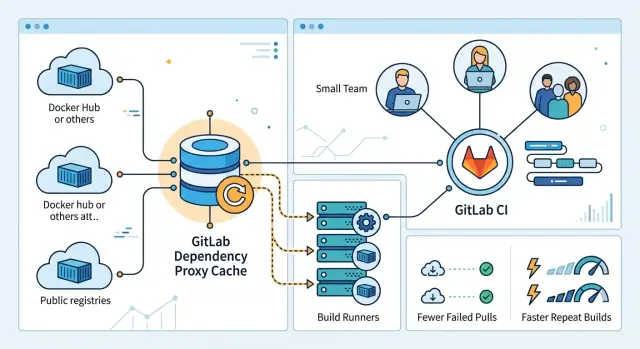
Table of Contents
Why Docker builds slow down and fail
Most Docker build problems start before your code runs. The job needs a base image first, and that image usually comes from a public registry. If that pull stalls, the whole pipeline waits.
Public registries slow down at bad times. They also rate-limit busy teams, return temporary errors, or time out when you least expect it. A build can fail even when the Dockerfile is fine.
This gets worse with fresh GitLab CI runners. Many teams use short-lived runners that start clean for each job or small batch of jobs. That keeps runners tidy, but it also means they begin with an empty image cache and download the same layers again and again.
One slow base image can hold up every pipeline. If several services start from the same image, one delayed pull can block test jobs, review apps, and release builds at the same time. You change three lines of app code, but the team still waits for node, python, or ubuntu layers to arrive.
Cold-cache pain is easy to miss because it looks random. One pipeline finishes in four minutes. The next takes twelve, and nobody touched the app. The difference is often simple: one runner already had the layers, and the next runner did not.
Small teams feel this fast. They usually run fewer runners, have less spare capacity, and do not have someone watching CI all day. When a public registry slows down or Docker pull limits kick in, one person may lose 20 minutes, but a whole team can lose half a day.
The problem is not just speed. Registry outages make builds less predictable, and unpredictable builds are harder to trust. Teams start rerunning jobs, guessing at fixes, or delaying releases for no good reason.
When Docker builds feel flaky, the bottleneck often is not Docker itself. It is image delivery. That is why the GitLab dependency proxy matters so much on lean teams that rely on clean, autoscaled GitLab CI runners.
What the dependency proxy does
The GitLab dependency proxy keeps local copies of container images that your CI jobs would normally pull from public registries. When a runner asks for a base image like node, python, or alpine, GitLab fetches it once from Docker Hub or another upstream source and stores a copy inside GitLab.
After that first pull, later jobs can get the same image from the cache instead of reaching out to the public registry again. That is the whole benefit. Your runners stop repeating the same download, which usually makes builds faster and less fragile.
Without this cache, each runner talks to Docker Hub on its own. If five jobs start around the same time, all five may pull the same image separately. That wastes time, adds outside network traffic, and pushes you closer to Docker pull limits. With the proxy in place, GitLab becomes the normal source for shared images, so runners hit the public registry far less often.
It also gives your team one stable place to fetch common images. That helps more than many people expect. Shared runners, self-hosted runners, and fresh machines all pull from the same GitLab address, so builds behave more consistently across environments.
If the upstream registry has a bad hour, the cache can soften the hit. Jobs can still pull images that GitLab already stored, even if the public registry is slow or flaky. It does not solve every outage, and it cannot cache an image nobody has pulled yet. Still, it removes a lot of routine dependence on external registries.
A simple way to think about it: the dependency proxy sits between your runners and public image registries. It is mostly for the base images your pipelines reuse every day, not for the images your team builds and publishes. For small teams, that one change often cuts waiting time and makes rebuilds feel much less random.
When it helps the most
The GitLab dependency proxy helps most when your team starts from scratch more often than it realizes. That usually happens with shared runners or short-lived runners. They spin up, do the job, and disappear with an empty local cache. The next pipeline pulls the same image layers again, even if nothing changed.
That pattern gets expensive fast. A team may build five services a day, all based on the same node, python, or alpine image. Without a proxy, each runner goes back to the public registry and repeats the same download. With the proxy in front, GitLab keeps a nearby copy and your runners pull from there instead.
It helps even more when several projects share the same base image. One project warms the cache, and the next project benefits from it. Small teams often miss this because each repo looks separate, but the image traffic is usually repetitive.
You will usually notice the difference first when runners are shared or rebuilt often, when several pipelines pull the same base images every day, when Docker Hub rate limits stop jobs at random times, or when a public registry hiccup slows work across several repos.
Rate limits are the most obvious pain point. Nothing feels more annoying than a build that fails because too many pulls happened that day. The code may be fine, but the pipeline still stops. A proxy does not change every Docker Hub rule, but it cuts how often your runners need to ask Docker Hub in the first place.
Registry outages are the other big one. If your builds depend on an outside service for every fresh runner, one outage can freeze several projects at once. With a warm proxy cache, many jobs keep moving because they no longer need to fetch every layer from the public source.
This matters most for small teams because they feel interruptions right away. If one blocked build can hold up a release, even shaving off 20 to 40 seconds per job and avoiding a few random failures each week makes the setup worth it.
Turn it on in GitLab
Start at the group level, not inside a single project. The GitLab dependency proxy lives on the group that owns the project, so if your repo sits under the wrong group, the cache sits in the wrong place too.
First, confirm that your GitLab setup can use the feature. On GitLab.com, check whether your group plan includes it. On a self-hosted instance, an admin may need to allow it before anyone in the group can switch it on.
The setup is simple: open the group that contains the project, find the dependency proxy setting, enable it, and note the proxy image prefix GitLab shows for pulls.
That part takes a minute. The part people skip is access.
Your runners need credentials that can pull through the proxy. If your jobs already authenticate to the registry with the built-in CI job token, you may be fine. If not, create a deploy token or another group-level credential with the right registry permissions, then store it in CI variables so every runner uses the same login.
Keep the first test small. Do not swap every image in every pipeline on day one. Pick one image your team pulls all the time, such as alpine, python, or node, and route only that image through the proxy first.
A small team can test this in one busy job that runs on every merge request. If that job usually pulls node:20 from Docker Hub, change that reference to the group proxy path, run the pipeline twice, and compare the pull step. The first run fills the cache. The second run shows whether your runners can pull cleanly from GitLab instead of going back out to the public registry.
If the first image works, expand slowly. Start with the base images that appear in many projects, then move to less common ones. That order gives you the fastest win and makes auth mistakes easier to spot before they spread across all your Docker jobs.
Update your Docker jobs
After you enable the GitLab dependency proxy, the speed gain only shows up if your jobs stop pulling images from public registries directly. In practice, that means changing image paths in .gitlab-ci.yml and in any job script that runs docker pull. If a job still points at Docker Hub, that job will still hit pull limits and random slowdowns.
Check three places first: the image your job runs in, any services it starts, and any manual pull commands inside the script. Those references should use the proxy path instead of the public image path. One missed line is enough to keep part of the pipeline cold.
Small teams often get better results when they stop using a different base image in every repo. Pick a short shared set and stick to it. If the web app, worker, and API all use the same few images, GitLab CI runners reuse cached layers more often.
For example, if two projects both build with the same node image and package into the same alpine image, the second pipeline usually starts from a warmer cache. The first run fills the proxy. The next run is the real test.
Keep registry login details out of the repo. Store usernames, passwords, and tokens in masked CI variables, then log in during the job. That keeps secrets out of merge requests and avoids the mess of rotating credentials in committed files. Protected variables also make it easier to limit who can use production credentials.
A quick check is enough. Run one pipeline after the path changes, run the same pipeline again with no image changes, compare pull time in the job logs, and confirm that every pull now goes through the proxy path.
The second run should be noticeably faster if the cache works. If it is not, one of two things usually happened: a job still pulls from the public registry, or your team uses too many image tags to get a decent cache hit rate. Tags like latest often make this worse. Fixed versions are less exciting, but they make the cache useful.
A simple example from a small team
Picture a team of three building two products at once. One developer owns the API, one works on the web app, and the third handles bug fixes, releases, and whatever broke overnight. It is a normal small-team setup: not much ceremony, not much spare time, and very little patience for slow CI.
Both projects use the same base images. The API starts from Node on Alpine. The web app does too. On paper, that should be easy to cache. In practice, their GitLab CI runners often begin Monday with empty image caches, so the first wave of pipelines all tries to pull the same layers again.
That is where the pain shows up. The API pipeline starts. The web app pipeline starts a minute later. A hotfix branch joins the queue right after that. All three jobs reach out to the public registry for the same Node and Alpine layers. If Docker Hub responds slowly, the whole queue drags. If pull limits hit, one job may fail even though nothing is wrong with the code.
For a team this small, the waste is obvious. They are not compiling huge binaries or running a giant test matrix. They are waiting on repeated downloads.
After they enable the GitLab dependency proxy and point both projects at it, the first pipeline of the week still does the initial fetch. That part does not disappear. The difference comes right after. The next pipelines pull those same base layers from the cached copy inside GitLab instead of asking the public registry again.
The result is boring in the best way. Later jobs stop fighting over the same image downloads. The web app build that often took eight or nine minutes drops closer to five. The API job cuts a couple of minutes too. Just as important, Monday morning stops feeling random.
This will not fix every slow build. It does fix one stubborn problem many teams accept for no good reason: downloading the same base images again and again when two projects share almost the same foundation.
Mistakes that waste the cache
Most cache misses come from habits that feel harmless. The biggest one is using latest for base images. It looks simple, but it hides change. When latest moves, your team cannot tell whether a slower build came from your code or from a new upstream image.
A pinned tag gives you much better reuse. If you need repeatable builds, pin the digest. Then the cache stays warm until you choose to update it.
Too many one-off tags cause a different problem. Some teams build or pull images with branch names, ticket numbers, or short commit SHAs in every pipeline. That makes each run look unique, so the proxy keeps fetching layers that no other job will use again.
A cleaner pattern is to keep a small set of stable base image tags for common jobs, update those tags on purpose instead of on every commit, use unique tags for release artifacts rather than shared build bases, and remove old image patterns that nobody reuses.
Authentication trips people up too. If a runner skips login to the GitLab dependency proxy, pulls can fail with errors that look unrelated to the cache. You might see access denied, rate-limit messages, or a job that suddenly tries to pull from the public registry again.
That is why every job that pulls through the proxy should log in first, even if the same job worked yesterday. Small teams often miss this because one runner still has old credentials while another runner starts clean and fails.
Storage is the quiet cache killer. Large images that you rarely use, like mobile SDK stacks or GPU toolchains, can eat disk space fast. Then the runner drops useful layers to make room, and your everyday jobs go cold.
If only one pipeline uses a huge image once a week, do not treat it like a common base. Put it on a separate runner or limit it to the jobs that truly need it. Teams that watch runner disk usage closely usually catch this early. Teams that do not end up wondering why the speed gains disappeared after a few days.
A boring tagging rule, a reliable login step, and some storage discipline fix most cache waste.
Quick checks after setup
A green pipeline does not prove the setup works well. Teams often switch on the GitLab dependency proxy, see one successful build, and assume the job now pulls through the cache. Sometimes it does not. Sometimes a warm runner hides the real result.
Run the same pipeline twice with no changes. Compare the image pull step, not the full job time. If the second run barely improves, the job may still pull straight from the public registry, or the image may change too often to stay useful in cache.
A few checks catch most mistakes:
- Repeat one pipeline and write down the pull time for both runs.
- Start a fresh runner, or clear local Docker images, then watch the first pull closely.
- Read the job log and confirm the image path points to the proxy path, not a direct Docker Hub path.
- Watch proxy storage for about a week before you roll it out to every project.
The fresh runner test matters more than many teams expect. A runner with local layers can make any setup look fast. A new runner shows the real behavior your team gets during autoscaling, after cleanup jobs, or when a runner dies and GitLab CI runners replace it.
The log check is simple but easy to skip. If your job still references the old registry path in one place, that one miss can trigger rate limits or fail during registry outages. One direct pull is enough to make the build feel unreliable.
A small team can spot the difference quickly. Say a base image takes 25 seconds on the first run and 4 seconds on the second. That is a good sign. If both runs stay around 25 seconds, stop and inspect the image path before you widen the rollout.
Do not push the proxy to every repo on day one. Give it a week. Check how much storage it uses, which images stay hot, and whether old tags pile up. That short wait helps you avoid a messy cleanup later and shows whether the faster builds are real or just a lucky result from one runner.
What to do next
Start small. Pick one project, then route one base image family through the GitLab dependency proxy first. Alpine, Debian, Node, Python, or Docker-in-Docker are common choices. One careful test tells you more than changing every pipeline at once.
Write down which images your team should share. Keep the list short and boring. If five developers and three GitLab CI runners all pull the same base images, those belong on the list. Odd one-off images usually do not.
A simple first pass is enough:
- choose one active repository
- choose one or two base images used in most jobs
- update the image path in CI
- run a few pipelines and compare pull times
- note any auth or tag issues right away
After that, set cleanup rules before the cache grows into a mess. Decide who owns the proxy settings, how often the team reviews old image tags, and when to stop pinning images that nobody uses anymore. You do not need a heavy policy. A short note in team docs is enough if people actually follow it.
It also helps to agree on naming and tag habits. If half the team pins exact digests and the other half keeps using latest, the cache gets noisy and harder to reason about. Pick one approach for shared images and stick with it.
Give the setup a week or two, then check real results. Look at cold pipeline starts, failed pulls, and how often runners hit remote registries. If builds still feel slow, the proxy may not be the main issue. Large images, weak layer caching, or too many fresh runners often hurt more than people expect.
Small teams usually get the best result from a plain plan: shared base images, consistent tags, and one person who keeps an eye on CI hygiene. That is enough to make faster Docker builds feel normal instead of lucky.
If your GitLab, Docker, and runner setup still feels wasteful, Oleg Sotnikov at oleg.is works with startups and small teams on Fractional CTO, self-hosted GitLab, and lean CI/CD setups. A short outside review can save a lot of trial and error.


