GitHub Actions to GitLab CI migration without outages
Plan a GitHub Actions to GitLab CI migration in stages, move workflows and secrets safely, test runners, and keep a clear rollback path.
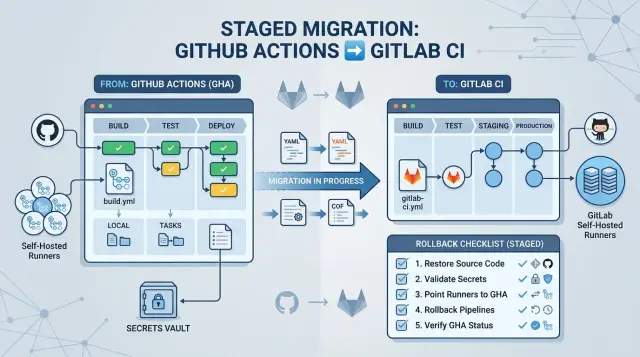
Table of Contents
Why migrations break delivery
A CI move usually breaks in a very ordinary place: the deploy job. If that job stops reading the right branch, loses a production secret, or lands on a runner without Docker access, releases stop even when the app is fine. Teams often notice late, when a hotfix is already in main and still cannot ship.
GitHub Actions and GitLab CI look similar at first glance. Both use YAML. Both run jobs, pass artifacts, and react to pushes and tags. That surface similarity tricks teams into copying workflow files and expecting the same result. The syntax is only one part of the move. The harder part is everything around it.
A copied pipeline can fail because the event model changes. A job that ran on push in GitHub may need different rules in GitLab to match merge requests, tags, or default-branch deploys. Artifacts may move differently. Variables may resolve in a different order. Small details like matrix jobs, manual approvals, or job dependencies can quietly change the release path.
The usual break points are simple and easy to miss. Triggers fire too often, or not at all. Secrets exist, but the job cannot read them in the right environment. Runners miss tools, network access, or cached dependencies. Rollback steps never make it over because the team copied only the happy path.
Picture a service team that deploys on every tag. In GitHub Actions, the workflow builds an image, signs in to a registry, and pushes to production after one approval. After a quick move to GitLab, the build still passes, but the deploy job never runs because the tag rule does not match the new pipeline setup. On paper, nothing looks wrong. In practice, release day is gone.
That is why this kind of migration should not start with a full cutover. The goal is not to rewrite every workflow at once. The goal is to keep delivery boring while you move one part at a time: low-risk pipelines first, then secrets, then runners, then production deploys with a clear rollback path. If one stage fails, the old path should still ship code.
What to document first
Teams usually get into trouble when they copy YAML first and inventory later. The safer order is dull but effective: write down what runs today, why it runs, and what each job touches.
Pull every workflow file into one document or sheet. For each workflow, record the trigger in plain language: push to main, pull request, tag creation, manual run, schedule, or another workflow finishing. If something runs only on a release tag or hotfix branch, note it now. Those small rules cause many of the first missed releases.
Then label jobs by purpose. Keep the labels plain: build, test, release, deploy, and support. That alone will expose hidden coupling. A job named "ci" may also publish an image. A job named "release" may quietly update a changelog, push a tag, and trigger production.
Write down every secret, variable, artifact, cache, and shared action each workflow uses. Include who owns the secret, where it lives, and whether the job can run without it. Shared actions deserve extra attention because many teams rely on custom actions or Marketplace actions that do far more than their names suggest.
Mark anything that touches production, billing, or customer data. Treat those jobs as a separate risk group. If a pipeline can rotate credentials, charge a customer, run a database migration, or deploy customer-facing code, it needs more review before you rebuild it.
It also helps to capture run times and failure patterns. Note the normal duration, the slowest steps, and the jobs that fail once in a while for reasons nobody fully trusts. If build and test normally take 14 minutes and the deploy job fails on cache misses twice a month, keep that record. You will need it later when you compare old and new pipelines.
Choose the first pipelines to move
Start with jobs that can fail without hurting customers, sales, or support. The safest first move is usually read-only automation: lint checks, unit tests, and preview builds.
These pipelines tell you a lot about runner setup, images, caches, and environment variables, but they do not push code to production. If a test job misbehaves for a day, the team gets annoyed. If a deploy job misbehaves, the team misses a release window.
Pick one repo or service with limited impact. An internal tool, a low-traffic API, or a side service is a better first target than your main customer app. You want something real enough to expose gaps, but small enough that people can recover quickly.
The best first candidates are usually simple: they run on every pull request or merge request, they do not publish packages or trigger releases, they finish in minutes, and one team owns them end to end.
Keep production deploys on the old system during the first wave. That gives you a clean line between testing CI behavior and shipping customer-facing code. It also avoids a common mistake: changing workflow logic and release mechanics at the same time.
Leave scheduled jobs and tag-based releases for later. Nightly syncs, cleanup scripts, version tagging, changelog generation, and package publishing often hide special rules that nobody remembers until they break.
A practical order looks like this: move a service's lint and unit tests first, then add its preview build, then copy staging deploy logic, and only after that touch production. It is boring on purpose. Boring migrations usually finish on time.
Map jobs, triggers, and artifacts
Think job by job, not file by file. For each job, ask four plain questions: what starts it, what it needs, what it produces, and what must happen before release. That turns a messy migration into a set of small mapping decisions.
GitHub events rarely map one to one. A push event may stay simple, but pull requests become merge request pipelines, and branch filters often need another look. Tag rules are a frequent trap. A release job that used to run only on version tags can suddenly run on every branch if you copy the logic too loosely.
A basic mapping list helps:
push-> branch pipeline rulespull_request-> merge request rulesworkflow_dispatch-> manual job or manual pipelineschedule-> scheduled pipeline- release tags -> tag rules with a strict pattern
Keep stage names plain. "build", "test", "package", and "deploy" are better than clever labels because anyone can scan the pipeline and see where it failed. If one GitHub workflow mixes too many concerns, split it now. One file can still hold several jobs, but each job should have one clear purpose.
Marketplace actions need special attention. Some map cleanly to GitLab features like caches, artifacts, container builds, or built-in variables. Others are just wrappers around shell commands. In those cases, plain scripts are often better. They are easier to read, easier to debug, and less likely to surprise you during the move.
Artifacts need an explicit plan too. Decide which job produces the build output, how long GitLab should keep it, and which later jobs download it. Logs, test reports, build packages, and deployment bundles do not all need the same retention. A test report may live for a few days. A release bundle may need to stay longer so rollback stays possible.
If your service builds on every branch, runs tests on merge requests, and deploys only on tags, write those as three separate rules. Teams often collapse them into one job and then spend days chasing odd releases.
Move secrets and variables safely
Secrets are where many teams break delivery. A job can look perfect and still fail because one token has the wrong name, the wrong scope, or no access in the target environment.
Start with a full inventory. Do not move secrets from memory. Export a simple sheet and group every value by where it is used, which environment needs it, and whether several repos share it.
Most teams end up with three groups. There are repo-only values, like test API tokens or package publish credentials. There are environment values, like staging and production database URLs. Then there are shared values, like Slack webhooks, container registry credentials, or cloud deploy roles.
That grouping tells you what belongs at project level, what should sit in a higher shared scope, and what must stay separate so one team does not get access it does not need.
Name clashes are common. The same name may exist in two repos but point to different accounts, or a vague name like API_KEY may mean one thing in staging and another in production. Rename before import, not after a failed deploy. A simple prefix pattern such as STAGING_, PROD_, or a service name is enough.
Production values need stricter rules than everything else. Mask them so logs do not print them by accident. Protect them so only protected branches or tags can use them. If your deploy process uses manual approvals, keep those approvals tied to production access. A leaked test token is annoying. A leaked production token can stop releases for days.
Do one dry run before any real cutover. Create a branch that runs the pipeline without deploying and verify that every job can read what it needs. Check the boring details: variable names, file-based secrets, multi-line certificates, JSON blobs, and shell quoting.
One team moved a deploy token, a registry password, and two environment files. The pipeline passed on the first branch run, but the deploy still failed because the production variable was protected and the branch was not. That is exactly the kind of mistake you want to catch in a dry run, not during a release window.
Keep the old secret store alive until the cutover is over and the new pipelines have survived a few normal releases. Remove old values only when rollback is no longer needed. A short overlap is safer than a rushed cleanup.
Prepare runners, images, and caches
Runners often cause more trouble than the pipeline file itself. If the runner does not match the old build environment, jobs fail for small reasons: a missing package, no Docker socket, the wrong Node or Python version, or not enough disk.
Start by deciding which pipelines belong on shared runners and which need project runners. Shared runners work well for simple lint, test, and build jobs across many repos. Project runners are safer for jobs with special tools, private network access, large caches, or tighter security rules.
If you host GitLab yourself, project runners are often the easier first step. They give you more control and make debugging less painful when one team hits a strange build issue.
Match each runner image to the tools your jobs really use. Do not guess from workflow names. Read the current jobs and write down the exact versions for language runtimes, package managers, Docker, cloud CLIs, and any custom scripts.
Small mismatches waste hours. If a build used Ubuntu with Java 17, Node 20, and Docker access in GitHub Actions, give GitLab CI the same base setup before you compare speed or reliability.
What to test before rollout
Before any team depends on the new runner, run a few direct checks:
- Can jobs pull private dependencies and container images?
- Can they reach internal services, package registries, and test databases?
- Can they build Docker images if the release flow needs that?
- Do they have enough CPU, memory, and disk for peak jobs?
- Can logs, artifacts, and test reports upload without timing out?
Caches need prep too. If you compare run times on a cold cache, GitLab will look slower than it really is. Prime dependency caches first, rerun the same jobs, and compare again. Use the same lockfiles and cache paths the team already trusts.
Watch disk usage from Docker layers, build artifacts, and package caches. Many migration failures look random at first, but the runner simply ran out of space halfway through a build.
One spare runner helps more than most teams expect. Keep it idle, configured, and ready. If a runner breaks during cutover, you can retry jobs quickly, move a project over, or roll back without blocking the whole team.
Run both systems side by side
A safe move rarely has one big cutover day. The safer approach is to run both systems from the same commit for a while and compare the results. Every push or merge should start both pipelines so each system sees the same code, tests, and build inputs.
Keep GitHub Actions in charge of releases at first. Let GitLab CI act as a shadow pipeline that builds, tests, and publishes reports, but does not deploy. That gives you real data without putting customer traffic at risk.
Compare the outputs
A green badge is not enough. Compare what each run actually produced and how long it took.
Check the test count and failed test names. Compare artifact names, sizes, and checksums when you can. Make sure container image tags and build metadata line up. Track total run time and the slowest job. Pay attention to flaky steps that pass in one system and fail in the other.
Small mismatches matter. If GitLab skips two integration tests or creates a slightly different build artifact, that can become a bad release later. Fix those gaps before you move any deploy step.
Once GitLab produces two or three clean runs in a row, move one deploy target, not all of them. Start with a low-risk target such as a dev environment, an internal tool, or a small service with a fast rollback path. Keep production on GitHub until that first target behaves well under normal changes.
After that, hand over one release path at a time. GitLab can deploy staging for a week while GitHub still owns production. Then GitLab can take one production target while the rest stay where they are. It sounds slow, but it usually saves time because the team stops chasing avoidable breakage.
Do not hand over release ownership until rollback works in GitLab. Prove that your team can redeploy the previous image, restore the last good artifact, or pin an earlier tag in a few minutes. If you cannot reverse a bad deploy quickly, you are not ready to switch the final release button.
A simple example from one service team
A small SaaS team does not begin with its busiest production flow. It starts with the staging pipeline for one API service. That keeps the impact low and gives the team room to compare results before real customer traffic is involved.
The team copies only the build and test steps first. They keep the same Docker image, the same test command, and the same artifact names. If the old pipeline publishes a package checksum and test report, the new one needs to publish those same outputs, not just say "pass."
Their first week is simple. On days one and two, they mirror build and test jobs in GitLab CI and run them on every commit. On days three through five, they compare runtime, test counts, image digests, and artifact sizes between both systems. For that whole week, GitHub still handles every staging deploy and remains the source of truth. After seven steady days, they promote one staging release from GitLab and watch it closely.
That release is not a full cutover. It is a controlled check. The team confirms that the container image matches, the migration step runs in the same order, and the service starts with the same environment variables. If anything looks off, they switch the deploy trigger back to GitHub and keep shipping.
That fallback matters. In this case, a GitLab runner is missing a system package that the test suite needs. The tests fail, not because the code changed, but because the runner image lacks one tool that GitHub already had installed. Because deploys still run from GitHub, the team fixes the runner, reruns the pipeline, and moves on in minutes.
This kind of staged rollout is boring by design. That is the whole point. When build, test, and deploy move at different times, one mistake does not turn into a broken release.
Mistakes that break releases
Most broken releases do not come from YAML syntax. They come from rushed assumptions.
The first bad move is changing too much at once. If one team moves every repo in the same week, nobody has time to notice the quiet failures. A nightly sync stops running, a release approval disappears, or a hotfix branch no longer follows the old rule. Each miss looks small. Together, they block delivery.
Teams also get tripped up when they copy the visible pipeline and forget the hidden behavior around it. Release jobs often depend on things outside the YAML file: scheduled jobs that run at night or on weekends, manual approvals before production, branch protections and naming rules, tag triggers for versioned releases, and artifact retention that later jobs rely on.
Another common mistake is expecting a perfect one-to-one match for every GitHub Action. Some actions map cleanly to GitLab CI jobs. Others do not. Cache behavior, matrix builds, reusable workflows, and third-party actions often need a different design. If a team tries to force an exact clone, they usually end up with a pipeline that looks familiar but behaves differently.
Secrets create their own mess. People often copy values over and call the job done. Then production deploys start failing because the variable sits in the wrong environment scope, or a staging token leaks into a wider set of jobs than intended. Check each secret one by one: where it lives, who can use it, and which branch or environment can read it.
One team migrated a service, saw the main test pipeline pass, and deleted the old workflow the same day. Two days later, the scheduled database cleanup never ran because nobody recreated the cron trigger. That is why rollback notes matter. Keep the old workflow ready, write down the switch-back steps, and remove it only after a few normal release cycles pass without surprises.
Go-live checklist and next steps
Before the switch, assign one person to each release path. If the API, web app, and worker all ship differently, each path needs a named owner, a release command, and a rollback action that matches that service. Write the rollback step in plain language. "Use the last good build" is not enough if images, packages, or deploy targets changed.
Keep the final review in one table. One row per service works well. Track the GitLab pipeline name, required secrets and variables, runner tags, and target environments in the same place. Many go-live problems come from small gaps here, like a job that expects a tag no runner has, or a production variable that exists in only one system.
A short checklist keeps the switch boring:
- Each release path has an owner and a tested rollback step.
- Secrets, runners, tags, and environments are checked against one shared table.
- The team has run at least one rollback drill before go-live.
- Pipeline changes are frozen during the final switch, except for urgent fixes.
- Everyone knows which GitLab pipeline replaces each GitHub Actions workflow.
Do the rollback drill on purpose, not as a last-minute thought. For example, deploy a new image to a staging service, then roll back to the previous image tag using the exact GitLab job you plan to use later. Time it. If rollback takes four minutes in rehearsal and 25 minutes in production, that tells you something useful before the real cutover.
Freeze pipeline edits for the final move. New jobs, renamed variables, and image changes create noise when you need calm. Stability matters more than one extra improvement. Save cleanup and refactoring for the week after traffic runs cleanly on GitLab.
After go-live, watch the first few releases closely. Check queue times, failed jobs, cache misses, and deploy duration. If one team still needs the old system for a while, keep that exception explicit and time-boxed.
If you want a second review before the switch, Oleg Sotnikov at oleg.is helps startups and small teams review GitLab setups, runners, rollback plans, and the broader move to AI-assisted engineering. Sometimes an outside review catches the one missing variable or runner tag before release day does.


