Git tags vs semantic versions vs commit SHA releases
Git tags vs semantic versions vs commit SHA: compare how each naming style affects debugging, customer support, and safe rollbacks.
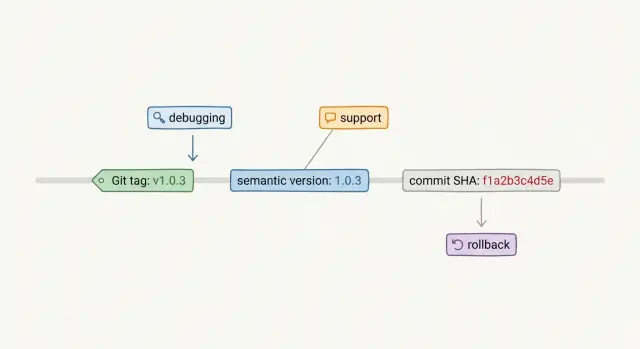
Table of Contents
Why release names turn into support problems
A release can end up with three names before lunch. Support writes "the Friday fix" in a ticket. A developer mentions v2.3.1 in chat. The logs show a1c9e7b. Everyone means the same deploy, but it doesn't sound that way.
That mismatch burns time fast. Support asks whether a bug is already fixed. Engineering checks the version in production, then asks which build the customer actually has. The customer shares a screenshot with one label, while the server log uses another. Ten minutes disappear before anyone even looks at the bug.
The deeper problem is traceability. A friendly release name helps people remember a deploy, but it often says nothing about the exact code that shipped. "Spring update" sounds clear in a meeting, yet it doesn't tell you which commit went live, whether config changed, or whether a hotfix shipped later under the same label.
That is why Git tags, semantic versions, and commit SHAs are not just a naming preference. The label you choose affects how quickly your team can answer basic questions. What is running right now? Did this customer get the hotfix? Can we roll back safely? Which code caused the error?
Easy names help in tickets and customer conversations. Exact identifiers help in debugging and rollback. Teams run into trouble when they choose only one side. If a release name is easy to read but hard to trace, support slows down. If it is exact but unreadable, people stop using it and make up nicknames instead.
What the three approaches mean
This topic sounds more technical than it really is. Git tags, semantic versions, and commit SHAs solve different problems, so many teams end up using all three.
A Git tag is a named marker in Git that points to one specific commit. You can think of it as a sticky note on one point in your code history with a name like release-may or v2.4.1. The tag does not change the code. It just gives that commit a stable name.
A semantic version is a release label such as 2.4.1. Most teams read that as major, minor, and patch. In plain language, 2.0.0 suggests a larger change, 2.4.0 suggests new behavior or features, and 2.4.1 suggests a smaller fix. That makes semantic versions easy to use in release notes, support tickets, and customer emails.
A commit SHA is the hash Git assigns to a commit, such as a1b2c3d. It is the most exact label of the three. If someone says production runs commit a1b2c3d, there is no guessing about which code they mean.
Each option has a trade-off. Tags and semantic versions are easier for people to read. SHAs are better when you need proof of what shipped. The safest setup is usually to pair a human label like 2.4.1 with one exact identifier, usually a Git tag and the commit SHA behind it.
How Git tags work in practice
Git tags feel simple when a team ships around clear milestones. A name like spring-release or v2-launch is easier to remember than a long commit ID, so product, support, and engineering can all talk about the same release without much friction.
That simplicity disappears when nobody sets a naming rule. One person creates release-april, another uses prod-fix-2, and someone else adds final-final after a late patch. The tag list still looks organized, but it stops being trustworthy.
Support usually feels this first. A customer says, "We are on release-august," and support still can't answer basic questions. Does that tag match the build in production? Was the tag created before deployment or after someone noticed a bug? Did the team deploy from the tag, or from a branch that changed later that day?
Tags work well when the team uses one naming pattern, ties each tag to one commit, records which tag went live, and keeps release notes aligned with that same tag. With that setup, rollback is often straightforward. If v2.4-hotfix causes errors and v2.3 is still safe, the team can redeploy the older tagged build and move quickly.
Rollback gets messy when tags are just labels. If people retag old commits, tag code after deployment, or change production config outside the release, the tag no longer tells the full story. You might restore old code and still keep the new database schema, feature flag, or environment setting.
Tags are useful for milestone releases. They become much less useful when a team wants precision but does not enforce discipline.
How semantic versions help and hurt
Semantic versions are easy for humans to read. If a customer says, "We started seeing this after 2.6.3," support has a clear starting point. Product, QA, and engineering can all talk about the same release without opening a commit log.
The number also gives people a rough sense of risk. Most teams read 3.0.0 as a larger change that might break existing use, 3.4.0 as new behavior that should still fit older integrations, and 3.4.2 as a fix rather than a redesign. That makes release notes easier to write and easier to understand.
The trouble starts when people have to judge the bump. Teams argue over whether a change is really breaking. An API can keep the same endpoint and still break clients by changing a default value. A screen can lose one field and trigger support tickets for days. Engineers may call that a patch because the code diff was small. Users care about behavior, not diff size.
Semantic versions also break down when deploys happen without a matching version update. The app may still report 3.4.2, even though the team pushed two hotfixes straight to production. Now support, QA, and ops use the same version number for different builds. Debugging slows down because nobody knows which 3.4.2 is actually running.
Semantic versions work well when every release number points to one build and the team uses the numbering honestly. If that discipline slips, the dashboard still looks tidy, but the version number stops telling you what users really have.
Where commit SHAs shine
A commit SHA gives engineers a precise answer. If production runs 9f3c2ab, everyone can point to the same code, the same diff, and the same build. That removes a lot of guesswork that appears when teams argue over whether "1.8.4" means the tag, the package, or the thing that really shipped.
This gets even better when the SHA follows the release everywhere. If your pipeline writes it into container labels, deploy records, logs, traces, and error reports, a bug report stops being vague. An engineer can open an alert, copy the SHA, inspect that commit, and see what changed in minutes.
SHAs are most useful when observability is already in decent shape. The same identifier can appear in application logs, traces, crash reports, and deployment history. During a messy incident, that consistency matters. Support says, "Users started failing after this morning's deploy," and engineering can match those failures to one exact revision with much less doubt.
The downside is obvious. Customers do not think in SHAs. A string like 9f3c2ab is hard to read over a call, easy to mistype, and nearly impossible to remember the next day. Sales, support, and non-technical managers usually need something easier.
That is why SHA based releases work best with a thin layer on top. Engineers keep the precision. Everyone else gets a simple release name that maps cleanly back to the SHA.
How debugging and rollback change across the three
When a customer says, "the app broke after the update," support needs a release name they can trust. Semantic versions help most because people can read and repeat them easily. Git tags can work almost as well, but only if the team tags every production deploy and uses the same tag everywhere. Commit SHAs are exact, but they are awkward over chat, on a call, or in a screenshot.
Engineers care about the next step: getting from the reported name to the exact code that ran. A commit SHA is the shortest path because it already points to one commit. A Git tag can be just as exact if the team treats tags as fixed markers and never moves them. Semantic versions are easier for humans, but they only help if the build, container image, deploy log, and app UI all point back to the same version.
Mixed labels create dead ends. Support may log v2.4.1, the deploy system may record 8f3c1ab, and the incident channel may mention release-2025-04-10. If nobody can prove those names refer to the same build, the team loses time before anyone checks the bug.
The trade-off is simple. Commit SHAs give engineers the fastest route to code. Semantic versions give support the easiest name to collect. Git tags work well when they match the deploy record exactly.
Rollback speed depends less on the naming style and more on consistency. If the release name in alerts matches the artifact name and the deployment record, the on-call engineer can pick the last known good build in seconds. If those names do not match, rollback slows down because someone has to translate labels, confirm the right image, and hope no tag moved after the fact.
You usually feel this during a late night incident. The best rollback plan is boring: one visible release label, one exact build ID behind it, and no guessing when production is on fire.
How to choose a naming approach
The choice gets easier when you ask one question first: who needs to read the release name under pressure? A developer fixing a production bug needs an exact build. A support person needs something easy to read on a call. A customer usually just needs a simple version number.
One name rarely does all three jobs well. Most teams should pick one immutable identifier for every deploy, then add one human label only if support or customers need it. In many cases, the immutable identifier is the commit SHA from the exact build.
If engineers handle most incidents, let the commit SHA be the source of truth. If customers report issues by version, add a semantic version too. If your team already creates Git tags for release points, keep using them, but treat them as labels tied to a commit rather than a substitute for the build record.
The real mistake is letting different systems show different names for the same release. Put the same identifier inside the app, in logs, and in deploy records. When someone opens a bug report, they should be able to follow one string all the way back to the code.
I would keep the setup boring. Use the SHA for precision. Add a version number when a human needs it. Anything more usually creates confusion.
Before you lock the process in, run one rollback test. Deploy a build, note its identifier, then roll it back using only your normal tools and notes. If the team has to guess which release matches which commit, the naming approach still needs work.
A realistic example
A small SaaS team pushes a Friday evening deploy. Half an hour later, support gets a ticket that says, "I can't log in after I enter the code from email. App version 2.14.0." That line is useful because the user can read and report a semantic version without guessing.
Support opens the internal release page and sees that version 2.14.0 maps to Git tag v2.14.0 and deploy artifact commit 8f3c2ab. Now everyone talks about the same release. Without that map, support would ask clumsy follow-up questions about timing, cache, and which server the user hit.
Engineering searches logs for commit 8f3c2ab because every request carries that SHA. They spot a spike in failed login callbacks right after the deploy. The bad commit tightened token checks and started rejecting codes that the old flow still produced for a few minutes.
Rollback becomes simple at that point. The on-call engineer does not debate whether to roll back "Friday-login-fix" or "latest" or some hand named tag from the repo. They roll production from 2.14.0 back to 2.13.4, confirm that 2.13.4 maps to commit 6c91d10, and watch the errors drop.
That is when this stops being a naming debate and starts affecting real support work. The user reports 2.14.0 because it is easy to read. The logs point to 8f3c2ab because machines work better with exact commit IDs. The Git tag gives the repo a clean checkpoint the team can inspect later.
If the team used only commit SHAs, support would waste time asking users to copy a long string they may never see. If they used only semantic versions, engineers would still need a reliable way to find the exact code in logs. When the three map cleanly to each other, rollback turns into a quick decision instead of a guessing session.
Mistakes teams make
Most release confusion starts when teams treat release names as labels for humans only. The name also has to match what support sees, what logs record, and what engineers roll back to under pressure.
A common mistake is reusing a tag name after a hotfix. Someone ships v1.4.2, finds a bug, moves the tag to a new commit, and calls the problem solved. Now one name points to two different builds over time. Support cannot tell which build a customer has, and rollback stops being predictable.
Urgent fixes create another problem when teams skip the version bump because the change feels small. Small changes still change behavior. If production runs new code but the app still reports 2.8.0, every bug report starts with guesswork instead of facts.
Teams also make life harder when the app shows one version and the logs store another identifier. A customer reports 3.2.1, but your tracing tool records only a commit SHA. Or the UI shows a SHA while the incident channel uses semantic versions. During an outage, engineers waste time translating names instead of fixing the issue.
Shared release names across services create a quieter mess. If both the API and the worker report v12, nobody knows which service failed without more digging. Plain prefixes like api-v12 and worker-v12 save time.
Config changes trip up plenty of teams too. The code may stay the same while someone changes a feature flag, queue setting, secret, or rate limit. If nobody records that config change next to the code version, a rollback restores only part of the system. The bug can stay live even after the rollback.
Most of these problems are preventable. Keep one release name for one exact build. Bump the version for every production change, even a rushed fix. Show the same identifier in the app, logs, and support tools. Add service prefixes when more than one service ships separately. Record config changes with the release instead of leaving them in someone's memory.
Teams rarely fail because naming is hard. They fail because they stop being strict when production gets noisy.
Quick checks before you ship
A release name only helps if people can use it under pressure. Five minutes before deployment, do a quick sanity check.
Ask someone outside the release work, often support or QA, to find the release identifier in seconds. If they need chat history, memory, or a developer to explain it, the name is too hard to use. Then make sure an engineer can take that same identifier and reach the exact commit in one step. If the name does not map cleanly to code, debugging slows down right away.
Check that production, staging, and test each show their own release clearly. If two environments display the same name, people will chase the wrong bug. Rehearse rollback once too. The team should know which previous release goes back live and where that record sits, without digging through old chat threads or terminal history.
Last, confirm that tickets, logs, alerts, and deploy records all store the same identifier. A small mismatch can waste a surprising amount of time. A customer reports a bug on version 2.4.1, your logs show only a container hash, and the deploy note mentions a Git tag. Nobody is stuck because the bug is unusually hard. They are stuck because the naming trail is broken.
Pick the format your team can trace quickly, teach everyone to use it the same way, and store it everywhere an incident might begin.
What to do next
Pick one release identifier this week, write the rule in one sentence, and stop making exceptions. Many teams compare Git tags, semantic versions, and commit SHAs, then keep mixing all three without a clear map. That is where support gets confused and rollback slows down.
A simple rule usually works best: every production deploy gets one public release name, and that name maps to one tag and one commit. If your team prefers semantic versions, use them everywhere people talk about a release. If you prefer tags or SHAs, do the same. Consistency beats a clever scheme.
Then make that identifier visible. Show it inside the app, include it in logs, add it to deploy notes, and require it in incident notes. When a customer report, a log line, and an engineer's rollback target all use the same name, debugging gets much faster. It can easily save 15 to 30 minutes during a live issue.
Before the next release, run a short drill with support and engineering together. Report one fake production bug with the release ID, find the exact deploy and rollback target, and check that the app and logs show the same identifier. Time the exercise and note where people get stuck. If the drill feels awkward, that is useful. It usually means the release habit is fuzzy, not the team.
If you want a second opinion, Oleg Sotnikov at oleg.is works as a Fractional CTO and startup advisor. A short review of your release naming, rollback steps, and incident flow can uncover small gaps that keep turning into support problems.
Frequently Asked Questions
Should we pick Git tags, semantic versions, or commit SHAs?
Use two layers. Let one immutable ID name the exact build, usually the commit SHA, and show one human label such as a semantic version for support and customers. That gives engineers precision without forcing everyone to read hashes.
What should support ask a customer for when a bug appears?
Ask for the version the user sees in the app first. That works well on calls and in tickets. Then your internal tools should map that version to the Git tag and commit SHA so engineering can find the exact deploy fast.
Are Git tags enough for release tracking?
Not by themselves. Tags work only when your team creates them in one consistent format, ties each tag to one commit, and never reuses or moves them later. If people treat tags like loose nicknames, traceability falls apart.
When should we change the semantic version?
Bump it for every production change, even rushed fixes. If the code changes but the version stays the same, support and engineering start talking about different builds with the same label, and debugging slows down.
Should every deploy map to one commit SHA?
Yes. Every production deploy should map to one exact commit. When logs, alerts, and deploy records all carry that SHA, engineers can jump from an incident to the code without guessing.
Can we move a Git tag after we find a bug?
No. Keep tags immutable. If you move a tag after a hotfix, one name starts meaning two different builds over time, and rollback turns into guesswork.
What should we show in the app and in the logs?
Show a readable release label in the app, usually a semantic version. Store that same release label and the commit SHA in logs, deploy records, and error reports. People can read the version, and engineers can still trace it to exact code.
How do we make rollback faster during an incident?
Make one release record that ties together the public version, the tag, the commit SHA, and the deploy artifact. Then test rollback with only that record and your normal tools. If someone has to search chat or memory, the process still has holes.
Do feature flags and config changes need release tracking too?
Record them next to the release. Code alone does not describe the full system if someone changed a feature flag, secret, queue setting, or rate limit. Without that note, you can roll back code and still leave the bug live.
When should a startup ask for outside help with release naming and rollback?
Get help when your team keeps losing time matching tickets, logs, and deploys, or when rollback feels uncertain. A short review from an experienced CTO can tighten the naming rule, release record, and incident flow before the next outage. Oleg Sotnikov does this kind of Fractional CTO work for startups and small teams.


