Generated code ops handbook for safer, faster releases
Create a generated code ops handbook with clear deploy rules, known risk zones, and rollback steps so reviewers can move fast and avoid guesswork.
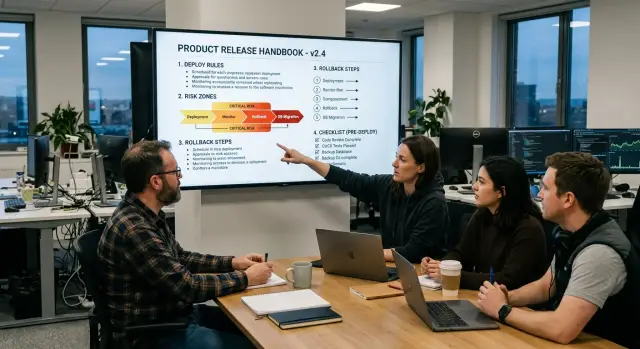
Table of Contents
Why teams get stuck with generated code
Generated code often looks finished before anyone understands why it changed. A reviewer sees the output, but not the prompt update, schema edit, template tweak, or generator setting behind it. That missing context slows review right away.
The problem gets worse when a small change creates a huge diff. Rename one field or adjust one config value and dozens of files move at once. Most of those edits are harmless, but reviewers still have to sort real risk from noise. After a few rounds like that, people stop trusting quick reviews and start reading everything line by line.
Deploy habits also drift faster than teams expect. One developer runs generation locally and commits the result. Another relies on CI. Someone else has a shell script with an extra cleanup step. None of that looks serious on its own, but the release process slowly splits into several versions. Then deploys depend on memory and personal habit instead of clear rules.
The worst delays usually come from missing notes. Each release turns into detective work. Which generated files always change? Which directories need a second look? Which part of the app breaks first when code generation goes wrong? Teams keep relearning the same lessons, especially where generated code meets handwritten logic.
Take a simple API schema update. The change may look minor, but one run can regenerate clients, tests, validation code, and docs. If nobody writes that down, the next reviewer treats a normal diff like a possible incident.
That is why a generated code ops handbook helps. It gives reviewers the reason behind the output, keeps deploy rules in one place, and saves the team from learning the same lesson every release.
What the handbook should cover
A useful handbook is a working map, not a policy file. When a release goes wrong, people need to see what runs where, who owns it, and what has to happen first. If they need to ask three people before they can read the plan, the handbook is already failing.
Start with the services that can ship generated code. Use the real environment names the team uses every day, such as local, staging, preprod, and production. Next to each service, name the owner and the backup. A reviewer should know who answers for the API, who watches the queue worker, and who checks the migration before anyone presses deploy.
Deploy order matters more than most teams think. Generated code can work in one part of the stack and fail in another because schemas, jobs, and front-end clients drift out of sync. Write the order in plain language. For many teams, it looks something like this:
- apply database migrations
- deploy the backend service
- run a smoke test in staging
- deploy workers or scheduled jobs
- deploy the web client
Add stop points between those steps. After migrations, someone confirms the schema is correct. After the backend deploy, someone checks logs and a few basic API calls. If a check fails, the handbook should say who pauses the release and where the team regroups.
It should also name the places that break most often. Do not leave that in memory or old chat threads. List the files, modules, prompt templates, generator configs, migration folders, and integration points that caused trouble before. A short, specific note helps. "Billing mapper sometimes generates wrong field names" tells people what to watch. "Billing is risky" tells them almost nothing.
Rollback rules need the same level of detail. Say who can approve a rollback, who runs it, and who confirms the system is healthy again. In a small team, one person may do all three jobs. That is fine, but write it down.
One page should let a reviewer scan the release path, spot the weak areas, and know who makes the call when things go bad. That alone can save an hour on a messy deploy.
Build the first draft step by step
Start with evidence, not memory. Pull the last three release notes and any incident notes tied to them. Those records show where deploys slowed down, where generated code behaved oddly, and what the team had to fix under pressure. If the notes are thin, use ticket comments, chat threads, and postmortems. Rough facts beat a polished guess.
Then talk to three people who see releases from different angles: one engineer, one reviewer, and one operator. Ask each person what they check every time before they trust a release. Keep the question simple. You want the checks they use when a real deploy is on the clock.
Their answers usually reveal the real workflow. The engineer watches database changes and generated migrations. The reviewer compares generated files against the prompt or spec to catch broad changes that look harmless but are not. The operator cares most about logs, error rate, queue depth, and the first ten minutes after rollout.
Write the process exactly as it happens today. Do not clean it up yet. If the team runs smoke tests after deploy because staging never matches production, say so. If someone always opens logs during rollout because generated handlers fail on edge cases, add that too. The handbook gets useful when it reflects reality first.
A first draft only needs four short parts:
- what changed in the release
- what people check before deploy
- where the risky areas are
- who can roll back and what triggers that call
Then cut every step nobody uses during a live release. Old checklist items pile up fast, especially after rushed fixes. If a step never changes a decision, remove it. Reviewers move faster with a short document they trust than with a long one full of abandoned habits.
Write deploy rules people can follow
Deploy rules fail when they read like personal notes. A reviewer should not have to guess which environment to use, which command to run, or when to stop. In a handbook like this, plain wording wins every time.
Use exact names everywhere. Write "staging-us", "prod-eu", or whatever your team actually uses. Do not write "staging" in one place and "preprod" in another if they mean different things. That small mismatch causes real mistakes.
Keep the order fixed. People move faster when every release follows the same path: checks first, migration second, deploy third, smoke test last. If one service has an exception, write it next to the rule instead of leaving it in someone's head.
Your deploy rules should answer a few basic questions with no room for interpretation:
- Which environment do we use for this step?
- What exact command or action do we run?
- What result means "continue"?
- What result means "stop"?
- Who decides what happens next?
Be direct. "Stop the release if tests fail, secrets are missing, health checks are red, or the latest backup is missing" is much better than a paragraph full of soft warnings. The same goes for smoke tests. Instead of "verify app after deploy," write "open production admin, create a test record, confirm it appears in the database, then delete it."
One rule per line works well because tired people scan faster than they read. During a late deploy, "Stop if backup is older than 24 hours" is hard to miss. Buried inside a paragraph, it is easy to skip.
The goal is not to explain every detail. The goal is to tell people what to do, in what order, and what should stop the release on the spot.
Mark risk zones before each release
Every release has a few places where one bad change can spread fast. Reviewers work quicker when those spots are named before deploy, not discovered during an incident.
Add a short risk note to every release. Keep it simple. One or two sentences per area is enough if the note says what changed, what might break, and how the team will notice.
What deserves a risk tag
Some parts of a system need extra attention almost every time:
- database schema changes, especially dropped fields, type changes, and new required values
- login, session, permission, and token flows
- billing logic such as price calculation, invoice creation, retries, and webhook handling
- generated files that update shared clients, models, or contracts used by several services
- external API limits, quota rules, and version changes
Schema work can fail quietly. A migration may pass, while an older query starts returning bad data an hour later. Auth changes can lock users out or give the wrong access. Billing bugs are worse because they often look normal until support tickets start arriving.
Generated code needs one more label: blast radius. If one generated file feeds several services, say that clearly in the release note. A regenerated SDK, shared protobuf, or API client can change request shapes across the whole stack in one commit.
Third-party services deserve their own line. If an API version changed or a vendor tightened rate limits, write the exact risk. "May hit 429s during backfill" is much more useful than "watch external API."
Failures that stay hidden
Background jobs hide problems well because the main app can still load and basic checks can still pass. Call out any release that changes queues, cron jobs, workers, retries, or delayed email and payment tasks.
A simple rule works here: if a failure can sit unnoticed for 30 minutes, mark it as a risk zone. Then add the first signal people should watch, such as error rate, queue depth, failed webhooks, or a drop in successful checkouts.
Write rollback steps for bad releases
A handbook needs a clear trigger for rollback. Teams lose time when they start debating during an incident. Decide before each release which failures mean "roll back now" and which ones still allow a patch. If login breaks, payments fail, data looks wrong, or errors stay high for several minutes, stop trying to patch forward.
Keep the last good release ready before you deploy anything new. Save the exact build tag, the matching config snapshot, and the feature flag state that went with it. Generated code can touch a lot of files in one pass, so "we can recreate it" is not a real plan.
Write the rollback order as plain steps anyone can follow under stress:
- pause new deploys and stop jobs that might keep writing bad data
- restore the last good code version
- revert data changes only if the release notes say the migration is safe to undo
- set feature flags back to their last good state
- bring jobs back one by one instead of all at once
Data needs extra care. Some schema changes reverse cleanly. Others do not. Mark that before release day. If a migration cannot go backward, say what the team should do instead, whether that means switching the app to read-only mode, turning off one feature, or restoring from a tested backup.
Add a short proof step after every rollback. "The site loads" is not enough. Pick two or three checks that match the product. A simple set might be: log in, complete one normal user action, and watch error tracking for ten minutes. If your team uses tools such as Sentry or Grafana, note the exact dashboard or alert to check.
Keep this section short. During a bad release, nobody wants an essay. They want the last good version, the right order, and a fast way to confirm the fix worked.
A simple example from a Friday deploy
At 4:40 p.m. on a Friday, a team pushed a routine update to an internal admin app. Most of the interface came from generated code, so the change looked much bigger than it really was. One new admin form tightened validation rules for order edits, and that small change blocked staff from saving older orders that did not match the new format.
Review did not catch it. The generator had touched hundreds of files, and the real change was buried in a wall of noise. Reviewers saw the huge diff, checked the obvious business logic, and approved the release.
Ten minutes later, support reported that order edits kept failing. Staff could open orders, but the save button returned validation errors on records that had worked earlier that day. This is the kind of moment a handbook is built for. The risky area had already been marked: generated admin forms, shared validation rules, and the order edit service.
It also gave the team a short rollback path. They did not need to guess, and they did not need to roll back the whole release:
- revert the admin service to the previous image tag
- clear the cached front-end bundle
- check logs for validation failures and save attempts
- confirm that order edits work again before touching anything else
That took about 15 minutes. Without those notes, the team might have spent an hour arguing about whether the bug lived in the API, the database, or the generated UI.
The handbook also showed which test had been missed: open an older order, edit one field, and save it before calling the release done. After the rollback, the team fixed the generator template, regenerated the files, and ran that exact test on staging.
They shipped the corrected version later, when someone could watch logs and support tickets during the first few minutes. One broken Friday deploy turned into a useful lesson: when generated code creates giant diffs, reviewers move faster if the handbook says where trouble usually starts and how to back out one service safely.
Mistakes that slow down reviewers
Reviewers lose time when the handbook makes them piece together the release story on their own. It should remove guesswork, not add more of it.
One common mess is putting build notes, release notes, and rollback steps on the same page with no clear split. During a deploy, nobody should stop and ask, "Is this a setup step, a release step, or a recovery step?" If that is unclear, people slow down and make worse calls.
Another problem is writing rules that mostly live in one person's head. You see this in lines like "run the usual checks" or "verify the service looks normal." That only works if the reviewer already knows the routine. Write the exact checks, the screen or command to use, and what a normal result looks like.
Tool lists also waste time when they skip order. Saying "use CI, logs, metrics, and alerts" is not enough. Reviewers need sequence. First confirm the build passed. Then check migration status. Then watch error rate for ten minutes. People make release decisions step by step, not from a pile of tools.
The slowest handbooks usually have the same flaws:
- they mix preparation, release, and rollback in one running note
- they assume reviewers remember unstated rules
- they name tools but hide the order and stop points
- they stay unchanged after a near miss or messy release
That last problem causes repeat failures. If a rollback took 15 minutes longer than expected because one service cached old config, update the handbook the same day or the next morning. If you do not, the team pays for the same lesson twice.
A simple test helps. Hand the page to someone who did not write it and ask them to explain the release flow out loud. If they pause to guess where to start, what tool comes next, or when to roll back, the handbook still has holes.
Quick checks before you press deploy
A release can look safe in review and still fail in production. Generated code makes that more likely because a small prompt change can touch files nobody expected. A short check before deploy saves time and prevents confused handoffs.
Run four checks.
- Confirm the exact version number, the person who owns the release, and the time window for the deploy.
- Compare the final diff with the risk zones in the handbook, especially sign-in, payments, data writes, jobs, migrations, and service integrations.
- Make sure backups finished, alerts are on, and the team can actually roll back.
- Decide who watches logs and who updates the rest of the team.
This matters most when the diff looks small. A generated file can hide a real change inside dozens of harmless lines. If the release touches a marked risk zone, slow down and confirm that the rollback path still matches the current version.
A simple rule is enough: if any of these checks is unclear, delay the deploy. Ten extra minutes before release is cheaper than an hour of guessing during an incident.
Keep the result in the handbook after each release. If backups ran late, an alert stayed noisy, or one person ended up doing too many jobs during deploy, write that down the same day. The next reviewer will move faster because the checklist matches real releases.
Next steps that keep the handbook useful
A handbook goes stale fast when the team treats it like a one-time document. A better habit is to open it after every release while the details are still fresh. If someone hit an odd deploy error, changed an environment variable, or used a manual workaround, add it that day.
Small updates work better than a big rewrite once a year. People forget the messy parts first, and those are usually the parts that slow the next reviewer down.
Keep the document short enough to read in about five minutes. That limit forces the team to keep only what matters during a release: deploy order, known risk zones, checks, and rollback steps. If the page turns into a wall of notes, trim it.
One drill is worth doing even when the team feels busy. Pick a low-risk change and run a rollback on purpose. Do it on a calm day, not during an outage. Most teams find a weak spot right away, such as a missing backup step, unclear ownership, or a command that no longer works.
A simple rhythm keeps the handbook alive:
- update it after each release
- remove steps nobody uses once a month
- test one rollback path every quarter
- add new owners as soon as roles change
The document should help a tired person make a good decision late in the day. Plain language matters more than perfect wording. If two reviewers read a step and interpret it differently, rewrite the step.
Sometimes an outside review helps because teams get used to their own workarounds. Oleg Sotnikov at oleg.is works as a Fractional CTO and startup advisor, and this is the sort of operational gap he helps companies tighten. If releases already work but still depend too much on memory and a few trusted people, an external review can make the handbook much sharper.
Frequently Asked Questions
What is a generated code ops handbook?
It is a short release guide for teams that ship generated code. It explains what changed, which order to deploy in, where bugs usually show up, and who can stop or roll back a release.
What should the first page include?
Put the real release path on page one. Name the service, environment, owner, deploy order, stop checks, and rollback trigger so a reviewer can scan it fast during a live release.
Who should own this handbook?
Give it to the person who already owns the release, not the person who writes the nicest docs. That owner should keep names, commands, and rollback steps current after every release.
How often should we update the handbook?
Update it right after each release while people still remember the messy parts. If a command changed, a risk zone moved, or a rollback took longer than expected, write that down the same day.
Which deploy steps should stay fixed?
Fix the order for every release and keep it boring. If your team usually runs migrations, deploys the backend, checks logs, then ships the client, write that exact flow and keep exceptions next to the service that needs them.
How do we choose risk zones before a release?
Tag anything that can break users, money, or data without showing up right away. Schema changes, auth flows, billing logic, shared generated clients, queues, cron jobs, and vendor API limits usually deserve extra attention.
When should we roll back instead of patching forward?
Roll back when the release breaks login, payments, writes bad data, or keeps error rates high for several minutes. Do not spend half an hour debating when the product already shows clear failure signs.
How should we document database migrations?
Treat migrations as their own risk area. Write whether they can go backward, who checks them after deploy, and what the team does if they fail, such as read-only mode, a feature shutdown, or a restore from backup.
How long should the handbook be?
Keep it short enough to read in about five minutes. If people need to scroll through old notes, tool dumps, and one-off fixes during a release, the handbook got too big to trust.
Should we bring in outside help to set this up?
Yes, if your team still relies on memory, chat threads, or one senior person during deploys. An outside review can tighten ownership, clean up rollback steps, and turn a vague checklist into something people actually use.