Generated code costs and why product scope feels fake
Generated code costs stay hidden at first. Learn why fast output can mask review, testing, ownership, and maintenance work that shows up later.
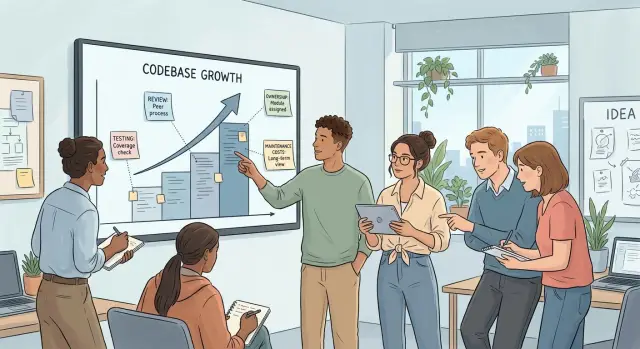
Table of Contents
Why scope starts to feel fake
Product scope feels real when every feature forces a real decision. Who can use it? What happens when data is wrong? What should a customer see when something fails?
Generated code can skip past that feeling because the output arrives before those decisions do. A team can create ten screens, a settings page, and a working demo in a day. That pace feels great, but it changes what people count as progress. They stop asking, "Do we understand the rule?" and start asking, "How much did we generate?"
That is when scope gets slippery. Code shows up before the product is clear. A demo looks complete because it follows the happy path. Real products live in edge cases, exceptions, permissions, strange customer requests, and dull admin tasks that nobody remembers until late.
Teams also start measuring the wrong things. File count, screen count, and prompt count look good in a meeting. Ownership is harder to show. Owned work means someone on the team understands the logic, can explain it, can change it next month, and can fix it when a customer hits a weird case.
A simple test helps. If a team says a feature is done, they should be able to explain which business rules it follows, who reviewed the code, who will maintain it after launch, and what breaks if the rule changes. If those answers are vague, the scope is probably inflated.
Early speed hides the cleanup bill. Generated code costs usually land after the celebration, when people try to connect features, remove duplication, tighten access rules, and make the code safe to change. What looked like two weeks of progress can turn into six weeks of review and repair.
This shows up often in startups. A founder sees a polished demo and feels the roadmap shrinking. Then sales asks for custom approval rules, support asks for audit logs, and finance asks how refunds should work. The product was never that close to finished. The team just had more output than ownership.
Fast output is still useful. It just creates a false sense of completion when code arrives before the hard decisions do.
What generated code does not include
Generated code can fill a repository quickly. What it usually leaves out is the work that makes software safe to run, easy to change, and clear enough for a team to trust.
The first gap is business logic. A generated feature may look complete on screen, but real products live in exceptions. Refund windows, tax rules, account limits, approval steps, duplicate submissions, partial failures, and region rules often stay outside the first draft.
An invoicing page makes this obvious. It might create invoices, send emails, and store totals. It may still miss what should happen if VAT changes after issue, if a customer belongs to two billing groups, or if finance needs a manual override. Those details are the product. They are not decoration.
The next gap is structure. Generated files often bring mixed naming, repeated helpers, and folder layouts that do not match the rest of the codebase. One part says "customer," another says "user," and a third says "account." That sounds minor, but it slows every future change because people have to stop and guess what each word means.
Tests are another missing layer. Generated code often covers the clean demo path and little else. Teams still need tests for permissions, broken inputs, retries, race conditions, and data loss risks. This is where generated code costs start to become obvious, because the output looked cheap while the risky work stayed unpaid.
Docs usually lag behind too. Someone has to write down why a rule exists, what can break, which service owns a piece of data, and how a new developer should extend the feature. AI code review can catch some obvious issues, but it will not write the handoff notes your team needs during software maintenance.
Ownership matters just as much. Every area needs one person who can answer questions, approve changes, and make tradeoffs when time gets tight. If nobody owns billing, auth, or notifications, problems sit in the backlog until they turn into outages or rework.
That is why product scope planning starts to feel fake after a burst of generated output. A feature is not done when files exist. It is done when the rules are covered, the code fits the codebase, risky paths have tests, the notes are clear, and a real person owns the result.
Where the real costs show up
The first version often looks cheap. The second, third, and tenth change reveal the real bill. Generated code costs usually land after the demo, when people start editing, reviewing, testing, and supporting what the model produced.
Review time grows faster than most teams expect. A model can add hundreds of lines in minutes, but someone still has to read them carefully. That work repeats on every change, and it gets worse when the code uses slightly different patterns each time.
Even a small product request can spread across many files. One button change might touch the UI, validation, API calls, error handling, tests, and logs. The request feels tiny from the product side. In the codebase, it becomes six places where behavior can drift.
Bug fixing gets expensive when prompts keep shifting the structure. A developer asks for the same thing twice and gets two naming styles, two layouts, and two ways to handle edge cases. The feature still works in a demo, but later fixes turn into search work. Engineers spend time figuring out which copy of the logic is the real one.
That lack of trust makes on call work much worse. When production breaks at 2 a.m., nobody wants to guess how a generated function handles retries, timeouts, or partial failures. Teams slow down because they cannot assume similar code behaves the same way.
The hidden costs are not mysterious. They show up as longer pull request reviews, more regression bugs after simple edits, slower incident response, and longer onboarding for new developers.
New hires feel this right away. Clean looking code can still be hard to read if it has no clear shape, mixed patterns, and comments that explain syntax instead of intent. A new developer may need two days to understand a flow that should take two hours.
This is one reason experienced leads and a good fractional CTO will sometimes slow generation down on purpose. They set rules for file structure, testing, and review before the team scales output. It feels less exciting than shipping ten features in a week, but it avoids a common trap: scope looks bigger on paper than the team can actually own.
Who owns the code after generation
Generated code still needs a human owner. If nobody owns it, the code turns into a shared mess fast. Bugs sit longer, rough patches stay in place, and every future change takes more time than expected.
Ownership works best at the module level, not at the app level. One person should own auth, another billing, another background jobs, and so on. That does not mean they write every line. It means they approve structure, watch for drift, and decide when a shortcut is too risky.
Teams also need a clear rule for AI written changes. Who can merge them? Who can reject them? If those answers stay vague, generated code costs show up later as rework instead of appearing during the first sprint, when everyone still feels fast.
The setup does not need to be complicated. Assign one owner to each module. Name the people who can approve AI generated changes. Keep the prompt, the output, and the manual edits in the same work item. Require cleanup before merge, not "later."
That last point saves a lot of pain. Cleanup means removing dead code, fixing names, trimming duplicate helpers, adding tests where the risk is real, and writing a short note on why the change exists. If a team skips this, the repository fills with code that works but nobody wants to touch.
Keeping prompts with edits helps more than most teams expect. Six weeks later, the owner can see whether the model guessed, copied an old pattern, or introduced a new one. That makes AI code review faster because the reviewer has context instead of a mystery diff.
A small startup feels this quickly. One founder asks a model to add user roles. Another edits the same area by hand two days later. If nobody owns permissions, both changes merge, tests pass, and the bug appears only when a customer gets the wrong access.
This is one place where a fractional CTO often helps. Not by writing every prompt, but by setting approval rules early so speed does not turn into cleanup debt.
How to review generated code step by step
Review generated code in small, boring pieces. If you try to approve a whole feature at once, the code looks bigger than it is, and the hidden work stays hidden.
Start with one user flow that matters to a real person. Pick something narrow, like signing up and creating the first project or submitting a form and seeing the result. That gives the team one path to read, test, and discuss without getting lost in the rest of the backlog.
A simple review loop works well. Generate one small slice of the feature, small enough to read in a single session. Run it and check the happy path first. Then break it on purpose with missing fields, bad input, slow responses, and expired sessions. After that, ask one developer to change a small rule. If nobody on the team can explain why the code works, stop there.
That follow up change matters more than most teams expect. The first small edit tells you a lot about generated code costs. If a tiny update takes half a day because the logic is tangled, the feature is already expensive to own.
Failure cases should come early, not after rollout. Generated code often looks clean in demos because demos avoid edge cases. Real users do not. They refresh the page twice, paste broken data, lose internet, or return with stale state in the browser. If the code falls apart there, the review is not done.
This is also where AI code review needs a human standard. The question is not whether the code runs once. The question is whether your team can trace it, test it, and change it next week without fear.
A practical rule is simple: one review session, one user flow, one small change after generation. Teams that keep that rhythm spot trouble early. Teams that approve huge drops of code usually discover the bill later, in bugs, delays, and confused handoffs.
A simple startup example
A founder is building a small SaaS product and needs admin screens fast. In two days, an AI tool produces a user list, role controls, subscription pages, and a refund button. The demo looks impressive. By the second day, the feature feels much bigger than it really is because the team can click through it and see a lot of surface area.
Then the missing rules arrive.
Support staff should view invoices but not change billing. Managers should cancel plans, but only for active accounts. Trial users should not get the same actions as paid customers. Refunds need logs. Plan changes need checks. None of that is obvious in the first generated version, even though those rules decide whether the feature is safe to ship.
The founder asks for updates with new prompts. The tool rewrites earlier choices each time. One screen checks permissions in the page. Another checks them in the API. A third skips the check because the last prompt focused on billing, not access. Button names change. Data fields move around. The code still looks busy, so the feature still feels close to done.
By day ten, that feeling is gone. A senior engineer opens the project and sees five versions of the same idea. Billing logic sits in several files. Access rules conflict with each other. Error messages do not match. There are no tests for the risky paths.
That engineer spends a week sorting it out. Most of the time does not go to writing new features. It goes to reading generated code, deleting duplicates, moving checks into one place, and making sure upgrades, downgrades, refunds, and role changes behave the same way everywhere. That is where generated code costs show up. The code came fast. Ownership, review, and cleanup came later.
A good AI code review would have caught this much earlier. One person could have stopped the team after the first demo and asked three plain questions: where do permissions live, where does billing logic live, and who will maintain this next month? Those questions feel boring on day two. They decide the schedule on day ten.
Mistakes teams make early
Teams often mistake visible output for finished work. A repo can jump from 20 files to 200 in an afternoon, and that feels like progress. It is still just text until someone checks the behavior, tests edge cases, and decides who will maintain it next month.
A common early mistake is counting generated files as completed scope. If an AI tool creates login screens, API routes, and database models, the team may say the feature is mostly done. What they really have is a draft. The hidden work starts after generation: review, cleanup, naming, tests, security checks, and all the small fixes that appear when real users click around.
Teams also let prompts decide structure. That sounds harmless at first. It is not. When each prompt adds a new pattern, folder layout, or library, the architecture turns into a pile of local decisions. Later, one engineer has to explain why three parts of the app solve the same problem in three different ways.
Polished output creates another bad habit: skipping review. Code that reads well can still hide weak error handling, duplicated logic, poor data access, or silent failure paths. This is where AI code review matters. Good review is slower than generation, and that gap is exactly why scope starts to feel fake.
The mess gets worse when teams mix experiments with production code. A fast prototype for a demo may be fine with shortcuts. A live system is not. If both end up in the same branch, cleanup rarely happens. The shortcuts stay.
One more mistake shows up near the end. Someone sees rough code and says one more prompt will clean it up. Sometimes it helps. Often it adds another layer on top of code nobody fully owns. That is how generated code costs grow: not in the first draft, but in the second, third, and fourth rewrite.
A simple rule helps: treat generated code like a junior draft, freeze architecture before heavy prompting starts, review every changed path that touches data, auth, or billing, and keep prototypes separate from production until a human approves the merge.
Teams that do this still move fast. They just do not confuse output with completion.
Quick checks before calling it done
Most problems appear after the happy path demo. The screen works, the form submits, and everyone moves on. Then a small change lands next week, and the team learns that nobody really understands how the code fits together.
You do not need a long audit to catch this early. You need a few blunt checks that expose whether the team owns the result or just received output.
Ask one engineer to explain the flow from start to finish without reading from a prompt. They should be able to say where input enters, where rules run, what writes to the database, and what can fail. Check tests for bad inputs, timeouts, missing data, and later edits. Passing tests on the main path are not enough if one small change breaks five other files.
Put one person in charge of the code after generation. If no owner exists, bugs and cleanup work drift until nobody wants to touch them. Then change one business rule on purpose, maybe a discount cap, a retry limit, or an approval step. If that edit spreads across many files, the code will cost more than it looked.
Tell support and ops what changed in plain language too. They need to know what users might report, what logs to watch, and what alerts may fire.
This is where generated code costs become real. Cheap output can hide review work, cleanup, test fixes, and support load. The code may look finished, but the team still has to carry it.
AI code review helps, but it does not replace ownership. A reviewer can spot odd patterns, dead branches, or copied logic. Someone on the team still has to know why the code exists and how to change it safely.
If a startup cannot answer these checks in one short meeting, the feature is not done. It is only produced. That gap matters more than the speed of generation, because software maintenance starts the day after release.
What to do next
Start by shrinking the size of every AI generated change. If one prompt creates 800 lines, split the work before anyone merges it. A small pull request is easier to test, easier to review, and much easier to own six months later.
Set a hard review limit your team can actually inspect. If two people cannot read the change, run the tests, and explain the intent in plain language, the change is too big. Fast output is cheap. Attention is not.
Then price the boring work before you promise more features. Generated code costs do not end when the code appears. Someone still has to review edge cases, name things clearly, fix broken tests, update docs, and clean up the next prompt when requirements shift.
That hidden work gets expensive fast. One extra dashboard page may look done today, but next month it can add bug triage, role checks, test updates, and support questions. If a feature looks like "two days with AI," budget the follow up work too or the roadmap will drift away from real capacity.
A useful operating rule is simple: keep prompts, code, tests, and review notes in one workflow; write down why the team accepted the change, not just what changed; assign one owner for each generated area of the codebase; and stop merging if review time grows faster than delivery time.
Teams usually get stuck when output grows faster than understanding. The backlog looks full, demos look good, and nobody notices the debt until a small change takes half a day. AI code review should catch that early, not after release.
When scope grows faster than the team can review and maintain, outside help can save a lot of time. A good reviewer can cut through weeks of false progress in a single session by tightening ownership and reducing what the team carries forward.
For startups and small teams, that often means bringing in a fractional CTO before the mess gets expensive. Oleg Sotnikov at oleg.is works with teams on exactly this problem: review limits, ownership lines, testing habits, and realistic scope planning for AI first development. The goal is not more output. It is a codebase the team can still trust and maintain after the demo ends.
Frequently Asked Questions
Why does generated code make a feature look finished too early?
Generated code makes visible progress very fast. Teams see screens, forms, and flows, then assume the hard product work is behind them.
The missing part is usually the real product logic: permissions, exceptions, failure paths, support cases, and maintenance. If nobody can explain those parts clearly, the feature is still a draft.
What does AI-generated code usually leave out?
It often skips the parts that make software safe to run and easy to change. Teams still need to define business rules, clean up structure, add tests for risky paths, and write short notes for the next developer.
A demo can work without those layers. Production code cannot.
How can I tell if our scope is inflated?
Ask four plain questions. Which rules does this feature follow, who reviewed it, who owns it after launch, and what breaks when a rule changes?
If your team answers with guesses or vague words, the scope is bigger on paper than in reality.
Why do later changes cost more than the first demo?
The first draft feels cheap because a model writes it fast. The cost shows up later when developers read it, untangle mixed patterns, fix edge cases, and support it in production.
A small product request can also spread across many files. That turns simple edits into review and search work.
Who should own code after AI generates it?
Give each module a real owner. One person should own billing, another auth, another background jobs, and so on.
That owner does not need to write every line. They need to approve structure, answer questions, and stop risky shortcuts before they spread.
What is a good way to review generated code?
Keep reviews small and boring. Take one user flow, read the code in one sitting, run the happy path, then break it on purpose with bad input, slow responses, and expired sessions.
After that, change one small rule. If the team struggles to explain or edit the code, do not merge it yet.
What tests matter most for generated code?
Start with the paths that can hurt users or the business. Test auth checks, billing rules, data writes, retries, timeouts, broken inputs, and stale state.
Those cases show whether the code can survive real use. Happy-path tests alone only prove the demo works.
Can a startup safely use generated code for admin screens and internal tools?
Yes, if you treat it like a draft and keep firm review rules. Generated code can save time on surface-level screens and routine flows.
You still need one owner, clear naming, and checks for permissions and billing. Without that discipline, quick wins turn into cleanup debt.
When should a team bring in a fractional CTO?
Bring one in when output grows faster than understanding. If your team ships a lot of AI-written code but nobody can explain ownership, review limits, or testing rules, outside help can save time.
A fractional CTO can set module ownership, merge rules, and realistic scope before the repo turns into rework. Oleg Sotnikov does this kind of work with startups and small teams.
What should we do before merging a large AI-generated change?
Split the change before anyone approves it. Keep prompts, code, tests, and manual edits in the same work item, then make sure two people can read the diff and explain the intent in plain language.
Also check who will maintain it next month. If that answer is unclear, the merge is early.