Frontend caching rules based on business risk levels
Frontend caching rules should match business risk. Learn what to cache, when to fetch fresh data, and how to avoid stale numbers.
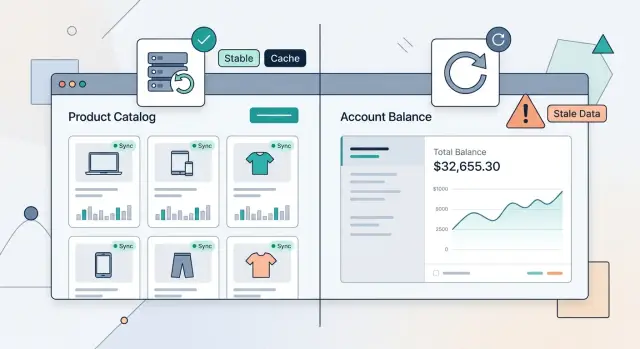
Table of Contents
Why one cache rule breaks trust
People react to stale data differently. If a product list shows yesterday's photo or an older description, most users keep browsing. If an account balance is old, they stop trusting the whole screen.
That is why one blanket cache policy causes trouble. The app may still feel fast, and nothing may crash, but the UI can show the wrong thing at the worst moment. Users do not care that the response came from cache. They care that the number in front of them was wrong.
Stale prices usually create confusion. A shopper refreshes, double-checks, or drops out of checkout for a moment. Stale balances, payout amounts, credit limits, or wallet totals create real risk. People can retry an action, make a payment they should not make, or think money disappeared.
Caching rules should match the cost of being wrong. Speed matters, but trust matters more. If two pieces of data can cause different harm when they go stale, they should not share the same cache lifetime.
Teams often choose one rule because it is easy to explain: cache everything for five minutes, or keep data until the user refreshes. It sounds tidy in code, but it hides small mistakes until they turn into support problems. Quiet errors are the worst kind because the page still looks normal.
A simple store example makes this obvious. An old list of t-shirt colors is usually harmless. An old gift card balance is not. One wastes a minute. The other can trigger failed checkout, refunds, and angry messages.
The simplest test is this: what happens if this data is 30 seconds old? What about five minutes? If the answer is "not much," cache it more freely. If the answer is "someone could lose money, make a bad choice, or see the wrong status," fetch fresh data or verify it before showing it.
That is the difference between a fast interface and a trusted one.
Sort data by business risk
Start by ranking data by how much damage stale values can cause. Do not group screens by feature or team. Group them by risk.
Time is a good way to judge it. Ask the same question three times: what happens if this data is 10 seconds old, one minute old, or one hour old? If nothing serious happens, you can cache it more aggressively. If a user could make a bad decision, treat it carefully.
Most products fall into three broad levels. Low-risk data rarely changes and does not affect money, access, or safety. Product catalogs, help text, profile photos, FAQ content, and marketing copy usually fit here. Medium-risk data changes often enough to confuse people, but usually does not cause direct harm. Order status, unread counts, delivery estimates, and dashboard summaries often land in this group. High-risk data touches money, permissions, inventory, or security. Account balances, wallet amounts, discount eligibility, stock left, login state, MFA status, and user roles belong here.
This framing stops abstract arguments. A product list can be 10 minutes old and most users will never notice. A bank balance that is 10 minutes old can trigger a support ticket, a duplicate action, or lost trust. Same app, very different risk.
Some screens mix several levels, and that is normal. A store page may show a low-risk product description next to high-risk stock and price data. A team admin page may show an avatar beside permission settings. When that happens, rate each piece on the screen instead of forcing one rule onto all of it.
If you are unsure, lean conservative. Fresh data costs a little speed. Wrong money, wrong access, or wrong stock costs much more. Even a short risk label beside each data source can clear this up fast and tell the UI when cached data is fine and when it must fetch again.
Cache catalogs, fetch balances fresh
Some data can be a little old with no real harm. Product lists, category pages, shipping options, and static settings usually fit that group. You can cache them longer because a short delay rarely changes a decision or costs someone money.
Balances, payment status, reward points, seat counts, and one-time codes are different. Users act on them right away. If the number is old, the screen can lie at exactly the wrong moment.
That is the split to follow: cache data people browse, fetch data people rely on.
A catalog page can stay fast with cached results for minutes, or longer if updates are rare. The page still feels current, and you avoid pointless requests every time someone opens the app. This works best for content that changes on a schedule, not every second.
A balance widget should do the opposite. Fetch it when the user opens the screen, returns to the tab, or starts an action like checkout, transfer, or withdrawal. Payment status should also refresh when the user expects a final answer, not from a copy saved ten minutes ago.
Mixed screens need extra care. One page can contain safe data and risky data at the same time. If you cache the whole page as one unit, the safe part may stay useful while the risky block goes stale.
Split the page by risk. Keep the catalog or content area cached. Load the risky widget with its own request. Refresh that widget on focus or before a sensitive action. Show a small loading state only there.
Picture a shopping app with featured products and a store credit balance in the header. The product cards can come from cache. The credit balance should fetch fresh data on demand. The page still opens fast, but the money number stays current.
That small separation prevents a lot of stale-data problems. It also avoids a common mistake: slowing down the whole screen just to protect one number that needs stricter treatment.
Split one page into safe and risky parts
Many screens mix data that ages at different speeds. A product title and photo might stay correct all day. Stock counts, prices, balances, and totals can change in seconds. When one page pulls all of that in a single response, the whole screen becomes harder to cache and easier to get wrong.
A better approach is to split the page by business risk, not by visual design. The user still sees one page, but the app treats each block according to the cost of stale data.
A store page makes this easy to see. Product details can usually come from cache for longer because stale copy or an older image rarely causes damage. Stock counts and price checks need tighter control, especially near checkout. Account balances, wallet amounts, and order totals should sit in their own requests so the UI can ask for fresh data without reloading everything else.
In practice, the page can load in layers. Product name, images, specs, and reviews can use a longer cache. Stock status can use a shorter cache or a fresh request. Price and promotion checks should happen close to purchase actions. Cart totals or balances should come from separate requests with strict freshness rules.
This split also helps after user actions. If a shopper adds an item to the cart, refresh the cart summary and maybe the stock badge. Leave the product description, gallery, and reviews alone. If someone changes a shipping option, update the totals block only. Small refreshes feel faster, and they reduce the chance of showing an old number in the wrong place.
One giant API response looks neat at first, but it creates bad trade-offs. Either you cache the whole page and risk stale money data, or you fetch the whole page again just to update one number. Neither is a good trade.
Separate requests give the UI clear rules. Safe content can stay put. Risky content gets checked again when the user gets closer to a decision that affects money or inventory.
Set the rules step by step
Start with the screens people open every day. Do not begin with the API or the cache library. Begin with the actual pages: product list, order history, account balance, checkout, admin dashboard. If a screen gets heavy traffic, a bad caching choice will show up fast.
Next to each screen, write the cost of stale data in plain language. Keep it blunt. "User sees an old price for 10 minutes" is annoying. "User sees an old balance and makes the wrong payment choice" is much worse. That one note helps engineers set caching rules and gives product and support teams a shared way to talk about risk.
A short worksheet is enough: the screen name, what can go stale, what happens if it is old, how long it can stay cached, and what should trigger a fresh fetch.
Then pick two numbers for each screen: how long the data can sit in cache, and what event should force a refetch. Time alone is rarely enough. Some data can wait five or 10 minutes. Other data should refresh when the user focuses the tab again, returns to the app, finishes an action, or reconnects after losing internet.
Test the moments where stale screens usually hide. Slow networks are one. Tab switching is another. Reconnects matter too, because many apps show cached data first and then forget to ask for fresh data when the connection returns. If you can, test with throttled internet and a real phone, not only a fast laptop on office Wi-Fi.
After release, treat the rules as working guesses. Product teams hear where users get confused. Support hears where trust breaks. If people keep asking why a number changed after refresh, your cache window is probably too long or your refetch trigger is too weak.
It is a boring process, which is exactly why it works. A short list, a few risk notes, and some real testing will prevent more stale-data bugs than weeks of debate.
Teach the UI when to fetch again
A good cache rule is not only about time. The UI should fetch fresh data when something happened that may have changed the truth.
User actions are the clearest signal. After a payment, save, cancel, refund, or role change, fetch the affected data again right away. If a manager changes a user's access, the screen should not keep showing buttons that person can no longer use.
A few moments matter more than any timer: after a user changes data, after money moves, after a status change like cancel or approve, after a role or permission update, and when the user returns to the tab.
That last one gets missed all the time. People switch tabs, answer a message, then come back and click the first button they see. When the tab becomes active again, refresh risky data such as balances, inventory counts, approvals, or permissions.
Low-risk pages do not need constant polling. A product catalog, FAQ, or settings page can stay calm for minutes or longer if nothing important changes there. Constant polling wastes battery, adds server load, and makes bugs harder to spot because the screen keeps changing under the user.
You also need a brake pedal. If the user opens the same view with the same filters and nothing changed on the server, do not fire the same request again and again. Deduplicate requests in the client, reuse fresh results for a short window, and stop background refresh when the tab is hidden.
When freshness matters more than speed, warnings help. If data is older than your safe limit, tell the user before they act. A small message like "Balance may be out of date. Refresh before sending money" is often enough.
The goal is simple: keep the UI quiet when data is safe and strict when data affects money, access, or irreversible actions.
A simple store and wallet example
Picture a store app that shows products, a cart, a wallet balance, and an order tracker. Each part changes at a different speed. Treat them all the same, and the screen becomes either slow or risky.
The product catalog is the easy part. A list of shoes, coffee beans, or phone cases usually does not change every second. You can cache that data for a few minutes and keep the app fast. If the user opens the same category again, the UI can show cached items right away and refresh quietly in the background.
The cart total is different. That number can change every time the user edits quantity, adds a coupon, or switches the delivery address. A cached total is fine for a moment while the UI updates, but the app should ask the server again after each of those actions. Address matters because tax and shipping can change. A coupon matters because the discount may fail, expire, or stop applying when the cart changes.
The wallet balance needs even stricter treatment. If a user has store credit, reward points, or a prepaid wallet, the app should fetch the balance right before checkout. Do not trust a number cached from five minutes ago. The user may have spent from the wallet on another device, or a refund may have landed since the last refresh.
After payment, order status moves into a different risk level. Before the user pays, a stale status is mostly annoying. After payment, it affects trust. People want to know whether the order went through, whether stock was reserved, and whether payment is still pending. Refresh that status more often for the first minute or two, then slow down.
A simple flow works well: cache catalog data for a short window, recalculate totals after every cart-changing action, verify wallet balance right before payment, and poll order status more often right after checkout.
Users accept a slightly old product list. They do not accept a wrong total or a wrong balance.
Mistakes that create stale or risky screens
A stale screen does more damage than a slightly slower one. Users forgive a short wait. They do not forgive seeing the wrong balance, the wrong permission, or an old status that leads them to click the wrong button.
One common mistake is giving every endpoint the same cache time. It sounds tidy, but it breaks down fast. A product catalog can often sit for a few minutes with no real harm. A wallet balance, discount limit, or admin permission should refresh much more often, and sometimes right away.
The same few problems appear over and over. Teams keep one cache rule for all data even when the business risk is different. They trust local state after a payment, refund, role change, or login switch. They reload the whole page instead of fetching only the risky part. They hide stale data behind a spinner and never show when the data was last checked. They also forget how often phones lose focus, apps go into the background, and reconnects leave old data on screen.
Trusting local state for too long is a quiet bug. If a user adds money, loses access, or switches accounts, the UI should treat its old data as suspect. Ask the server again. Do not assume the number in memory is still true just because the last action looked successful.
Refreshing the whole page is another lazy fix that creates new problems. It makes the screen jump, resets scroll, and wastes requests on safe content. Fetch the part that carries risk instead. A store page can keep its catalog cache while the cart total, stock count, and payment status refresh on their own.
Spinners cause trouble when they hide what is happening. If data may be a few seconds old, say so. A small note like "Updated 18 seconds ago" tells the user more than a blank loading state.
Mobile and laptop users make this worse without trying. They switch apps, lock screens, lose signal, then come back. When the app regains focus or reconnects, fetch risky data again. Slow and honest beats fast and wrong.
Quick checks before you ship
A screen can feel fast and still be unsafe. The last review before release should ask a plain question: if this data is a few seconds old, what can the user do with it? A cached product name is usually harmless. A cached balance, credit limit, or access level is not.
Use a short release check. Ask whether an old number could trigger a real action. If someone can spend money, submit an order, withdraw funds, or approve a request based on that value, fetch it fresh. Look for values that can change while the page stays open. Stock, account limits, seat counts, permissions, and prices often shift in the background, so the UI should recheck them instead of trusting old cache.
Then make a change and watch the next step. After a purchase, refund, profile update, or role change, the UI should refetch or invalidate cached data right away. Show whether the data is fresh enough. A small timestamp, a refresh state, or a brief loading cue helps users decide whether to wait or act now.
Test the cases people hit every day but teams skip. Leave the page open, switch to another tab and come back, drop the connection and reconnect, and try a slow network. Stale-data bugs often appear there first.
One extra test catches a lot of bad cache behavior: open the same account in two tabs. Change something in the first tab, then check the second. If the second tab still invites the user to act on old data, the cache rules are too loose.
Good caching rules are not about caching less. They are about being strict where mistakes cost money, trust, or access.
What to do next
Start small. Pick your top five screens by traffic or by money at risk, then rate each one as low, medium, or high risk. A product list is usually low risk. A wallet, invoice total, admin permission panel, or checkout step is not.
Write one short rule for each screen. Keep it plain enough that a designer, frontend developer, and PM all read it the same way. "Cache catalog data for 15 minutes." "Fetch account balance on page open and after every transfer." "Never reuse cached permissions after login, role change, or tab focus." Simple rules stop long debates and a lot of quiet bugs.
Start with the places where stale data breaks trust fastest: balances and credits, permissions and approval states, cart totals and checkout steps, and order status screens where the next action depends on fresh data.
After that, split mixed screens into safe and risky parts. A store page can cache product cards, filters, and reviews, while the wallet widget on the same page fetches fresh data. That gives you a faster page without taking a risk you do not need.
Then test the moments that break caches most often. Open two tabs. Change a role in one tab and check the other. Add an item, apply a coupon, then go back. Leave the app idle for 20 minutes and return. If the screen still matches reality, your rules are close.
If your team keeps getting stuck on invalidation, stale-data prevention, or UI fetch timing, a short outside review can save time. Oleg Sotnikov at oleg.is advises startups and small businesses on product, architecture, infrastructure, and AI-first development. For teams dealing with risky screens and messy refresh logic, that kind of review can turn vague habits into rules people actually follow.
Frequently Asked Questions
Why is one cache rule for the whole app a bad idea?
Because the cost of stale data is not the same. An old product photo usually wastes a moment, but an old balance or permission can push someone into the wrong action.
Set cache time by business risk, not by convenience. Keep low-risk content cached longer, and fetch money, access, and inventory data fresh when users rely on it.
What kind of data can I cache for longer?
Cache content people browse but do not act on right away. Product catalogs, help text, profile photos, reviews, and marketing copy usually fit that group.
If that data stays a little old, most users will not care. You keep the app fast without much downside.
What data should I avoid serving from old cache?
Fetch balances, wallet amounts, prices near checkout, stock counts, permissions, login state, one-time codes, and approval status fresh. People make real decisions from those values.
Refresh them when the screen opens, when the tab gets focus again, or right before a sensitive action like payment or transfer.
How do I cache a page that mixes safe and risky data?
Split the screen by risk. Keep safe blocks like descriptions, images, or reviews in cache, and load risky blocks like totals, stock, or balances with separate requests.
That way the page still opens fast, and you only refresh the part that can cause trouble.
When should the UI fetch fresh data besides waiting for a timer?
Do not rely on time alone. Refetch after payments, refunds, saves, role changes, cart edits, login changes, reconnects, and tab focus.
Those moments often change the truth on the server. If the user may act on the result, ask again.
Should I poll high-risk data all the time?
No. Poll only where users expect a fast status change, like right after checkout or while a payment stays pending.
For most screens, event-based refresh works better. It cuts waste, saves battery, and keeps the UI calmer.
What should the screen show while fresh data is loading?
Show the old value only if you make that state clear and the action stays blocked or guarded. A short note like "Updated 20 seconds ago" or "Refresh before sending money" works better than hiding everything behind a spinner.
If the value controls a payment, transfer, or permission change, fetch first and let the user act after the fresh result arrives.
How can I catch stale-data bugs before release?
Test stale moments on purpose. Leave a page open, switch tabs, lose the network, reconnect, and try the same flow on a slow phone connection.
Also open the same account in two tabs. Change data in one tab and check whether the other tab still shows old values or wrong actions.
How do I handle changes from another tab or device?
Treat local state as temporary after any action that changes money, access, or status. If another tab or device could change the same record, refetch or invalidate the cached value when the user returns.
For risky actions, verify again right before the action runs. That step protects you from old state sitting in memory.
What is a simple way to start fixing cache rules?
Start with your five busiest or riskiest screens. For each one, write one plain rule that says how long the data may stay cached and what event forces a refetch.
Keep the first pass simple. For example, cache catalog data for a few minutes, refresh totals after cart changes, and fetch balances fresh on screen open and before checkout.


