Frontend and backend boundaries for invalid actions
Frontend and backend boundaries fail when screens allow actions the server rejects. Learn to spot gaps, fix contracts, and cut rework.
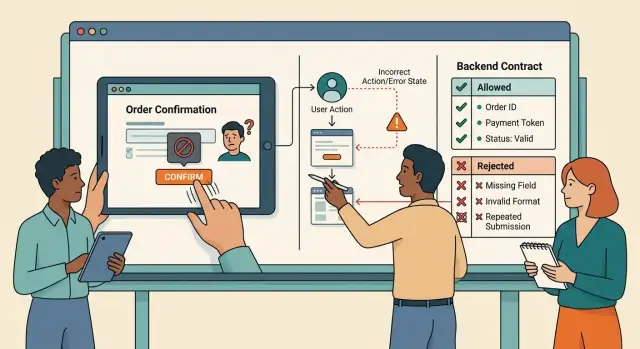
Table of Contents
Why this problem keeps coming back
A product often breaks at the same seam: the page accepts an action, then the server rejects it. The user sees a button, a form, or a setting that looks valid, so they keep going. A few seconds later, the system says no.
That gap feels small inside a team. It feels much bigger to the person using the product. They entered data, clicked submit, waited for a response, and only then learned about a rule the screen never showed. That's how people lose time, repeat work, and stop trusting the product.
A common example is checkout. A page lets someone apply a discount code, shows a lower price, and enables payment. The server later refuses the code because it expired, belongs to another account, or can't be combined with that plan. The page said yes first, so the rejection feels like a bug.
Teams usually patch the visible part and move on. They add a tooltip, disable one button, or rewrite the error message. That can help for a few days, but it doesn't fix the contract between the screen and the server. If the real rule still lives in one backend check, the same bad action will come back through another screen, a mobile app, an admin panel, or an API client.
That's why this problem sticks around. The UI tries to protect the user, the server tries to protect the data, and the two drift apart over time. Small product changes make it worse: a new promo rule, a new account state, a new permission edge case.
Support teams often spot it first. Many tickets start with an action that looked allowed: a user changed a field, retried payment, invited a teammate, or saved a draft that later failed. It sounds like a one-off mistake, but it usually points to a rule that crosses layers without a clear shared contract.
When that contract is vague, every screen starts guessing. Users pay for that guess with time and frustration.
Where boundaries usually break
Most failures start when the UI invents rules the API never promised. The page looks fine, yet users still reach actions that should never have been possible.
Stale state is one of the most common cases. A user opens a page, sees a button, and waits a minute before clicking it. In that minute, stock runs out, a record gets locked, or the price changes. The button stays active because the page still believes the old state. The backend rejects the action after the click.
Teams often patch that by disabling one button on one screen. The real fix sits lower. The system needs one rule for when the action is valid, and both layers need to follow it.
Defaults cause quieter damage. The frontend guesses a missing value because it wants the flow to keep moving. The backend never set that default, or it uses a different one. The user submits a form that looked complete, but the server reads something else and stores the wrong state.
The same action also drifts across clients. One page sends { planId: 4 }. Another sends { plan: "4" }. A mobile app might send a third shape. All of them mean the same thing to a person, but the backend now has to interpret guesses instead of one clear request.
Error messages often hide the real problem. "Something went wrong" could mean the item expired, the user lost permission, the request shape is wrong, or a limit was reached. People retry the wrong thing because the product doesn't tell them what actually happened.
Permissions create another break because they can change after page load. An admin removes access, a trial ends, or a workspace role changes. If the page never checks again, the user can still open a modal and press "Save." The rejection comes late, which feels like a bug even when the backend is right.
This is the sort of issue product audits keep finding: the screen acts like it owns the rule, while the backend acts like it only cleans up mistakes. Bad actions travel too far through the system.
If two screens trigger the same business action, they need the same request shape, the same validity rules, and failure reasons people can understand.
Map user mistakes before you change code
Don't start with the screen just because the bug is visible there. If you don't map the mistake first, the same bad action slips through a second page, a mobile app, or a script a week later.
Start with actions, not screens. "Click submit twice" is one action. "Upload a file before choosing a project" is another. "Save with a missing required field" is a third. Put them in one list even if they happen on different pages.
For each action, write down the exact state the user sees right before it happens. Is the button enabled? Is old data still on the page? Did the user lose network for two seconds? Those small details explain why the action felt allowed.
This is where the split gets clearer. The screen can warn and guide. The server should decide whether to reject, accept, or ignore the action.
A simple rule helps:
- Reject when the action would create wrong data or break order.
- Accept when the action is still valid, even if the screen looks odd.
- Ignore when repeating the same action should have no effect, like a second tap on "resend code" within a short limit.
Group mistakes by action name, not page name. "Delete item without permission" should stay one case whether it starts from a table, a detail view, or a keyboard shortcut. That keeps the API contract cleaner and stops teams from patching the same issue three times.
A small shared table is usually enough:
| Action | What the user sees before it | Server behavior | Notes |
|---|---|---|---|
| Invite teammate with empty email | Button looks active, field has focus error | Reject | Return clear field error |
| Save draft after item was archived | Old tab still open | Reject | Tell user item is no longer editable |
| Click "send" twice | Slow spinner, no confirmation yet | Ignore duplicate | Return same result as first request |
Product, design, and engineering should work from that same table. It gives product a clear rule, design a clear message, and engineering a contract that covers bad actions before code changes start.
Fix the contract one action at a time
Start with one action. Don't try to fix five screens at once. Pick something narrow, like changing an email address or canceling an order after payment.
A lot of teams patch the button, the form, and the message text, but the bug stays alive underneath. One screen blocks a bad click while the API still accepts the same invalid action from another screen, a mobile app, or an old client.
Write the contract in plain language first:
- Define the states before the action starts. For order cancellation, that might be "pending," "paid," "packing," and "shipped."
- Decide which states allow the action and which reject it. Keep that rule in the API, not only in the screen.
- Name each rejection reason in language a support person can read without guessing. "Order already shipped" is better than
invalid_transitionon its own. - Return the same response shape every time. If the API rejects a request, keep the same error fields, codes, and message format across all clients.
- Write tests for both paths first. One test should prove the action works in an allowed state. Another should prove the API rejects it in a blocked state.
Details matter here. If one endpoint returns { code, message } and another returns { error: { type, text } }, the screen team starts adding one-off fixes. A month later, nobody trusts the error handling.
A simple contract is easier to keep stable. For example, an email change endpoint can always return the current email, a status, and an optional error object. That lets the screen show the same fields after success or rejection instead of guessing what changed.
This work isn't glamorous, but it saves real time. Clear contracts stop small mismatches from turning into repeat support tickets, edge cases, and silent data errors.
What the screen should do after a rejection
When the server rejects an action, the screen shouldn't act surprised. It should reflect the same rule the backend enforces. If the server allows an action, the client shouldn't block it early just because the UI guessed wrong. That's where products start to feel random.
Show the reason at the point of failure. If a user clicks "Pay now" and the order fails because the coupon expired, put that message near the payment action or the coupon field, not in a vague banner at the top. People shouldn't have to scan the whole page to learn what went wrong.
Keep their input unless the server says it's unsafe to keep. A rejected shipping form should still contain the address they typed. A failed profile update should still show the changed name, phone, or company field. Clearing the form after a rejection turns one mistake into two.
A good rejection state usually does five things:
- Leaves the page in place.
- Points to the exact failed action or field.
- Uses the server's reason in plain language.
- Keeps entered data where possible.
- Offers one safe next move.
That next move matters more than many teams expect. A dead end frustrates people fast. If stock ran out, offer "remove item" or "save for later." If a session expired, offer "sign in again" and return them to the same step. If a permission check fails, show who can approve the action or where to request access.
Small details help too. Re-enable the button after the rejection unless retrying would repeat the same bad action. Preserve scroll position. Don't close a modal if the user still needs to fix something inside it. If the server returns a field-level error map, use it instead of a generic failure toast.
Teams should also log the full rejection path: the user action, the page state, the request payload shape, the response code, and the rejection reason. That gives support and engineering something concrete to inspect.
A simple example from checkout
A common checkout bug starts with a discount code. A shopper types a code that looks fine, and the page drops the total right away. The browser guessed that the code was valid before the server checked it.
That feels fast for a second, then it breaks trust. The shopper now believes the lower price is real. When they move to payment, the server finally checks the code, sees that it expired, and rejects the order or recalculates the amount.
The shopper often doesn't see the real issue. They get a vague payment error instead. That points them in the wrong direction, so they may retry the card, switch cards, or leave the cart.
The page acted like it owned the price. The server still owned the final total.
Broken flow
Say the cart total is $80 and the shopper enters SAVE20. The page shows $64 because it only checks that the code matches a pattern or exists in a cached list. The shopper clicks Pay and expects to finish in a few seconds.
Then the server checks the code against current rules and finds that the promotion ended yesterday. The server now has a different total than the page. If the flow is sloppy, payment fails with something like "transaction failed" or "unable to process order." That's useless.
Better contract
The fix isn't a prettier error box. The fix is a better API contract for promo code validation. When the shopper applies a code, the server should return:
- a clear result such as
expired_discount_code - the correct current total
- the updated discount amount, if any
- enough cart data for the page to redraw the summary
After that, the page should update the price right away, keep the cart intact, and tell the shopper to try another code. It shouldn't wipe the address form, empty the cart, or wait until payment to reveal the problem.
That small change makes the whole flow feel calmer. The shopper sees what changed, why it changed, and what to do next.
Common patch mistakes
Teams often react to a broken flow by changing the page that exposed it. That feels fast, but it usually leaves the same bug alive somewhere else. One screen blocks a bad action while another path still lets it through.
The most common mistake is adding one more frontend rule and stopping there. A form now blocks a date, disables a field, or shows a warning. That helps a little, but it doesn't fix the contract. If the server still accepts the request, the same invalid actions can return through mobile, a direct API call, browser autofill, or a stale tab that submits old data.
Another weak patch is hiding the button. That can reduce mistakes, but it isn't a rule. If a user shouldn't cancel an order after it enters fulfillment, the server must reject that change every time. Otherwise imports, admin panels, background jobs, and test scripts can still do it.
Generic errors create a second mess. Teams reuse one message for very different failures because it's easy. Users get "Something went wrong," support gets vague tickets, and product teams can't see what actually failed. An expired coupon, a permission problem, and an out-of-stock item need different responses.
Things also drift when mobile and web follow different rules. One app blocks duplicate taps while the other sends two requests. One trims spaces in a field while the other stores them. Users don't care which client caused the bug. They only see random behavior.
Older paths are easy to forget. A team fixes the latest web screen, then misses old app versions, CSV imports, partner integrations, and scheduled jobs. Those paths often keep the same bad action alive for months.
A quick check catches most of this:
- Put the rule on the server first.
- Return a specific error for each failure users can fix.
- Test the same action from web, mobile, admin tools, and background processes.
- Decide what older clients should receive when they hit the new rule.
If the rule matters, every client should hit the same limit. The screen can guide people, but the server has to draw the line.
Quick checks before release
A release isn't ready if the screen looks correct but the server still accepts a bad action. Test the rule at the boundary first. Then check whether every client, error message, and recovery path follows the same contract.
A short pre-release pass catches most expensive mistakes:
- Try the invalid action through the API, not only through the UI. If a direct request still works, the rule lives in the wrong place.
- Compare web, mobile, admin tools, and background jobs. They should send the same fields for the same action, or the server will end up guessing what the request means.
- Read each rejection response as if you were the person using the product. One clear reason beats a vague message like "Request failed" every time.
- Force a rejection and watch what the form does next. Keep the user's valid input, mark the field or step that failed, and don't make them type everything again.
- Check the logs for the failed request. You should see the state that caused the rejection, such as an expired cart, a locked record, or a missing confirmation step.
Small mismatches matter here. If one client sends "quantity" and another sends "count," the server may reject one path and accept the other. That looks random to users, but it's usually a contract problem, not a UI problem.
Recovery is where many teams slip. A rejected action should leave the person close to success, not back at the start. In checkout, for example, keep the shipping address and delivery choice if payment fails. Ask for the missing fix only.
Logs need the same care. "Validation error" is too thin to help anyone. Record which rule failed, which object state triggered it, and which client sent the request. That gives developers something real to fix before support tickets pile up.
What to do next
Pick one flow that already costs you money or support time. Failed signups, refund requests, and checkout paths that create tickets are good places to start because the pain is easy to see. Most teams try to clean up several flows at once and stall.
Before anyone changes the UI, write the contract in plain language. Skip technical terms in the first draft. A sentence like "If the promo code expired, the server rejects the order, keeps the cart unchanged, and returns a reason the screen can show as-is" is much more useful than a vague note about validation.
This step matters because old flows usually hide the worst boundary problems. Over time, teams push business rules into the screen: who can retry, when a refund is allowed, whether stock is still available, or when a signup should be blocked. Then each client makes its own guess. Web behaves one way, mobile another, and support invents a manual workaround.
A short review pass usually finds the problem fast:
- choose one flow with the most support pain
- list every invalid action in simple English
- move the business rule into the API if the screen currently decides it
- define the exact response and what the screen does next
This is also a good time to review older endpoints. If the UI still hides buttons, disables forms, or rewrites error text to enforce a rule, the contract is probably too weak. The screen should guide the user, but the server should decide.
If you want an outside review, Oleg Sotnikov at oleg.is works as a fractional CTO and startup advisor, and this kind of contract cleanup is exactly the sort of product and architecture problem he helps teams sort out.
Ship one corrected flow first and watch what changes. If tickets drop, refunds stop bouncing between teams, or failed signups become easier to explain, you've found a pattern worth repeating.
Frequently Asked Questions
Why is fixing the button alone not enough?
Because that only hides one path. Another screen, an older app, or a direct API call can still send the same bad action if the server never blocks it.
Start by putting the rule in the API. Then let the screen guide people before they submit.
Should the frontend or the backend decide invalid actions?
Let the backend decide whether the action is valid. It owns the data and sees the real state at the moment of the request.
The frontend should warn early, show the current state, and explain failures in plain language.
What does a shared contract mean here?
A contract is the rule both sides follow for one action. It defines the request shape, when the action works, when it fails, and what the response looks like.
Write it in plain English first. If two clients trigger the same action, they should send the same fields and receive the same error format.
How should we handle stale page state?
Treat stale state as normal, not rare. A user can leave a tab open, lose access, or hit a price change before they click.
Keep the latest rule on the server, and make the UI refresh or recheck when timing matters. If the action now fails, show the exact reason near the action they took.
What should the API return when it rejects an action?
Return a specific reason, the current state, and enough data for the screen to redraw without guessing. That helps the UI stay honest after a rejection.
For example, send the updated total for a coupon failure or the current item status for an edit failure. Avoid vague replies like "request failed."
What should the screen do after the server says no?
Keep the user on the same page, keep their valid input, and point to the exact field or action that failed. Then offer one safe next step.
If payment fails because a coupon expired, keep the cart and address in place. Show the coupon problem near checkout instead of a generic banner.
How do we stop duplicate clicks and double submits?
Make repeated requests safe. If a second click should do nothing, the server should ignore the duplicate and return the same result as the first request.
The UI should also disable the action while it waits, but do not rely on that alone. Slow networks and double taps still happen.
How specific should error messages be?
Use messages that tell people what happened and what they can do next. "Coupon expired" or "You no longer have access" beats "Something went wrong" every time.
Specific errors also help support and engineering. They can trace the failed rule instead of guessing from a generic complaint.
What should we test before release?
Test the invalid action at the API boundary first. If the server still accepts it, the rule lives in the wrong place.
After that, try the same action from web, mobile, admin tools, and jobs. Force a rejection and check that the form keeps valid input and shows the same reason everywhere.
Where should we start if several flows have this problem?
Pick one flow that already creates tickets, lost sales, or repeat manual work. Checkout, signup, refunds, and invites usually show the problem fast.
Map the bad actions for that flow, move the rule into the API, and make the response shape consistent. Ship that fix first, then repeat the pattern on the next costly flow.


