Front-end logging that helps reproduce user problems
Good front-end logging records route changes, failed requests, and feature flags so engineers can replay user issues without filling the browser with noise.
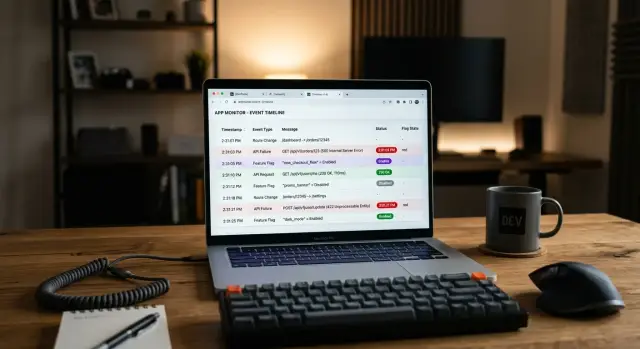
Table of Contents
Why user reports go nowhere
A user report often starts too late. Someone says "the page broke" or "checkout froze," but the screen they saw at the end is only the last step in a longer chain. By the time support reads that message, the browser has already moved through several pages, loaded new data, and changed state more than once.
That is why screenshots and short bug reports rarely give engineers enough to reproduce user bugs. The visible problem may show up on one page, while the cause lived two screens earlier. A user might open a product page, switch shipping options, go back, sign in, then return to checkout. If your logs only capture the final crash, you miss the path that set up the failure.
Requests make this worse. One failed API call can quietly change what the user sees without throwing a dramatic error. Maybe the pricing request times out, so the page falls back to stale totals. Maybe the cart request returns partial data, so one button disappears. The user reports a "broken page," but the real issue is a request failure that changed the UI a few seconds before.
Feature flags add another layer of confusion. Two users can visit the same route and see different code paths. One gets the new checkout form. Another gets the old one. A third lands in an experiment variant with an extra step. If the report does not include flag state, engineers may test the wrong version and never hit the same bug.
Front-end logging helps when it records enough context to rebuild the session without turning every click into noise. You usually do not need full session replay to get started. You need the route history, the failed request details, and the active flags that shaped the page.
Without that context, teams guess. They retry the page, cannot reproduce the issue, and close the ticket as random. Users then report the same bug again, often with the same vague sentence, because the browser knew what happened and nobody wrote it down.
What to record on route changes
Most teams log only the page a user opened. That helps a little, but it does not explain how they got there. When a bug shows up after a few clicks, the path matters as much as the page where it broke.
For each route change, store one small event with a short, consistent set of fields:
- the current route and the route the user just left
- a timestamp and a stable session ID
- the action that caused the change, such as a button click, browser back, or an automatic redirect
- the time spent on the previous screen
That is usually enough to rebuild the user's journey without flooding the browser with noise.
The route itself should be clean. Log a normalized path like /orders/:id instead of the full URL with raw IDs, search terms, and tracking parameters. Engineers still see where the user went, but you avoid extra volume and messy personal data.
The trigger is often the part that solves the mystery. A jump from cart to checkout after the user clicks "Continue" means one thing. The same jump after a silent auth redirect or a failed permission check means something else entirely.
Time on the last screen adds context that screenshots never show. If users leave a page in under a second, the app may redirect too fast or load the wrong state. If they sit there for 90 seconds, they may be stuck reading an error, waiting for data, or trying the same button again.
Use one session ID for the whole browser session or tab. That lets engineers connect route events with failed requests later, without tying logs to a real person. In many cases, a plain random ID is enough.
A simple example shows why this works. If a user says checkout "keeps sending me back," the route log might show cart -> shipping -> payment -> shipping in eight seconds, triggered by an automatic redirect after a request error. That short trail gives engineers something they can reproduce instead of a vague complaint.
What to record when requests fail
Good front-end logging for failed requests stays small and specific. Engineers do not need a full browser dump. They need enough context to see what the app tried to do, what the server returned, and how to find the same request on the backend.
Start with a request name that stays the same over time. "CreateOrder" or "LoadProfile" is easier to search than a raw URL. Add the HTTP method and status code next to it. "POST 422" tells a very different story than "GET 401" or "POST 500," and it cuts down guesswork fast.
Keep an endpoint group, not the full URL. A pattern like "/api/orders/:id/pay" gives engineers the shape of the call without exposing IDs, emails, tokens, or query strings. Full URLs often leak more than people expect, especially when a browser request carries session data in parameters.
The error message should stay short and plain. "timeout," "network error," "validation failed," or the server's brief error text is enough. If the backend returns a request ID or trace ID, capture it exactly. That one field often saves 20 minutes because someone can jump straight to the matching line in Sentry or server logs.
Skip full payloads unless you have a clear reason. Most teams get more from a summary:
- a few booleans, like signed_in or coupon_applied
- small counts, like item_count or field_count
- safe labels, like payment_method "card" or plan "pro"
- response size or timeout bucket when useful
That summary helps people reproduce user bugs without storing sensitive data or blowing up event volume.
A checkout failure shows the pattern well. One event might record request_name "CreateOrder," method "POST," status 422, endpoint_group "/orders," error "coupon expired," request_id "req_91A...," item_count 3, coupon_applied true. That is enough to replay the path, compare it with backend logs, and fix the issue without turning the browser into a data hose.
How to capture feature flag context
Feature flags often explain why a bug shows up for one user and not for anyone else. If the page depends on a pricing experiment, a new checkout flow, or a hidden rollout, you need that flag state in the log at the moment the user saw the problem.
Start small. Do not dump every flag the app knows about. Log only the flags that change what the current screen does or shows. A profile page may need none. A checkout page may depend on three or four.
For each relevant flag, save the exact value the browser used. That means the variant, not just the flag name. "new_checkout=true" is better than "new_checkout present." If a flag has multiple variants, record the actual one, such as "control," "variant_a," or "variant_b."
A compact event usually needs four fields:
- flag name
- value or variant
- timestamp
- source, if the source can change behavior
The source matters more than many teams think. A flag may come from a remote config service, a cached value, a query parameter for QA, or a local override set by support. Two users can open the same page and get different results because one browser used stale cache and the other fetched fresh config.
Mid-session changes deserve their own event. If the app updates flags after login, after account data loads, or after the user switches workspace, log that change when it happens. Otherwise, you may read the initial page log and miss the fact that the UI changed under the user a few seconds later.
A small example makes this clear. Say a user reports that the "Apply coupon" box vanished during checkout. Your logs show the page opened with "checkout_redesign=control" and "promo_box=enabled." Three seconds later, the app refreshed account settings and flipped "promo_box=disabled" from remote config. Now the bug is reproducible.
Front-end logging works best when flag context stays attached to the events that matter. When the user loads the screen, submits a form, or hits an error, include the current flag snapshot with that event. If a login form depends on two flags, log those two flags every time. Do not send fifty others just because they exist.
Build a lean event plan
Most front-end logging gets noisy for one simple reason: teams log everything they can see, not the moments they actually debug. Start with the flows that create repeat support tickets or late-night bug hunts. For many products, that means sign in, checkout, file upload, onboarding, or account settings.
Start with the flows that fail most
Pick one or two events for each flow. That feels almost too small, but it forces discipline. If engineers cannot explain why an event exists, delete it before it ships.
A simple plan might look like this:
- For sign in, record "login_started" and "login_failed"
- For checkout, record "checkout_viewed" and "payment_failed"
- For uploads, record "upload_started" and "upload_failed"
- For settings, record "settings_saved" and "settings_save_failed"
That already gives you enough to place the user in a flow and spot where it broke. You do not need every click, focus, blur, and scroll event. Those logs fill storage fast and rarely help reproduce user bugs.
Every event should carry the same small set of shared fields. Keep them boring and consistent: session ID, user ID or anonymous ID, route, timestamp, app version, browser, device type, and environment. Add one request or trace ID when an event relates to a network call. When those fields appear on every event, engineers can compare events fast instead of guessing which payload shape they got.
Cut noise before it reaches production
Noisy events need sampling before release, not after your dashboard explodes. Open staging, click through the app for ten minutes, and inspect the event stream. If one page creates dozens of near-identical events, sample them or drop them.
A quick release check helps:
- Count events per common user session
- Sample high-volume UI events
- Check payload size on slow pages
- Remove fields that never help during triage
That last step matters more than most teams admit. If nobody uses viewport size, referrer, or a full feature flag dump when debugging, stop sending them. Each field should answer a real question an engineer asks during triage. If it never answers one, it is just browser exhaust.
A checkout bug from first report to replay
A shopper says, "Payment page keeps spinning after I apply a promo code." That report is vague, but good front-end logging can turn it into a short, readable timeline.
The session starts on the cart page. The user clicks "Checkout," and the app records one route change: /cart to /checkout/payment, plus a request ID for the new page load. Right after that, the app records a small feature flag snapshot. One flag matters here: the promo experiment is on, so the standard payment form does not render. The user gets the alternate form instead.
A second later, the browser sends a tax request. That request fails. The useful part is not a giant payload dump. It is a compact record of what the app knew at that moment:
- current route
- checkout form variant
- request name and status
- cart total and country
- whether the user could retry
Now the engineer has a real sequence, not a guess. The route changed normally. The promo flag switched the form. The tax call failed after the alternate form loaded. That points to the form variant first, not the payment provider or the cart page.
The next step is simple. The engineer enables the same promo flag in a test account, opens the payment route, and watches the tax request. The alternate form sends a different field shape, so the tax endpoint rejects it. The spinner never stops because the error handler only exists in the default form.
That is enough to recreate the bug in minutes. No one needs screen recordings, and no one has to ask the shopper for ten follow-up messages.
This kind of log works because it stays lean. It captures one route event, one flag snapshot, and one failed request with a shared session trail. It does not record every click, every keystroke, or the full contents of the checkout form. Engineers get the story they need, and the browser stays quiet the rest of the time.
Mistakes that flood the browser with noise
Teams create noise when they treat the browser like a flight recorder. If you log every click on every page, you get a giant pile of events that nobody reads. Most clicks mean nothing by themselves. Log turning points instead: a route change, a form submit, a failed request, or a feature flag value that changed what the user saw.
Another mistake is saving too much payload. Full API responses, request bodies, and raw personal data fill storage fast and create real risk. When a request fails, engineers usually need the endpoint, method, status code, latency, request ID, and a short error message. They rarely need the full response body, and they almost never need names, emails, tokens, or payment details in the log.
Field names also drift more than teams expect. One screen logs "userId", another logs "uid", and a third logs "account_id". Then search breaks down, dashboards get messy, and nobody trusts the data. Pick one event schema and keep it plain. If the same thing appears in three places, log it with the same name every time.
Release context often goes missing too. A bug report without app version or release number sends engineers on a slow hunt through old code and partial rollouts. Add version, build number, environment, and active feature flags to any event tied to a real user problem. That small bit of context often explains the issue before anyone opens DevTools.
Time can ruin the story in a quieter way. If events come from unsynced clocks, the timeline stops making sense. A failed request may look older than the route that triggered it. A flag may appear enabled after the user already saw the wrong UI. Use one clear timestamp format, record the user's timezone, and keep server receive time when possible.
A lean plan is usually enough:
- record state changes, not every gesture
- redact personal data before it leaves the browser
- use one shared schema for common fields
- attach version and release details
- keep timestamps consistent
That is what makes front-end logging useful. It gives engineers enough detail to reproduce user bugs without turning the app into a noisy diary.
Quick checks before you ship
A logging setup is ready when one person can read a single user session from start to finish and understand what happened without guessing. Open a test session, click through one real flow, and read the events in order. If the story jumps around, hides timing, or leaves out the user action that started the problem, fix that before release.
The fastest check is simple: can you search one ID and find the same problem in browser logs, API logs, and server logs? If the browser uses a session ID, request ID, or trace ID, that same value should appear on the backend too. When IDs do not line up, engineers waste time stitching together clues by hand.
A bug report also gets much easier when route, request, and feature flag data sit next to each other. If a user lands on a pricing page, triggers a request, and sees a broken button under a flag variant, those facts should appear in one timeline. Splitting them across different tools is where reproduce user bugs turns into guesswork.
Five release checks
- Follow one full session and confirm the events read like a clear story.
- Search one shared ID across client and server logs.
- Check that each failed request shows route, request details, and active flags together.
- Verify that logs never store tokens, email addresses, or full request and response bodies.
- Simulate a slow network and confirm retries, timeouts, and UI state changes still make sense.
Privacy needs a hard pass before rollout. Strip anything a person could use to identify the user unless you truly need it. In most cases, a user ID hash, a route name, an error code, and a small request summary are enough. Full payloads feel useful at first, then they fill storage and create risk.
Test the slow path on purpose. Throttle the network, force one request to fail, and switch a flag variant during the session. Good front-end logging should still show what the user clicked, what the app requested, what changed on screen, and why the failure mattered. If that sequence is clear, the setup is probably lean enough to ship.
Next steps for your team
Pick one flow that causes support pain every month. Login, checkout, password reset, or file upload is enough. Do not try to log the whole app on day one.
A small plan is easier to ship and easier to read. It also gives your team a fair test of whether front-end logging is helping or just creating noise.
Start with a narrow event set. For one painful flow, most teams only need:
- route changes with route name, previous route, timestamp, and a session or trace ID
- failed requests with method, endpoint name, status code, request ID, and a short error type
- active feature flags or experiment variants when the problem happened
- a few user actions around the failure, such as submit, retry, or back
- browser version and app version so engineers can group similar reports
Run that setup for two weeks, then review real incidents instead of arguing about fields in advance. Pull a small batch of support tickets and bug reports. For each captured field, ask a blunt question: did this help someone reproduce the issue faster?
If the answer is no, remove it. Teams often keep extra fields because they feel safer with more data. In practice, that habit fills the browser with clutter and makes useful signals harder to spot.
Keep only the fields that solved a real case. If one missing detail blocks a future investigation, add that detail with a reason. That is a better pattern than collecting everything and hoping it helps later.
If your team is still unsure what to capture, a short outside review can help. Oleg Sotnikov does this kind of debugging and system design work as a fractional CTO, and he can review one flow with your team, point out what belongs in the logs, and cut what does not.
Set one rule and stick to it: every new event must help reproduce a specific class of bug. If nobody can name that bug, do not add the event.


