Freshness windows for assistant answers on moving facts
Learn how freshness windows for assistant answers reduce false certainty, match answer age to source updates, and warn users when facts may have changed.
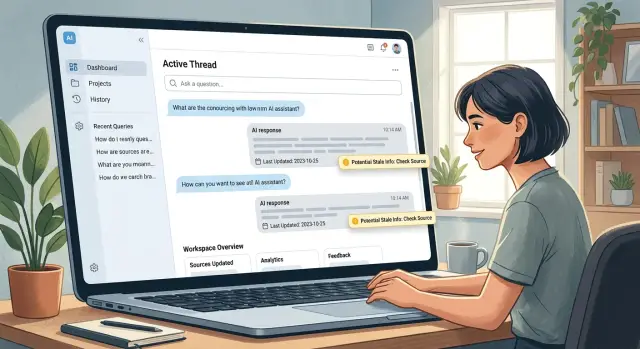
Table of Contents
Why this problem shows up
Assistants often sound certain even when their source material is old. That's the real problem. A smooth sentence and a direct answer can make yesterday's fact sound current, even when a price changed, a feature disappeared, or a policy was updated this morning.
Most users don't stop and ask, "When did this source last change?" They read the answer, assume the system checked, and move on. If the assistant doesn't show age or uncertainty, people fill in that gap themselves. They hear confidence and assume the information is fresh.
Not all facts age at the same speed. A company history page can stay correct for months. API limits, shipping rules, refund terms, product availability, and security guidance can change in days or hours. If you treat all of those topics the same, stale answers slip into normal use.
A small example shows the risk. A support bot tells customers that a plan includes a feature because the docs said so last week. The product team removed that feature yesterday. Support gets angry replies, sales has to explain the mismatch, and the customer starts doubting every answer after that.
Trust breaks fast. Users usually forgive an assistant that says, "I may be out of date." They don't forgive an answer that sounds sure and turns out wrong. One bad reply can create extra tickets, refunds, and internal cleanup. It can also push people back to manual checking, which defeats the point of having the assistant in the first place.
The issue isn't that assistants answer questions. It's that they answer moving questions with the same tone they use for stable facts. Once you notice that gap, answer age and source updates stop looking like a technical detail. They become part of the user experience.
What a freshness window means
An assistant can sound correct and still be wrong if its sources are old. A freshness window puts a time limit on how long an answer stays trustworthy after the source last changed.
That time limit should start from the source update date, not from when the chat happens. If a pricing page changed yesterday, a reply based on last month's version is already old, even if the user asked the question two seconds ago.
That's the point. A freshness window ties the answer to the life of the source, not to the timing of the conversation.
Think of it like food storage. A label doesn't say when you opened the fridge. It says when the item was made or when it expires. Answers need the same logic.
Some topics can keep a long window because the facts move slowly. A company founding date, a math formula, or a public biography might stay safe for months or years. Other topics need much tighter limits because the facts change all the time. Prices, discounts, shipping times, stock levels, policy rules, legal requirements, model features, API limits, and support status pages usually belong in that second group.
When the window is still open, the assistant can answer directly. When the window closes, the tone should change. It should stop sounding certain and start signaling doubt in plain language.
Instead of saying "The fee is $29," it should say "The last source update I have shows $29, but this may have changed." That small shift matters. It tells the user the system knows the fact may have moved.
A good freshness rule doesn't make the assistant timid. It makes it honest. If your source updates every few hours, the answer should age every few hours too. If your source changes once a year, a wider window is fine.
Answers should stay confident only while the source still earns that confidence.
Which topics need tighter windows
Some topics go stale in hours. Others stay useful for months. A good policy starts by grouping content by how often the source changes, not by how important it sounds.
Prices, stock levels, breaking news, exchange rates, travel times, and legal rules need short freshness windows. If the source can change several times a day, the assistant shouldn't answer with a calm, fixed tone. A price from this morning may already be wrong by the afternoon.
Product docs, setup steps, and team processes often last longer. They still change, but usually on release cycles, policy reviews, or planned updates. If a support article changed two weeks ago and nothing else moved, that answer may still be fine. The same is often true for internal workflows, onboarding notes, or API basics that only change when the product changes.
Mixed topics need more care than single-topic answers. A support bot might explain a refund rule and also mention the current sale price. The refund rule may stay current for a month. The sale price may expire tonight. Those claims need separate rules inside the same answer.
That's why freshness rules work best at the claim level, not only at the full-answer level. Stable parts can stay direct. Fast-moving parts need checks, timestamps, or softer wording.
When no recent source exists, the assistant should say so plainly. It shouldn't guess, and it shouldn't hide behind vague language. A simple line works: "I can explain the general policy, but I do not have a recent source for today's price." That's much better than a neat answer that sounds certain and turns out wrong.
If you sort topics this way early, you avoid a common mistake: one global freshness rule for everything. That rule is almost always too loose for fast-moving facts and too strict for stable documentation.
How to set a freshness window
Start with the questions your assistant gets every day, not with a broad policy document. A support bot that answers refund rules, pricing, shipping times, and product availability shouldn't treat those topics the same. Some facts stay steady for months. Others can change by lunch.
Make a simple topic list first. Keep it practical. If users ask about pricing, subscription limits, legal terms, stock status, office hours, release notes, or API behavior, each of those needs its own rule.
Then give every topic a clear source owner. One person or team should control the source and know when it changes. If nobody owns the source, your assistant will sound confident about old information and nobody will know who should fix it.
In most teams, pricing and promotions belong to product or sales. Policies and compliance text usually belong to legal or operations. Product behavior and release notes tend to sit with engineering or product. Inventory, delivery, and schedules are usually owned by operations, while company facts and contact details often sit with marketing or admin.
After that, set the time limit by change speed, not by importance. Fast-moving topics need tight windows. Slow topics can stay open longer. Stock levels might expire in hours. Pricing may last a few days. Tax guidance, policy text, or product specs may stay safe for weeks if the source rarely changes.
Three states usually work well: fresh, aging, and stale. Write exact behavior for each one. When content is fresh, the assistant can answer directly. When it is aging, the assistant should use softer wording and mention that details may have changed. When it is stale, it should stop stating facts as current and send the user to a verified source or a human.
You don't need fancy math. A plain rule table is enough:
| Topic | Fresh | Aging | Stale |
|---|---|---|---|
| Pricing | 3 days | 4-7 days | 8+ days |
| Shipping times | 12 hours | 13-24 hours | 24+ hours |
| Product docs | 30 days | 31-60 days | 60+ days |
Test the rules with both old and newly updated sources. Feed the assistant yesterday's pricing page, then last month's page, then a page changed ten minutes ago. Read the answers out loud. If stale content still sounds certain, tighten the window or change the wording rules. That quick test catches most failures before users do.
How the assistant should speak when answers age
A good answer should tell the user how old the fact is before the user decides to trust it. If the topic changes often, the assistant shouldn't sound as sure on day 20 as it did on day 2.
The simplest fix is to put the source date inside the reply when the date affects the decision. A shipping cutoff, pricing rule, product policy, or API limit can change quietly. In those cases, a short line such as "As of last update on March 3, the fee is $25" does more than a confident sentence with no date.
Tone should shift as the answer gets older. Fresh information can sound direct. Information near the edge of its allowed age should sound careful.
Match the wording to the age
If the source is well inside the window, the assistant can answer plainly and still name the date. If the source is close to the limit, it should add a small warning. If the source is past the limit, it should stop pretending the fact is current.
- Fresh: "As of last update on March 3, returns are accepted within 30 days."
- Near limit: "As of last update on March 3, returns are accepted within 30 days, but this policy may have changed recently."
- Too old: "I found a March 3 policy saying 30 days, but I cannot confirm that it is still current."
That middle case matters more than many teams expect. A lot of stale answers happen when the system still gives a clean, polished reply even though the source is almost too old to trust.
When the user might act on the answer, the assistant should ask for confirmation instead of guessing. A simple prompt works: "Please confirm the current rate before payment" or "Check the latest policy before you book." That extra line can prevent a support mistake, a bad purchase, or a missed deadline.
A small example makes this clear. If a customer asks about same-day delivery and the source was updated this morning, the assistant can answer directly. If that source is six days old in a seven-day window, the assistant should answer with the date and a caution. The user still gets help, but not false certainty.
A simple support bot example
A support bot answers refund questions from a company help center. Customers ask things like "Can I get a refund after 14 days?" or "Do annual plans have a different refund period?" The bot doesn't guess. It checks the refund policy page and looks at the last update date before it replies.
Now add a real change. The billing team updated that policy page three days ago after changing how plan upgrades work. Because the source changed very recently, the bot can answer in a normal, plain tone. It can say the refund window for annual plans is 30 days, mention the new upgrade rule, and treat that information as current.
A reply might look like this:
Yes. For annual plans, you can request a refund within 30 days of the charge. The refund policy was updated 3 days ago after a billing change, so this answer matches the current help center page.
That works because the answer age and source updates line up. The source is fresh, so the bot doesn't need a warning.
The tone changes when the page sits untouched for months. Maybe nobody edited the refund policy for six months, even though billing rules changed twice in practice. The bot should still answer from the page, but it should add a small note that the information may need a quick check.
That second reply could sound like this:
The help center says annual plans are refundable within 30 days. This page has not changed in several months, so you may want to confirm with support if your case involves a recent billing update.
That note does two jobs. It protects the user from old information, and it protects the company from a bot that sounds too certain when the source might have drifted. A small warning often feels better than a confident wrong answer.
Mistakes that cause stale answers
Most stale answers don't come from bad models. They come from simple policy mistakes in how the system treats time.
The first mistake is using a single time limit for every topic. That sounds tidy, but it breaks fast. A tax rule, shipping fee, product price, or service outage can change in hours, while a math definition can stay correct for years. If both get the same freshness window, one side becomes too strict and the other too loose.
Another common mistake is trusting crawl time instead of the source's own update date. Crawl time only tells you when your system saw the page. It doesn't tell you when the publisher changed the facts. If a bot crawled a pricing page this morning, but the page itself was last updated three months ago, the answer is still old.
Teams also hide age signals from users because they want replies to feel smooth. That usually backfires. If the assistant knows a source is 19 days old on a fast-moving topic, users should see that age in plain language. A short note like "based on a source updated 19 days ago" is better than fake certainty.
Mixing fresh and old documents in one reply causes quiet errors. The answer may look current because one source is new, but an older document can slip in a rule, number, or exception that no longer applies. This gets messy in policy answers. A refund rule from last week and a help center article from six months ago shouldn't blend into one neat paragraph.
Tone matters too. Once the freshness window closes, the assistant should stop sounding sure. It should say that the information may have changed, name the date it relied on, and ask the user to confirm if the decision has a cost or deadline.
These rules only work when the model, the retrieval layer, and the interface agree on one thing: old facts need a different voice. If that voice never changes, stale answers will keep sounding correct right up to the moment they fail.
A short check before launch
Before you turn the assistant loose, inspect the data like an editor, not a builder. Most stale answers start with one quiet mistake: the system knows a source exists, but it doesn't know when that source last changed.
Every source needs a clear update date that the assistant can read and use. If a pricing page, policy doc, or product note has no reliable timestamp, treat it as risky. The assistant should answer with less certainty, or skip that source entirely.
Give each topic its own time limit. A support article about account setup might stay useful for months, while shipping times, prices, outage status, or policy details can go stale in days or hours. Freshness rules only work when they match the speed of change for each topic.
Tone matters just as much as the rule table. When data is fresh, the assistant can answer plainly. When data is old, it should sound more careful, mention that the source may have changed, and point the user to a safer next step such as checking with support or asking for a live review.
Before launch, run a few simple tests. Ask a question that uses a source still inside its allowed window. Ask the same question after marking that source as too old. Remove the update date from one source and see if the assistant becomes cautious. Then mix fresh and stale sources in one answer and check whether the assistant separates what it trusts from what it doesn't.
These tests catch a common failure: the answer stays smooth and confident even when the facts got old. That's worse than a partial answer, because users usually trust a calm tone.
It also helps to keep a short review sheet for every topic with three fields: source, last update, and max answer age. Teams skip this because it feels small, but it saves time later when someone asks why the bot answered with old information.
If the assistant can read dates, apply topic rules, and change its tone when facts age, you're in good shape to launch.
What to do next
Don't roll this out across every topic at once. Start with two or three areas where stale answers can hurt trust or create extra work. Pricing, refund rules, service status, and compliance notes are common places to begin.
That small start gives you something better than a big policy document. It gives you real cases, real failures, and a clear sense of which answer-age rules actually fit your business.
A practical first pass is simple. Add a visible last-updated date to each source file the assistant uses. Give each source one owner who can confirm that the content is still correct. Set a time limit for answers based on that source, such as 24 hours, 7 days, or 30 days. Then record every case where the assistant answered from old content or sounded too sure.
The date matters because the model can't guess whether a source changed yesterday or six months ago. The owner matters because shared responsibility often turns into no responsibility. When one person owns a source, updates happen faster and stale content is easier to spot.
Review the failure cases every week. Keep it short. Fifteen to thirty minutes is enough for most teams at the start. Look for patterns. Did the assistant answer confidently from expired content? Did the source itself lag behind reality? Did your time limit stay open too long?
Then adjust the limits. If product stock changes every day, tighten the window. If your return policy changes twice a year, a wider window may be fine. The goal isn't perfect freshness everywhere. The goal is to stop avoidable mistakes where the facts move faster than the system.
If your team wants a second opinion, Oleg Sotnikov at oleg.is works on AI-first software operations and fractional CTO advisory. A review like that can help you map source owners, set practical freshness rules, and decide where the assistant should defer to a human.
Frequently Asked Questions
What is a freshness window?
A freshness window is the amount of time an answer can stay trustworthy after the source last changed. If the source falls outside that window, the assistant should stop sounding certain and show the date or ask the user to verify it.
Why should I use the source update date instead of the chat time?
Use the source update date because that tells you how old the fact really is. Chat time only shows when the user asked, not whether the price, policy, or feature changed yesterday.
Which topics need short freshness windows?
Start with topics that change fast and affect user decisions. Prices, stock, shipping times, outage status, promotions, legal rules, and API limits usually need short windows because those facts can move in hours or days.
How should the assistant talk when information gets old?
Match the wording to the age of the source. Fresh answers can stay direct, older answers should mention the last update date, and stale answers should say the fact may have changed instead of stating it as current.
Should every topic use the same time limit?
No. One global window almost always fails because topics age at different speeds. A company history page can stay right for months, while a sale price can go wrong by the afternoon.
What if one answer mixes stable facts and fast-changing facts?
Split the answer by claim instead of giving one blanket reply. Let the stable part stay direct, and add caution or verification for the fast-moving part so one fresh source does not make the whole answer sound current.
Who should own the source for each topic?
Give each source one clear owner. That person or team should know when the content changes and should confirm that the assistant still uses the right version. Without ownership, old information lingers and nobody fixes it fast.
What should I do if a source has no last-updated date?
If a source has no reliable update date, treat it as risky. Either answer with clear caution or skip that source for time-sensitive questions. The model cannot judge freshness if nobody records when the content changed.
How do I test freshness rules before launch?
Run simple tests with fresh, aging, and stale sources for the same question. Then remove a date from one source and mix new and old documents in one answer. If the reply still sounds smooth and certain, tighten the rule or change the wording.
When should the assistant defer to a human?
Send the user to a verified source or a human when the answer is stale and the decision has a cost, deadline, or policy risk. If your team wants help setting the rules, a professional review from Oleg Sotnikov can map source owners, answer-age limits, and handoff points.


