Fine-tuning vs prompt design: when tool use fits
Use this practical decision tree for fine-tuning vs prompt design, with clear signs that point to tool use, testing order, and costly traps.
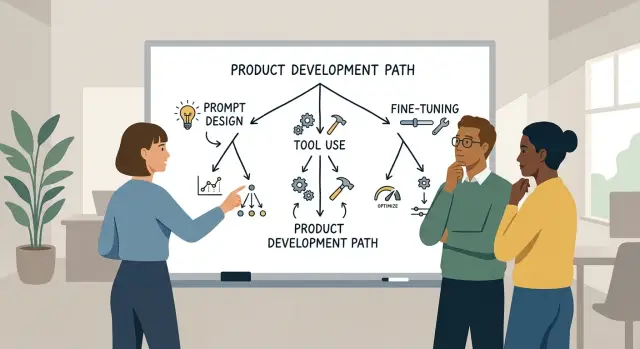
Table of Contents
Why teams pick the wrong path
Many teams blame the model when the task itself is still fuzzy. They see weak answers, slow output, or odd formatting and jump straight to custom training because it feels like the serious fix.
That jump is common, and often wrong. The model may not need more training at all. It may need clearer instructions, access to the right data, or a way to call a tool instead of guessing.
Most choices fall into three options. You can improve the prompt with clearer instructions and examples. You can add tools so the model can search documents, query a database, or trigger a workflow. Or you can fine-tune the model so it follows a narrow pattern more reliably.
Teams often skip past the first two because fine-tuning sounds more advanced. It also looks decisive in meetings. The cost of picking the wrong route is real. A team can spend weeks cleaning data, running experiments, and wiring a training pipeline, then learn that a tighter prompt or a document lookup fixed most of the problem in two days.
The reverse mistake happens too. Some teams keep rewriting prompts for a task that clearly needs tool access, such as checking account status or pulling the latest policy text. In that case, the model is not missing style. It is missing facts.
So do not start with a debate about prompt design versus fine-tuning. Start with a simpler goal: get better output with less wasted time. If the model already knows the task, prompts may be enough. If it needs live facts, give it tools. If it must follow the same pattern every time, fine-tuning may be worth the effort.
Start with the task, not the model
Most teams make the wrong call before they touch prompts or training. They start with model names, then try to squeeze the work into whatever the model can do. It works better the other way around.
Write the job in one plain sentence, like "sort support tickets into billing, bug, or access issues" or "draft a reply using only the facts in the customer record."
Then define what a good answer is. "Sounds smart" is useless. A good answer has the right format, uses the right facts, matches the tone you want, and is fast enough for real work. If two people on your team cannot agree on what correct output looks like, the model will drift.
A short scorecard helps:
- What input will the model receive?
- What output must it produce?
- What makes the answer right or wrong?
- How often will people run this task?
After that, look at where the current answers fail. Some failures are style problems. The answer is too long, too stiff, too casual, or inconsistent. Those problems often improve with stronger prompts, tighter examples, and clearer rules.
Other failures come from missing data. The model cannot mention a refund policy it never saw. It cannot check live order status without a tool. It cannot cite your internal playbook if that content is not available at runtime.
If you mix up style problems and data problems, you can waste months. A team might fine-tune a model to sound nicer when the real issue is that it needs access to the ticket system. Start with the job, the success bar, and the failure pattern. The right path becomes easier to see.
A simple decision tree
Most teams should test options in the same order: instructions first, tools second, training last. That order saves time because weak output usually comes from vague prompts, missing context, or a broken workflow, not from the model itself.
Watch a few real tasks, keep the setup steady, and ask one question at a time.
- If you rewrite the instructions, does the output improve quickly? Make the goal, format, tone, and edge cases explicit. If quality jumps after two or three prompt revisions, stop there.
- If the model still guesses, does it lack facts or the ability to act? Give it outside data, search, retrieval, or tools. A support assistant that needs order status should check the order system, not invent an answer.
- If the task repeats the same pattern at high volume, ask whether training will pay for itself. Fine-tuning makes sense when you need very consistent formatting or specialized wording that prompts alone cannot hold.
- Stop when one path clearly fits. Do not pile on prompt tricks, retrieval, agents, and fine-tuning at the same time. You will not know what fixed the result.
A small example makes this obvious. If a model writes good refund replies after a prompt rewrite, you do not need tools or training. If it must pull account data before replying, tools fit better. If your team handles thousands of similar claims and wants nearly identical output every time, fine-tuning may be worth it.
This is closer to diagnosis than open-ended experimentation. Pick the first option that solves the task well enough, measure it, and move on.
When prompt design is enough
Prompt design usually solves the problem when the model already knows the subject but answers in the wrong shape. Maybe it writes friendly copy when you need a short status update. Maybe it gives a long explanation when you need a JSON block. In those cases, changing the model is often too much.
Start with the request, not the weights. A clearer instruction, a fixed output format, and one or two good examples can change the result fast.
A good prompt usually does four jobs:
- sets the role and task
- defines the exact output format
- shows a small example of a good answer
- states what to avoid
Examples matter more than many teams expect. If you want short ticket summaries, show three real summaries. If you want calm support replies, include one reply that gets the tone right. The model will usually follow the pattern if the pattern is clear.
Make changes one at a time. If you rewrite the system prompt, add examples, change temperature, and swap models on the same day, you learn nothing. Tighten one part, test it, then move to the next. It feels slower at first. It usually saves weeks.
Use the same test set every time. Pick 20 to 50 real tasks and score them for format, tone, and correctness. If version B feels better but scores the same as version A, keep working. Feelings are noisy. A stable test set shows whether prompt work is actually helping.
Prompt design is enough when the model knows the content, misses the presentation, and improves after a few careful revisions. That is common, and it is the cheapest problem to fix.
When tool use makes more sense
If the model needs facts that change every day, do not try to bake them into prompts or training. Give it a way to fetch the latest data.
That usually means search, database lookups, API calls, calculators, or internal system actions. The model decides what to do next. The tool does the actual work.
A few cases make this choice pretty clear:
- The answer depends on live data, like inventory, pricing, ticket status, or account details.
- The task needs exact math, filtering, or search across a large set of records.
- The model must take a real action, such as creating a ticket, updating a CRM field, or sending a refund request.
- The model needs to check several systems before it can answer safely.
Prompt design alone will not fix those jobs. A prompt can tell the model how to behave, but it cannot give it fresh order data or make it run a tax calculation.
This matters even more when accuracy has to be boringly reliable. If a support bot must quote the current policy, it should call the policy source. If an ops assistant must report server health, it should read monitoring data instead of guessing from old examples.
A simple pattern works well: keep the model narrow. Let it classify the request, choose the right tool, ask for missing details, and explain the result in plain language.
This is also why tool-based systems hold up better in operations work. Deployment status, logs, test results, and repo data change too fast for fine-tuning to help much. A model that can call the right system stays useful longer and fails less often.
If the hard part is getting current facts or doing real work, tools beat training most of the time.
When fine-tuning earns the effort
Fine-tuning starts to make sense after you have already pushed prompts hard and the model still misses the same pattern. If the errors look random, fine-tuning will not save you. If the errors are consistent, like using the wrong tone, picking the wrong label, or skipping the same field every time, then you may have a real training problem.
Fine-tuning usually wins on narrow, repeatable work. Think of tasks like classifying support tickets, writing replies in one exact brand voice, or extracting the same fields from the same document type. The job should stay mostly the same for months, not change every week because the team keeps changing rules.
It is usually worth it when all four of these are true:
- You have a lot of clean examples, not a handful of good prompts.
- People can label new data without arguing about the right answer.
- The task has a stable target and clear pass or fail results.
- You expect to run this task often enough that better output pays back the setup time.
The hidden cost is not the training run. It is the labeling, review, and retraining work that comes after. Teams often underestimate this part. If you need two people to clean 5,000 examples, review edge cases, and repeat that work every month, the real price climbs fast.
A simple test helps. Ask how often the task changes, how many labeled examples you already have, and how much the current misses hurt the business. If the answers are "rarely," "a lot," and "every day," fine-tuning deserves a serious look. If not, better prompts or tools may get you most of the gain with far less upkeep.
How to test the options step by step
Most teams learn more from one small trial than from weeks of debate. The question gets clearer when you test one narrow task under the same conditions every time.
Choose a job people already do often, such as tagging support tickets or turning meeting notes into action items. Pick one metric that matters, like correct first-pass answers, average response time, or review time saved per item. If you track five things at once, people argue about results and nothing gets decided.
Build a small test set from real work. Fifty to one hundred examples is usually enough to spot patterns. Keep the messy cases in the set, not just the easy ones, because easy samples make weak ideas look better than they are.
- Start with a plain prompt and record cost, speed, and error rate.
- Improve the prompt with better instructions, examples, and output format.
- If the model still lacks facts, give it tools or retrieval before you touch training.
- Run the same test set again after each change.
- Stop when the gains get small or the setup gets too expensive to maintain.
Tool access often fixes problems that teams wrongly treat as a training issue. If the model needs fresh order data, policy files, or a calculator, connect those things first. Training a model to guess changing facts is usually a bad bet.
Only budget for fine-tuning after prompt changes and tools both level off. At that point, you need proof that training improves a stable pattern, not hope that it will rescue a vague task.
A realistic example: support team triage
Picture a small ecommerce team with one shared inbox and 300 messages a day. Most emails ask about late shipments, returns, damaged items, or account access. The team wants faster replies, but they do not want to spend months building the wrong thing.
They start with one model that does two jobs: sort each message into a queue and draft a reply for an agent to review. This is where prompt design usually gives the first win. A clear prompt can force a simple structure: summarize the issue in one sentence, pick a category, set urgency, and write a calm reply in the company's tone.
A prompt can also stop a lot of bad habits. It can tell the model not to promise refunds, not to guess delivery dates, and to ask one follow-up question when the email is missing order details. For many teams, this fixes the tone and format problem without any fine-tuning.
The weak spot shows up fast: the model still does not know the facts. If a customer asks, "Where is order 18427?" the model needs a tool to check the order system. If someone asks, "Can I return opened skincare items?" it needs the latest policy text, not a guess.
In practice, the setup often looks like this:
- prompts shape the reply and keep it consistent
- tools pull order status, refund rules, shipping dates, and account data
- agents approve the draft or send it back with edits
Fine-tuning starts to make sense later. Say the team sees the same awkward edge cases every week: split shipments, partial refunds, replacement parts, and warranty claims with messy order history. If those cases follow repeatable patterns, a tuned model can classify them better and draft replies that need fewer edits.
That is the usual path. Prompts fix style. Tools fetch truth. Fine-tuning helps when the same hard cases keep showing up and the team already has good examples.
Mistakes that waste months
Teams often start training because it feels like real progress. That is backwards. First decide what "better" means in numbers: fewer wrong answers, shorter handling time, better routing accuracy, or lower cost per task. If you cannot name the score you want to move, the whole project turns into guesswork.
Another common mistake is testing on examples that already make the model look good. Ten clean tickets from last week do not tell you much. Use a messy set of real cases instead: vague requests, edge cases, bad input, and cases with missing data. Keep a separate test set and leave it alone while you experiment.
Teams also burn time by changing the prompt, the tools, and the model at the same time. Then nobody knows what helped. Change one thing, measure it, write down the result, and move to the next step. It feels slow for a few days. It saves weeks later.
Tool-based workflows add failure cases that demos often hide. A model may call search, a database, or an internal API and look great in a meeting. In production, one slow tool can make the whole system feel broken. Check latency, timeouts, empty results, stale data, and what the model says when a tool fails.
Teams also forget who will maintain the system six months later. The first version may live in one person's head, with special prompts, hard-coded rules, and quick scripts taped together. That setup rarely lasts. If a new engineer cannot understand the flow from one short document, the system is too fragile.
A small support team can fall into all of these traps at once. They fine-tune a model, add retrieval, and change ticket labels in the same sprint. Accuracy moves, but nobody can explain why. Two months later they still do not trust the output. The fix is usually simple: roll back, test each change on the same dataset, and keep the setup plain enough that the next person can own it.
Quick checks before you commit
Most debates get simpler when you stop asking what sounds advanced and ask what keeps failing. If a clearer prompt, better examples, or a stricter output format fixes most errors, stop there. Teams often rush into training because the first prompt was vague.
A fast test helps. Rewrite the prompt, add two or three good examples, and define what a correct answer looks like. If quality jumps, you do not have a model problem yet.
Before you commit time and money, ask five plain questions:
- Are most mistakes just instruction mistakes? If the model ignores tone, format, or simple rules, prompt work usually fixes that faster.
- Does the task need fresh data every run? If it depends on current prices, policy changes, user records, or live docs, tools make more sense than training.
- Do you own enough clean examples? A few messy spreadsheets and old chat logs will not give you a reliable fine-tuned model.
- Can your team maintain this after launch? Someone needs to watch quality, update prompts, check tools, and retrain when the task shifts.
- Does the cost make sense for the business? Saving 5 seconds on a low-volume task rarely pays for months of model work.
One small example: a support team wants better ticket routing. If categories are stable and they have thousands of well-labeled tickets, fine-tuning may help. If routing depends on live account status and changing rules, the model should call tools and fetch current data.
This is where many projects drift. The build looks smart, but the gain is tiny. A plain prompt, one retrieval step, and a simple review loop often beat a custom model that nobody wants to maintain six months later.
What to do next
Pick one task that hurts enough to matter and is small enough to test in a week. A support reply draft, document summary, or ticket routing rule is a better starting point than a full platform rewrite. Teams get stuck when they try to solve ten problems at once.
Before you run a single test, write down the stop rule. Decide what result is good enough, how much time you will spend, and what failure looks like. If a prompt-only setup still misses the mark after a set number of iterations, move on. If tool access adds too much delay or complexity, cut it. If fine-tuning needs data you do not have, pause it instead of forcing it.
Keep the scorecard simple so people actually use it. Track the same numbers for every option:
- task success rate
- average edit time by a human
- cost per 100 or 1,000 runs
- response time
- setup and maintenance time
That scorecard will tell you more than strong opinions in a meeting. It also makes trade-offs visible. A method that looks smart in a demo can still lose if people spend too long fixing outputs.
If your team wants an outside review before spending more weeks on the wrong approach, Oleg Sotnikov at oleg.is does this kind of Fractional CTO and startup advisory work. He helps teams sort out whether a problem needs better prompts, tool-connected workflows, or fine-tuning, and he can also review the infrastructure around the system.
Small tests beat big plans. Pick one task, set the stop rule, keep score, and let the results decide.


