File upload architecture for browser and mobile apps
File upload architecture for browser and mobile apps: chunking, retries, and metadata checks that keep one upload flow consistent across clients.
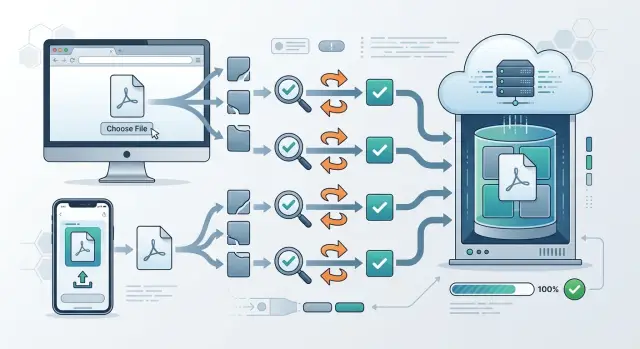
Table of Contents
Why upload logic splits apart
Teams rarely disagree at the start. The web team tests uploads in a stable browser tab, the iPhone team works around background limits, and the Android team plans for app restarts and storage quirks. Each group solves the problem in front of them, and one shared flow slowly turns into three.
Big files speed up that split. A 2 MB avatar usually works everywhere. A 900 MB video on weak hotel Wi-Fi does not. Browsers refresh, phones lose signal, apps restart, and servers time out. Once that starts, each client adds its own chunk size, retry timing, and progress rules.
The trouble usually comes from small mismatches, not dramatic crashes. One client sends an upload ID as a UUID, another uses a local temp ID, and a third creates a new ID after a restart. Then the server cannot tell whether it should resume the upload, reject the chunk, or store a duplicate file.
The same pattern shows up in a few places:
- status codes for "chunk already received"
- checksum rules for each chunk or the full file
- metadata fields like filename, size, and content type
- the exact meaning of "complete"
Users do not care which client caused the problem. They only see an upload stuck at 97 percent, a photo that appears twice, or a file with the wrong name. Teams then patch each client again, and the behavior drifts even further apart.
A better start is plain and strict. Define one contract before browser and mobile teams add client logic. Decide who creates the upload ID, what metadata every client must send, how chunks are numbered, which responses trigger a retry, and when the server marks the upload as done. That is the base of solid file upload architecture. Client code can still differ, but the rules should not.
What every client should send
If browser and mobile uploads drift apart, the problem often starts before the first chunk leaves the device. Each client sends the same file, but wraps it in different names, IDs, and timestamps. The server then has to guess what belongs together, and that guesswork turns into bugs.
Start with one upload ID. The client creates it before the upload begins, and keeps it if the page reloads or the app closes. When the user comes back, the same upload ID lets the client ask, "Which chunks do you already have?" Without that single ID, resumes turn messy fast.
Keep the basic fields separate. Do not pack them into one free-form blob or overload one field with two meanings. A clean request usually includes:
- upload_id
- file_name
- file_size
- mime_type
- user_title
That split matters. "file_name" is what came from the device. "user_title" is what the person typed in the UI. They are not the same thing, and mixing them causes odd behavior when one client edits titles and another does not.
Chunking also needs one rule that every client can follow. Pick a fixed chunk size, such as 5 MB, and make every client use it except for the last chunk. Do not let the web app use 4 MB while iOS uses 6 MB and Android switches sizes on slow networks. Predictable chunk boundaries make resume checks much simpler.
Use one format for supporting data too. If you send checksums, choose one algorithm and one encoding. If you send timestamps, use one UTC format. If auth data travels with each request, keep the same header names and token shape everywhere.
This part of file upload architecture feels boring, but it saves a lot of cleanup later. When every client sends the same contract, the server can stay strict, and strict systems break less often.
How chunking stays predictable
Chunking should be boring. If the browser cuts a file one way, iOS another way, and Android a third way, the server ends up carrying all the complexity. A clean file upload architecture uses one chunk rule for every client, even when network quality changes.
Split large files into fixed-size chunks. Do not switch chunk size halfway through an upload, and do not let each client pick its own default. A 4 MB or 5 MB chunk is a common starting point because it is small enough for mobile data and still efficient on desktop networks. Tiny chunks create too many requests. Huge chunks fail more often on weak connections.
Number chunks the same way everywhere. Pick zero-based or one-based indexing and never mix them. If chunk 0 is the first piece in the browser, it must also be the first piece on mobile. Each request should carry the upload ID, the chunk number, and the total chunk count so the server can check progress without guessing.
When a connection drops, the client should ask the server which chunks already arrived. The server answers with the received chunk numbers, and the client resumes from there. That removes duplicate work and stops each app from inventing its own retry logic.
The last uploaded chunk should not silently end the process. After every chunk arrives, the client sends one explicit "complete upload" call. Only then should the server join the parts and mark the file ready. A photo upload from a browser tab and a video upload from a mobile app may feel different to users, but the chunking rules underneath should stay exactly the same.
How retries should behave
A good retry system fixes small network failures without making users start over. If chunk 37 fails, the app should send chunk 37 again. It should not restart the whole file unless the server says the upload session is gone.
This matters even more on phones. A user can switch apps, lose signal in an elevator, or lock the screen for a minute. In a clean file upload architecture, those normal interruptions do not create a new upload or a second copy of the same chunk.
Each retry should reuse the same upload ID and the same chunk number. That gives the server a stable reference point. If the first attempt partly reached the server, the second attempt can match it instead of creating a mess.
Wait longer after each failed attempt. A simple pattern works well: wait 2 seconds, then 5, then 15, then stop. That pause protects your server during outages and keeps browser and mobile uploads from hammering the same endpoint at once.
Some errors should stop the retry loop right away. If the token expired, the file type is blocked, or the metadata does not match the upload session, more retries will not help. Show a plain message such as "Session expired. Please sign in again" or "This file no longer matches the upload details." Users can act on that.
Local progress storage also pays off. Save the upload ID, finished chunk numbers, file size, and a file fingerprint on the device. When the app returns from the background, it can ask the server which chunks are already complete and continue from there.
A simple test case is a 120 MB video on weak mobile data. If the app can pause, reconnect, resend only the missing chunks, and finish with the same upload ID, your retry logic is doing its job.
How the server stays in sync
Good file upload architecture depends on one simple rule: the server decides what exists, what is missing, and what can finish. If each client keeps its own upload state, browser and mobile behavior will drift within weeks.
Start by creating an upload session before the first chunk arrives. The client asks for a session, the server returns a session ID, chunk size rules, and an expiry time. After that, every chunk belongs to that session instead of floating around on its own.
Store the whole session record in one place. That record should include the file name, total size, content type, expected chunk count, received chunk indexes, byte ranges, checksum data if you use it, and the session expiry. When a phone drops off the network and reconnects later, the server can answer with facts instead of guesses.
One status check keeps every client on the same path. A browser tab, an iPhone app, and an Android app should all be able to ask the same question: "What do you already have?" The answer can stay small:
- session state
- received chunks or missing chunks
- next allowed action
- expiry time
That single check prevents waste. Clients do not need to reupload the whole file just because the app restarted.
The final assemble step needs a lock. Two finish calls can arrive at nearly the same time, especially after retries. If the server assembles twice, you get duplicate records, double processing, or corrupted state. Lock the session, verify that all chunks exist, assemble once, mark it complete, and make later finish calls return the same completed result.
Clean up abandoned sessions on a schedule. Delete partial chunks and expired session records after a safe window. If you skip this, old uploads pile up, storage costs creep upward, and status checks start dealing with stale data that no user still cares about.
Validate metadata early
If metadata is wrong, an upload can look fine for several minutes and then fail at the end. That wastes battery on phones, burns bandwidth, and leaves the server with partial chunks it should never have accepted. Good file upload architecture stops bad uploads before chunk 1 starts.
The client should send a small metadata request first. Include file size, filename, MIME type, a checksum for the whole file if you require one, and any business fields the server needs to route the upload.
What to check before chunk 1
The server should do a few fast checks up front:
- Reject files that exceed the size limit for that document type or account.
- Normalize the filename, strip unsafe characters, and save a safe display name if needed.
- Compare the declared MIME type with the actual file signature, not just the extension.
- Require checksums in the format you expect, and reject missing or malformed values.
- Keep fields like customer ID or document type in metadata, not inside the binary stream.
This separation prevents a lot of messy edge cases. A file called invoice.pdf may actually be a ZIP file. A photo from a phone may have a generic MIME type even though the bytes clearly show HEIC or JPEG. If the server checks early, every client gets the same answer before any large transfer begins.
Checksums need one more gate at the end. After the last chunk arrives, the server should verify that the assembled file matches the checksum declared at the start. If it does not match, reject the upload and discard the assembled file. Do not let one client skip that check while another client enforces it.
A simple example shows why this matters. Say a customer uploads an ID photo from mobile, but the app sends the wrong customer ID and a filename with unsafe characters. If the server catches both during metadata validation, the app can fix the form and retry once. If the server waits until final assembly, the user spends two minutes uploading a file that was invalid from the start.
Early validation feels strict, but it keeps browser and mobile uploads on the same path. That is usually the difference between one upload system and three half-compatible ones.
Build the flow step by step
Start with the smallest version that can work end to end. In a good file upload architecture, that means one API contract and four actions that every client follows in the same order.
- create an upload
- send a chunk
- check upload status
- finish the upload
Define those actions before you write browser or mobile code. Keep the server states small too: created, uploading, complete, and failed usually cover most cases. If you add too many special states early, each client starts making its own guesses, and that is how browser and mobile uploads drift apart.
Both clients should use the same state machine. A browser app and an iPhone app may look different on screen, but the upload rules should match: create once, send chunks in order, ask the server what it has, then finish only when every chunk is there. Write these rules down and treat them as shared product behavior, not app-specific logic.
Build the happy path first. Get one file from start to finish with no interruptions. After that works, add resume support. Resume logic is where teams often overbuild too soon. Keep it simple: when the app reconnects, it asks the server which chunks arrived, then continues from the next missing chunk.
Logging helps more than people expect. Log every state change with the upload ID on both the client and the server. When someone says, "uploads fail on Android" or "Safari gets stuck at 95%," you can trace the exact step instead of guessing.
A practical order works well:
- lock the API shape
- build the server flow
- build one client against it
- copy the same state rules to the second client
- add retries and resume last
That order saves rework. It also keeps one upload system from slowly turning into three separate ones.
A simple example with one photo
A user picks one photo on a phone while standing in a place with weak signal. The app does not try to send the whole file at once. It starts one upload session, splits the photo into fixed-size chunks, and sends the first few chunks with the same upload ID on each request.
After chunk 3, the connection drops. The app does not guess what the server has. It saves local progress instead: the upload ID, the chunk size, the photo size, and the chunk numbers the server already confirmed.
That small detail keeps the flow calm. The phone can stop, sleep, or lose signal, and the upload session still makes sense later.
Now imagine the user opens the web app when they get home. The same photo is available there, so the browser does not start a brand-new upload. It sends the upload ID and asks the server which chunks arrived.
The server replies with a short status, such as: chunks 1, 2, and 3 received, chunks 4 through 10 missing. The browser then sends only the missing chunks. It uses the same chunk size and the same upload ID, so the server can place every piece in the right spot.
Retries stay simple in this example. If chunk 6 fails twice, the browser retries chunk 6. It does not resend the full file, and it does not open a second session for the same photo. That rule matters more than people think, because duplicate sessions create strange bugs fast.
Metadata checks tie the phone upload and the browser upload to the same file. Both clients send the same basic facts before resuming:
- file size
- content type
- original file name
- last modified time
- a file hash or fingerprint
If those facts match, the server lets the browser continue the session. If one field changes, the server stops the resume attempt and asks for a new upload. That protects you from mixing two similar photos with the same name.
The result feels simple to the user. They started on a shaky mobile connection, continued in the browser later, and finished one upload instead of three different flows pretending to be one. That is usually what people expect, and it is what good chunked uploads should do.
Mistakes that cause split behavior
Upload flows split when each client team solves the same problem in a different way. A browser app calls a failed part "temporary_error", iOS calls it "try_again", and Android returns a plain 409. Now the server has to guess what each one means, and your file upload architecture gets messy fast.
The same thing happens with chunk tracking. If one client uses byte offsets and another uses chunk numbers, support cases get ugly. A server may think chunk 3 starts at 10 MB, while a mobile app thinks it starts after the last confirmed byte. Resume logic breaks, duplicate data appears, and uploads stall for no clear reason.
Metadata causes another split. Many teams trust the file extension because it is easy. That works until someone renames a large video to ".jpg" or a phone sends a strange MIME type. Check the file content and basic rules early: type, size, checksum format, and upload session ID. It is much cheaper to reject bad input before the third retry.
Retries need limits. Some failures need another attempt, such as a dropped connection. Others need the user to act, such as expired auth, blocked file type, or no device storage. If the app retries forever, it drains battery on mobile, wastes bandwidth in the browser, and hides the real problem.
One more common mistake is keeping upload state only in memory. A browser tab refresh, an app crash, or a phone restart wipes the session. Then one client starts over while another tries to resume with missing data. Persist the upload ID, current chunk, and file fingerprint locally so every client can pick up from the same place.
A simple rule helps: one protocol, one state model, one error vocabulary. Different screens are fine. Different meanings are not.
Quick checks before launch
A file upload architecture usually breaks at the edges, not in the happy path. The fastest way to catch that is to test one real file across a browser, an iPhone, and an Android device with the same checklist.
Use the same file name, size, and type in every run. That makes it easy to spot when one client changes chunk size, skips metadata, or sends the finish request twice.
A short launch checklist does most of the work:
- Upload the same file from browser, iPhone, and Android, then compare chunk count, metadata, and final server state.
- Cut the network during an early chunk and check that the client resumes from the next missing chunk, not from zero.
- Send wrong MIME data, such as a JPG labeled as PDF, and confirm the server rejects it with a plain message.
- Call the finish endpoint twice and make sure the server creates one completed upload, not two.
- Read both logs and user-facing messages, then remove vague text like "upload failed".
The log review matters more than most teams expect. If a browser says "network error," Android says "server issue," and the server log says nothing useful, people will blame the wrong layer and lose hours.
Good messages are specific and short. "Chunk 3 did not match upload ID" is useful. "File type does not match content" is useful. "Something went wrong" is not.
If you want one upload system instead of three slightly different ones, look for mismatches in behavior, not just pass or fail. A shared test plan makes those mismatches obvious while they are still cheap to fix.
What to do next
Write one upload contract before any team adds another edge case. Keep it plain: required fields, chunk size rules, checksum format, retry limits, expiry times, and the final completion call. If the browser, iPhone app, and Android app all follow the same contract, you keep one system instead of three versions that slowly drift apart.
Settle the two rules that teams often postpone: retry behavior and metadata schema. Decide how many times a client retries, how long it waits, and which errors should stop the upload at once. Decide which metadata fields are required, which are optional, and which values the server rejects.
A short checklist helps:
- Write one shared upload spec and make every client team use it
- Freeze one retry policy for all clients
- Freeze one metadata schema before more file types appear
- Review storage cost, upload expiry, and cleanup jobs
- Read support tickets and look for repeated upload failures
Do the cost review before launch, not after the first billing surprise. Chunked uploads can leave partial files behind, and expired sessions can pile up faster than most teams expect. Support cases matter too. If users keep asking why an upload "stuck at 99%", your flow needs clearer status updates and sharper server responses.
If your team wants a second opinion, Oleg Sotnikov can review the design as a Fractional CTO. He helps startups and small businesses with product architecture, infrastructure, and practical software decisions, including keeping one upload system across web and mobile.
Fix the contract now, test it with one browser and one mobile app, then add more clients only after the logs stay clean for a week.


