Fewer integration points can help you close deals faster
Fewer integration points can cut support load, keep sales promises clear, and reduce custom work that slows deals and drains delivery teams.
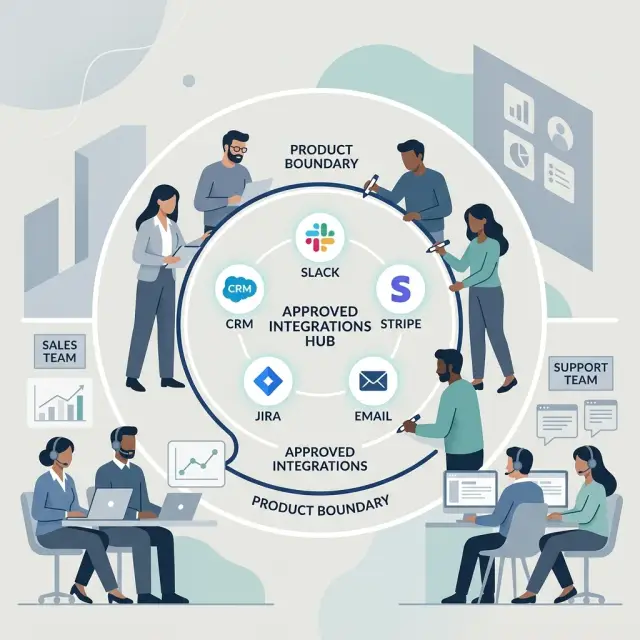
Table of Contents
Why too many integrations slow deals
Teams often think more connectors make a product easier to sell. A lot of the time, the opposite is true. A smaller set of integrations makes the offer easier to understand, cuts technical back and forth, and keeps a deal from turning into custom scoping.
Every new integration creates extra questions. Buyers ask which version you support, how fields map, who handles errors, what happens when an API changes, and whether setup needs custom logic. One connector can add several calls before anyone talks about rollout or price.
That work rarely stays inside sales. Product gets pulled into scoping. Engineers answer custom technical questions. Customer success starts planning around promises nobody wrote down. A short sales cycle turns into a chain of exceptions.
What buyers usually need
Most buyers do not begin with, "We need a brand new integration." They start with a simpler need: data has to move, someone has to see it, or a report has to show up in another system.
Ask one more question and the request usually gets smaller. A buyer asking for a CRM integration may only need a daily export. A team asking for Slack alerts may really need an email when something breaks. The first request sounds technical. The real need is usually operational.
A few questions clear that up fast:
- What job are you trying to complete?
- How often does the data need to move?
- Who uses it, and where do they use it now?
- What breaks if this stays manual for 30 days?
Those answers tell you whether the request is a blocker or an optional improvement. A blocker means the buyer cannot use your product without it. An optional request makes the workflow smoother, but the team can still operate for a while.
That distinction matters. When teams treat every request like a blocker, sales turns into custom scoping, product gets dragged into promises, and support inherits odd edge cases later.
Clear boundaries usually build more trust than a soft yes. Buyers can tell when a team is guessing. "We do not have a direct integration, but you can export this report as CSV and import it into your finance tool today" is clear and easy to verify. "We can probably build that for you" sounds helpful, but it creates doubt.
Manual work is not always bad. It becomes a problem when it is frequent, fragile, or hidden. A weekly export for five accounts may be fine. A CSV import that takes three minutes may solve the real problem without leaving you with another connector to maintain forever.
This is where a lean product mindset helps. Oleg Sotnikov often advises companies to keep systems tight, solve the business need first, and add moving parts only when there is a clear payoff.
A simple test works well. If the buyer can finish the workflow with a CSV, an email alert, or a scheduled export, they probably do not need a new integration yet. If staff would have to copy data by hand all day, or the product needs data to sync almost immediately to work, the request deserves deeper review.
Where to draw the line
A product is easier to sell when people can tell, in one minute, what it does and what it does not do. That line should come from the jobs your product handles well, not from every request a prospect mentions on a call.
Start with the use cases you solve every week. If customers buy your product to collect leads, route them, and send them into a CRM, stay close to that. Do not drift into custom reporting, billing sync, or special workflow logic because one large prospect asked for it.
Fewer integrations force that focus. Sales spends less time checking with engineering, buyers hear a cleaner promise, and the team knows what counts as standard.
Say exactly what you support. If you support HubSpot, Salesforce, and Slack, say that plainly. Do not say "we can connect to almost anything" unless you already have a repeatable way to do it without custom work. Buyers hear flexibility. Your team hears weeks of testing, edge cases, and future tickets.
Sales also needs language it can repeat without calling product on every deal:
- "We support these systems today: HubSpot, Salesforce, and Slack."
- "We add new integrations when they fit our product plan."
- "We do not build custom integrations for a single customer."
- "If you need a custom setup, we can discuss it as a separate paid project."
That script protects the roadmap and reduces confusion later. Internally, you also need a rule for what you will not build. Be specific. For example, you might decline any direct integration that needs custom field mapping, custom retry logic, or ongoing maintenance for one account only.
If a prospect wants your app to push order data into an old ERP used only by their company, the answer should stay consistent: no product commitment, no quiet promise from sales, no "maybe after signup." You may lose the deal. You also avoid months of support work and awkward renewal conversations.
The line can feel strict. In practice, it cuts future support issues at the source.
How to choose fewer integration points
Start with your live customer base, not your wishlist. Many teams keep old connectors because one big prospect asked for them two years ago. If only three accounts use an integration and your team still fixes it every month, that is a bad trade.
Pull a simple list of every active integration. For each one, note how many accounts use it, how often they use it, and how much support time it creates. That alone usually clears the fog.
A scorecard beats opinion. Rate each integration on a few practical factors: revenue tied to accounts that use it, setup effort for new customers, support time after launch, how often it breaks when the other vendor changes something, and whether customers can get the same result another way.
Patterns show up fast. A connector used by 40 accounts with little support pain should stay. A connector used by one account, with custom mapping and repeated bug fixes, deserves hard questions.
Keep the small set of integrations that solve the same problem for many customers. Cut the ones that pull your team into custom work. The product becomes easier to explain, easier to support, and easier to sell.
Do not build for rare requests right away. Offer a workaround first. A CSV import, webhook, API export, or shared inbox often solves the real problem well enough. Buyers ask for a named integration when they really want one outcome, such as "send order data into our finance system by Friday."
Suppose a prospect asks for a direct connection to a niche ERP. You can spend three weeks building and testing it, or you can offer a daily export that their ops team uploads in five minutes. If the deal still moves, you just saved weeks of custom work and months of maintenance.
You still need room for exceptions. Keep the approval path short. One product lead and one technical lead can approve custom work when the revenue is clear, the support cost is acceptable, and the request points to repeat demand. If it does neither, say no.
A simple sales example
A 12 person B2B SaaS team sells an internal operations tool to midsize companies. The product has one standard CRM integration, one billing connection, and one clean data export. That setup is not flashy, but it is easy to explain, easy to price, and easy to support.
A buyer likes the product and moves into procurement. Then the requests start. Their team asks for three extra connectors before signing: a custom sync to their old CRM, a direct link to a finance system the SaaS team does not support, and a special reporting feed for their internal warehouse.
This is where deals get messy. A rep wants the contract, says "we can probably do that," and suddenly the product team spends two weeks scoping work nobody planned. Legal wants delivery terms, the buyer wants dates, and support gets pulled in to guess how these custom integrations will behave after launch.
A disciplined team handles it differently. It keeps the standard CRM integration because it already works, has documentation, and fits the roadmap. For the finance system, it offers import and export through the billing tool it already supports. For reporting, it points the buyer to the standard data export instead of promising a new connector.
The answer is not "no" to everything. It is "yes, within these boundaries." The buyer can still connect the product to the workflow, but the scope stays clear.
The deal moves faster for a simple reason: nobody has to debate custom engineering during procurement. The buyer sees what implementation will look like, legal sees fewer vague promises, and the SaaS team keeps one support path instead of four.
A month later, the team has one new customer and no strange connector to maintain. Support does not need a special playbook. Engineering does not need to monitor another fragile sync. Sales has a cleaner story for the next prospect too.
That is the practical upside of fewer integration points. You will lose some deals that depend on heavy custom work. You will also win more of the deals that fit your product. For most small teams, that trade is worth it.
Mistakes teams make
Teams rarely create integration sprawl on purpose. It usually starts with one promising deal and one quick yes.
A rep hears, "We can buy if you connect to our system," and treats the request like a small feature. Product has not reviewed it. Engineering has not sized it. Support has not asked what happens after launch. The team wins the call and loses the next six months.
The first mistake is saying yes before anyone checks the real cost. A connector is never just build time. Someone has to test edge cases, handle API changes, explain setup, and answer tickets when data stops syncing on a Friday afternoon.
The second mistake is chasing the logo instead of checking fit. Big names make people sloppy. Teams see a brand they want on the homepage and ignore the fact that the request works only for that buyer, not for the rest of the market.
Then engineers build the custom work in isolation. They usually do it with good intent. They want to help sales close the deal. But if support does not review the plan, the team ships something nobody else can maintain without the original developer.
The pattern is familiar. Sales promises a custom connector on the call. Engineering builds the fastest version that can pass a demo. Support inherits setup issues and recurring failures. Finance never sees the full cost compared with the deal size. Then other prospects start asking for similar exceptions.
Another mistake shows up after launch: nobody tracks what that "small" promise keeps costing. The work keeps pulling time from bug fixes, documentation, and product improvements. After a few months, the connector is still fragile and still eating time.
The most expensive mistake comes last. Exceptions stack up until the roadmap bends around them. Instead of building a product with clear boundaries, the team builds around special cases.
A good CTO pushes back here because clear boundaries protect margin, keep support sane, and make future deals easier to close.
Quick checks before you promise custom work
A custom integration can feel like an easy way to save a deal. It rarely stays easy. One promise in a sales call can turn into months of edge cases, weekly support tickets, and a feature that only one customer uses.
Before anyone says yes, ask a few plain questions.
First, would another customer ask for this in the next 6 to 12 months? If the answer is no, you may be spending product time on a private feature.
Second, will support hear about it every week? Integrations break in boring ways: changed fields, expired tokens, odd mapping rules, missed syncs. If support expects steady tickets, the real cost is much higher than the build estimate.
Third, can the buyer solve the need with import, export, or API access? Many buyers ask for a direct connection when they really need a safe way to move data once a day.
Fourth, did product, sales, and support agree on the same promise? Teams get into trouble when sales says "yes," product means "maybe," and support hears about it after the contract is signed.
Last, if you say no, does the deal still make sense? Some requests sound make or break on the call, then fade once the buyer sees a decent workaround for the first month.
Picture a buyer who wants a direct sync to a niche ERP. The account is good, but not huge. No other prospect has asked for that ERP, support expects constant field mapping issues, and the buyer could upload a nightly file instead. Saying yes would pull the team into custom work long after the contract closes. Saying no, with a clear import process, protects product boundaries and often keeps the sale alive.
This is where fewer integration points help most. The product stays easier to explain, support has fewer odd cases to handle, and the sales cycle moves faster because the team stops debating custom requests.
What to do next
Pick a date this week and turn your current integration sprawl into one plain language page. List the integrations you fully support, the ones you support in a limited way, and the ones you do not build at all. A clear default no saves more time than a vague maybe that drags through three calls and ends in custom work nobody wants to own.
Then train sales to start with the standard path. When a buyer asks for a new connector, the first reply should cover the approved options, import methods, API access, or manual steps that already work. That keeps the sales process moving and stops your team from pricing special promises before anyone checks the cost.
A short internal checklist helps:
- Name the integrations you support now and who owns each one.
- Write one sentence for every common request you decline.
- Give sales fallback options it can offer without asking engineering.
- Review old custom connectors and decide which ones still earn their keep.
Support tickets will show where your boundaries are weak. Look at the last 60 to 90 days and sort requests by connector, effort, and customer impact. If one integration creates steady noise but little revenue, trim it or move it to a lighter support level. Teams often keep low use connectors out of habit, even when they add hours of work every month.
Do the same with sales notes. If reps keep asking engineering the same questions, turn the answers into short internal guidance. If a request needs a meeting, special pricing, and custom code, keep it rare.
If you want an outside review, Oleg Sotnikov at oleg.is works with startups and small businesses as a Fractional CTO and advisor. He helps teams tighten product boundaries, cut unnecessary custom work, and build lean AI first software operations without adding more process than they need.
You do not need a huge reset. Start with one page, one sales script, and one ticket review. Buyers move faster when the answer is clear, and your team is far more likely to deliver exactly what it promised.
Frequently Asked Questions
Why do more integrations often slow down a deal?
More integrations create more questions before a buyer signs. Sales pulls in product, engineering, and support to explain field mapping, errors, API changes, and setup. A simple deal starts to look like a special project.
How can I tell if a buyer really needs a new integration?
Ask what job they need done, how often data has to move, and what breaks if they keep it manual for 30 days. In many cases, they do not need a brand new connector. They just need data to land in the right place on a simple schedule.
When is a manual workaround good enough?
Use a workaround when it solves the workflow without daily pain. A CSV export, email alert, or scheduled file often works fine if the task happens once a day or once a week. Skip the new build unless people would end up copying data by hand for hours or the product needs near real time sync to work.
What should sales say when we do not support a requested connector?
Keep it plain and firm. Tell them what you support now, what workaround you offer today, and whether you handle special setups as a separate paid project. That gives the buyer a clear path instead of a vague maybe.
Should we ever build a one-off integration for one customer?
Only do it when the revenue is clear, support cost stays reasonable, and you expect the same need from other customers soon. If the request fits one account only, you will likely carry the cost long after the deal closes. Most small teams do better when they say no and offer a simpler path.
How do we decide which integrations to keep?
Start with active use, support load, and revenue tied to each connector. Keep the ones many customers use with little trouble. Cut or downgrade the ones few accounts use and your team keeps fixing.
What are the signs an integration costs us too much?
Watch for repeated setup issues, constant mapping questions, and bug fixes after the other vendor changes something. Another red flag shows up when one connector serves one customer but keeps pulling engineering time every month. That trade rarely makes sense.
How do fewer integrations reduce support load?
Support gets fewer odd cases and less hidden work. The team can write one clear setup path, answer fewer edge case tickets, and spend less time chasing broken syncs on Friday afternoons. That makes service more predictable for everyone.
What should we check before promising custom integration work?
Check five things: repeat demand, support burden, workaround options, team agreement, and deal value. If support expects weekly tickets, product sees no wider demand, and the buyer can use import or export instead, do not promise the build. Get one shared answer from sales, product, and support before you commit.
What is the first step to reduce integration sprawl?
Write one plain page that names what you fully support, what you support in a limited way, and what you will not build. Then give sales simple fallback language for common requests. That alone cuts confusion and stops random promises from spreading.