Federated model gateway rate limits that prevent lockups
Federated model gateway rate limits keep requests flowing when one vendor slows down. Learn routing, backoff, quotas, and failover rules that work.
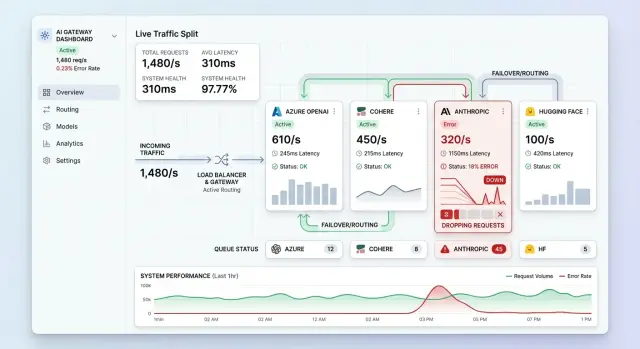
Table of Contents
What goes wrong when one vendor hits a limit
When a model vendor starts returning 429s or slows to a crawl, the problem rarely stays on that route. In a shared gateway, blocked calls sit on workers, hold connections open, and age in the same queues other requests need. Soon chat, search, and summaries all feel slower, even if only one vendor is in trouble.
Queue spread is usually the first problem. If requests keep waiting on the limited vendor, they occupy the same worker pool or timeout budget as healthy routes. Retries make it worse fast. One failed call becomes several when the client, the gateway, and a job runner all retry on their own clocks. What started as a vendor limit turns into a traffic jam your system created.
Healthy vendors can even sit idle while this happens. The router still prefers the usual provider because of stale weights, cached rules, or health checks that react too slowly. So the gateway keeps feeding the crowded lane while open lanes stay empty.
Imagine a product that sends chat, search, and summarization through one multi-provider AI gateway. Vendor A hits a per-minute cap during a busy hour. The gateway waits through long timeouts and retries after failure. Vendor B and Vendor C still have room, but shared workers are now busy with the backlog. Users who never touched Vendor A still feel the delay.
People notice this before most alerts do. They see typing pauses, spinners that hang for 10 seconds, and replies that arrive out of order. Error dashboards can look mild at first because many requests have not failed yet. They are just stuck.
From the outside, this feels random. One user gets a reply in 2 seconds. The next waits 20. That uneven behavior is often the first sign that failover exists only on paper. The gateway has a backup route, but it is not shaping traffic in real time.
What the gateway needs to do
A gateway should treat each vendor and each model like a separate road with its own speed limit. One provider may allow a high request rate on a small model and clamp down on a larger one. If the gateway lumps those together, it makes bad bets and sends traffic into a wall.
To route well, the gateway needs a live picture of four things for every vendor-model route: quota, refill rate, current usage, and recent errors. This does not need a fancy control plane. It just needs to stay current enough that routing decisions come from measured capacity instead of guesses.
Shared queues do more damage than many teams expect. A slow batch job can fill the same line that a chat request needs, and now both feel broken. Keep separate lanes for user requests, background work, and retries. Give interactive traffic first access to healthy capacity. Let background jobs use what is left. Make retries wait in their own queue with stricter rules.
When a provider starts timing out or bursts 429s, the gateway should not hold every request open just because the route might recover soon. Set a clear wait budget and reroute when it expires. For interactive traffic, 1 to 3 seconds is often enough. Batch jobs can wait longer, but only if the queue stays bounded.
Rerouting needs guardrails too. If Vendor A is full, the gateway should check whether Vendor B actually has room before it shifts traffic. Otherwise, it just moves the jam. A sane router looks at remaining budget, queue depth, recent latency, and request type before moving anything.
If the gateway gets these basics right, one vendor problem stays local instead of spilling across the whole product.
Map the limits you actually have
Rate limits in a federated gateway look simple until you write them down. Most teams think they have one cap per vendor. In practice, they have a stack of limits that overlap and clash.
A gateway usually lives inside at least three limits at once: requests per minute, tokens per minute, and concurrent calls. A model may allow plenty of requests but choke on token volume. Another may have generous token room but tight streaming session limits. If you track only one number, the others will surprise you at the worst moment.
Split these limits along the real boundaries your vendors use. That often means model, region, endpoint, and account. One account in one region may run smoothly, while the same model in another region hits the wall much earlier. Test accounts, paid accounts, and enterprise quotas often behave differently too.
Keep one table the whole team can read
Keep one plain table with every route your gateway can call. For each row, record the hard numbers, the reset window, and any burst rules. Some vendors refill on a rolling window. Others allow a short spike and then clamp down hard for the next minute.
This matters more than it sounds. A provider may look fine at 600 RPM on paper and still reject a sudden wave because it only tolerates a small burst at the start of the minute. Chat traffic, retries, and batch jobs create exactly that kind of wave.
Separate throttling from outage errors
Your router also needs a short error map. A 429 usually means "slow down," not "abandon this vendor for the next hour." A 5xx, a timeout, or a connection failure points to a different problem. Some vendors use custom overload codes or headers, so normalize them into a few plain categories inside the gateway.
A busy product might use one model for long answers, another for quick chat, and a fallback model on a cheaper account. If each route has different caps, reset behavior, and error signals, your team needs those facts in writing. Without that map, failover turns into guesswork, and guesswork creates traffic jams.
Route traffic by budget, not guesswork
If you push traffic by instinct, one busy hour can wreck the whole gateway. A safer rule is simple: treat every vendor like a budget with hard edges, not an endless pipe. That budget includes requests per minute, tokens per minute, daily spend, and the small buffer you keep for trouble.
Start by reserving a traffic share for each vendor before you need it. If one provider looks cheapest today, do not send everything there. Give each vendor a steady share based on what it can handle safely, not on the biggest number in the docs. In practice, many teams use only 70 to 85 percent of a stated limit during normal traffic.
That spare room matters. Sudden spikes are messy, and rate limits often fail fast. A marketing email, a noisy customer workflow, or a retry storm can eat your last margin in seconds. If you keep headroom on two vendors, the gateway can absorb the surge instead of throwing 429s at users.
Budgeting also means ranking work by importance. Live chat should beat batch summaries, embeddings, and cleanup jobs every time. When pressure rises, move background work first. Pause it, slow it, or shift it to a vendor with unused quota. Users will forgive a delayed report. They will not forgive a frozen chat box.
Large prompts need their own lane. A long context window can burn the same token budget as several short conversations. Route those requests to vendors that still have room, even if they are slightly slower or cost a bit more. Save the fast route with the tighter budget for short chats and simple tool calls.
A practical split is simple. Let Vendor A handle most short chat requests. Keep Vendor B with spare room for spikes and failover. Send large prompts and overnight jobs to Vendor C. It is less clever than constant route guessing, but it holds up much better under pressure.
Set up failover step by step
A gateway should fail over like a dimmer switch, not a breaker. If one vendor starts returning 429s, timing out, or letting queue age climb, clear rules should move traffic before users feel a full stall.
- Watch separate signals. Repeated 429s, timeout spikes, and queue age growth do not mean the same thing. A vendor can answer slowly before it starts rejecting requests, so track all three.
- Stop new sends to the hot vendor first. Keep health probes running, but block fresh user traffic so the queue does not keep growing.
- Let in-flight requests finish if they still have a fair chance to succeed. Do not cut active calls unless they already crossed your own timeout budget. Hard cuts often turn one slow period into a wave of retries.
- Shift traffic in small steps and bring it back the same way. Move 10 percent, then 25 percent, then 50 percent while you watch latency, error rate, and spend. A second vendor can look healthy at low volume and crack under a sudden full load.
A simple example makes this concrete. Say your support assistant normally sends 70 percent of traffic to Vendor A and 30 percent to Vendor B. Vendor A starts returning 429s and average queue age doubles. The gateway stops new sends to A, lets current calls drain for a short window, then moves part of the load to B and the rest to a third provider. Users may see a small latency bump, but the product stays up.
This is where vendor failover routing becomes real work instead of a diagram. Write the thresholds down, test them with fake 429 storms, and keep the traffic moves boring. Boring failover is usually the best kind.
A busy hour example
At 12:05, a customer support bot gets hit with a lunch rush. A billing email went out a few minutes earlier, and now thousands of users open chat at once. Most questions are simple, but the burst is sharp. That is the part that hurts.
On a normal day, the bot sends almost everything to one vendor because that route is fast and cheap. Then the vendor starts returning 429 errors. If the app keeps retrying the same path, the queue grows, response times jump, and users end up watching a spinner.
A good gateway does not treat every task the same. It keeps live customer replies on the healthiest low-latency route. At the same time, it moves summary generation and intent classification to a second vendor that still has room. Those jobs are usually portable, so the swap does not break the product.
The gateway also slows down work that no customer needs right now. Batch summaries, ticket tagging, and trend reports can wait until the limit window resets. That one rule often saves the whole system. Busy products lock up when they let low-priority work fight with live chat.
In practice, users may notice small changes. Some answers get shorter. A few replies take an extra second. But the chat still answers, and that matters more than perfect consistency during a spike.
That is what LLM gateway traffic shaping should do in real traffic. Protect the user path first, then spend the remaining quota where it still helps.
Mistakes that create traffic jams
Traffic jams usually start with one bad assumption: every failed request deserves an instant retry. When one vendor returns a 429 or slows down, many teams send the same request again from every worker at nearly the same time. That turns a small limit event into a flood. The vendor stays overloaded, your queue grows, and users see delays everywhere.
The problem gets worse when retries share the same timer. If every job waits two seconds and tries again together, you create a pulse of traffic instead of a smooth flow. Random delay, capped retries, and queue priority rules work better. Some requests can wait. Some should fail fast.
Another common mistake is using one global counter for all vendors. That looks simple, but it hides the limits that actually matter. One provider may cap requests per minute, another may cap tokens per minute, and a third may enforce limits by model or region. If you lump them into one number, you either waste capacity or send traffic to a vendor that is already near its edge.
Teams also break their own system when they shift 100 percent of traffic in one jump. Vendor A gets slow, so everything moves to Vendor B. A minute later, Vendor B hits its own cap and the whole product stalls again. Move traffic in steps. Watch errors, latency, and token burn before each increase. A 10 to 20 percent shift is boring, but boring keeps systems alive.
Token-heavy prompts cause quieter damage. A gateway may look healthy on request count while one customer sends huge contexts and long output windows that eat the vendor budget. The fix is simple: track tokens, not just calls. A short request and a 40,000-token request should not cost the same in your router.
Per-customer and per-team quotas matter too. Without them, one busy account can drain shared capacity and everyone else pays for it. That is how "random outages" happen during a product launch or a large internal batch job.
Most of these failures do not start in the model call itself. They start in the rules around it.
Quick checks before you ship
A gateway often looks fine in staging because traffic is polite. Production is not. One bad minute at a model vendor can turn into a growing queue, a retry storm, and a much bigger bill.
Before launch, break one provider on purpose and watch the rest of the system. Your app should slow down a bit, not freeze. If requests keep moving through another route, your setup is probably strong enough to handle a real outage.
Use this short checklist before you send real traffic through it:
- Shut off one vendor for 10 minutes and confirm that traffic reroutes, latency stays within your target, and the product still returns usable answers.
- Set alerts on queue depth, retry count, and time to first token. Fire them early, before users notice and before workers pile up.
- Track prompt tokens and completion tokens on the same dashboard as request count. Request count alone can look normal while token use and spend climb fast.
- Add backoff with jitter for 429s and 5xx errors, cap retries, and stop low-priority jobs first.
One detail matters more than many teams expect: dashboards should show traffic by vendor, model, and token type. If you only watch total requests, you miss the moment when short prompts turn into long completions and eat the remaining quota.
A small support product is a good example. It may handle normal load with one main vendor and one backup. If the main route starts returning 429s, the backup should take only the traffic budget it can afford, while the gateway delays or drops less urgent work. That keeps chat replies moving for the users who are active right now.
Ship only when one vendor can fail, alerts fire early, retries calm the system instead of flooding it, and your team can still see the cost of every traffic shift.
Next steps for a safer gateway
Pick one user path that matters every day. For most teams, that means a single flow like chat replies, support drafts, or document summaries. Connect that path to your main vendor, then add one backup vendor with a clear switch rule. Two vendors are enough to learn a lot.
Start with limits you can explain in one sentence. Set a per-minute cap, a retry ceiling, and a timeout for each vendor. Then decide what the gateway does when a provider sends 429s, slows down, or stops answering. Good rate limit handling does not just block traffic. It moves traffic on purpose.
Run failure tests before users hit them in production. Force 429 responses. Force timeouts. Cut one vendor off for five minutes and watch queue length, latency, and error rate. If requests pile up and never drain, your retry logic is too stubborn or your failover rule waits too long.
Keep the review cycle short. Test one primary path and one backup first. Re-run 429 and timeout drills every time you change routing. Check cost after each new rule, not just uptime. Write down who can change limits in production and who approves emergency changes.
Cost review matters because traffic shaping can hide waste. A routing rule may lower errors and still push too many requests to a more expensive model. Teams miss this all the time because the system looks healthy on the surface.
Write the operating rules where the team can find them fast. If support sees a spike, they should know whether to lower traffic, disable retries, or move more load to the backup vendor. If only one engineer understands the limits, the gateway is still fragile.
If you want an outside review, Oleg Sotnikov at oleg.is works with startups and smaller teams on gateway rules, infrastructure decisions, and practical AI adoption. A second pass often catches simple fixes like lower retry counts, tighter vendor budgets, or cleaner fallback paths.
A safer gateway is usually not more complex. It's more deliberate.
Frequently Asked Questions
Why can one vendor limit slow down the whole gateway?
A lockup starts when slow or rate-limited calls keep workers, connections, and timeout budgets busy. Retries then pile on top, so healthy routes wait behind stuck work and the whole product feels slow.
How long should chat requests wait before rerouting?
For chat and other user-facing requests, give the route a short wait budget and reroute fast. In most setups, 1 to 3 seconds is a good default because users feel longer stalls right away.
Should retries share the same queue as user traffic?
No. Keep user traffic, background jobs, and retries in separate queues. If they share one line, low-priority work can block live requests when a vendor gets slow.
What limits should I track for each vendor and model?
Track requests per minute, tokens per minute, and concurrent calls for every vendor-model route. Also split by the real boundaries vendors use, such as region, endpoint, and account.
How much headroom should I keep on each vendor?
Keep some slack instead of running every vendor at its stated max. A common default is to use about 70 to 85 percent of the published limit during normal traffic so you still have room for spikes and failover.
When should the gateway stop sending new traffic to a vendor?
Stop new sends when you see repeated 429s, rising timeouts, or queue age growing on that route. Let in-flight requests finish if they still have a fair chance, but do not keep feeding the jam.
Can I fail over 100 percent of traffic to the backup vendor right away?
Do not move everything at once. Shift traffic in small steps, watch latency and errors, and confirm the next vendor still has room before each increase.
How should I handle large prompts during busy periods?
Route large prompts on their own budget because they can burn far more tokens than short chats. During a spike, send them to vendors with more token room or delay them if users do not need them right now.
Why do users notice problems before the alerts look bad?
Users feel queueing before requests start failing. You may still see a mild error rate while spinners hang, replies arrive out of order, and time to first token gets worse.
What should I test before I ship gateway failover?
Break one vendor on purpose and see how the system reacts. Check that traffic reroutes, retries back off with jitter, queue depth stays bounded, and your dashboards show requests, tokens, latency, and spend by vendor and model.


