Federated model gateway testing before traffic spikes
Federated model gateway testing helps you catch slow replies, outages, and broken tool calls with fake vendors before real users hit your system.
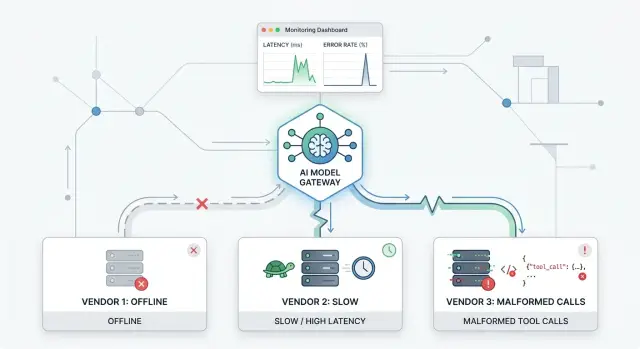
Table of Contents
Why first traffic spikes break gateways
The first traffic spike rarely breaks a gateway because of raw volume alone. It breaks because real users create timing problems that clean test runs never show.
Ten calm requests in staging can look fine. Two hundred overlapping requests can expose queue buildup, retry storms, and timeouts in a few minutes. One slow vendor can hold open an entire request path while the gateway waits for a reply, tries a fallback, or repeats the same call. Once enough requests stack up, the delay spreads. Memory use climbs, workers stay busy, and even healthy vendors start to look slow.
Tool calls make this worse. A malformed tool call is not just one bad response from one model. It can trigger schema errors, parser failures, bad retries, and confused fallback rules across the whole flow. If your gateway lets one broken payload move downstream, the next service often pays for it.
A simple example shows how fast this happens. Say your app sends each user request to three vendors for routing, ranking, or fallback. Vendor A answers in 800 ms. Vendor B hangs for 12 seconds. Vendor C returns a tool call with the wrong argument shape. Under light testing, that might look like one slow log line. Under real traffic, the gateway starts waiting, retrying, and holding open connections. Soon one weak spot turns into a queue.
Small test cases miss this because they are too clean. They use short prompts, one tool, warm caches, and one request at a time. Busy hours look nothing like that. Users send messy input. Calls arrive in bursts. Some clients retry before the first request even finishes.
Teams that run lean AI systems learn this early: gateways fail at the edges first. They fail where timing slips, vendors disagree, and tool output gets messy. That is why fake vendors matter before the first real spike, not after it.
What your fake vendors should mimic
Good federated model gateway testing starts with fake vendors that behave like real providers, including the annoying parts. If your test vendor always answers fast, cleanly, and forever, you learn almost nothing.
Start with normal behavior. Most calls should succeed, return sensible output, and take a believable amount of time. A vendor that replies in 40 ms every time does not feel real. Give it some spread instead. One answer arrives in 800 ms, another in 2.1 seconds, and another in 5 seconds when the prompt is larger.
Then make the same vendor fail in ways that stress routing logic. A real provider might accept a request, stream part of a response, and then cut the connection. That case matters because your gateway has to decide whether to retry, fail over, or stop before it sends duplicate tool work.
Rate limits should also show up late, not only on the first call. A better fake vendor allows a few successful requests, then starts returning 429 errors when traffic rises. That pattern catches gateways that look healthy in small tests but wobble once concurrency climbs.
A useful fake vendor usually needs a few habits:
- believable delays, not fixed timing
- partial streams that sometimes die halfway through
- rate limits that appear after some success
- broken JSON, missing fields, or the wrong tool name
- behavior that shifts over time instead of repeating one fixed failure
Bad tool calls deserve extra attention. One vendor might send JSON with a trailing comma. Another might call web_serch instead of web_search. A third might return the right tool name with the wrong argument shape. These look like small mistakes, but they create large downstream problems if your parser, retry logic, or tool runner expects perfect output.
Time based behavior makes tests much more honest. A vendor might act fine for the first 20 requests, slow down for the next 10, and then start mixing slow replies with malformed tool calls. Many gateways pass isolated checks and fail only after state builds up.
A simple rule helps here: fake vendors should feel slightly inconsistent, not random. Real providers have patterns. They get slower under load, stricter with limits, and messier when streaming or tool use gets complicated. If your test doubles copy that behavior, your first traffic spike is much less likely to teach you the lesson in production.
Set the failure rules before you test
Random chaos is not a test plan. Before you start federated model gateway testing, decide which failures matter most for your users and your budget. Start with the cases that hurt real traffic first: a vendor that times out, a vendor that answers too slowly, and a vendor that returns broken tool output.
A simple ranking works well. If a 20 second delay blocks checkout, support, or an internal workflow, test that before rare edge cases. If one model often drifts into bad tool calls, move that near the top too. You do not need a giant matrix on day one. You need a short list that matches actual risk.
Set a timeout budget for each vendor instead of using one global number. Vendors behave differently, and your gateway should treat them differently. A fast classification model may get 2 seconds. A larger reasoning model may get 8. If you send work to Claude, GPT, and an open source model through the same gateway, give each route a limit that fits the task.
Retries need rules too. Blind retries often make a bad moment worse. Retry when the failure looks temporary, such as a network timeout or a 5xx error. Do not retry when the vendor returns malformed tool output or bad JSON if the next attempt will likely repeat the same mistake.
Fail fast when waiting adds no value. If the request has already missed its user deadline, stop and return a clear fallback. That could mean serving a smaller model, skipping the tool step, or returning plain text that says the action could not run.
Write down what success means before you run anything. Keep it concrete:
- the gateway switches vendors within 3 seconds after a timeout
- retries never exceed the request budget
- broken tool calls do not crash the worker
- logs show which rule fired and why
If you cannot state success in one sentence per rule, the test is still too vague.
Build the test loop step by step
Start with the smallest setup you can trust: one fake vendor that answers correctly, uses normal timing, and returns the shape your gateway expects. If that path is shaky, every later result will mislead you.
Keep the traffic boring at first. Send a small, steady flow of requests for a few minutes so you can see the baseline. You want to know the normal latency, how often retries happen, and whether responses finish cleanly.
In federated model gateway testing, clean comparisons matter more than big numbers. Change one thing, run the same test again, and compare the results. If you add timeouts, retries, and bad payloads all at once, you will not know what actually caused the break.
A simple loop works well:
- Run one fake vendor with normal behavior and record the baseline.
- Add one failure mode, such as a timeout or a 500 error.
- Keep request volume steady and watch latency, retry count, and final status.
- Raise concurrency in fixed jumps, such as 5, 20, 50, then 100.
- Repeat the same run after every gateway change.
Those fixed jumps matter. A jump from 10 requests to 1,000 feels dramatic, but it hides the point where the gateway starts to wobble. Smaller steps show when queues form, when retries pile up, and when a fallback path starts doing too much work.
Record each run in the same format every time. A short table or log summary is enough: request count, concurrency, average latency, p95 latency, retry total, failed calls, and which vendor behavior you enabled. That habit saves hours when two test runs feel similar but fail for different reasons.
If you change routing rules, retry limits, or timeout values, run the earlier baseline again before moving on. Small edits can shift behavior in ways that are easy to miss. The best test loop is not fancy. It is repeatable, a little dull, and easy to compare run against run.
Simulate slow replies without hiding the cause
A slow model call can look like five different bugs if you blur all delays together. Split the slowdown into stages instead. Delay the response headers, drip the body in small chunks, and then pause again before a tool result returns.
That setup shows where the gateway gets stuck. Some systems fail during connection setup. Others keep the stream open but choke when tool output arrives late.
Start with one slow vendor
Slow down only one vendor first. Keep the others fast and clean. If every fake vendor drags at once, you prove the system can get slow, but you do not learn which timeout fired, which queue filled, or which fallback rule made things worse.
Use two kinds of delay. Short stalls of 1 to 3 seconds expose twitchy retry logic and bad user timeouts. Long hangs of 20 to 60 seconds show whether workers stay busy forever, whether requests pile up behind them, and whether cleanup code actually runs.
Watch the system around the slow call, not just the final error:
- request queue length
- open connections per vendor
- time spent waiting before first byte
- time spent waiting for tool results
- retry count per request
If the queue grows while CPU stays calm, the gateway probably waits on I/O and holds work too long. If retries jump right after a timeout, you may have a retry storm. One timeout at the gateway can trigger another retry in the SDK, then another in a job worker. Traffic multiplies fast.
A small test makes this easy to spot. Vendor A replies in 300 ms. Vendor B waits 2 seconds before headers, streams slowly, then pauses 15 seconds before returning a tool result. Vendor C stays healthy. If requests still back up across all three vendors, your scheduler or shared worker pool likely causes the bottleneck, not the vendor itself.
The goal is simple. You are not trying to prove that slow replies exist. You are trying to name the exact stage that hurts the system, then fix that stage without guessing.
Force bad tool calls and messy outputs
Gateways usually break on ugly responses, not on clean outages. One vendor may call a tool your router does not know. Another may send JSON that parses fine but still does the wrong thing. Federated model gateway testing gets much more useful when the fake vendor acts messy on purpose.
Start with missing fields in tool arguments. Drop one required field at a time, then try nulls, empty strings, and wrong types. If a tool needs query, account_id, and limit, test every way those values can go wrong. A parser that only says "bad request" is not enough. The log should say which vendor sent it, which field failed, and what the gateway did next.
Then return JSON that is valid but shaped wrong. That failure is easy to miss because the parser succeeds, so the bad data slips deeper into the system. Suppose the expected tool is get_weather with arguments { "city": "Berlin", "units": "c" }, but the vendor returns weather.lookup with { "location": "Berlin", "unit": "celsius" }. The parser may accept the structure while the business logic still breaks.
That small mismatch can damage routing, retries, and audit trails. It can create a worse bug too: the gateway thinks the call worked and sends a confident answer built on nothing.
Messy outputs matter just as much. Some models mix plain text with a broken tool payload in the same reply. You might get "I found the invoice" followed by half a JSON object, an extra comma, or a truncated argument block. Your gateway should not pass that text through as if the tool succeeded. It should separate user facing text from the failed tool attempt and mark the response clearly.
Use one fake vendor that behaves like this on every fifth request. Use another that switches tool names without warning. Small patterns like that expose parser bugs fast.
When the parser reports a failure, make it precise. Include the vendor name, request ID, raw tool name, schema error, and whether the gateway retried or stopped. If your team needs ten minutes to figure out what happened, the error message is still too vague.
A good test ends with a boring result: the gateway rejects the bad call, keeps the session stable, and leaves a clean record for the next person who has to debug it.
A simple example with three vendors
Run 120 requests through your gateway with three fake vendors and one simple rule: every request asks for the same tool and expects the same answer shape. This makes the test easier to read because you can blame changes on vendor behavior, not on changing prompts.
Vendor A is the calm one. It replies in about 400 ms and stays healthy for the whole run. Vendor B starts fine, then slows down after request 50 and begins taking 8 to 12 seconds. Vendor C keeps normal speed, but every tenth request returns a broken tool call, such as missing fields or invalid JSON.
Your gateway should keep serving traffic without freezing when B and C go bad. After B crosses your timeout or latency limit, the router should send fewer requests there and shift load to A. When C sends a broken tool call, the gateway should reject that response, log the parse failure, and retry with another vendor if your rules allow it.
A clean run usually looks like this:
- requests 1 to 50 spread across A, B, and C
- requests 51 to 120 move away from B as its latency climbs
- every tenth C response gets marked as a tool call failure
- total success rate stays stable because A absorbs more traffic
The logs matter as much as the pass rate. Your team should be able to read a few minutes of logs and explain why request 67 went to A instead of B, why request 80 retried after C failed, and why no worker got stuck waiting on a dead upstream.
If the team cannot explain those outcomes, the test did not do its job. Oleg Sotnikov often pushes teams to make failure behavior readable before they chase raw speed, and this is a good example of why. A gateway that reroutes cleanly is useful. A gateway that reroutes cleanly and leaves a clear trail in logs is one you can trust during a real traffic spike.
Mistakes that waste test time
The biggest time sink is testing cartoon failures. A vendor that goes fully dark is easy to reason about. Real trouble usually starts in the messy middle: replies that take 8 seconds instead of 800 ms, short bursts of 502 errors, or tool calls that work once and break on the next request.
If you only test full outages, you miss the behavior that usually hurts users first. The gateway may not fail fast. It may keep accepting traffic, stack requests, and look mostly fine right up to the point where latency jumps for everyone.
Retries create the next trap. Teams often add them early, then forget to put a hard cap on them. One slow vendor can trigger a retry storm, and that storm can be worse than the original fault. Instead of one delayed request, you now have three or four copies chasing the same bad path.
That is why queue growth matters so much. A gateway can survive a few slow replies. It struggles when those slow replies block workers, hold connections open, and age every waiting request behind them. If you do not watch the queue, you can walk away thinking the test passed because the error rate stayed low.
A short set of counters usually tells the truth faster than a giant dashboard:
- queue depth
- age of the oldest request
- retries per request
- timeout rate
- parser errors counted separately
That last one gets missed all the time. Parser errors are not normal model failures. If a vendor returns malformed JSON or a broken tool call, the fix may live in your schema checks, sanitizer, or fallback rules. If you throw those cases into the same bucket as timeouts and 5xx responses, you lose the signal you actually need.
Another wasteful habit is changing two variables in the same run. If you raise concurrency and shorten timeouts together, you will not know which change caused the result. The same goes for testing a slower vendor and a new parser at once. Run one change, record the outcome, then move to the next.
This sounds strict, but it saves hours. Clean test runs make failures boring, and boring failures are the ones you can fix quickly.
Quick checks before you open traffic
The last pass should feel boring. If anything still looks fuzzy, traffic will find it fast.
Start with timeouts. Each vendor needs its own limit, based on how that vendor actually behaves, not one shared number for all. A fast vendor might get 8 seconds, while a slower one gets 20. If you leave this vague, one bad upstream can hold the whole request open longer than users will tolerate.
Then cap retries hard. One retry is often enough. Two can be fine. Beyond that, you usually turn a short failure into a slow pileup, especially when several vendors wobble at once.
A short before launch checklist helps:
- set a clear timeout for every vendor and every tool path
- keep retries to a small fixed count, and log each retry
- check that fallback rules match the real cost of failure
- make sure logs name the vendor, error type, and request ID
- split dashboards so slow replies and bad payloads show up as different problems
Fallback rules deserve extra care. They should match the job, not just keep the gateway alive. For a general chat reply, falling back to a second model may be fine. For a tool call that touches billing, orders, or account data, failing closed is often the safer choice.
Your logs need to answer one question in seconds: what failed, where, and why? "Request failed" tells you nothing. "Vendor B timeout after 12s" or "Vendor C returned malformed tool arguments" is enough for a teammate to act.
Dashboards should separate latency from payload quality. If both land in one error bucket, you lose the cause and chase the wrong fix. Slow replies point to timeout and capacity rules. Bad payloads point to parsing, schema checks, or output guards.
One final test matters more than people admit: hand the setup to a teammate. If they cannot rerun it quickly from the docs and scripts, your test rig is still too fragile for real traffic.
What to do next
Leave the fake vendors in your normal release checks. If they only run once, right before launch, the test loses most of its value. Small changes in routing, retries, timeout values, tool schemas, or logging can quietly break behavior that looked fine a week earlier.
A good habit is to run the same failure set on every release candidate. One vendor should time out. One should answer slowly. One should return broken tool arguments or messy text around structured output. That gives your team a steady signal instead of a single snapshot. For federated model gateway testing, consistency matters more than a huge test lab.
Before a big launch, rehearse one traffic spike on purpose. Do it close enough to release that the code, settings, and dashboards still match reality. Watch who gets paged, how fast people spot the issue, and whether the gateway fails in a calm way. A short drill can save hours of guessing later.
Keep the team playbook short enough that people will actually read it. It should answer four basic questions: which failures you simulate every week, which metrics and logs the team checks first, when to fail over, retry, or stop tool execution, and who makes the call if users start seeing errors. Put names on actions. Vague ownership slows everything down.
If you want an outside review, Oleg Sotnikov at oleg.is helps startups and smaller teams tighten gateway rules, infrastructure, and practical AI adoption. That kind of review is useful when you already ship models in production but want cleaner failover rules, leaner systems, and fewer surprises during launch week.
The target is simple: when a vendor acts badly, your gateway should act predictably. If your team can prove that on every release, traffic spikes stop feeling mysterious.
Frequently Asked Questions
Why do traffic spikes break a model gateway so quickly?
Traffic spikes usually expose timing problems, not just high volume. Slow vendors, hanging requests, retries, and open connections stack up fast, and one weak path can slow the whole gateway.
What should fake vendors copy in a realistic test?
Make them act like real providers. Let most requests succeed, then add uneven latency, partial streams, late rate limits, malformed JSON, wrong tool names, and behavior that changes after some load builds up.
What is the best first test to run?
Start with one fake vendor that replies correctly and uses normal timing. Run a small steady load first so you know your baseline before you add timeouts, errors, or bad tool output.
Should every vendor use the same timeout?
Use a timeout budget for each vendor based on the job it does. A fast route might get a couple of seconds, while a heavier model can get more, but every limit should fit the user deadline.
When should I retry a failed vendor call?
Retry only when the failure looks temporary, like a network timeout or a 5xx error. Skip retries for malformed tool output or bad JSON, because the next attempt often fails the same way and adds more load.
How do I simulate slow replies without making the test vague?
Slow down one vendor at a time and split the delay into stages. Hold headers, drip the stream, or pause before a tool result so you can see exactly where the gateway starts to wait too long.
How should my gateway handle malformed tool calls?
Force missing fields, wrong types, wrong tool names, and valid JSON with the wrong shape. Your gateway should reject the bad call, keep the session stable, and log what failed in plain language.
Which metrics tell me the gateway is starting to wobble?
Watch queue depth, age of the oldest request, retries per request, timeout rate, parser errors, and wait time before first byte. Those numbers show whether the gateway struggles with slow I/O, bad payloads, or retry storms.
What mistakes waste the most testing time?
Teams waste time on cartoon failures like full outages and ignore the messy middle. They also change two variables at once, skip retry caps, and lump parser errors together with normal upstream failures.
What should I verify right before launch?
Check vendor timeouts, hard retry caps, fallback rules, and logs before you open traffic. Then ask a teammate to rerun the setup from the docs and scripts; if they stumble, the rig still needs work.


