Feature specs that survive model changes in real products
Feature specs that survive model changes keep product intent stable by splitting task rules, examples, and safety policies into clear parts.
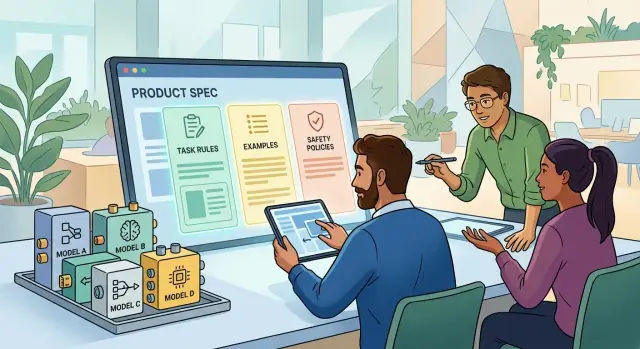
Table of Contents
Why single model specs break so fast
Most teams start with one big prompt. It holds the task, a few examples, formatting rules, edge cases, and safety notes in the same block. That feels fast at first, but it creates a hidden problem: the product behavior depends on the habits of one model, not on a clear spec.
When you swap models, small differences show up fast. One model may copy the examples too closely. Another may follow the safety note more strictly and become overly cautious. A third may change the tone, skip a field, or wrap the output in extra text. The prompt did not change much, but the feature suddenly behaves like a different product.
This happens because the real intent is buried under wording. If the instruction says "classify this ticket" and the example also teaches priority, routing, and refusal behavior, the model learns a messy mix of rules. A new model may decide the examples matter more than the instruction. Another may do the reverse. Teams then start tweaking phrases line by line, hoping to get the old behavior back.
That is where time disappears. QA does not just test the feature anymore. They chase prompt regressions:
- Output format shifts even though the task is the same
- Edge cases get different answers after a model swap
- Safety behavior changes because it lived inside examples
- Simple prompt edits fix one case and break two others
After a few rounds, nobody knows which sentence controls which behavior. The prompt becomes a pile of patches.
If you want feature specs that survive model changes, treat the prompt as a delivery format, not the spec itself. The spec should say what the feature must do, what examples illustrate, and what safety limits always apply. Once those parts live separately, switching models stops feeling like a rewrite and starts feeling like a normal test cycle.
That change sounds small. In practice, it saves teams from weeks of brittle prompt tuning and gives QA something stable to verify.
What every spec should separate
Teams get feature specs that survive model changes when they stop mixing four different things in one blob of instructions. A portable spec keeps the job, the examples, the safety limits, and the review standard in separate blocks. That sounds simple, but it prevents a lot of drift when you switch from one model to another.
Task rules come first. They tell the model what job it has, what input it will receive, and what output shape it should return. If you hide that inside examples or policy text, different models will guess differently. One model may write a friendly paragraph, another may return JSON, and both will think they followed the prompt.
Examples do a different job. They show the pattern, not the law. Good examples include the easy case and the awkward one: messy input, missing details, conflicting signals, or a user request that almost crosses a line. When examples sit in their own block, you can swap or add them without changing the actual product intent for LLMs.
Safety policies need their own space too. These are the hard limits. They say what the model cannot do, when it should refuse, when it should ask for clarification, and what content needs a safer fallback. If you bury safety inside task instructions, one model may treat it as optional style.
Review notes are the part many teams skip. They describe what a good answer looks like and what failure looks like. This is not the same as examples. Examples show specific cases. Review notes describe the standard across all cases.
A clean spec often has these four parts:
- Task rules: the job, input fields, output format, and success conditions
- Examples: normal cases plus awkward edge cases
- Safety policies: refusal rules, red lines, and fallback behavior
- Review notes: signs of a good answer and common failure patterns
Oleg Sotnikov uses this kind of separation in AI-first product work for a practical reason: models change, costs change, and teams often test more than one model at once. If the product intent lives in a clean spec instead of a tangled prompt, you can swap the model and keep the feature stable. That saves time, and it also makes debugging much less annoying.
A simple spec shape teams can reuse
Each feature needs one source document. If the real rules live across tickets, chat threads, and old prompt files, the team will drift fast. One person updates the prompt, someone else updates the app, and the model starts doing a different job.
A reusable spec fixes that by giving every feature the same shape. People should know where to find the goal, the rules, the examples, and the safety limits without guessing. That alone makes reviews faster and model swaps much less messy.
A simple layout works well for most teams:
- Goal and user outcome
- Inputs and expected outputs
- Task rules
- Examples
- Safety and escalation rules
Keep these section names the same every time. Consistent labels matter more than fancy wording. When a new engineer joins, they should recognize the document in seconds.
Put model settings in a small config block, separate from product intent. That block can hold temperature, model name, token limits, and any routing notes. Keep it short. If you change from one model to another, you should edit the config block, not rewrite the feature itself.
A tiny template can be enough:
Feature: support ticket triage
Goal: send each ticket to the right queue with a short reason
Inputs: ticket text, account tier, language
Outputs: queue name, priority, short explanation
Rules: billing issues go to billing, abusive language gets flagged
Examples: 3 to 5 real ticket samples with expected output
Safety: never invent refunds, escalate threats to a human
Config: model=gpt-4.1, temperature=0.1, max_tokens=300
Change log: 2026-04-02 billing refund rule moved to human review
Track changes when product rules move. A short change log is enough. If the business changes refund policy, log that update in the spec instead of silently editing the prompt. Later, when results shift, the team can see whether the cause was a model swap or a product decision.
That is how AI feature specification stays portable. The model can change. The product intent stays put.
How to write a portable spec
A portable spec starts with the action, not the model. Write one plain sentence that says what the user is trying to do, such as "Classify each support ticket by urgency and send it to the right team." If that sentence changes when you switch vendors, the spec is mixing product intent with prompt tricks.
Then name the inputs the model may use. Keep this part plain and exact: ticket subject, message body, account tier, past order count. If one field is optional, say so. If the model must ignore a field, say that too. Teams run into trouble when the model sees more context than the spec admits.
Add task rules one line at a time after that. Short rules travel better than a dense paragraph. "Use only the provided inputs." "If urgency is unclear, choose normal." "Do not invent account data." Each line should change behavior in one small way. That makes reviews easier and makes a model swap strategy less painful.
Then lock down the output shape. Name the fields, list allowed values, and include one example that looks like real work. A good example teaches format without trying to teach the whole task.
{
  "urgency": "high",
  "team": "billing",
  "reason": "Customer reports a failed charge and blocked renewal."
}
This is where many teams get vague. If the model can answer in JSON sometimes, plain text other times, and a paragraph on bad days, the AI feature specification is not finished.
Keep vendor settings outside the spec. Temperature, max tokens, model name, retry policy, and provider flags belong in config or code. They matter, but they are not product intent for LLMs. When you separate behavior from runtime settings, you can test a new model without rewriting the feature.
A useful check is simple. If a sentence stays true after you swap OpenAI for Anthropic or an open model, it belongs in the spec. If it only exists because one model needed extra nudging, move it out. That is how teams end up with feature specs that survive model changes.
How to use examples well
Examples do more than explain the spec. They show what good output looks like when a new model reads the same instructions. For feature specs that survive model changes, examples work best when they look like real user requests, not neat little classroom exercises.
Pull them from tickets, chats, emails, or logs. Keep the rough edges. Users leave out facts, mix two questions together, paste broken text, and ask for things your product should refuse. If your examples do not show that mess, they will give you false confidence.
Pair each normal example with one awkward case. A plain case tells the model what acceptable behavior looks like. The awkward case shows where the borders are.
For a meeting note assistant, a plain case might be a clean transcript with three action items. An awkward case might include cross-talk, missing names, and a joke that sounds like a task but is not one. That second case often matters more during a model swap.
Each example needs a short note on why it passes or fails. Keep the note blunt. "Pass: it captured all three action items and ignored small talk." "Fail: it invented a deadline that nobody said."
A compact example set usually has four parts:
- the raw input
- the expected output
- a one line reason
- a pass or fail label
These notes stop teams from arguing about tone when the actual problem is product behavior. They also make review faster, because people can compare results against a clear reason instead of guessing what the spec meant.
Do not let example sets go stale. Product rules change, support policy changes, and UI labels change. When that happens, old examples teach the team to accept the wrong behavior. If the refund window moves from 14 days to 30, update every example that touches refunds on the same day.
A small set of fresh examples beats a large archive nobody trusts. Five honest examples from production will teach more than fifty polished ones written in a planning doc.
Where safety policies should live
Safety rules need their own part of the spec. If you bury them inside task instructions or examples, teams forget what is a preference and what is a hard limit. That causes trouble fast when you swap models, because one model may treat a buried warning as optional while another follows it too literally.
A clean spec keeps safety separate from behavior. The task section says what the model should do. The examples show the style and shape of good answers. The safety section says what the model cannot do, when it must refuse, and when it should hand the case to a person.
Keep that safety section split into plain buckets:
- legal and compliance limits
- abuse and misuse rules
- privacy and data handling rules
- brand tone rules for allowed responses
These buckets solve different problems. Legal limits cover things like regulated advice or restricted claims. Abuse rules stop the model from helping with fraud, harassment, or evasion. Brand tone matters too, but it does not belong in the same sentence as legal risk. "Be polite" is not the same as "do not give tax advice."
Write refusals in direct language. Do not hint. Say what the model must refuse, what it may answer in a limited way, and what it should do instead. For example: if a user asks for steps to bypass account security, the model must refuse and offer account recovery steps. If a customer reports self-harm, the model should stop normal handling and route the case to a human path defined by the product.
That handoff path should live in the same safety section. Name the trigger, the action, and the destination. A simple rule works well: "If the request touches payments, threats, self-harm, legal claims, or account takeover, collect the needed details and escalate to human review."
When teams write safety this way, they can change models without rewriting product intent. The task stays the task. The examples stay examples. The limits stay clear.
A real example: support ticket triage
A small support inbox shows why spec structure matters. The model reads each new ticket and returns three fields: topic, urgency, and a one-sentence reason. Teams often jam all of that into one prompt, along with examples and safety notes. One model may handle it. The next one may drift.
Write the task rules as plain product logic. Topic might be billing, bug, account access, or other. Urgency might be low, normal, or high. A bug gets high urgency only when the message says people cannot use the product, payments fail, or data may be at risk. Angry wording alone does not raise urgency.
A few examples set the boundaries:
- "I was charged twice for March" should map to billing and normal.
- "The app crashes every time I upload a PDF" should map to bug and high.
- "I cannot tell why my invoice looks wrong" should map to billing and normal.
- "Help" should map to other and low unless the rest of the thread adds facts.
These examples do real work. They show how to treat vague messages, and they stop the model from guessing what the user meant.
Safety policy should sit outside the task rules. If a ticket says, "Did you change my bank details?", the model must not invent account history, payment status, or personal details. It can tag the ticket for human review, but it should not claim facts it cannot verify.
Review notes should check label accuracy first. Then check the short reason. Good reasoning points to the actual ticket text, such as "mentions duplicate charge" or "reports repeat crash on upload." Bad reasoning adds made-up context, like "likely enterprise billing issue," when the message never says that.
That split is what makes an AI feature specification portable. The task rules stay steady, the examples show the edges, and the safety policy keeps the model inside safe limits when you swap models.
Mistakes that make model swaps painful
Many teams think they have a model problem when they really have a spec problem. If a new model means rewriting the whole prompt, the prompt is doing too much. It is carrying product rules, formatting hints, edge cases, and safety notes in one fragile block.
That feels quick during the first build. A month later, every model test turns into a rewrite, and nobody knows which part changed the behavior.
Another common mistake is mixing business rules with model settings. A rule like "refunds above $500 need human review" should live apart from randomness settings, token limits, or response length controls. When those pieces sit together, teams change a setting for style or cost and accidentally change product intent.
Examples create their own trap. Teams often write clear rules, then add a few examples that quietly teach something else. Many models copy the examples more strongly than the written instructions. If your spec says "ask for missing details" but every example guesses the answer, the model will guess.
Safety rules also get lost in practice. A tester pastes them into chat history, a developer keeps them in an old system prompt, and a third person assumes they are already covered somewhere else. Then the team swaps models or SDKs and those notes disappear. Safety policies need a fixed home in the spec, not in someone's test thread.
The last mistake is simpler and more damaging: nobody defines failure. Without that, review turns into opinion. One person says the new model feels smarter. Another says it feels off. Neither can prove it.
Write failures down in plain language:
- wrong decision for the same input
- broken output format
- ignored hard policy
- invented facts or actions
- too many retries to get a usable answer
That is how you get feature specs that survive model changes. Keep the job stable, keep safety separate, and judge each model against the same written standard.
A short review checklist
A spec is ready when a different person can hand it to a new model and still get roughly the same behavior. That is the test for feature specs that survive model changes. If the result depends on old chat history, a private note, or one person's memory, the spec is not done.
Run four quick checks before release:
- Give the spec to someone who did not write it and ask them to try another model. If they need extra context from Slack, meetings, or a side document, move that missing context into the spec.
- Ask QA to test ten sample cases, not just the easy ones. Mix in messy inputs, vague requests, and one or two edge cases. QA should know what a good answer looks like and what counts as a failure.
- Change one safety rule without editing the task rules. For example, tighten the privacy rule for support tickets. If that change forces a rewrite of the whole spec, you mixed policy with task behavior.
- Ask the product owner to explain the feature in one sentence. If they need a long speech about prompt wording, tools, and exceptions, the product intent is buried.
A quick review like this does more than catch writing problems. It shows whether your AI feature specification is portable, testable, and easy to maintain.
A small team can do this in about 20 minutes. That short pass often saves days later when you swap models and discover the old spec only worked because one model guessed your intent better than the others.
What to do next
Start with one feature that already matters to users. Pick something live, like ticket routing, reply drafting, or lead qualification. Then break its current prompt into separate parts: the task, the rules, the examples, and the safety policy. That one split usually shows where product intent lives and where model-specific habits have crept in.
A simple first pass looks like this:
- Write the task in plain language, with the exact input and output you expect.
- Move business rules into their own block so they do not hide inside examples.
- Keep examples short and realistic, and label them as examples.
- Put safety limits and refusal rules in a separate policy file or section.
After that, run the same spec on two different models. Do not look only at which model sounds better. Look at where each one fails. One model may ignore edge cases. Another may over-follow examples and miss the real rule. Those differences tell you whether your spec is clear enough to travel.
Save product intent outside model settings. If the only true version of your feature lives inside a prompt field in one vendor dashboard, you will rewrite too much later. Store the spec in the same place your team keeps product decisions and tests. Version it. Review it when the feature changes. Treat it like part of the product, not a temporary prompt.
If your team wants a second set of eyes, Oleg Sotnikov can review AI feature specification work and model swap plans as a Fractional CTO or advisor. That kind of review is most useful before a migration, not after a launch goes sideways.
A week from now, you should be able to point to one cleaned-up spec, one cross-model test result, and one place where product intent lives independent of any single model. That is enough to change how the next feature gets built.


