Feature flags for small teams without enterprise tools
Learn how feature flags for small teams make releases safer with simple naming rules, basic rollout steps, cheap storage options, and quick checks.
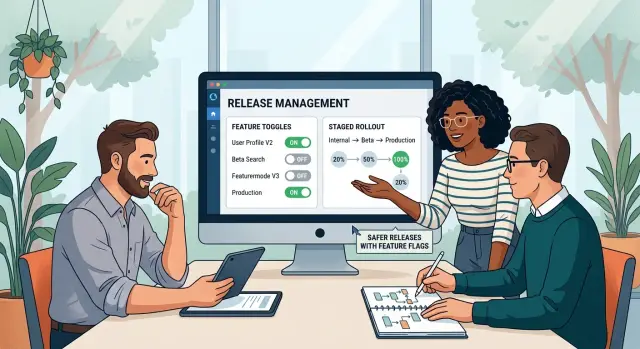
Table of Contents
Why releases feel risky for small teams
Small teams often ship straight to everyone. One deploy, one merge, one config change, and every customer gets the new behavior at once. That feels efficient until a small mistake lands in checkout, sign-up, billing, or some other part of the product people use every day.
The risk is not limited to broken code. A release can slow pages down, confuse users, trigger more support tickets, or create bad data you have to clean up later. If you have two engineers and a founder answering customer messages, even a minor bug can wreck the rest of the day.
Big companies usually soften that risk with more process. They have staged rollouts, internal testing groups, release teams, heavy monitoring, and people on call around the clock. Most small teams do not need all that. Copying it too early usually adds work without making releases much safer.
What small teams do need is a fast way to change course. When a release goes bad, rollback should not mean a stressful redeploy, a database scramble, and a long team chat full of guesses. You want a simple off switch.
Releases feel risky because software changes rarely arrive alone. A new button depends on an API update. The API change depends on a schema change. The schema change touches reporting. Everything looks fine in testing, then real users click in a different order and expose the weak spot.
That is why shipping code straight to everyone is often the most fragile release plan a small team can choose. There is no buffer, no quiet test with real traffic, and no easy way to limit damage.
A simpler setup usually works better. Release the code, but keep the new behavior behind a switch. Turn it on for yourself first, then a few users, then everyone else if nothing looks strange. It is not fancy. It just gives you breathing room.
What a feature flag actually does
A feature flag is an on-off switch inside your code. When the flag is off, users do not see the new feature or cannot use it. When the flag is on, the new code path opens up.
That sounds small, but it changes how you release software. You can deploy code to production without exposing it right away. If something looks wrong, you turn the flag off instead of rushing into a full rollback.
Picture a new "Buy now" button on a product page. The button, tracking, and checkout handoff can already live in production. With the flag off, customers still see the old page. When you are ready, you switch it on for a small group or for everyone.
The same idea works for a new checkout step. Maybe you added a tax form for business buyers. A flag lets you hide that step until support, billing, and engineering confirm it behaves the way you expect.
A flag gives you release control. It does not fix bad code. If the new checkout logic corrupts orders, the flag can stop more users from hitting the problem, but it will not repair broken data, weak testing, or a risky database change on its own.
It also helps to keep feature flags separate from other controls. A config setting manages normal system behavior, like a tax rate, API endpoint, or file size limit. A feature flag decides whether a feature path is available right now. An A/B test compares versions to measure behavior, like which button text gets more clicks. Those things can overlap, but they do different jobs.
For a small team, the goal is simple: release code more safely, expose it on purpose, and shut it off fast if users run into trouble.
Pick the simplest flag pattern first
Most teams do not need a full flag platform on day one. They need a safe way to turn something on, keep it hidden, or show it to a small group before everyone sees it.
Usually that means one of four simple patterns:
- Dark launch - ship the code, but keep the feature off for customers.
- Gradual rollout - turn it on for a small share of users first.
- Internal testing - show it only to your team or a beta group.
- Fast rollback - switch it off without a new deploy.
A single boolean flag handles more than people expect. If the question is just "should anyone see this yet?", an on-off flag is enough. It works well for a new settings page, a redesigned checkout step, or a risky backend change you want to hide until support is ready.
When a simple segment is enough
Some releases need one more layer. Maybe your team wants to test a feature with staff accounts first, or with five pilot customers who agreed to try it early. In that case, add a small segment rule instead of building a whole control panel.
Keep the rule plain. Check for internal email domains, a short allowlist of account IDs, or one team tag in your app. That gives you a clear path from hidden, to internal, to beta users, to everyone.
A realistic rollout might look like this: a small SaaS team ships a new reporting screen behind one flag. On Monday, only employees can open it. On Wednesday, ten customer accounts get access. On Friday, the team turns it on for everyone after checking support tickets and error logs.
For many teams, that is enough. You do not need percentage rollouts, nested rules, audit dashboards, and flag dependencies unless your release process truly calls for them.
Building a mini platform too early creates its own risk. Someone has to maintain the UI, permissions, targeting logic, and cleanup. Old flags pile up. Rules get messy. People stop trusting them.
Start with one switch. Add segments only when a real release needs them. Simple flags are easier to test, easier to remove, and much harder to misuse.
Set up a basic system step by step
A basic flag system does not need a vendor, a dashboard, or a long setup. For a small team, the safest start is one shared source of truth, a few clear rules, and the habit of cleaning up after each release.
Pick one place to store flag values and stick to it. That can be a small database table, a config file in your app, or environment variables if the number of flags stays low. The exact storage matters less than consistency. Everyone should check the same place, and the app should read from the same place every time.
Name flags before you write the first condition in code. Good names tell you what the flag controls and where it applies. checkout_new_form is clear. new_ui is vague and turns into a mess six months later. A simple rule helps: use the area plus the change, and avoid names that sound temporary but never disappear.
Every flag needs a safe default. If the app cannot find the flag value, it should choose the lower-risk option, which is usually "off". That protects you during deploys, config mistakes, and late-night edits. Teams get into trouble when a missing value quietly turns a half-finished feature on for everyone.
Decide who can change a flag before release day. In a tiny team, one engineer and one product owner is often enough. Also decide when changes are allowed. Many teams do best when they flip customer-facing flags during working hours, with someone watching logs and support messages for the next 15 to 30 minutes.
Set an expiry date for each flag on day one. Put it in the ticket, the code comment, or your release notes. If a flag should live for two weeks, say so. Old flags pile up fast, and they make code harder to read, test, and trust.
A simple setup usually needs only a few things:
- one place for all active flags
- one naming rule the whole team uses
- one safe default for missing values
- one person who can approve changes
- one cleanup date attached to the task
That is enough to use feature flags without turning release management into a full-time job.
Choose low-cost tools that fit your team
A small team does not need a dedicated flag service on day one. You need a way to turn behavior on or off without making each release feel risky. Start with the tool your team can still understand at 2 a.m. That is when release tools get tested for real.
Environment variables work well when a flag changes rarely. They are fine for hiding an unfinished settings page or keeping a new payment flow off until launch week. They cost almost nothing, and most teams already know where to set them. The downside is speed. You often need a restart or a new deploy to change them, so they are weak for live rollbacks.
A database table works better when you need live toggles. One table with a flag name, on-off status, and maybe a short note is often enough. Your app can read it directly or cache it for a minute. That gives you faster control, but it adds another failure point. If the database is slow or unavailable, your app needs a safe default.
A small internal page makes sense only when several people need to change flags and nobody wants to edit SQL or hosting settings. Keep that page tiny. Show the flag name, current state, who changed it, and when. If one developer handles all releases, skip the page for now.
The trade-offs are simple. Environment variables are cheapest, but they change slowly. A database table takes a bit more work, but it lets you react fast. A small internal page saves time once several people need it, but you have to maintain it.
That order usually works in practice too. Start with environment variables. Move to a database table when you ship often or need to turn something off without a deploy. Build a page only after the team feels real pain.
Cheap tools are fine if the rules stay clear. Pick a safe default, log every flag change, and delete old flags before they pile up.
A realistic rollout example
A new billing page looks small on the roadmap, but it can break something people care about right away: paying you. That makes it a good test case.
Say your team built a cleaner billing page with clearer plan details, a coupon box, and a new payment form. The old page still works, so you keep both versions in the app and put the new one behind a flag.
Start with staff-only access. Ask a few people on your team to upgrade a plan, change a card, apply a coupon, and download an invoice. This stage is not about polishing every detail. It is about finding the obvious failures before customers run into them.
If that goes well for a day or two, move to a small customer group. Pick a mix of account types, not just your happiest users. A handful of active customers can show you a lot. You might find that the page works fine for monthly plans but fails on annual upgrades, or that one browser breaks the payment form.
Watch the boring signals closely. They usually tell the truth faster than opinions do:
- payment errors in your logs
- support tickets about checkout or invoices
- drop-offs on the final payment step
- refund requests or duplicate charges
If one of those numbers jumps, turn the flag off and send everyone back to the old page. You do not need a rushed deploy or a late-night rollback. You flip the flag, stop the damage, and fix the issue with less stress.
If nothing looks wrong, widen access in small steps. You can move from a small group to 10 percent, then 25 percent, then everyone. A small team does not need expensive release software for this. One simple flag in a database or config file is often enough if someone owns the rollout and checks the same signals each time.
This can feel slower for a week or two. In practice, it usually saves time because you catch problems while they are still small.
Mistakes that create more risk
A flag should lower risk, not stretch it out. Small teams get into trouble when a quick safety switch turns into a second product hidden inside the first.
The most common problem is keeping both the old path and the new path alive for too long. At first, that feels safe. A few weeks later, every bug fix needs two updates, two reviews, and two mental models. If the old checkout flow still sits beside the new one three months after launch, the flag is no longer a guardrail. It is debt.
Names cause more confusion than people expect. A flag called new_flow, beta_v2, or temp_fix tells nobody what it controls or when it should disappear. Use plain names that answer two questions: what changes, and who gets it. A name like checkout_one_page_for_10_percent is much harder to misuse.
Testing only the "on" state is another quiet mistake. Teams focus on the new version because that is the exciting part. Then someone turns the flag off during an incident and finds that the old path broke two releases ago. Every flag creates two real product states, so both need basic testing.
Trouble also starts when one screen depends on too many flags at once. If a dashboard has separate flags for layout, filters, permissions, pricing text, and API behavior, even simple QA turns into a maze. Users can end up in combinations nobody meant to ship. Fewer flags with clearer scope usually work better than lots of tiny switches.
Dead flags are easy to ignore because they do not fail loudly. They just sit in the code, confuse new teammates, and make every change slower. Set a removal date when you create the flag. If the feature is live for everyone, delete the old branch and move on.
A simple rule helps: every flag needs an owner, a purpose, and an end date. If one of those is missing, the flag will probably create more risk than it removes.
A quick checklist before you ship
A flag helps only if the team treats it like part of the release, not a last-minute switch. These five checks take a few minutes and can save hours of cleanup:
- Verify the default value in production matches your plan.
- Test both paths, with the flag off and with it on.
- Give one person clear ownership for the rollout.
- Put a removal date on the flag when you create it.
- Write a rollback note in plain language.
A small example makes this concrete. Say you add a new checkout step behind a flag. Before release, confirm the flag starts off for all customers. Then place a test order with the old checkout and another with the new one. Make sure a named teammate owns the rollout for that day. Add "remove after two weeks if error rate stays normal" to your task. Then write a note like: "If checkout errors rise, switch off NEW_CHECKOUT in admin config. Customers return to the old flow immediately."
That routine is why feature flags work so well for small teams. You do not need fancy release software. You need a default state you trust, two tested paths, one owner, one cleanup date, and one rollback note. If your team cannot answer those five points in under a minute, do not ship the flag yet.
What to do next
Start with one release flow your team can repeat every time. That matters more than fancy tooling. If each release follows the same path, people know when to add a flag, who checks it, and when to remove it.
For most teams, feature flags should stay boring. Use them for changes that need extra safety, such as a new pricing page, a risky database write path, or a fresh onboarding step. Do not put a flag on every small UI tweak. Too many flags turn a simple system into a mess.
A good first workflow is simple. Add a flag only if you might need to turn the change off without a new deploy. Give the flag an owner and a short note about what it controls. Roll it out in steps, such as internal users first, then a small customer group, then everyone. Set a removal date when you create it.
That last step is easy to skip, and it causes problems later. Old flags leave dead paths in the code, confuse testing, and make future releases harder. Once the rollout ends and the change is stable, delete the flag and the old branch of code. If a flag lives for months, nobody really owns it anymore.
Keep the first version simple. A config file, an environment variable, or a small table in your database is often enough. You do not need enterprise tools to get safer releases. You need a clear rule for when flags are allowed, a rollout plan, and the discipline to clean up after yourself.
If your team is shipping a new signup flow, put only that flow behind a flag. Release it to staff first. Check errors and support messages for a day or two. If it looks good, expand access. If it breaks, turn it off fast and fix it without a rushed rollback.
If you want help designing this kind of release process, Oleg Sotnikov at oleg.is works with startups and small companies as a Fractional CTO. His approach is practical: lean systems, solid infrastructure, and AI-assisted development without unnecessary overhead.
Frequently Asked Questions
Why would a small team use feature flags at all?
For most small teams, a feature flag gives you a fast off switch. You can deploy code, turn the feature on for a small group, and turn it off in seconds if errors, support tickets, or bad data show up.
When should I use a feature flag instead of a config setting?
Use a config setting when you want to control normal app behavior, like a tax rate or file size limit. Use a feature flag when you want to decide whether users can access a new code path right now.
Can I start with environment variables?
Yes. Environment variables work fine when you change a flag rarely and you can tolerate a restart or deploy. They are a good first step for launch-week features or hidden pages that do not need instant rollback.
When does a database-backed flag make more sense?
Move to a database table when you need live toggles. If a release might need a fast rollback without a deploy, a small table with the flag name and state gives you more control.
Should I build a dashboard for flags right away?
No. Build a small internal page only after the team feels real pain from editing SQL or hosting settings. If one developer handles releases, extra UI just gives you more code to maintain.
What default should I choose if the app cannot read a flag?
Default to off. If your app cannot read the flag value, keep users on the older path unless you have a strong reason not to. That choice lowers risk during deploys, config mistakes, and late-night changes.
How do I roll a feature out to a few users first?
Start with staff accounts, then give access to a short allowlist of customer accounts. After that, widen access in small steps only if logs, support messages, and conversion numbers stay normal.
What should I check right after I turn a flag on?
Watch the boring signals first. Check error logs, payment failures, support tickets, drop-offs, and duplicate actions like double charges. Those numbers usually tell you faster than opinions do.
What mistakes make feature flags risky?
Teams run into trouble when they leave old and new paths alive for months, use vague names, or test only the on state. Too many flags on one screen also create odd combinations that nobody meant to ship.
How long should a feature flag stay in the code?
Remove the flag as soon as the rollout ends and the new path looks stable. Set an end date when you create it, or it will sit in the code, slow testing, and confuse the next person who touches that area.


