Feature flag governance with domain policies and end dates
Feature flag governance works better when each flag has a business rule, owner, and end date. Use a simple plan to stop checks piling up.
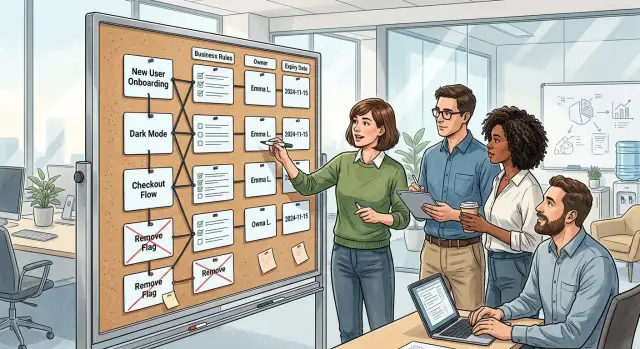
Table of Contents
Why feature flags get messy fast
A feature flag usually starts with a sensible reason. The team wants a safer rollout, a quick test, or a way to limit damage if a release goes bad. In that moment, the flag feels clean and practical.
The mess starts later.
The release ships, everyone moves to the next sprint, and the flag stays because removing it feels less urgent than shipping the next thing. A few months later, the codebase has old rollout checks, customer exceptions, pricing hacks, and experiments that never really ended.
Rushed releases make this worse. Teams add flags to lower risk, which is fair, but they often skip the part where they set an end date and assign an owner. A developer sees a branch in the code and assumes it still matters. A product manager sees a setting in the admin panel and assumes it is still a real product choice. Soon people build plans around logic that was only meant to live for two weeks.
The confusion starts small. A bug appears for some users because one flag is on in staging and another is off in production. Support asks why two customers on the same plan see different behavior. Product wants to simplify the experience, but engineering first has to figure out which version of the experience they mean.
Then the temporary logic hardens into architecture. A flag that once protected a migration now sits in billing, permissions, or onboarding. New work has to respect both paths. Tests multiply. Small changes take longer because nobody wants to touch the old branch, even when nobody can explain why it still exists.
Most teams do not solve this with more tooling. Another dashboard will not fix a habit of treating every flag like a harmless shortcut. What usually helps is much simpler: say why the flag exists, who owns it, what business rule it supports, and when it should disappear.
That is the point of feature flag governance. Without a few plain rules, flags stop acting like temporary safety switches and start acting like hidden product decisions.
What a domain policy looks like
A domain policy is a short rulebook for one part of the product, such as pricing, trials, billing, or account access. It tells the team when a feature flag is allowed, what problem it solves, and how it leaves the codebase later. That keeps flags tied to business decisions instead of developer habit.
The policy should use plain language. If a product manager, engineer, and support lead cannot read it and agree on what the flag does, the rule is too vague. "Control access to the new annual plan for users in market A until finance approves rollout" is clear. "Support flexible launches" is not.
Each flag should match one business rule. A flag for "new customers get the updated onboarding flow" is manageable. A flag that controls onboarding, pricing, email copy, and support routing is a mess waiting to happen. Once one flag carries several ideas, nobody knows when it is safe to remove.
A usable policy usually answers four questions:
- What business rule does this flag enforce?
- Who can approve removal?
- What date or event ends the flag?
- What cleanup work follows removal?
The owner matters more than most teams expect. "Engineering" is not an owner. "Product" is not an owner either. Pick one person. That person decides whether the rule still applies, whether the rollout is done, and whether the flag can go. Without a named owner, old flags sit in the code because everyone assumes someone else will handle them.
The exit plan should exist before the flag ships. This is where teams usually slip. They add the flag quickly, promise to clean it up later, and move on. A better policy sets the exit up front: remove the flag after 30 days, after the A/B test ends, or when legal approves the flow in all regions. The trigger can be a date or a specific event, but it has to be real.
A simple example makes the idea concrete. Suppose a team launches a new refund flow only for premium customers. The policy might say that the flag exists to apply the premium refund rule, the head of product owns the decision, the flag expires when support tickets stay below the agreed limit for two weeks, and engineering removes the old branch and the flag configuration in the same sprint.
That is the whole idea. Keep the rule small, give it one owner, and decide the ending before release. Flags stay temporary when the policy is specific.
Attach each flag to a real business rule
A flag without a business rule turns into mystery code fast. Six months later, nobody knows who asked for it, what risk it controlled, or when the team can delete it.
Start with one plain sentence: what business decision does this flag represent? If the team cannot answer that in a few seconds, the flag is already too vague.
Each flag should carry four facts with it, not in a separate document that nobody updates. The team should be able to see the business event that turns it on, the exact users or accounts it affects, the sentence that says when to remove it, and the reason for its existence next to the flag name where people actually manage flags.
That sounds strict, but it saves time. A developer can tell whether the flag belongs to a pricing test, a regional rollout, or a contract promise for one customer. Support can tell whether the behavior is intentional. Product can tell whether the flag still maps to a real decision.
Naming helps here. A vague flag like new_export_v2 hides the point. A longer name such as enable_export_for_paid_eu_accounts_until_support_load_stays_below_2_percent is less pretty, but it tells the truth. You can see who gets it, where it applies, and what outcome decides whether it stays.
The stop condition matters most. "Remove after launch" is weak because launch rarely ends the discussion. "Remove when all paid EU accounts use the new export and support tickets stay below 2 percent for 30 days" gives the team a real exit.
This also prevents a common failure. Teams often create flags for technical safety and keep them forever because nobody tied them to an outcome. If the rule says the flag exists only until one contract goes live, one regulator signs off, or one migration finishes, cleanup gets much easier.
Store the reason next to the flag name where engineers and product people both look. A short note is enough: "Required for staged rollout to German business accounts during VAT update." That one line can save an hour of Slack messages later.
When teams use domain policies this way, flags stop behaving like hidden architecture. They become temporary business rules with a clear owner and a clear ending.
How to set up a new flag
Most flags go wrong before anyone writes them. A team adds a quick switch for a launch, nobody names an owner, and six months later that temporary check sits in three services and two admin screens.
The setup should start with the release goal, not the toggle. Write one sentence that says why the flag exists right now. "Roll out the new billing page to a small group" is clear. "Give us flexibility" is not.
A simple setup process works well:
- Tie the flag to one rollout, one risk, or one business limit. If you cannot explain the goal in one short sentence, narrow it.
- Write the business rule, the owner, and the end date next to the flag name. The owner is the person who will answer, "Can we delete this today?"
- Keep one home for the rule in code and one home in team docs. In code, place the check close to the domain logic instead of scattering it across handlers, jobs, and UI code.
- Put a review date on the calendar before release day. A date buried in a document is easy to miss. A calendar reminder is harder to ignore.
- Remove the flag when the stop condition happens. If the rollout reaches 100 percent, the customer exception ends, or the test fails, delete the branch and the config right away.
A small example helps. Say a product team ships a new signup flow only for leads from one paid campaign. The rule should say exactly that: show the new flow to campaign users until April 30 while support watches drop-off and failed signups. Now the team has a clear audience, a clear owner, and a clear end.
If you work with a CTO or advisor, keep the same rule. The owner still needs to be someone inside the company, and the review date still needs to sit on the calendar. Outside help can set up the process, but your team has to remove the flag when its job is done.
A flag without a business rule, an owner, and an end date should not ship.
A simple example from a product team
Imagine a team that sells project management software. They want to test a higher annual price, but only for companies with 20 to 100 seats that buy online without a sales rep. Enterprise accounts keep contract pricing. Very small teams keep the old self-serve plans.
Before anyone writes code, the team writes the rule in plain English: "Apply the test only to Growth accounts on self-serve checkout." That sentence limits the scope. Support, billing, and engineering all read the same rule, so nobody adds the flag to unrelated flows later.
They use two flags and one review rule. pricing_growth_v2_launch shows the new price to that segment. pricing_growth_v2_rollback sends the same segment back to the old path if billing errors or complaints jump. The kill date is 30 days after launch, and the team puts it on the ticket, in the flag registry, and in a calendar invite for review.
The old pricing code stays in place for now, but only as a short-lived branch in the product logic. The new flag does not decide who is a Growth account. The billing domain already knows that. The flag only decides whether the new price page is active for customers who already match the rule. That boundary matters. It keeps business rules and feature flags from getting tangled.
After two weeks, the team reviews the test with product, finance, support, and one engineer. They do not chase a pile of numbers. They check a short set of signals: checkout completion, upgrade rate, refund requests, support tickets about price confusion, and whether sales had to rescue accounts that should have converted on their own.
If the numbers look healthy, the team ends the experiment early. A developer removes the old pricing branch, deletes both flags, and keeps the winning price path as normal code in the next release. If the test fails, they flip pricing_growth_v2_rollback, confirm checkout is stable, and then remove the new branch instead. Either way, cleanup happens as soon as the decision is made, not months later.
That is feature flag governance in a form teams can actually keep up with. One segment, one owner, one review date, and a clear end.
Mistakes that make flags stick around
Most flags stay in code for a simple reason: nobody treats them like temporary decisions. A team adds one during a launch, a hotfix, or a pricing test, then moves on. Six months later, nobody feels safe deleting it.
The first problem is ownership. If a flag has no named owner, it becomes shared clutter. Product thinks engineering owns it, engineering thinks product will decide, and the flag survives through release after release.
Another common mistake is using one flag for several business decisions. It can look neat on day one, but it gets ugly fast. One switch ends up controlling rollout, pricing, support access, and a special case for one customer. At that point, nobody can remove it without fearing that something else will break.
Names cause trouble too. Flags named after old tickets or sprint jokes age badly. PROJ-1847-temp means something for a week and nothing after that. Use names that people can still understand a year later.
Emergency flags are often the worst offenders. Teams add them during an outage or a bad deploy, then keep them because they feel safe. In practice, old emergency switches create a false sense of protection. They usually point to a deeper fix the team never finished.
The hardest mess to clean is nested checks inside domain logic. Once flags get buried in billing rules, user permissions, or order flows, removal stops being a small cleanup task. It turns into a risky rewrite because the code no longer shows the real business rule in one place.
A simple example makes this obvious. Say a team adds a flag to allow same-day refunds for a trial offer. Later, they reuse the same flag for VIP customers, then add another check inside the refund service for one payment provider. Now the flag no longer answers one question. It hides three separate policies.
You can usually spot a stale flag quickly. Nobody can name the owner. The name needs a story to make sense. One flag changes more than one rule. Removal feels scary because checks sit everywhere.
If you want flags to leave on time, ask four direct questions: who owns this, what single rule does it control, when does it expire, and where is the cleanup task? If nobody can answer those in a minute, the flag has probably outlived its job.
Quick checks for your current flag list
Most teams do not need a new tool first. They need 15 quiet minutes, the current flag list, and an honest look at what still earns its place in the code.
A short review often tells you more than a big dashboard. If a flag fails two or three basic checks, it is probably adding drag instead of safety.
- Ask someone outside the original project to explain the business rule behind the flag in one sentence. If they cannot, the flag has drifted away from its purpose.
- Check whether one person owns it today. Shared ownership usually means no ownership.
- Read the expiry date and compare it with reality. A date that passed last quarter is a missed decision, not a harmless detail.
- Ask whether the team can remove the flag in this sprint. If the answer is always "maybe later," the flag is already becoming permanent.
- Look at where the checks live. If the same flag appears across backend code, UI logic, admin settings, and support scripts, cleanup will only get harder.
This review does not need to be perfect. It just needs to surface the flags that nobody understands, nobody owns, or nobody wants to touch.
What to do next
If your flag list feels messy, do not plan a big rewrite. Pick one working session and clean the list you already have. Most teams get quick wins by making current flags visible and deciding which ones still matter.
Start with one product area, such as signup, billing, onboarding, or admin. Group the active flags there. Then sort them by owner so every flag has one person who can answer for it. Add or confirm an expiry date for each one, even if the first date is only an estimate. After that, delete dead flags first. It cuts noise fast and makes the remaining list much easier to judge.
That first cleanup pass usually finds the same kinds of leftovers: rollout checks for launches that ended months ago, emergency kill switches for incidents nobody remembers, and test flags that no longer change anything. Removing those saves real time during reviews and releases.
Then look for flags that now act like policy. If two or three flags keep deciding who gets a discount, which customer tier can use a feature, or when an approval step appears, move that logic into clear domain code. A flag can still control rollout, but the business rule should live in one place with names people understand.
Once teams do this, feature flag governance stops feeling like cleanup for its own sake. Owners know what they control. Engineers know which checks are temporary. Product managers can see when a flag should disappear instead of assuming it will stay forever.
Some teams can set this up on their own in a week. Others need an outside view because the flag list grew across too many launches and nobody wants to touch it. That kind of cleanup and policy work fits the sort of Fractional CTO help Oleg Sotnikov offers through oleg.is, especially for teams trying to tighten product logic and reduce delivery overhead without adding more process.
Keep the first pass small. One product area is enough. If the code feels simpler after that pass, repeat the same routine next week. A shorter flag list usually means calmer releases and fewer surprises.
Frequently Asked Questions
When should we create a feature flag?
Create a flag when you need a short-term rollout switch, an experiment, or a safety valve for a risky change. If you cannot say what business rule it covers and when you will delete it, skip the flag and ship normal code.
What should every flag include?
Every flag needs a plain reason, one owner, a clear audience, and an end date or end event. Put that info next to the flag so engineers, product, and support can all read the same rule.
Who should own a flag?
Name one person, not a team. That person answers a simple question: can we delete this today, or does the rule still apply?
How long should a flag stay in the code?
Keep it for the shortest time that still covers the rollout or test. Many teams use a date like 30 days, but an event works too, such as legal approval, a finished migration, or stable support volume for two weeks.
Should one flag control several things?
No. One flag should map to one decision. If one switch changes pricing, onboarding, and support behavior at the same time, nobody will know when it is safe to remove.
Where should we put flag logic?
Put the check close to the domain logic it affects, not all over the app. If billing owns the rule, keep the logic in billing and avoid spreading the same check across handlers, jobs, UI code, and admin tools.
How should we name a flag?
Use names that tell the truth about who gets the change and what ends it. A longer name helps more than a short vague one, because people can understand it months later without digging through old tickets.
How do I spot a stale flag?
A stale flag usually has no owner, no clear end, and no one who can explain the rule in one sentence. If removal feels scary because the check sits in many places, the flag has likely outlived its job.
How often should we review feature flags?
Review active flags on a regular schedule, often once per sprint or once a month. The review does not need to take long; you just need to confirm the owner, the rule, the expiry, and whether the team can delete it now.
What should we clean up when we remove a flag?
Delete the old branch, the flag config, and any admin or support settings tied to it in the same sprint. If you leave the cleanup for later, the code keeps the old decision alive and the next change gets harder.


