FastAPI async pitfalls that slow apps under production load
FastAPI async pitfalls can block requests, exhaust pools, and break tests. Learn practical patterns that keep apps responsive under load.
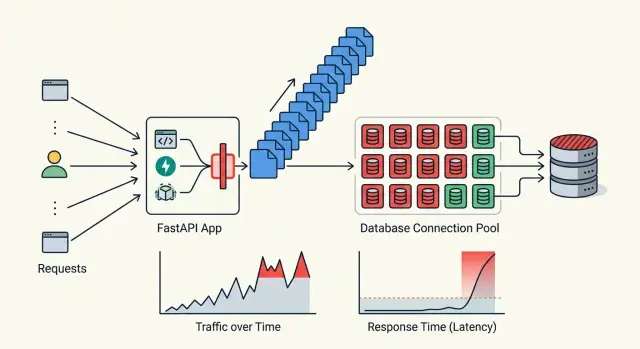
Table of Contents
Why async apps still freeze
Many FastAPI async pitfalls start with one false assumption: if a route uses async def, the app will stay responsive. It will not. Async code only helps when every part of the request path gives control back quickly. One slow call can keep a worker busy far longer than it seems on paper.
That matters because delays stack. A request might spend 30 ms waiting on the database, 40 ms on a cache lookup, and another 80 ms on an external API. None of those numbers look scary alone. Under traffic, they pile up. Ten requests waiting at once turns a small pause into a queue, and the queue is what users feel.
The event loop is sensitive to this. If one request hits blocking work, other requests do not move forward when they should. Response times jump in bursts. A page that felt instant in testing suddenly hangs for two or three seconds, even though the code looked fine during review.
Users notice this before your charts do. They see slow logins, spinning buttons, and random timeouts. Meanwhile, CPU may still look normal, memory may look fine, and average latency can hide the worst requests. Percentiles and queueing pain show up later, after people have already felt the app slow down.
Local testing misses this all the time. On a laptop, one person clicks through a happy path and everything seems fast. Production is different. Real traffic means overlapping requests, uneven network timing, retries, and bursts that arrive at the same second.
A simple example: one endpoint calls a payment service that usually answers in 120 ms. Once traffic rises, a few calls take 900 ms. Those slow requests hold workers open, newer requests wait behind them, and the whole app feels sticky. Nothing is fully broken. It is just busy in the wrong places.
That is why async apps still freeze. They usually do not fail from one huge mistake. They fail from small waits that pile up until the app cannot hide them anymore.
What blocks the event loop
An async FastAPI handler can still stall hard if one line inside it does synchronous work. That is why many FastAPI async pitfalls show up only under load. One request looks fine. Fifty concurrent requests make the problem obvious.
The most common trap is a sync HTTP client inside async def. If a route calls requests.get() or another blocking client, that worker waits for the remote server and stops running other coroutines in the meantime. A slow payment API, a webhook retry, or even a DNS delay can back up unrelated requests.
Some database tools cause the same pain. They look async on the surface, but a driver, ORM adapter, or helper function may still do sync network or parsing work underneath. The code reads cleanly, yet the event loop sits idle while that call finishes.
A few blockers hide in boring places:
time.sleep()pauses the whole worker- local file reads and writes can stall requests
- DNS lookups may block if a library does them synchronously
- heavy logging can slow hot paths, especially with disk or network handlers
- CPU-heavy work like image resizing, large JSON parsing, PDF handling, or data compression burns time that the loop needs for other tasks
A small example makes this clearer. Imagine an upload endpoint that saves a file, writes a large audit log, sends a sync HTTP call to a third-party service, and then creates a thumbnail in Python. Each step may seem harmless on its own. Together, they turn one request into a traffic jam.
Connection waits can look similar to event loop blocking, even when they are a different problem. If your database or HTTP pool runs out of free connections, requests pile up and users still feel the app freezing. The effect is the same from their side: pages hang, timeouts rise, and latency jumps.
If a request path touches the network, disk, or heavy CPU work, assume it can block until you prove otherwise.
How to audit a request path
Most FastAPI async pitfalls show up when you follow one real request all the way through. Pick a single endpoint, then trace the exact path from the route handler to the database, cache, external APIs, and response encoding. A simple diagram on paper often finds more trouble than reading files one by one.
Label every call as async or sync. Be blunt about it. If an async def route calls a sync SDK, a sync ORM method, or local file I/O, that part can block the event loop or force a jump into the threadpool.
A useful audit usually includes these stops:
- route function and dependencies
- middleware, auth, and request parsing
- database, cache, and outbound HTTP calls
- background tasks triggered by the request
- response serialization and logging
What to mark during the audit
For each stop, write down two things: how long it takes, and where it runs. You want to know whether the request is waiting on true async I/O, sitting in a busy threadpool, or blocking the loop outright.
A small example makes this obvious. Say one endpoint loads a customer from Postgres, checks Redis, then calls a billing API. The database layer uses an async driver, but the Redis client is sync, the billing SDK is sync, and a custom middleware reads a file on every request. That app may look fine in local testing, then slow down hard when traffic rises.
Check middleware, startup hooks, and background tasks with the same care. Middleware runs on every request, so even a 20 millisecond sync call adds up fast. Startup code can also hurt if it refreshes data in a blocking way and ties up workers during deploys. Background tasks do not magically make blocking work harmless if they still run in the same process.
Accidental threadpool jumps deserve special attention. They often come from sync dependencies, helper functions, old SDKs, or wrappers that hide blocking code. One jump is not always a problem. Five small jumps in one request usually are.
If you can answer "what runs where, and for how long" for one request path, you already know where to fix the app first.
Replace blocking work step by step
Start with the calls that wait on something outside your app. Many FastAPI async pitfalls begin with one innocent line: a sync HTTP client, a sync database driver, or a file read inside an async def handler. If a library offers a real async version, switch that first. It usually gives you the biggest win with the least redesign.
A practical order helps:
- Replace sync network and database calls with async clients.
- Move heavy CPU work out of the request path.
- Isolate the few sync calls you still need in a threadpool.
- Add timeouts so slow dependencies do not hold requests open.
The first step is usually boring, and that is good. Swap requests for an async HTTP client. Use async database access instead of a sync ORM session hidden inside an async route. One blocking call can stall the event loop for every request on that worker.
CPU work needs a different fix. Image resizing, PDF parsing, large CSV imports, and complex report generation do not belong in the request handler. They keep the CPU busy, so async does not help much. Put that work on a queue, run it in a separate process, or hand it to a worker service. Return quickly, then let the client poll for status or fetch the result later.
Sometimes you cannot remove a sync call right away. Maybe a payment SDK or an internal library only supports sync code. In that case, wrap it on purpose in a threadpool. Treat this as a temporary bridge, not the default design. If those calls become common, the threadpool turns into another bottleneck.
Timeouts matter more than most teams think. Set them on outbound HTTP calls, database queries, and cache requests. Without a timeout, a slow dependency can pile up open requests until the app feels frozen. A short timeout with a clear error beats 40 seconds of silence.
Keep request handlers thin. A good handler should parse input, call one service layer, and return a response. If the route opens files, talks to three external services, formats a report, and sends email, it is too fat.
A simple example: a FastAPI endpoint receives a file upload, stores metadata, calls an external API, and builds thumbnails. The responsive version saves the upload, writes a job record, returns 202, and lets a worker handle thumbnails and any slow processing. Users get a fast reply, and your app keeps moving under load.
Set connection pools on purpose
A pool is a traffic gate, not a speed trick. If you set it too high, your app can flood the database or an external API and make every request slower. If you set it too low, requests sit and wait even when the rest of the app is fine.
Start with the system that has the hardest limit. If your database can safely handle 40 active connections, a FastAPI app with 8 workers should not try to open 20 connections per worker. That math breaks production fast. Leave room for migrations, admin tools, and background jobs.
Shared clients matter just as much. Create one database engine and one HTTP client at startup, then reuse them for every request. A client per request burns sockets, skips reuse, and turns small traffic spikes into connection churn.
Outbound calls need caps too. If your app retries a slow third-party API with no connection limit, those retries stack up. Soon you are not waiting on one slow service. You are waiting on hundreds of blocked tasks.
Pick limits your system can survive
A simple setup often works better than a big one:
- Set the database pool from real database capacity, not guesswork.
- Reuse one shared async client for each service.
- Cap outbound HTTP connections and keep retry counts low.
- Set short pool timeouts so requests fail fast.
- Return a clear 503 or similar error when the app is overloaded.
Failing fast feels harsh, but waiting forever is worse. A request that times out after 30 seconds ties up memory, worker time, and user patience. A fast failure gives the caller a chance to retry later and protects the rest of the app.
Watch queue time, not only query time. A SQL query may run in 40 ms, but if the request waited 900 ms for a free connection, users still felt a slow app. The same rule applies to outbound HTTP.
Track at least three numbers: time spent waiting for a pool slot, time spent doing the actual work, and the count of pool timeouts. That split shows whether you need a query fix, a pool change, or lower concurrency.
A simple FastAPI example under load
A common FastAPI failure starts with an upload endpoint that looks harmless. A user sends a file, the app stores it, runs a virus scan, writes a row to the database, and returns "ok". On a laptop, it feels fast enough.
The trouble starts when the route is async, but the virus scanner is not. Many teams call a sync scanner from the request handler and assume FastAPI will smooth it over. It often does, for a while, by pushing that work into a small threadpool.
Where the slowdown starts
Now add one more problem: every request opens a fresh database session. That means more connection churn, more time spent waiting for a free slot, and more pressure on the pool. With five users, you may not notice. With fifty users uploading files at once, wait time jumps fast.
The sequence usually looks like this:
- request enters the async endpoint
- sync scan grabs a thread
- database code opens another session
- other requests pile up behind both limits
At first, the threadpool hides the issue. A few requests still finish, so the app looks healthy in basic tests. Then retries begin. Clients hold connections open longer, workers stay busy longer, and pool starvation gets worse.
You can picture it with simple numbers. If a scan takes 2 seconds and the threadpool can run 10 scans at once, request 11 already waits before it does any real work. If each request also creates a new database session, the pool fills with work that should have finished much earlier. The app does not crash. It just turns slow, then erratic.
What fixes it
The clean fix is to move scanning out of the request path. Store the upload, return a job ID, and let a worker scan the file in the background. Reuse database sessions through a proper pool instead of creating them from scratch on every request.
That change gives the app headroom again. Upload requests finish quickly, the event loop stays free to accept new work, and the database pool handles short queries instead of long waits. This is one of the most common FastAPI async pitfalls because each piece seems small on its own. Together, they choke a busy app.
Testing patterns that catch stalls early
Single request tests miss the problem. An endpoint can return 200 in 40 ms by itself and still jam the event loop when 30 requests hit it together. Many FastAPI async pitfalls only show up when the app shares a database pool, an HTTP client, and a slow upstream API.
Pick one async test stack and keep it for the whole suite. Use pytest-anyio or pytest-asyncio, not a mix that grew by accident. Keep one event loop policy, one style of async fixtures, and one way to create test clients. Mixed setups create flaky failures that waste hours.
Tests to keep
- Run a concurrency test for every hot endpoint. Send 20 to 100 requests at once and check total time, status codes, and whether unrelated requests still finish on time.
- Add a slow upstream case. Mock one dependency to pause for 2 or 5 seconds, then verify other requests do not pile up behind it.
- Force pool exhaustion on purpose. Shrink the database or HTTP client pool in test config, send more work than the pool allows, and assert the app times out or returns a controlled error.
- Trap blocking calls. Patch
time.sleep, sync HTTP calls, or other known blockers so tests fail the moment someone adds them to an async route.
A small test can catch a lot. Make one request wait on a fake upstream service, then send a second request to a cheap endpoint such as health or config. If that second request slows down too, you probably blocked the loop or held a pool slot too long.
Timeout checks matter just as much as success checks. Do not stop at "it returned 504". Assert that the app cancels the work, frees the connection, and logs a clear error. If one stuck request keeps a slot forever, the next ten users pay for it.
These tests do not need a huge load rig. A few focused async tests in CI catch stalls early, while the fix is still one small pull request instead of a late night production issue.
Mistakes teams keep making
A lot of FastAPI async pitfalls come from half-finished migrations. A team starts with async handlers, then leaves one old sync database driver in place because "it still works." It does work, until traffic rises and that one blocking call holds the event loop long enough to slow unrelated requests.
The same mess shows up with HTTP calls. If each handler creates its own AsyncClient, the app keeps opening and closing connections instead of reusing them. That adds latency, wastes sockets, and makes timeouts harder to read when things go wrong.
Background tasks get abused too. Teams move slow work into BackgroundTasks, send the response, and assume the problem is gone. It is not gone. If that task does CPU-heavy work, big file processing, or blocking network calls, it still eats resources in the same app process.
Where the trouble usually starts
One route often ends up with all of these at once:
- an async endpoint that calls a sync library
- a fresh database or HTTP client per request
- a background task that runs longer than the request itself
- a pool size set high enough to flood the database
Big connection pools look safe, but they can make a bad day worse. If your app can open 200 database connections, that does not mean your database can handle 200 busy queries well. I have seen teams "fix" slow requests by raising pool limits, then watch the database spend all its time context switching and queueing.
Testing habits make this harder to catch. A codebase can have perfect unit test coverage and still freeze under real concurrency. If every test mocks the database, mocks the HTTP service, and runs one request at a time, you never see connection churn, pool starvation, or event loop blocking.
A better habit is simple: keep one async path for each kind of I/O, reuse clients, and test with a small burst of concurrent requests against real services or close fakes. Even 20 parallel requests can expose problems that 2,000 unit tests miss.
This is the sort of thing an experienced CTO or advisor spots fast during a review. One request path diagram, plus a short load test, often shows why an app feels fine in staging and sticky in production.
Quick checks before you ship
A FastAPI app can look fine in local tests and still slow down hard in production. Most FastAPI async pitfalls come from a few small choices that stack up under load: no timeout on one outbound call, a new client per request, or pool sizes that do not match real traffic.
Use a short pre-release checklist and treat it like part of the code review. Five minutes here can save hours of chasing random stalls later.
- Put a timeout on every outbound call. That includes HTTP requests, database calls, cache operations, and any background retry logic. If one dependency hangs, your request should fail fast instead of holding the event loop open.
- Create shared clients once and keep them for the app lifespan. Reusing one HTTP client or database client avoids extra connection setup and keeps FastAPI connection pools predictable.
- Set pool limits on purpose. Match them to your worker count, expected concurrency, and the hard limits of your database or upstream service. Bigger pools do not always help. They often just move the bottleneck.
- Test failure paths, not only happy paths. Simulate retries, client cancellations, and queued requests so you can see what happens when 20 or 50 requests pile up at once.
- Watch a small set of numbers on dashboards. Queue time, timeout rate, and open connections tell you very quickly whether the app is waiting on code, waiting on a dependency, or simply overloaded.
A simple example: if you run 4 workers and each worker can open 50 database connections, you may ask for 200 connections without noticing. If the database allows 100, requests will queue, time out, or fail in bursts. That problem looks random until you check the numbers.
Teams that stay calm in production usually make these checks boring and repeatable. They keep shared clients in startup and shutdown hooks, cap retries, and test with delays on purpose. That is how responsive Python apps stay responsive when real traffic shows up.
Next steps for your team
Pick one endpoint that gets real traffic and inspect it this week. Do not start by changing worker counts or adding more servers. If one request still blocks the event loop, extra workers only hide the problem for a while.
A good first target is the route that slows down first when traffic rises. For many teams, that is login, search, checkout, or a dashboard API that pulls data from several places. Trace that path from request start to response end and mark every database call, HTTP call, file read, sleep, and CPU-heavy step.
Use a short checklist and keep it practical:
- Pick one hot endpoint and measure its normal response time and p95 under light load.
- Remove one blocking library before you tune concurrency settings.
- Set database and HTTP client pool limits on purpose, then test them under load.
- Add one load test to CI before the next release, even if it is small.
That order matters. Teams often waste days tuning Gunicorn or Uvicorn settings while a single sync SDK, ORM call, or file operation stalls every request behind it. Fix the blocking work first. Then pool settings and worker counts start to mean something.
Your CI test does not need to be fancy. A simple run that sends steady traffic for a few minutes can catch queueing, slow pool recovery, and timeout spikes early. If response time jumps when concurrency goes from 20 to 50, you have a clear place to look before users feel it.
If your team keeps hitting the same FastAPI async pitfalls, an outside review can save time. Oleg Sotnikov can audit blocking calls, connection pool limits, and test setup as part of Fractional CTO support. That works well when you need a clear fix plan without rewriting the whole app. If stalls keep showing up in production, book a consultation and fix the real bottlenecks first.


