How to extract a domain model before building screens
Learn how to extract a domain model from onboarding checklists, forms, and approvals so teams define actions, rules, and data before UI work.
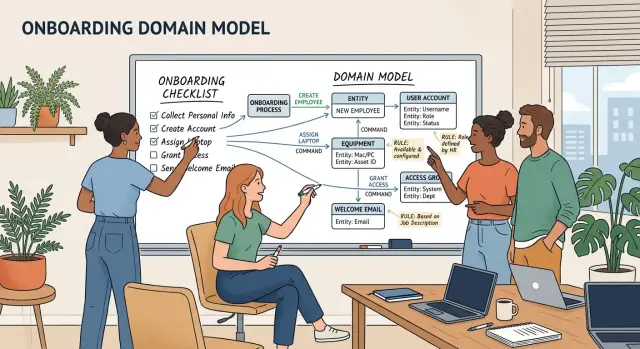
Table of Contents
Why teams start in the wrong place
Teams often start with screens because screens are easy to point at. A signup form, a dashboard, and a few status emails feel like progress. But screens only show the surface.
The real work sits underneath. Someone submits information. Someone checks it. Something gets approved or rejected. A deadline changes what happens next. If the team skips that part, it builds pages before agreeing on what the system actually does.
That is how rules end up scattered across the product. One rule lives in a dropdown label, another in a confirmation email, another in a nightly job, and another in a support playbook. A month later, nobody can explain the full onboarding flow without opening five tools and asking three people.
Small wording gaps do more damage than most teams expect. If one screen says "active," support says "verified," and finance says "approved," people assume those words mean the same thing. Often they do not. Engineers make one guess, operations makes another, and users get stuck in the middle.
A simple example shows the problem. A founder asks for an onboarding flow with steps for account setup, document upload, and review. The team designs three screens right away. Later, it learns that some users can skip review, some need extra checks, and some documents expire after 30 days. Now the UI, background jobs, and messages all need changes because the team modeled pages first instead of behavior.
When you name the business objects, actions, and rules early, the conversation changes. Designers, engineers, and support start using the same terms. Workflow mapping gets easier because everyone can see where a state changes and why.
That is usually the point of a product architecture review: slow down before code spreads confusion. A small shared model does not make the work heavier. It cuts rework, shortens handoffs, and keeps hidden rules from leaking into random screens and jobs.
Start with the onboarding checklist
Start with the checklist people already use, not the polished version from a slide deck. Ask the person doing the work to show the real document, ticket template, spreadsheet, or chat thread. If three teams onboard people in three different ways, collect all three. The mess is useful. It shows where the real rules live.
Read each line and mark what is happening in plain words. One line may tell someone to create an account. Another may ask a manager to approve a request. A later line may pass work to finance or IT. Those are different kinds of steps, so label them early. Usually you can sort them into four simple types: an action, an approval, a handoff, or a gate that decides whether the next step is allowed.
As you read, circle words that name a thing. In onboarding, that might be applicant, employee, contract, laptop, access request, or training record. Do not clean these up yet. If one team says "candidate" and another says "new hire," keep both on the page until you know whether they mean the same thing.
Watch for places where people stop and ask, "Can we do this yet?" That question usually points to a business rule, even if nobody wrote it down. Maybe IT cannot issue credentials until HR confirms the start date. Maybe payroll cannot start until the signed contract is in place. Mark those spots and keep going.
Keep the first version plain and a little rough. If you rewrite everything into formal product language too early, people stop recognizing their own work. Simple wording helps the team argue about what really happens, not about jargon.
If the checklist still fits on one page after this pass, that is a good sign. Engineers, operators, and managers can read it together and fix it before anyone wires up screens or background jobs.
Step by step: turn steps into commands
A checklist step often hides the real business action. "Review signup," "welcome screen," or "KYC page" may help a team talk about the flow, but they do not tell engineers what the system must do. Rewrite each step as a command.
A good command uses a plain verb and an object. "Approve account" works. "Account approval" is weaker, and "approval screen" is just a screen name. The command should sound like something a person or a system can start.
Then add the actor. Someone always starts the action, even if a job runs it later. It may be a customer, an operations agent, a manager, or the system itself. Write that down, and hidden decisions show up fast. "System sends reminder" and "support agent sends reminder" look similar, but they create different rules.
Then write what must already be true. "Approve account" is incomplete until you say what has to exist first: identity documents received, email confirmed, or risk review passed. Those conditions stop teams from wiring screens and background jobs around guesses.
A short rewrite makes the difference clear. "Review new user" becomes "Operations agent approves account." "Welcome page" becomes "System creates workspace." "KYC" becomes "Compliance agent verifies identity." "Reminder email" becomes "System sends onboarding reminder." "Payment setup" becomes "Customer adds billing method."
Keep commands separate from screen names all the way through. A screen can trigger several commands, and one command can appear in different places. If you name the command after the screen, the UI starts driving the model. That is how logic gets spread across forms, jobs, and admin panels.
This small rewrite step often finds missing rules before code starts. If a team cannot say who starts an action and what must already be true, the step is not ready. It is still a note, not a command.
Find entities and state changes
When you build the model, look for nouns that appear across several steps. A welcome email is usually not an entity. An applicant, company, account, or approval often is, because the business keeps referring to it before, during, and after onboarding.
A quick test helps: if product, support, and finance would all use the same noun, it probably belongs in the model. If a noun only appears on one screen or in one report, leave it out for now.
Then clean up the names. Teams often say "user," "member," "customer," and "account" as if they mean different things when they actually mean one thing. Pick one name, write a short definition, and keep it consistent. If two words really describe different business objects, split them on purpose.
States come next. Keep them few and clear. Write only the states that change a decision, permission, or next step. For onboarding, "invited," "approved," and "active" are useful because people can act on them. Twenty tiny statuses usually create noise.
This is where real gaps show up. One team thinks "approved" means sales checked the deal. Another thinks it means legal signed off. That is not a naming issue. It is a state issue.
Map each state change to a command. For example, "Invite company" moves a company from draft to invited. "Approve company" moves it from invited to approved. "Activate account" moves an account from approved to active. "Suspend account" moves it from active to suspended.
If you cannot name the command that causes a change, the process is still fuzzy. If two commands produce the same change for different reasons, write both down. The reason often matters for permissions, audit logs, and follow-up jobs.
Ignore database tables at this stage. Tables, columns, and foreign keys pull the conversation toward storage too early. The team starts debating schema names before agreeing on what the business is tracking.
A plain-language model is enough: entity, current state, allowed next state, and the command that moves it. Once that is clear, screens and background jobs get much easier to design.
Write invariants before screens and jobs
If you want a model that holds up, write the rules that stay true no matter how work enters the system. A user might click a form, a manager might edit a record, or a scheduled job might retry at night. The rule should not change with the entry point.
That is why invariants belong on paper before anyone wires up screens and jobs. Skip them, and each screen invents its own logic. The admin panel allows one thing, the public form allows another, and the job queue creates records nobody meant to allow.
Write each invariant as one short sentence. Keep the wording plain and concrete. "An applicant can have only one active onboarding case." "Approval expires after 30 days." "The system sends a welcome message only after identity verification passes." If one sentence tries to do too much, split it.
Some rules block an action. "Do not activate the account until payment clears." Some rules create follow-up work. "If a document expires, create a review task." Some rules do both. "If training is missing after 30 days, block access and open a compliance task."
This removes guesswork. Engineers know whether the system should reject, warn, queue, retry, or create work for a person.
Keep time limits inside the rule itself. Do not write "expires later" or "after a while." Write the number. "Invite expires after 7 days." "Background check expires after 30 days." Time rules often drive jobs, reminders, and audit logs, so vague wording creates rework fast.
Good invariants also point to state changes in your entities. If a command says "approve applicant," the rule should tell you when approval is allowed, what status changes, and what extra work starts next. If two people read the rule and imagine different outcomes on day 30, the rule still needs work.
A simple onboarding example
Imagine a new hire named Maya. She submits her ID and tax details before her first day. That one step already contains three parts: an action, a record, and a rule.
The action is simple: Maya submits documents. The records are the employee profile, the uploaded files, and the current review status. The rule is simple too: HR cannot move the case forward until the required documents are there.
HR checks the files next. If the ID photo is blurry or the tax number is missing, HR sends the case back for fixes. That is a separate action, not a footnote inside the same form. Maya then resubmits the corrected documents, and the case returns to review.
After HR clears the documents, the manager approves the role, team, and start date. That split matters. HR confirms identity and tax details. The manager confirms where Maya will work and when she starts. Keeping those actions separate makes the workflow easier to understand and easier to audit later.
The contract needs its own place in the model too. A signed contract changes the employee record from "pending" to "ready for payroll." Payroll can start only when two conditions are true: the manager approved the assignment, and Maya signed the contract.
Now the model is clear in one place. The commands are submit documents, request fix, resubmit documents, approve assignment, sign contract, and start payroll. The entities are employee, document set, approval, contract, and payroll profile. The invariants are the rules that must always hold, such as "no payroll before approval" and "no approval without role, team, and start date."
Once the model is clear, engineers can build the upload screen, the HR review queue, and the payroll job without guessing how the process should work.
Mistakes that cause rework
Most rework starts before anyone writes much code. The model is still fuzzy, so the team fills gaps with screens, cron jobs, and extra tables. That feels fast for a week. Then edge cases show up, and people start renaming fields, merging records, and rewriting flows they thought were done.
A common mistake is turning every form field into its own entity. A tax ID, a phone number, and a preferred contact method are usually attributes on a company or user record. If the team treats each field like a separate thing, the data model gets strange fast. Engineers add relations nobody needs, and simple changes start taking twice as long.
Another trap is naming commands after buttons. "Click submit" is not a business action. "Submit application" is. Button labels change when the design changes. The business action should stay the same on a web page, in a mobile app, or through an API.
Teams also hide rules inside background jobs because jobs feel like a safe place for cleanup. That creates confusion later. Nobody can answer a simple question like when an account becomes active or why one applicant moved to manual review. Jobs should do work. They should not decide policy.
A smaller mistake creates a lot of clutter: mixing one-time tasks with long-lived records. "Send welcome email" happens once. "User" stays for years. "Request missing document" is an event or a task, not a core entity. When teams mix these up, reports get noisy and old workflow items stick around as if they still matter.
Skipping exceptions is another steady source of rework. Real onboarding always has rejected documents, duplicate accounts, expired links, and people who retry with a new email. If the model ignores those cases, engineers bolt on flags later. Soon one status field means four different things.
A quick check helps before any build starts. Ask of every item: is this a business object, a business action, or just a screen detail? If the answer is fuzzy, stop there and fix it first.
Quick check before engineers start
A team can save days of rework with a ten-minute review before anyone opens Figma, starts a job runner, or builds an API. If you cannot explain the flow out loud, the flow is still fuzzy. Screens often hide gaps that become expensive later.
Ask one person to describe the process from the user's first step to the final result without showing a mockup. Then ask a second person to repeat it in their own words. If the story changes, the model is not stable yet.
Before engineers begin, check five things. First, say the flow in plain language. A new teammate should understand who starts the process, what happens next, and where it ends. Second, check every command name. Each one should describe one action, such as "submit application" or "approve account," not a bundle of actions packed into one vague label. Third, check every entity. Each entity needs an owner, a current state, and a reason that state can change. Fourth, write the rules that can never break. If a user must accept terms before activation, or a record cannot move backward after approval, put that in writing now. Fifth, list the odd cases people already know. Duplicate submissions, missing documents, manual overrides, and late approvals should not live only in someone's memory.
This review is where teams often realize they mixed commands with screens. "Open onboarding page" is not a domain action. "Upload ID" is. That small distinction keeps the model useful even after the UI changes.
Another test works well: take one real onboarding case and walk it through the commands, entities, and rules on paper. If someone asks, "What happens if the user leaves and comes back tomorrow?" or "Who can reopen this record?" and nobody knows, stop and answer it before the build starts.
If the team passes this check, engineers can build with fewer guesses. They know what must happen, what data matters, and which rules they cannot bend just to make a screen feel finished.
Next steps for your team
Put the draft model in front of product, ops, and engineering at the same time. If they review it separately, each group fills gaps in its own way. A 30-minute working session is usually enough to catch missing steps, fuzzy ownership, and state changes nobody wrote down.
Ask people to read each command out loud in plain language. If a support lead or operations manager hesitates, the command is still too vague. Rewrite it until non-technical people agree on what triggers it, who can do it, and what must already be true.
A simple review order helps. Read the workflow from start to finish without talking about screens. Rename unclear commands so they sound like real actions, not system labels. Check each entity and its state changes against the actual process. Then mark which screens, background jobs, notifications, and approvals each step needs.
That last pass usually changes scope. Once the model is clear, estimates get easier. You can size the first build by counting real user actions, hidden jobs, and messages the system must send. Many teams find that one "simple" onboarding flow really needs four screens, two approval paths, and a retry job for failed documents.
Outside help can be useful when the flow touches pricing rules, approval chains, contracts, or compliance checks. Those areas create quiet rework because one missed rule changes both the product and the operations process. A short architecture review can save weeks of cleanup.
If you want another set of eyes, Oleg Sotnikov at oleg.is does this kind of work as a fractional CTO and startup advisor. His background in product architecture, infrastructure, and AI-first software teams makes him a good fit for reviewing a draft model before engineers start wiring screens, jobs, and notifications.
Do not wait for perfect diagrams. Get agreement on the language first, lock the main rules, and let engineers build from that.
Frequently Asked Questions
Why is starting with screens a bad idea?
Screens show the surface, not the business rules underneath. If you design pages first, the real logic ends up split across forms, emails, jobs, and support notes.
Start with what the system must do, who does it, and what has to be true before each step. Then the UI has a much better chance of matching the real workflow.
What should I collect before I model the flow?
Use the real checklist, ticket, spreadsheet, or chat thread that people already follow. The messy version tells you where approvals, handoffs, and hidden rules actually live.
If different teams do the same flow in different ways, put all versions side by side. That makes conflicts and missing rules much easier to spot.
How do I turn a checklist step into a real command?
Rewrite each step as a plain verb plus an object, then add the actor. "Approve account" is clearer than "approval screen," and "Operations agent approves account" is clearer than both.
After that, write what must already be true. If you cannot name the actor or the preconditions, the step is still fuzzy.
What is the difference between a screen and a command?
A screen is a place where someone does work. A command is the actual business action that changes something.
One screen can trigger several commands, and the same command can appear in different places. If you name actions after screens, the UI starts driving the model and the logic spreads everywhere.
How do I know which nouns should become entities?
Look for nouns that show up across several steps and still matter later. Things like applicant, contract, account, and approval usually belong in the model because multiple teams talk about them.
Ignore one-off items tied to a single page or report. Those often belong in the UI or reporting layer, not in the core model.
How many states should an entity have?
Keep states few and clear. Use only the ones that change a decision, a permission, or the next step.
Names like "invited," "approved," and "active" work because people can act on them. If you have a long list of tiny statuses, the team will argue about wording instead of behavior.
What are invariants, and why should I write them early?
An invariant is a rule that stays true no matter how work enters the system. The rule should hold on a form, in an admin tool, and inside a scheduled job.
Write it as one short sentence with concrete wording, like "Approval expires after 30 days" or "Do not activate the account until payment clears." That stops each entry point from inventing its own logic.
What mistakes cause the most rework?
Teams often treat every field like its own entity, name actions after buttons, or hide policy inside background jobs. Those shortcuts feel fast at first, then they create messy data and hard-to-explain behavior.
Another common problem is skipping exceptions. Rejected documents, duplicate accounts, and expired links will happen, so model them before engineers start bolting on flags.
How can I tell if the model is ready for engineers?
Walk one real case through the model from start to finish without showing a mockup. If people cannot agree on who starts each action, what changes state, or what happens when something goes wrong, the model still needs work.
A simple retell test helps too. Ask two people to explain the same flow in their own words. If their stories differ, fix the language before anyone starts building.
When should a team bring in outside help?
Bring product, ops, and engineering into one short working session and read the commands out loud. If people hesitate or use different words for the same thing, tighten the language first.
Outside help makes sense when the flow touches approvals, contracts, compliance, pricing, or other areas where one missed rule creates weeks of cleanup. A short architecture review can catch those gaps early.


