External integration owner: stop tool risk from piling up
An external integration owner keeps runbooks, billing reviews, and sunset calls clear so unused tools do not turn into hidden cost and security risk.
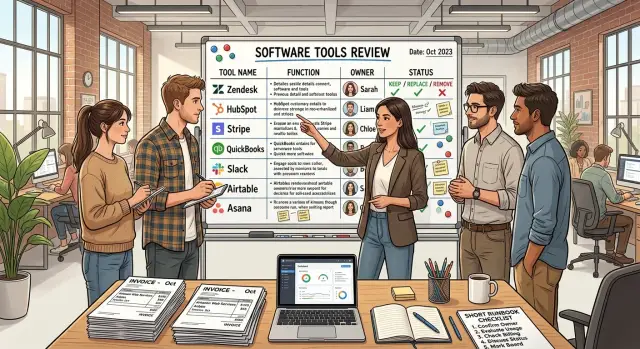
Table of Contents
Why forgotten integrations become quiet risk
Most integrations start with a simple need. A team wants leads to sync, invoices to send, or support tickets to land in the right place. Someone connects two tools, tests the happy path, and moves on.
The risk starts later, when nobody clearly owns that connection.
A familiar pattern plays out in growing teams. The person who bought the app leaves, changes roles, or stops using it. The integration keeps running with the same token, the same permissions, and the same access to company or customer data. Nobody checks whether it still needs that access. Nobody checks whether the data still lands where the team expects.
That seems minor until something changes. A field gets renamed. An API limit gets hit. A webhook fails on Friday and no one notices. The error sits there until a customer misses an email, a teammate works from bad data, or finance asks why a tool renewed for another year.
Money leaks the same way. Teams keep paying for apps nobody opens because the renewal sits on a company card, the invoice goes to an old inbox, or the tool still feels "useful" even though no one can explain what it does now. One forgotten app will not wreck a budget. Ten often will.
Data problems are worse because they stay quiet. If a form tool still pushes records into a CRM with the wrong mapping, the system may not fail loudly. It just fills the pipeline with messy entries. Then people waste hours fixing reports, chasing missing context, or contacting the wrong customer.
This gets worse as a company adds more tools. More apps mean more tokens, more billing cycles, and more places where a small mismatch can sit for months. That is why one named owner matters. It does not remove every risk, but it keeps integrations from drifting into a blind spot where access, cost, and failures pile up together.
What ownership looks like
On paper, the job is simple: one person keeps each outside tool understandable, paid for, and safe to use. That person does not need to be the most technical employee. They need enough context to answer basic questions quickly and enough discipline to keep a few details current.
The owner starts with purpose. They should know why the tool exists, which team depends on it, and what breaks if it stops working. If nobody can explain that in two or three plain sentences, the tool already has a problem.
They also keep a short runbook. Short matters. A useful runbook fits on one page and covers setup, who approves access, where credentials live, and what to do first when something fails. If a finance sync stops on a Friday afternoon, people should not have to guess who logs in first or where alerts show up.
Good owners watch the money too. They check invoices, seat counts, and renewal dates before auto-renewal makes the decision for them. It is boring work, which is exactly why teams skip it. A tool with 40 paid seats and 11 active users can waste money for months.
During review, the owner should ask blunt questions. Who still uses this every week? What job does it do that another tool cannot do? Has usage grown, stayed flat, or quietly disappeared? What would it take to replace it or remove it?
This is where ownership becomes useful instead of administrative. Someone makes the call, or pushes for the call, when the tool stops earning its cost. Maybe it stays because one business-critical workflow still depends on it. Maybe another tool already covers the same job. Maybe it should go away entirely.
The point is not to create a gatekeeper. It is to stop the common mess where five people assume someone else is handling access, billing, outages, and renewals.
Choosing the right owner
Start with the business process, not the vendor name. The right owner sits in the team that depends on the tool every week and feels the pain when it breaks. If the integration moves leads into a CRM, sales should own it. If it pushes invoices into accounting, finance should own it. If it handles deployments or alerts, engineering should own it.
The owner also needs enough authority to make a call when renewal time comes. They do not need to sign every invoice, but they should be able to say "keep it," "replace it," or "remove it" without waiting for three layers of approval. If they cannot do that, they are just taking notes.
Shared ownership sounds reasonable, but it usually fails. When several managers "own" one tool, nobody updates the runbook, nobody checks usage, and everyone assumes someone else reviewed the bill. One named person works better. Other teams can still give input, but one person keeps the record current and makes the final call.
A simple test helps. Ask who notices first if the integration stops working, who understands why the business still needs it, who can approve renewal or say no, and who will answer questions during an audit or incident. If one person matches most of those answers, you probably found the owner.
Write down a backup owner on day one. People take vacations, switch roles, and leave. Without a backup, even a well-managed tool can become an orphan in a month. Put both names in the same place as the runbook, renewal date, and billing details.
This matters even more in small companies, where one person may cover product, operations, and vendor decisions at the same time. Clear ownership saves time and cuts quiet risk before it grows.
Write the runbook in one sitting
A runbook that takes 20 minutes to write can save a full day later. The owner should write it right after setup, while the details are still easy to remember.
Start with the basics. Note how the team logs in, who has admin rights, which email address gets account alerts, and which billing account pays for the tool. If the person who set it up goes on vacation or leaves the company, someone else can still get in and act.
Then map the connections. Write down which systems send data into the tool, which systems receive data from it, and what breaks if one connection fails. A short note like "form tool sends leads to CRM" or "support app syncs users from billing system" is often enough. You do not need a diagram unless the setup is messy.
Keep the troubleshooting section simple. Describe what normal looks like, which checks to do first, where error messages usually appear, who can unblock access or billing issues, and how to export data if the tool stops working.
That export step matters more than most teams expect. It is easy to ignore when everything works. It becomes urgent when you need to leave the tool quickly, recover records, or prove what data you still have. Write down the export format, any size limits, and where the file should be stored.
Finish with renewal details. Save the renewal date, notice period, contract owner, and the last day you can cancel without paying for another term. Put that date somewhere people already check, such as the finance calendar or operations tracker.
A runbook does not need polish. It needs enough detail that another person can log in, confirm the issue, pull the data, and stop an unwanted renewal without guessing.
Review billing before renewal
Renewals are where tool sprawl turns into real cost. A team adds one service for analytics, another for support, and a third for storage, then leaves every setting untouched for a year. The bill grows quietly, and so does the risk.
The owner should review each contract before the renewal date, not after the invoice lands. Start with the mismatch that shows up all the time: paid seats versus active users. If 12 people can log in but only 5 used the tool in the last 60 days, fix that first.
Then look at the charges hiding on the second line of the bill. Storage fees, premium support, extra environments, reserved phone numbers, and parked domains often stay active long after the team stops using them. Each one looks small on its own. Together, they drain budget every month.
Overlap is the next problem. Many teams pay for two tools that solve the same job because no one wants to untangle the switch. One app sends alerts. Another already does that. One service stores files. Another already includes enough storage. If a second tool does not earn its place, remove it or set a clear sunset date.
A billing review can stay simple: match licenses to real users, remove add-ons nobody uses, check whether another current tool already covers the same work, cancel old test environments or unused domains, and set the next review date before the meeting ends.
Put review dates on the team calendar at least 30 days before each renewal. That gives the owner time to confirm usage, ask questions, and make a decision without rushing into another term.
Small companies feel this fast. A team lead or fractional CTO might find three dormant subscriptions, an oversized support tier, and a staging environment nobody touched in six months. One review can cut waste, but the bigger win is clarity. The team knows what it pays for, who uses it, and when it should go away.
Decide: keep, replace, or remove
A tool does not earn a permanent place just because the team set it up once. Every outside app should have a simple decision attached to it: keep it, replace it, or remove it. If nobody can explain the tool's job in one or two sentences, removal is often the right call.
Keep the tools that still save real time, reduce mistakes, or protect revenue. That might be a payment service, a support system, or a monitoring tool the team uses every week. If people rely on it, the cost is fair, and problems get fixed in a reasonable time, keep it and move on.
Replace tools that do the job badly. Common signs are weak fit, slow support, awkward setup, or pricing that keeps climbing while usage stays flat. The owner should not wait for a disaster before making a switch. If the team keeps building workarounds around one tool, that tool is already costing more than the invoice suggests.
Remove tools with no clear user and no clear job. This is where risk piles up. Old forms still send data. Former contractors still have access. Billing keeps renewing because nobody wants to touch it. If a tool is not part of a live process, shut it down cleanly.
Before you remove or replace anything, do a few small things first. Export the data you may need later. Decide who keeps that export and where it lives. Hand off any live process to the new tool or to a person. Turn off access, tokens, and admin accounts. Tell affected teams when the change happens.
That last step prevents more trouble than people expect. Quiet shutdowns create support tickets, missed work, and bad surprises. A short note to sales, support, finance, or operations usually avoids that.
A simple example from a growing team
A small team launches a paid campaign. Marketing needs a form fast, so they buy a form tool and connect it to the CRM. It takes one afternoon, the campaign goes live, and leads start coming in.
Two months later, the campaign ends. The form stays online. It still sends a few leads into the CRM, the API token still works, and the monthly charge keeps hitting the card. Nobody owns the setup now, so nobody checks whether leads still map correctly, whether errors are piling up, or whether the old data still needs to sit there.
That is how small messes grow. Sales sees odd records in the CRM and assumes marketing is testing something. Support notices a customer who filled an old form and got no reply. Finance sees the renewal, but the charge is small enough to slide by. No single issue looks urgent, so the integration stays in place for another quarter.
One owner fixes this with a short review. They check the last real use, look at error logs, confirm who still depends on the data, and ask a plain question: do we still need this?
In this case, marketing says no, but a few related systems still matter. The owner exports the old submissions the team wants to keep, updates the runbook, turns off the API token, cancels the renewal, and removes the CRM sync. Sales and support keep the systems they still use every day. Nothing breaks because someone checked the dependencies before shutting anything down.
This is not a big governance exercise. It is one person making a clear call and writing down what changed.
Common mistakes that leave tools unmanaged
The biggest tool problems rarely start with a bad product. They start when nobody owns it after the first setup. A team buys something quickly, connects it to real data, and then moves on.
A few mistakes show up again and again. The person who bought the tool stays the owner forever, even after they switch roles or leave. The team treats renewal emails as the only review point, so by then nobody remembers why the tool exists or what it touches. One person keeps the setup in their head, which means everyone waits for them when something breaks. Nobody writes down vendor notice periods, so the company misses the cancel window and pays for another year. Old API keys and service accounts stay active long after the tool stops mattering.
A simple example makes the pattern obvious. A marketing manager buys a form tool and connects it to the CRM, email platform, and Slack. Six months later, a new manager takes over, but nobody updates ownership. At renewal time, finance sees the invoice, marketing assumes IT reviewed it, and IT does not know the tool exists. The team renews it by default. Meanwhile, the old service account still has access to customer data.
Most of this is avoidable. Give one person clear ownership, keep the runbook in a shared place, and review access before the renewal date, not after it. Add the notice period and shutdown steps next to the billing details. That small habit stops forgotten tools from hanging around for years.
A checklist for this week
Spend 30 minutes on this and you will probably find at least one tool nobody owns. That is often where access sprawl, surprise renewals, and quiet data risk begin.
- Pull up your billing dashboard, password vault, SSO admin, and finance records. Write down every outside tool that touches customer data, employee data, or internal systems.
- Put one owner next to each tool, then add one backup. The owner keeps the runbook current, answers access questions, and makes the first call on changes or shutdown.
- Add the renewal date, current cost, and billing source. Billing review gets much easier when the card, invoice account, or budget line sits in the same row.
- Flag any tool that has no runbook, no recent login, or no clear reason to exist. Those tools create the most confusion because nobody notices them until something breaks or a renewal hits.
- Choose one flagged tool and finish the review this week. Confirm who uses it, what data it receives, and whether you should keep it, replace it, or remove it.
A plain spreadsheet works fine. You do not need another app for this. Columns like tool name, owner, backup, data touched, renewal date, billing source, last usage, and runbook status cover most of the job.
Most growing teams find the same pattern. Someone connected a support tool to the CRM six months ago, the setup worked, and then everyone forgot about it. Now nobody knows who pays for it, who can log in, or what happens if the sync stops.
Start with tools that move data between systems or send data to a vendor. They deserve attention before a rarely used design or note app. Finish one review now, then repeat the same pass next week. Within a month, your list will be smaller, cleaner, and much easier to manage.
What to do next
Start with the integrations that can hurt you fastest. Pick the ones tied to payments, customer data, or alerts. If one of those tools breaks, renews without review, or keeps access for the wrong person, the cost shows up quickly.
Then pause new purchases for a moment. Before your team adds another app, assign an owner for each tool you already have. One person should know why the tool exists, who uses it, what it touches, what it costs, and when the team should remove it.
A good first pass is simple: name one owner per integration, write a short runbook with login, purpose, dependencies, and failure steps, check the next renewal date and current spend, and put a quarterly review on the calendar.
That review does not need a big meeting. Fifteen to thirty minutes is often enough. The owner checks usage, access, billing, and whether the tool still solves a real problem. If the answer is no, the team should replace it or remove it.
This habit matters more than another policy document. Teams usually do not get into trouble because a tool is bad. They get into trouble because nobody feels responsible for it after setup ends.
If your stack is already messy, outside help can make the cleanup faster. Oleg Sotnikov at oleg.is works as a Fractional CTO and startup advisor, and this kind of review fits naturally into broader work on architecture, infrastructure, software cost control, and AI-first operations. The goal is simple: clear ownership, a working runbook, and fewer tools your team has to manage blindly.
If you do only one thing this week, pick the riskiest integration and assign its owner today. That step usually exposes the rest.
Frequently Asked Questions
Why does every external integration need one owner?
One owner stops the usual confusion. That person tracks access, billing, failures, and renewals so the tool does not drift for months without review.
Without one name on it, teams assume someone else checked the token, the invoice, or the error log. That is how quiet risk grows.
Who should own an integration?
Pick the person closest to the business process, not the vendor. If sales feels the pain when the CRM sync breaks, sales should own it.
That owner also needs enough authority to say keep it, replace it, or remove it. If they cannot make that call, they are not really the owner.
What should the owner know about the tool?
They should know why the tool exists, who uses it, what data moves through it, and what breaks if it stops. They should also know where the team stores credentials and who approves access.
If nobody can explain the tool in two or three plain sentences, treat that as a warning sign.
How long should the runbook be?
Keep it short enough that someone can read it fast during a problem. One page usually does the job.
Write it right after setup while the details are fresh. A short, clear runbook helps more than a polished document nobody opens.
What should go in the runbook?
Include the login method, admin access, alert email, billing source, renewal date, and the systems that send or receive data. Add the first checks for common failures and note how to export data.
That gives the next person enough context to log in, confirm the issue, pull records, and stop a bad renewal.
When should we review billing?
Review it before renewal, not after the invoice lands. Give the owner at least 30 days to check usage, seat counts, add-ons, and overlap with other tools.
That timing gives the team room to ask questions and cancel in time if the tool no longer earns its cost.
How do we decide whether to keep, replace, or remove a tool?
Start with one blunt question: does this tool still save time, reduce mistakes, or protect revenue? If yes, keep it.
Replace it when the team keeps building workarounds or pricing no longer fits. Remove it when nobody uses it, nobody owns it, or nobody can explain why it still exists.
What risks do forgotten integrations create?
Old tools often keep live tokens, stale mappings, and active billing long after the team forgot them. A broken sync can feed bad data into your CRM, miss customer messages, or renew for another year without review.
The damage often stays quiet until finance, support, or a customer notices it.
What should we do before shutting down a tool?
Export any data you may need, tell the teams affected, and move any live workflow first. Then turn off access, revoke tokens, remove admin accounts, and cancel the renewal.
That order prevents surprises. Quiet shutdowns usually create more cleanup later.
What is the fastest way to audit our integrations this week?
Open your billing records, password vault, and SSO admin, then write down every outside tool that touches company or customer data. Put one owner, one backup, the renewal date, and a short note about purpose next to each tool.
Then pick one tool with no clear owner or no recent use and review it this week. That small pass usually exposes the rest.


