Event-driven architecture before product-market fit
Event-driven architecture can help after real scale appears, but before product-market fit it often adds queues, retries, and harder bugs.
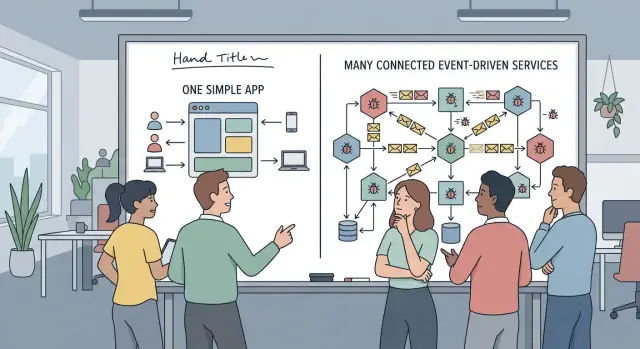
Table of Contents
What problem are you trying to fix
Many teams reach for event-driven architecture because it sounds like the mature choice. Scale, decoupling, background jobs, and room to grow all sound smart. Before product-market fit, the question is smaller: what pain do you have today that a simple app cannot handle?
If the answer is vague, stop there. Early products usually fail because demand is weak, learning is slow, or onboarding is messy. They rarely fail because one web app handled too much work in a single request.
Every new service, queue, and event gives bugs another place to hide. A user clicks "Buy," but the payment service says one thing, the email worker says another, and the dashboard updates 10 seconds later or not at all. One action now lives in three logs, two retries, and a support ticket.
That delay matters. In a simple app, cause and effect stay close together. A request fails, you inspect it, and you fix it. In an async system, the cause may happen now while the visible problem shows up minutes later in another service. That slows debugging when your team should be learning fast.
Before you add events, ask a few plain questions:
- Are users waiting on work that can safely happen later?
- Do traffic spikes break the app unless you buffer requests?
- Does one unreliable outside system block everything else?
- Can your team trace one broken flow across several services without guessing?
If you cannot point to a real bottleneck, async design is probably a bet on an imagined future. Startups make this bet all the time because "built for scale" sounds better than "easy to change." Easy to change is usually the better choice.
A simple codebase helps you test pricing, onboarding, and feature ideas quickly. You can remove steps, rename things, and rewrite weak parts without touching five consumers and a queue schema. That speed often matters more than elegance.
Use events when they remove a clear problem now, not when they make the architecture diagram look impressive. If the only benefit is that it feels more advanced, keep the system boring and keep learning.
When async work earns its keep
Async work pays off when the user needs one fast answer and the rest can happen a few seconds later. Checkout is a good example. The customer needs "order placed" right away. The receipt email, analytics update, CRM sync, and fraud review can happen after that without hurting the moment.
That is the first real win. You move slow side tasks out of the request path, so people stop waiting on work they never asked to see. If image processing takes 12 seconds, or an email provider slows down for a minute, the main action can still finish on time.
Queues also help when traffic arrives in bursts. A launch day, a campaign, or a batch import can flood the app with work in a few minutes. If every request tries to do everything at once, response times climb and timeouts follow. A queue lets you accept the work now and process it at a steady rate.
Another good reason is fault isolation. Say a user signs up and your app also creates a billing profile, sends a welcome email, and writes to a reporting system. If the reporting system has a bad day, it should not block the signup. Async jobs with retries can contain that failure.
Still, separate services only make sense when they remove a clear bottleneck. They do not help because the system feels more modern. Every queue adds delay, retry logic, duplicate events, monitoring work, and more places for bugs to hide.
Async work usually earns its keep when the user only needs a quick confirmation, a side task is slow or unreliable, traffic arrives in spikes, or one downstream failure should not cancel the whole action.
If none of those problems are real yet, a single app with a background job table is often enough. "Microservices too early" is often just another way to make debugging slower. Keep the design simple until delay, traffic, or failure patterns give you a concrete reason to split it.
When one simple app is still the better choice
If one small team owns the whole product, a single app is usually the faster and safer choice. Everyone can trace a request from the screen to the database without jumping across services, brokers, and retry rules. That matters when the same people build features, fix bugs, and answer support questions.
Early products also change fast. You tweak onboarding on Monday, change pricing on Wednesday, and rewrite part of the data model next week. In that kind of product, event contracts get old almost as soon as you write them. A shared codebase and one database can still be messy, but they are usually easier than keeping several services in sync while the business keeps moving.
Most startups hit product problems before they hit system limits. Users ask for missing features, clearer workflows, and fewer confusing steps. They rarely ask for async system design. If your app can handle peak traffic with normal caching, decent queries, and a few background jobs, you do not need extra moving parts yet.
Support is another reason to stay simple. When a customer says, "I paid, but my account did not update," your team needs answers fast. In one app, an engineer can check the request, the payment record, and the account state in one place. Spread that flow across events, and the same issue can hide in delayed messages, duplicate deliveries, or two services reading slightly different data.
A simple setup is often enough when the same team works on the whole product, flows and data rules still change every week, most complaints are about missing features, peak load fits on ordinary infrastructure, and support needs fast debugging more than separate scaling.
There is nothing outdated about this choice. Plenty of good products stay monolithic far longer than founders expect because it keeps learning cheap. Until scale or workflow complexity forces your hand, one well-structured app usually gives you more speed, fewer bugs, and a much clearer picture of what users actually need.
How to decide in five steps
Start with one user action, not a full system diagram. If people complain that signup stalls, reports take too long, or invoices sometimes disappear, use that path as your test case. Early event-driven architecture often fails when teams move too much at once.
A simple decision process keeps you honest:
- Pick the action that feels slow, fragile, or both. Use a real problem, not a guessed future one. "User uploads a file" is better than "media pipeline."
- Measure how often it happens and where it breaks. Count failures, timeouts, retries, and support tickets. If it happens twice a week, you may not need async work yet.
- Split out only the side task that does not need an instant answer. If a user must see "payment confirmed" right away, keep that part in the main request. Sending a receipt or creating an internal analytics record can move to the background.
- Add one background worker before you add many services. A queue plus one worker is enough to learn whether async design helps. You do not need three new apps, separate teams, and cross-service debugging on day one.
- Decide how you will catch and fix failures on that path. Where will failed jobs show up? Who retries them? Can someone replay one job safely without creating duplicates?
That last step matters more than most teams expect. Bugs feel smaller in a single app because you can trace one request from start to finish. Once you add queues, the same bug can hide in delayed jobs, duplicate events, or silent failures.
A blunt rule works well: if the user does not need the result now, and the work fails often enough to justify isolation, move that piece first. If you cannot explain the benefit in one sentence, keep it in the app for now.
For startups before product-market fit, this is usually enough. You learn where async work helps without turning one bug into five services worth of confusion.
A simple example from an early product
Picture a small online shop. A customer pays for an order and waits for one clear answer: did the payment go through, and is the order confirmed? That answer belongs in the main request. If the app cannot say "paid" or "failed" right away, the customer loses trust fast.
For that reason, keep payment authorization and order creation in one path. The server checks the card or wallet, records the result, and returns the order status before anything else. This is the part that changes the outcome. If it breaks, support gets tickets and finance gets messy.
Some work does not need to block checkout:
- Send the receipt email a few seconds later.
- Add loyalty points after the order is safely saved.
- Notify the internal dashboard or CRM in the background.
That split is boring, and boring is good early on. The customer cares about the order. They do not care whether your email worker or points service started within 200 milliseconds.
Now imagine a team turns each step into its own service in week one. Payment is one service. Orders are another. Email, loyalty, inventory, and analytics all listen for events. Soon a simple bug becomes a scavenger hunt. The card charge succeeds, but the order service misses the event. Or loyalty points fail, and someone asks whether the order should roll back. The team spends half a day reading logs instead of fixing checkout.
This is where event-driven architecture often gets used too early. Async work makes sense for side effects. It causes pain when you use it for the one thing the customer needs confirmed now.
A simple rule helps: ask which parts change the business result the user sees on that screen. Keep those steps together. Push the rest to background jobs only if they can run late, retry safely, and fail without changing the order outcome.
If your product is still small, one app with one database usually handles this better than five services and a queue. You can still add async jobs later, once slow tasks or real traffic force the change.
What changes when you add queues and events
Queues and events do not just move work into the background. They turn one user action into a chain of separate steps, often across several services. That can help when you truly need async work, but it also adds failure points that a single app never had.
A simple example makes this clear. A user clicks "Buy," your app creates an order, a worker charges the card, another worker sends email, and a third updates inventory. If one step fails, the others may still run. Now the question is no longer "did the request fail?" You need to know which parts ran, which parts retried, and which parts stopped halfway.
Tracing becomes real work. You need a way to follow one action across the app, the queue, the worker, and any downstream service. Without a shared request or event ID, debugging turns into guesswork. Support asks why a customer got two emails and no receipt, and your logs tell four different partial stories.
Retries sound safe, but they often repeat the same action twice. A worker times out after charging a card, the queue retries, and now the card gets charged again unless you built idempotency into the flow. Many teams add retries early and only think about duplicate handling after the first painful incident.
The event format also becomes a contract. If one team changes a field name, drops a value, or changes a type, another service can fail quietly. The message still moves through the queue, but the consumer may skip part of the logic or store bad data. These bugs are annoying because nothing looks fully broken at first.
You also need a place to see stuck jobs and someone who owns that queue. Jobs pile up. Workers freeze. One message poisons the queue and keeps failing. If nobody watches the backlog and decides what to retry, cancel, or fix, users end up waiting while the problem grows.
Local testing gets worse too. Instead of running one app, you now run the app, the queue, one or more workers, and enough fake services to make the flow believable. Bugs hide in timing, retries, and race conditions, so tests get slower and less clear.
This is the real price of event-driven architecture before product-market fit. You are not only adding flexibility. You are taking on a small operations job every day.
Common mistakes that spread bugs
Teams often create the worst event bugs before they even need events. The first mistake is simple and costly: they publish an event before they confirm the main database write. If the write fails, rolls back, or times out, other parts of the app may still react to an order, signup, or payment that never existed.
That bug wastes hours because each service looks fine on its own. The queue shows a message. The worker ran. The notification went out. Only later does someone notice the source record is missing or incomplete.
Another common error starts even earlier. A team splits one product into several services because it feels like the "right" architecture, not because they hit a real limit. They guess boundaries such as users, billing, catalog, and notifications before they know where the actual friction is.
Every extra service adds more failure points. Now you have network calls, event versions, retry rules, and data that drifts apart. For a small product still looking for product-market fit, one app and one database usually give you fewer surprises.
Async flows also become a hiding place for slow code. A page feels slow, so the team pushes work into a queue instead of fixing the heavy query or the messy write path. The user waits less, but the real problem stays. Then the backlog grows, workers lag, and support starts seeing odd timing issues instead of one clear bottleneck.
Two questions catch a lot of these problems early: what happens if the same worker runs the same job twice, and would a simple database-backed job table do the job? It also helps to ask which current pain forced the split into separate services and how you will trace one customer action across the whole flow.
Retry logic needs duplicate protection. Without it, one timeout can create two invoices, two emails, or two shipments. That is not an edge case. Retries are normal.
Tool choice matters too. Teams often jump to complex brokers and full event stacks long before traffic or team size demands them. A simpler setup is easier to reason about, easier to test, and much easier to repair at 2 a.m. when something goes wrong.
Quick checks before you commit
Before you add queues and events, ask a boring question: can one app with a few background jobs handle this for the next six months? In many early products, the answer is yes. That setup keeps code, logs, and data in one place, which makes change much cheaper.
Speed only counts if users feel it. If async work cuts a signup flow from 3 seconds to under 1, people notice. If it makes an internal sync a bit faster but nobody sees the difference, you are buying more complexity for little return.
A short test helps:
- Keep the first version in one codebase if background jobs can cover email sends, file processing, imports, or webhooks.
- Pick one user action, like placing an order, and trace it end to end. Your team should find a failed step in minutes, not after digging through three services and two dashboards.
- Name who owns each retry. If a job runs twice, someone must stop duplicate charges, repeated emails, or bad status updates.
- Write down the error states before you build. After the third failure, what happens next, who gets alerted, and who fixes it?
- Assume you may change your mind. If you can remove the queue or extra service later without tearing apart half the app, the design is safer.
That last point gets ignored a lot. Before product-market fit, reversibility matters. You are still learning what the product is, which flows matter, and where users actually wait.
Event-driven architecture can be the right call, but only when the pain is clear and repeated. If the design makes ownership fuzzy or turns one bug into five small mysteries, wait. A simple app your team can debug fast usually beats a clever async setup that spreads problems across more places.
What to do next
Keep the first version boring. Before you have clear product-market fit, one app and one database usually beat an event-driven architecture. You can change a simple system fast, and you can find bugs faster too.
A good next move is to isolate one delayed task instead of redesigning everything. Pick something that already slows users down or fails often.
- Move one background job off the main request, such as sending emails, building exports, or calling a slow external API.
- Keep the rest of the product in the same app so you still debug in one place.
- Add basic logging, retries, and an alert for that one job before you add a second.
- Watch real traffic and support issues for a few weeks.
That approach gives you a clean test. If the queue cuts response time, prevents timeouts, or stops repeat failures, you learned something useful. If nothing changes, you avoided spreading the same bug across more services.
Add more events only when traffic or failure patterns force the change. Good reasons are concrete: users wait too long, retries pile up, a third-party service goes down, or one part of the product needs to scale on its own. "It might help later" is usually not enough.
Review the design every month while the product still shifts. Ask simple questions: which async jobs earn their complexity, which ones create support work, and which ones should move back into the main app. Early products change direction a lot. Your architecture should not trap you.
If you want a second opinion, Oleg Sotnikov at oleg.is works with startups on product architecture, infrastructure, and Fractional CTO support. A quick review can tell you whether async design solves a real bottleneck or just adds overhead.
Frequently Asked Questions
Should I use event-driven architecture before product-market fit?
Usually, no. Start with one app and one database until you see a real pain in production.
Add async work when users wait too long, traffic arrives in bursts, or a flaky outside service blocks the whole action.
What problem actually makes async work worth it?
Use it when the user needs a fast answer now and the rest can finish a bit later. It also makes sense when spikes overload requests or one outside system fails often enough to drag everything down.
What should stay synchronous?
Keep the steps that decide the user-facing result in the main request. Payment approval, order creation, and account state changes usually belong there because the user needs a clear answer right away.
What should I move to a background job first?
Start with side effects. Receipt emails, analytics writes, CRM updates, file processing, exports, and slow webhook calls usually fit well in a background job.
Move one task first and watch what changes before you split more.
Is a monolith still fine for an early startup?
For most early products, yes. One team can trace a bug faster, change flows faster, and support customers without chasing logs across several services.
A monolith does not block growth if you keep the code clean and add background jobs where they earn their keep.
Do queues actually fix performance problems?
Not by itself. A queue can make the user wait less, but it does not fix a bad query, a slow write path, or wasteful code.
If the root cause sits in your app, fix that too. Otherwise you just move the delay somewhere else.
What new bugs show up when I add events and retries?
You get duplicate jobs, delayed updates, partial failures, and harder debugging. A worker can charge a card, time out, and run again unless you stop duplicates on purpose.
Track one action with a shared ID and make each job safe to replay.
Can a database-backed job table be enough?
Often, yes. A database-backed job table is simpler to run, test, and debug, which matters more than fancy tooling early on.
Use a broker later if volume, team size, or isolation pushes you there.
How can I test this without redesigning the whole system?
Pick one user flow that feels slow or fragile. Measure how often it fails, move one safe side task out of the request, add logging and retries, and watch support tickets for a few weeks.
If you cannot explain the win in one sentence, keep the design simple.
When should I break the app into more services?
Split later when one part needs its own scaling or failure boundary and your team can operate it without guesswork. If the only reason is "we might need it later," wait.
You can also ask for a second opinion before you commit. A short architecture review often saves weeks of cleanup.


