ERP replacement project: connect systems before you rebuild
Before you approve an ERP replacement project, map events, route exceptions, and connect plant and field tools so teams fix the real gaps first.
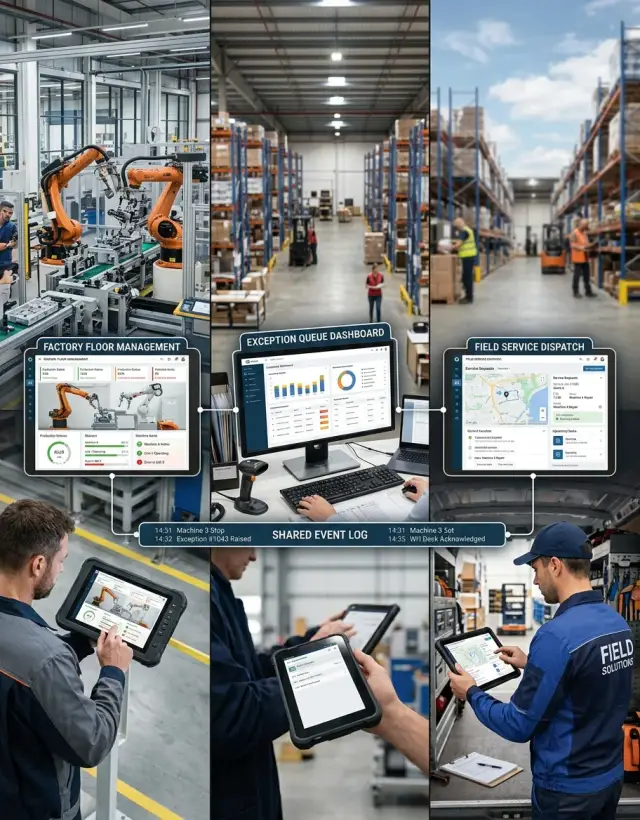
Table of Contents
Why one ERP often fails in real operations
A single ERP looks clean on paper. Real operations are not clean.
A plant reacts to machine downtime in minutes. A warehouse works around truck arrivals by the hour. Field teams deal with changing site conditions. Finance needs a clean close and a clear audit trail. Those rhythms do not match, and one shared workflow rarely fits all of them.
That is where the trouble starts. One system may handle purchasing well but slow down maintenance. Another may track inventory neatly but force service teams through too many screens. When people cannot move work forward fast enough, they stop waiting for the system and find another way.
The pattern is familiar. Supervisors call to confirm whether a part is really in stock. Planners send spreadsheets because the schedule in the ERP is already out of date. Field technicians text updates that someone retypes later. Finance fixes coding issues by hand at month end.
This does not mean the teams are careless. It usually means the handoff between teams is weak. One group needs speed. Another needs accuracy. The ERP pushes both into the same process, and that rarely lasts.
That is also why many replacement projects start for the wrong reason. Leaders see duplicate entry, late reports, missing updates, and frustrated staff, then blame the old system. Sometimes the real problem sits between systems, not inside one of them.
A manufacturer might run production in one tool, warehouse activity in another, and field service in a third. That setup is not automatically bad. It becomes bad when nobody can trace what happened, what failed, and who needs to act next. Then people build a shadow process with calls, inboxes, and spreadsheet trackers.
Replacing everything can feel like a clean answer. Often it is not. If the flow between plant, warehouse, field, and finance stays broken, the new ERP inherits the same mess, only with a bigger bill and a longer timeline.
Where the breaks usually happen
Most operational breaks happen at handoffs. One team updates reality, while another team still sees an older version of it.
Job status is a common example. A planner releases work, the floor starts it, and a dispatcher or service coordinator still sees "scheduled" because the update sits in a separate app, a spreadsheet, or a sync that runs later. That delay sounds minor, but it changes real decisions. A truck leaves too early, a customer gets the wrong ETA, or a supervisor moves people to the wrong job.
Inventory breaks in a quieter way. On the floor, people move fast. They pull a substitute part, split a pallet, move a unit to inspection, or park a failed item in rework before anyone updates the record. The system still shows stock in the old bin, so purchasing orders parts that are already in the building while production waits for parts that look available on screen.
Field service often finishes the work before billing gets the full story. A technician records labor, swaps a part, adds notes, and takes photos on site, but finance only receives a close code and a few line items. Missing serial numbers, warranty details, or approval notes can hold the invoice for days. Cash comes in later, and customers argue because the paper trail is thin.
Returns, rework, and warranty cases usually cause even more trouble because they do not follow the clean path most ERP screens expect. A returned unit may go from customer site to bench test, then to a vendor, then back into field stock. Rework can consume labor and parts without fitting neatly into the original order. Teams often track those steps in email or chat because the standard workflow is too rigid.
A simple example shows the pattern. A technician fixes a failed controller at 2 p.m. The field app marks the job done. Dispatch still sees "in progress" until the evening sync. Billing does not see the replaced part because it sits in another table. Inventory still shows that part in the van. No single mistake caused the problem. Slow, partial handoffs did.
What event logs and exception queues actually do
Many replacement projects begin when people stop trusting what they see. One screen says a job is ready. Another says a part is missing. Someone has to call three teams to figure out what is true. Event logs and exception queues can fix that confusion before you replace everything.
An event log is simply a record of change over time. It notes that a purchase order was approved at 9:12, a pallet left the warehouse at 10:03, a technician marked a visit complete at 2:47, and an invoice failed to post at 2:49. When those moments from different systems sit in one timeline, teams stop arguing about whose screen is right. They can see the sequence.
That matters because the problem often sits between systems, not inside one system. The ERP may know the work order exists. The warehouse tool may know the part shipped. The field app may know the customer was not on site. Without a shared log, those facts stay split apart.
Exception queues handle the cases that software should not guess. If a serial number does not match, if a technician closes a job without the required photo, or if a shipment posts after the planned service window, the case goes into a queue for review. People spend time on the odd cases instead of every case.
That changes daily work quickly. Planners stop chasing updates through inboxes and phone calls. Supervisors stop asking five people for status. Support teams stop retyping the same notes into different tools. They open the queue, decide what needs attention, and move on.
Managers get something just as useful: patterns. If the same mismatch appears every day at shift change, they can fix the process. If it appears once a month, they can leave it manual. That is a much better basis for action than a vague sense that manufacturing ERP integration is messy.
Done well, these two tools create order before you fund a rebuild. The log shows what happened. The queue shows what needs a person. Together, they show which breaks matter and which ones only look dramatic in meetings.
How to connect systems before a full replacement
Start with one handoff that hurts every week. Work order to invoice is often a good choice because small mistakes there turn into late billing, rework, and too many calls between teams.
Keep the scope narrow on purpose. If you try to map every process at once, the pilot turns into the same oversized project you wanted to avoid.
Write down the events each system already creates. Most teams already have more signals than they think, even in old software. Look for moments like work order opened, technician assigned, parts issued, job completed, invoice draft created, and invoice sent.
Put those events into one shared log. Do not overdesign it. Give each entry a few labels people can read at a glance: asset ID, customer, work order number, timestamp, source system, and event type.
This shared log does one useful thing right away. It tells the story of a job across systems without forcing everyone into one new tool. When something goes wrong, the team can see where the trail broke.
Then add an exception queue for the cases that need a person. In most pilots, the same small set of issues shows up again and again: missing data such as a site ID, conflicts such as different part counts in two systems, failed syncs, and duplicates. Each queue item should say what failed, where it failed, and who should fix it. If people need ten clicks to understand the problem, they will ignore the queue.
Run the pilot with one team for a few weeks. A plant maintenance group and one field crew are enough. Ask them to note every fix they make, including the boring ones, because those fixes show what the process really needs.
One small example makes the point. A technician closes a job in the field system, but accounting cannot invoice because the site code is missing. The event log shows that the close event arrived on time. The exception queue catches the missing site code, assigns it to operations, and the invoice moves after one manual correction.
After a few weeks, you will know which problems come from process gaps, which come from bad data, and which come from the systems themselves. That is a much better basis for any rebuild decision than a slide deck and a rough budget guess.
A simple example from plant to field
A packaging line stops at 10:14 a.m. after a fault on a sealing machine. The plant maintenance system opens a repair ticket right away and writes an event entry with the machine ID, fault code, shift, and work order number. Nothing fancy happens yet. The team just captures the problem in a form other systems can read later.
The repair cannot wait for a full back office cycle, so the job moves to the field service team. A technician gets the task on a mobile app, goes on site, swaps a failed sensor, and spends 95 minutes on the repair. Before leaving, the technician records the part used, travel time, labor time, and a short note about the cause.
That data then flows back toward inventory, service history, and billing. This is where many teams run into trouble. The sensor part number is present. The labor entry is present. The serial number for the removed unit is missing.
An exception queue catches that gap before billing runs. Instead of letting the whole job pass through and create a bad invoice, the queue holds that one record and marks it for review. The rest of the day's jobs keep moving.
A service coordinator checks the event log and sees the chain in order: the fault opened in the plant system, the technician accepted and closed the visit, the part entry arrived without the required serial number, and billing stopped for that job only.
That one missing field tells the team more than it first seems. If the technician had the serial number but forgot to enter it, the problem is data entry. If the mobile workflow never asked for it, the problem is process design. If the app allowed a blank field even though the rule exists, the problem is software.
This is why connecting systems first often beats funding a large replacement too early. The event log shows what happened. The exception queue shows what needs a person. Together, they turn a vague operations problem into a fixable one.
What to watch during the pilot
A pilot should produce numbers, not opinions. If people say the new flow feels better but you still miss shipments, redo work orders, or fix invoices by hand, the pilot is not ready to scale.
Start with the exception queue. Count how many cases land there each day and group them by cause. Ten pricing mismatches tell a very different story than ten missing serial numbers. Event logs help because they show the exact handoff that failed: order entry, production update, dispatch, or billing.
Time matters as much as volume. Measure how long one person needs to clear a case from start to finish. Five minutes may be fine. Forty minutes across twenty cases a day means the team just inherited a hidden job.
You also need to separate software limits from process mistakes. Teams often blame the system too early. In practice, the mess often starts with unclear ownership, approval rules that clash, or data entered differently by plant staff and field crews.
Track a short set of numbers through the whole pilot:
- exceptions per day, grouped by type
- average and median time to clear one case
- how many issues come from process rules rather than missing features
- rework, delays, and billing corrections before and after the pilot
The before and after comparison matters more than a polished demo. If rework drops by 30 percent and billing corrections fall from twelve a week to three, that is a real gain. If the new flow creates fewer errors but makes every exception slower to fix, you still have a problem.
Watch for repeat cases. When the same exception appears every day, do not ask people to work around it for another month. Fix the rule, map the missing field, or change who owns that step.
A good pilot is usually a little boring. That is a good sign. Orders move, field service systems stay in sync, and staff stop chasing missing details. If manufacturing ERP integration still depends on heroics, keep connecting and cleaning up before you fund a full rebuild.
Mistakes that waste time and budget
Most failed ERP work starts with a bad guess. Leaders assume the problem is "too many systems" and rush toward one large replacement. In manufacturing and field operations, the real issue is often smaller and more specific. One handoff breaks. One status never updates. One return sits untracked until an angry customer calls.
A common mistake is trying to standardize every team before testing one workflow. It sounds tidy, but it burns months in meetings. Start with one path that hurts every week, such as a spare part leaving the plant, reaching a depot, and then getting installed by a technician. When that path works, you learn what needs shared rules and what should stay local.
Another expensive move is buying a large system before anyone names the real failure points. "Inventory mismatch" is not a failure point. "Returned parts stay in vans for three days before stock updates" is. Teams can solve a concrete delay. They can argue for months over a vague complaint.
Some of the waste hides in plain sight. Teams bury exceptions in email, chat, and side spreadsheets instead of sending them into a queue with one owner. Vendors shape the process around templates and demos while supervisors, planners, and operators get little say. Project teams map the office view of the job and skip technicians who work on customer sites, in weak signal areas, or after hours. Managers ask for full reporting and perfect data on day one, which slows the pilot before anyone proves the flow works.
Ownership matters more than most teams admit. If a work order fails, someone needs to see it, decide what to do, and close the loop. Hidden exceptions turn into write-offs, missed billing, and emergency calls. A clear queue with named owners often fixes more than another dashboard.
The floor view matters too. A vendor may design a clean process for issuing parts, but the real job includes damaged labels, calls from drivers, and techs swapping items in the field to finish a repair. If you skip those people when you map the work, the new process will look correct and still fail in practice.
Before you fund a replacement, test one workflow, name each failure point, and assign one owner to every exception. That small discipline can save months of rework and a very large invoice.
Quick checks before you approve a replacement
Teams often approve a major ERP spend while the real problem is still fuzzy. "Data issues" is not a diagnosis. Ask each team lead to name the worst handoffs in one sentence. Keep them plain and concrete: a finished job does not create an invoice, a parts issue does not reach the field service record, or a technician closes work but finance still retypes the same details by hand.
If nobody can describe the break clearly, the replacement discussion is still too early. You need a short list of broken flows, not a long list of complaints.
The next test is even simpler. Sort work into two groups: cases that should pass through without help, and cases that truly need a person to review them. Most orders, status updates, and stock movements should move on their own. Human review should stay for a small set of exceptions such as missing serial numbers, duplicate jobs, price mismatches, or safety holds.
If the team sends almost everything to review, they are not fixing the process. They are moving the mess to another screen.
Use a short approval checklist before you sign anything major:
- write the top broken handoffs in one sentence each
- mark which cases need human review and which should flow automatically
- pick one pilot that can remove manual re-entry this quarter
- check whether the new ERP fixes the gap itself or just changes where people click
A small pilot tells you more than a long vendor demo. Pick one painful path and follow it end to end. For example, a plant issues a replacement part, the field team installs it, and finance bills the customer. If people still export a file, email it, and type it again in another system, the gap is between systems, not inside a single form.
That is where event logs and exception queues earn their keep. They show where work stops, what failed, and which cases need a person. If one pilot removes a daily re-entry task or cuts 20 minutes from each job, you have proof. If it cannot, a full replacement may only make the same problem look newer.
What to do next
If you are close to funding an ERP replacement, start smaller. Pick one workflow that either cuts margin or slows response time every week. Good candidates are parts shortages that reach field teams too late, work orders that stall between the plant and service desk, or inventory updates that force people to check three systems to find the truth.
Set a short pilot around that one path. Four to six weeks is often enough to see where data goes missing, who fixes it by hand, and how often the same exception returns.
Trace the workflow with event logs at each handoff. Send failures into an exception queue that people can review and clear. Count labor time, delays, rework, and missed orders. Write down which system should own each status change.
Put budget into the pilot before you spend money on licenses. Logs, queues, and staff time may look boring on a spreadsheet, but they tell you more than a vendor demo. If one supervisor spends 45 minutes a day fixing shipment status by hand, that cost is real. If a dispatcher waits two hours for a sync to finish, that delay is real too.
The goal is not to prove that one ERP can do everything. The goal is to learn which problem you actually have. Some teams need to repair a broken process. Some need to connect systems that already do their jobs well enough. Others really do need a full replacement, but only after a pilot shows where the break sits and what it costs.
If your internal team is split between "patch it" and "replace it," an outside review can help. Oleg Sotnikov at oleg.is can scope a focused pilot as a Fractional CTO, map the handoffs, and help you decide what to fix first before you commit to a larger ERP spend.
When the pilot cuts manual fixes, shortens delays, and gives managers a cleaner view of exceptions, the next move becomes obvious. Repair, connect, or replace based on proof.


