Release windows for enterprise customers without slowdowns
Learn how to set release windows for enterprise customers by risk level, protect planned dates, and let teams keep shipping safe changes.
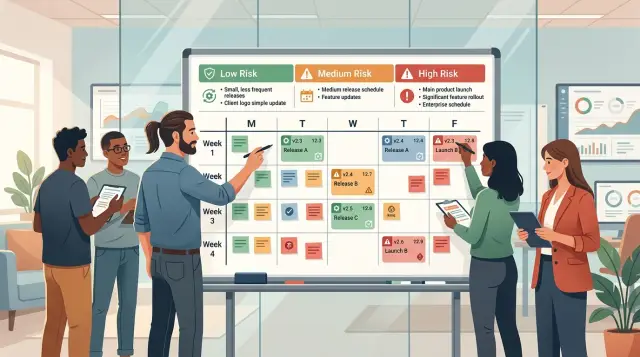
Table of Contents
Why large customers ask for fixed dates
Large accounts rarely care about a feature only on the day it ships. They plan around it weeks earlier. A new workflow might mean staff training, updated help docs, legal review, support scripts, and a note to their own customers.
That planning takes time because more people are involved. One product change can touch operations, security, procurement, customer success, and internal IT. If the date moves without warning, their calendar breaks and your release turns into their fire drill.
Surprises create risk on their side. A small UI update can confuse a call center team. A new permission rule can block access for hundreds of users. Even a harmless-looking API change can delay another launch they already promised internally.
That is why enterprise customers ask for release windows. The point is not to slow shipping down. The point is to give large customers a date range they can trust while your team keeps moving on safer work.
A lot of SaaS teams overreact. One enterprise customer asks for predictability, and the company creates a broad code freeze. Fixes sit in review, small improvements wait for weeks, and every release starts to feel like a major event. That usually creates more stress, not less.
A better approach is simple. Give customers stable dates for changes that can affect their rollout, and keep normal delivery open for safer updates. Copy tweaks, isolated bug fixes, and low-risk internal improvements do not need the same control as pricing logic, permissions, or customer-facing workflow changes.
Think about a company rolling out your product to 2,000 employees on Monday. They scheduled onboarding sessions, staffed extra support, and got sign-off from their IT lead. If a last-minute change lands on Friday, they pay the cost even if your team shipped it with good intent.
Big customers ask for fixed dates because they need fewer surprises, not slower software. If you give them predictability without freezing everything, both sides win.
What a release window should cover
A release window needs clear edges. Put a start date and end date on every window, with exact cutoff times and the time zone. If one team reads "Friday" as local time and another reads it as UTC, you get last-minute arguments instead of a calm release.
Scope matters just as much as timing. Say which product lines, modules, and environments follow the rule. Some teams include only production. Others include customer-facing APIs, admin portals, mobile apps, and shared integrations. If staging or internal tools are out of scope, say that plainly.
This is where teams often get sloppy, and that is when a release window starts to feel like a hidden freeze. A good window does not treat every change the same. New features, bug fixes, and simple config updates should not all land in one bucket. A copy fix or a safe config change usually does not need the same handling as a new workflow or a schema change.
You do not need a giant approval map in this document, but you do need simple labels. Product teams can mark planned feature releases as window-bound, while low-risk fixes and config updates follow lighter rules. That gives enterprise customers predictability without blocking normal delivery.
Customers also need to know what the window means in practice. Tell them when they will get notice about planned changes, whether they should expect user-facing updates or only back-end work, what downtime is acceptable if any, who sends release notes or status messages, and whether emergency fixes can still happen outside the planned slot.
A simple setup works well. If an enterprise customer uses your main web app and API in production, you might place both inside the window, keep staging outside it, hold feature launches for the agreed dates, and allow safe bug fixes in between. That gives the customer a steady planning rhythm without forcing your whole team into a freeze every week.
Sort changes by risk
If every change goes through the same gate, teams either slow down or start taking chances. A better rule is to sort work by customer impact and rollback effort.
Low-risk changes are the ones that rarely surprise anyone. Think copy edits, label fixes, spacing issues, small visual bugs, or a button that needs clearer text. These changes do not touch business logic, stored data, billing, or access rules. If a team can test them quickly and undo them in minutes, they belong in the low-risk bucket.
Medium-risk changes need more care, but they should not stop delivery. Feature-flagged work often fits here because teams can turn it off if something looks wrong. Reversible config updates fit too. So does a new dashboard shown only to internal users first, or a back-end improvement that does not change stored data and can roll back cleanly.
High-risk changes need a stricter path. Billing logic is high risk because even a small mistake can affect invoices, revenue, and trust. Auth and permission changes are high risk because they affect who can get in and what they can see. Database schema changes often belong here too, especially when they rewrite existing records, remove fields, or change an API contract that customers already use.
Teams classify changes more consistently when they ask the same plain questions every time. Does this touch money? Does it change login, SSO, roles, or permissions? Does it alter stored data or the schema? Can we turn it off fast without a patch? Can support explain the customer impact in one sentence?
A few shared examples help more than a long policy. "Fix typo in billing page" is low risk. "Release new page behind a flag" is medium risk. "Change tax calculation" is high risk. If two people disagree, move the change up one level and update the examples so the next call is easier.
Who approves each type of change
If everyone can approve a release, no one really owns it. Enterprise release planning works better when each team decides one thing and one person makes the final call.
Product should decide whether a change needs the window at all. That sounds obvious, but it cuts a lot of last-minute noise. If a feature tweak can wait a week without causing customer pain, product should say so and keep it out.
Engineering should answer a different question: can this ship safely? That means checking test coverage, rollback steps, and monitoring before the window opens. A change with weak test results or no clear rollback plan should not move forward just because a customer asked for it.
Support brings a practical view that other teams miss. They know when customer-facing work will land badly, such as during a training week, a finance close, or a planned migration on the customer side. If support sees a timing problem, they should raise it early, not on release day.
A simple approval map is enough. Product decides if the change is needed now or can wait. Engineering decides if it is safe to ship. Support checks customer timing and communication risk. One release owner gives the final yes or no.
That last role matters most. Pick one named owner before the window starts. In a small SaaS team, this is often the CTO, a fractional CTO, or an engineering manager. In a larger company, it might be a release manager. The important part is simple: one person makes the call when teams disagree.
Without that owner, teams drift into committee mode. Product wants to help the account, engineering wants more time, support wants a calmer date, and nothing gets decided until the last hour.
Keep the rule plain. No change goes into the window unless product wants it, engineering can support it, support is okay with the timing, and the release owner signs off. A copy update may move through in a day. A database change may need a week of checks. Different risk means a different path.
Set the rules in five steps
Start with the customers who already ask for planned release dates. They give you a real constraint, not an invented one. If two enterprise accounts need a week of notice, build the first version of your policy around that.
First, review the last month or two of releases and group changes by risk. Copy updates, feature flag tweaks, and internal admin fixes usually sit in the low-risk bucket. Auth changes, billing logic, schema updates, and anything that can affect uptime belong higher up.
Second, pick one short release window and test it for a month. A weekly window or a twice-monthly window is enough to start. Keep the first test short so the team can spot friction fast and fix it before the process gets heavy.
Third, keep low-risk changes moving outside the window. This is where teams often get it wrong. If every fix waits for the same date, you did not create predictability. You created a freeze with a friendlier name.
Fourth, decide who approves each risk level. Product and engineering can usually handle low-risk changes during the normal week. Higher-risk work may need an engineering lead, support, and the account owner to agree on timing, rollback steps, and customer notice.
Fifth, adjust the policy after each release review. Look at what caused noise, what slipped, and what felt stricter than necessary. Change one or two rules at a time so people can follow the updates without guessing.
A short policy beats a long one. One team might learn that database changes need a window while UI text changes do not. Another may find that a Friday release window creates support load on Monday. Test the rules against real releases, trim what slows delivery, and keep what helps customers plan ahead.
Handle urgent fixes
A release window should not trap your team when a real problem appears. If a security issue puts customer data, access, or billing at risk, ship the fix right away. Waiting for the next planned date can turn a contained problem into a long incident.
The exception path matters as much as the planned schedule. Write the rule before anything breaks. Security patches, broken login flows, and defects that can corrupt data should bypass the normal window without a long debate.
That does not mean every bug becomes "urgent." Low-risk fixes can go out between windows when the team keeps the scope tight and prepares a rollback plan. If you can undo the change fast, monitor it after release, and confirm that it does not touch sensitive workflows, you usually do not need to hold it back.
A simple policy works well: security and data protection fixes ship immediately; low-risk fixes can ship outside the window with a tested rollback plan; medium and high-risk changes need extra approval if they move outside the schedule; and the team tells affected customers what changed and why it could not wait.
Keep that extra approval narrow. Use it when a change affects shared infrastructure, customer-facing APIs, permissions, billing, or a workflow that large accounts use every day. Do not make people chase approvals for a text fix, a small UI repair, or a logging change.
Clear customer communication matters just as much as the fix itself. A short note often does the job: "We deployed a security patch outside the normal release window to reduce customer risk. The change was isolated, tested, and monitored after release. No action is needed from your team."
Customers usually accept exceptions when they see a reason, a limit, and a plan. That keeps trust intact while your team keeps shipping.
A simple example with one enterprise account
A large customer closes its quarter on Friday, and finance wants a calm week before that date. They ask the SaaS team for one rule: do not ship any high-risk changes that could touch billing, permissions, or core workflows during the last 10 days of the quarter.
That does not mean the team stops shipping. It means they sort work by risk and keep moving on the safe items.
In practice, the team keeps deploying low-risk changes that are easy to reverse, like copy fixes in the app and emails, visual polish that does not change behavior, hidden feature work behind flags, and internal tooling or support improvements. Customers get stability, and the product team keeps its pace. That is a much better deal than a full code freeze, which usually blocks far more work than it should.
Now imagine the team has a billing update ready on Tuesday. The change improves invoice grouping, but it touches money flow and reporting. Even if the code looks clean, the team classifies it as high risk because a small mistake could create support tickets quickly.
So they hold that update for the next agreed release date after quarter end. Nothing dramatic happens. Product does not argue, support does not scramble, and the account team can tell the customer exactly when billing changes will land.
One small habit makes this work: support shares one calendar with the account team. It only needs a few entries, such as the protected window, the next allowed date for high-risk changes, and any planned maintenance note.
When everyone uses the same calendar, fewer surprises reach the customer. Support knows what to expect. Sales does not promise the wrong date. Engineers keep shipping low-risk work instead of waiting around.
This is why risk-based change rules beat blanket freezes. You protect the areas that can hurt trust while the rest of the product keeps improving in the background.
Mistakes that turn a release window into a freeze
A release window fails when the team treats it like a stop sign instead of a planning tool. Fear usually causes that shift. Once people start assuming every change might upset a large customer, normal delivery slows down for no good reason.
The first mistake is simple: teams label almost everything high risk. If a copy update, feature flag change, back-end patch, and schema migration all go through the same heavy approval path, risk labels stop meaning anything. Engineers wait, product guesses, and the safest choice becomes doing nothing.
The second mistake is making the window too long. A short buffer around a planned customer date can work well. A two or three-week lock is just a code freeze with nicer wording. Teams still write code during that time, but they stop merging, stop releasing, and pile up changes that become harder to test later.
Another common problem starts with mixed promises. Sales talks to the customer, product plans the sprint, and engineering tries to satisfy both with one date. That rarely ends well. Customer commitments should define what must stay stable for that account. Internal sprint goals should define what the team wants to finish. When people blend the two, every missed sprint target starts to look like a broken customer promise.
Small changes also cause trouble when teams skip rollback checks. People often say, "It is a tiny fix," and move on. Then the tiny fix touches billing, login, or permissions and turns into a late-night problem. If a team cannot roll a change back quickly, the change is not low risk.
A few warning signs show up early. Risk labels keep moving upward. The protected period starts long before the customer actually needs it. Teams test the happy path but not rollback. One loud customer gets a special rule, then everyone asks for the same thing.
That last one breaks the system fast. One account may ask for custom timing, extra approvals, or last-minute exceptions. If you change the rules each time, nobody knows which rules still apply. A better approach is boring on purpose: keep one policy, define exceptions in advance, and say no when a request does not fit.
A good release window stays narrow, uses clear risk levels, and keeps rollback checks non-negotiable. If the process blocks ordinary shipping week after week, you do not have a release window anymore. You have a freeze.
Quick checks before each release window
Release windows usually go off track for small reasons, not big ones. A missing alert, a rollback that needs manual steps, or a customer contact who did not get the timing can turn a normal deploy into a long night.
A short pre-release check is usually enough. The goal is simple: confirm that the change fits the agreed rules and that the team can recover fast if something looks wrong.
Compare the change to your written risk examples. If the work touches only text, labels, or an internal admin page, it may fit a low-risk slot. If it changes billing, permissions, login, or data flows, treat it more carefully even if the code change looks small.
Make sure rollback is real, not theoretical. Someone on the team should know the exact steps and be able to undo the change in minutes.
Check timing with the people closest to the customer. Support should know when users may notice a change, and the account owner should confirm that the customer does not have a launch, audit, or busy reporting day at the same time.
Look at monitoring before you deploy. Dashboards and alerts should cover the part of the product you are changing so the team can spot errors, latency, or failed jobs right away.
Decide whether the customer needs a short message. Many changes do not, but a heads-up helps when users may see a new workflow, brief maintenance, or changed behavior.
One simple test helps: if something breaks five minutes after release, can the team see it, explain it, and reverse it fast? If the answer is no, delay the change until those gaps are fixed.
This check should take 10 to 15 minutes, not half a day. If it takes longer, your rules are probably too vague or your release process has too many manual steps.
What to do next
Start small. Write the first version of your release window policy on one page. If it needs ten pages, the team will not use it. Keep only the parts people need every week: change types, risk levels, who approves what, when the window opens, and what happens if something urgent breaks.
Then test it with one enterprise account instead of rolling it out to every customer at once. Pick an account that cares about planning and gives clear feedback. Run the process for one or two release cycles, then ask two simple questions: did the customer feel informed, and did the team keep shipping at a normal pace? If either answer is no, fix the rules before you expand them.
Measure the process from day one. Three numbers tell you a lot: lead time, rollback rate, and customer complaints. Lead time shows whether approvals slow the team down. Rollback rate shows whether your risk rules are too loose. Customer complaints show whether the planning side still feels messy even if engineering thinks the process works. A release window is only useful when both sides feel less pain.
You do not need a fancy system at first. A shared page, a simple change log, and one person who owns the schedule can be enough. Many teams fail because they overbuild the process before they prove it works.
If you want an outside review, Oleg Sotnikov at oleg.is works as a Fractional CTO and helps startups and smaller software teams put simple rules around delivery, infrastructure, and AI-first development without turning the roadmap into a freeze.
A good next step is boring on purpose: draft the one-page policy this week, try it with one customer next month, and review the numbers after the first two windows. That gives you real data, not guesses.
Frequently Asked Questions
What is a release window?
A release window is a planned time slot for changes that might affect how an enterprise customer rolls out your product. It gives the customer a date range they can plan around without forcing your team to stop shipping safe work.
Does a release window mean a code freeze?
No. A good release window holds only higher-risk changes, such as billing, permissions, or major workflow updates. Your team should still ship low-risk fixes and small improvements outside that window.
Which changes should wait for the window?
Hold changes that could disrupt rollout plans or hurt trust if they go wrong. Billing logic, auth, permissions, schema changes, and customer-facing workflow changes usually fit that group.
What can we ship outside the window?
Teams usually ship copy edits, small UI fixes, isolated bug fixes, and reversible config updates outside the window. If you can test the change fast and undo it in minutes, it often belongs in the low-risk path.
How do we decide if a change is low, medium, or high risk?
Use the same plain questions every time. Ask whether the change touches money, login, roles, permissions, stored data, or an API contract, and ask whether the team can roll it back fast. If people disagree, move it up one level.
Who should approve a release?
Keep ownership simple. Product decides whether the change needs to go now, engineering decides whether it can ship safely, support checks customer timing, and one release owner makes the final call if teams disagree.
How should we handle urgent fixes?
Write the exception rule before something breaks. Ship security, data protection, and broken login fixes right away, keep the scope tight, and tell affected customers what changed and why you could not wait.
How long should a release window be?
Start short. A weekly or twice-monthly window works for many SaaS teams because it gives customers a steady rhythm without turning every release into a big event. If the window feels heavy, shorten it before you add more rules.
Do customers need release notes for every change?
Not every change needs a customer message. Send a short note when users may notice new behavior, downtime, or a workflow change. For low-risk back-end fixes, your internal log and support team usually cover it.
How do we start without making the process too heavy?
Begin with one account that already asks for planned dates. Write a one-page policy, test it for one or two cycles, and watch lead time, rollbacks, and customer complaints. That gives you enough feedback to tighten the rules without slowing delivery.


