Enterprise-friendly features without product bloat
Learn how to choose enterprise-friendly features that win buyer trust, keep setup simple, and avoid turning a flexible product into custom software.
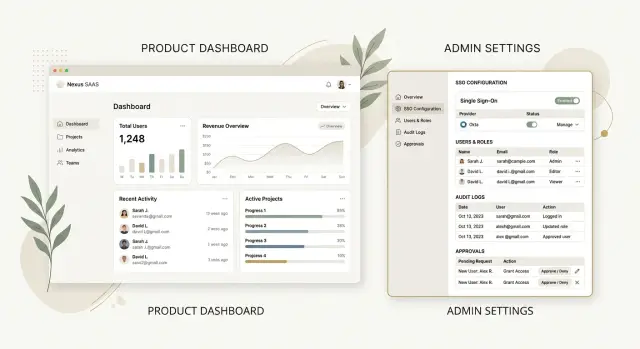
Table of Contents
Why this gets messy fast
Products rarely get bloated because a team is careless. More often, it starts with a reasonable sales request. A rep is close to closing a large account, and the buyer asks for one control, one exception, or one extra admin screen. On its own, that request sounds small.
The problem starts when the team treats a special case like a normal part of the product.
One request rarely stays one request
A buyer's request almost never stays contained. One setting needs a permission rule. That rule needs a default. The default needs docs, tests, analytics, and support notes. Soon the team has built far more than the original checkbox.
Most customers never use those settings, but they still pay for them with attention. They see more options, more labels, and more chances to get lost. The app feels heavier. Even if the extra controls live in an admin area, the team still has to explain them, design around them, and make sure they do not break.
Support usually feels the cost first. Edge cases multiply when one customer has different rules from everyone else. A ticket that once took five minutes now takes twenty because the agent has to ask which plan, which flag, and which exception applies. Confusion spreads across product, engineering, onboarding, and customer success.
The bigger issue is shape. The product began as one clear app for a broad set of users. After enough buyer-specific additions, it starts acting like two products sharing one codebase. One path stays clean. The other fills up with overrides, account logic, and odd limits that only make sense to a few people inside the company.
That is why teams need discipline with enterprise requests. The upside is easy to see because the deal is right in front of you. The cost shows up later in slower releases, messier support, more testing, and a product that feels harder for everyone.
What buyers ask for first
Most enterprise buyers are not asking for a whole new product. They usually want a small set of controls that lower risk and cut admin work. These are the features that help IT, security, and operations teams approve the purchase.
Single sign-on often comes first. Companies want employees to use the identity system they already trust, and they want access removed when someone leaves. It also cuts down on password resets.
Permissions usually come next. Buyers rarely want a simple admin-and-user split. Sales, finance, support, contractors, and managers often need different levels of access. If a support rep can export customer data or change billing settings, the deal can stall.
Audit logs matter for the same reason. When something goes wrong, teams do not want guesses. They want a timestamp, an action, and a user.
Other early requests tend to come from legal, security, or operations rather than end users. Buyers often ask for data export, retention controls, admin controls for access and sessions, and approval steps for risky actions like mass deletes or large refunds.
What they usually do not ask for at the start is just as important. Most buyers are not asking for giant settings menus, custom workflow engines, or policy systems with endless rules. They want a product that covers obvious risks without slowing down everyday work.
A growing SaaS team can support this without turning the product into software built only for large accounts. Keep the default experience simple. Add controls where the risk is real. A delete action may need approval. A profile edit probably does not. A data export may need logging and review. A comment update probably does not.
This is where teams overbuild. They hear one enterprise request and start designing for every edge case they can imagine. A better move is simpler: solve the first real buying blocker, ship it cleanly, and wait to see whether the next request repeats.
What belongs in the core product
The core product should include controls that solve the same problem across many accounts. If the same request shows up in several sales calls, pilots, and renewals, that is a product signal. If one prospect asks for it once, that is usually a custom need, not a roadmap choice.
The best buyer-facing controls feel quiet. They help serious customers say yes, but they do not make daily work harder for everyone else. Good examples are simple role rules, account settings, and clear activity records that admins can check without training the whole company.
Put broad-use controls in the product. Put rare or advanced ones in admin areas, where power users expect setup work. People using the product every day should not have to scan past settings they touch twice a year.
Every extra toggle has a cost. It adds one more decision during onboarding, one more way to misconfigure an account, and one more thing support has to explain. Product bloat usually does not arrive as one giant feature. It shows up as twenty small options that pile up over time.
A simple test
Before a control moves into the core product, ask four questions:
- Do several customers ask for it in roughly the same way?
- Will more than one type of customer use it?
- Can admins manage it away from the main workflow?
- Will it save more setup and support time than it creates?
If most answers are no, wait.
Custom workflows need even more caution. A special approval chain, routing rule, or one-off compliance step can win a deal, but it can also pull the whole product toward one team's process. Delay that work unless it opens a market you clearly want and can support.
A simple rule helps: build for patterns, not pressure. One large buyer can sound urgent. Five smaller buyers asking for the same thing usually tell you more about where the product should go.
How to decide what to build first
Start with real requests, not guesses. If you ask sales, support, and product what enterprise buyers want, you will get a long wishlist in minutes. The better source is the last ten requests buyers made in live deals, trials, or security reviews.
Group those requests into three buckets: access, visibility, and compliance. Access covers who can do what. Visibility covers logs, reports, and audit history. Compliance covers the rules a buyer needs to follow before they can sign.
That quick sort is often enough to clear up the debate. Teams usually find that half the list is the same problem described in different words.
A simple process works well:
- Write down the last ten requests from deals, trials, or security reviews.
- Group each one by access, visibility, or compliance.
- Mark each request as either "blocks purchase now" or "can wait until after launch."
- Build the smallest version that removes the blocker.
- Test it with one admin and one regular user before calling it done.
The third step matters most. A blocker stops legal review, security review, or admin approval. A nice-to-have is something a buyer wants but can still live without for a while. If one prospect asks for a detailed export format, that can probably wait. If three buyers say they cannot buy without role controls or audit logs, move that up.
Keep the first version tight. If a buyer needs permissions, you probably do not need a full policy engine. A small set of roles with clear limits may be enough. If they need audit history, start with login events, permission changes, and data exports. Add depth later if people actually use it.
Then test the flow with two people who see the product differently. The admin should be able to set things up without a manual. The regular user should still finish normal work without extra screens, extra clicks, or confusing warnings.
If both can do their job without friction, you likely picked the right first version. If either one gets stuck, the feature is still too big, too hidden, or solving the wrong problem.
A realistic example from a growing SaaS team
A SaaS team with a few dozen customers gets serious interest from a mid-size buyer. The buyer likes the product, but asks for three things before signing: single sign-on, audit logs, and approval for exports. That sounds like a huge enterprise project. In practice, it is often a product design test.
The team makes one smart decision early. It does not build custom screens across the app for one account. Instead, it adds a single admin section where account owners can turn on single sign-on, review export requests, and check a clear audit trail.
Regular users keep the same workflow they already know. They log in, do their work, and export data the same way they did before, unless an admin has turned on approval. That matters because most users do not want extra steps for rules that only a few buyers need.
This also makes sales conversations cleaner. Instead of saying, "We can probably support that," the team can say exactly what the product does today: single sign-on is available for managed accounts, audit logs track admin actions and export events, and export approval is an admin setting rather than a separate workflow.
Buyers notice that kind of clarity. Sales does not need to guess. Product does not need to promise custom work on the call.
Support feels the difference after launch. Before, the team handled odd requests with hidden settings and manual changes. Now support can point admins to one place. Fewer tickets bounce between support, engineering, and sales, and fewer accounts need special treatment.
That is what good enterprise support looks like inside a growing SaaS product. Buyers get the controls they need. Everyone else keeps a product that still feels simple and fast.
How to add controls without clutter
Many teams make the same mistake: they put every advanced option where every user can see it. That slows down simple tasks and makes the product feel harder than it is. Good buyer controls stay quiet until the right person needs them.
Put advanced settings in an admin area, not in the main flow. A new user should finish the common job without seeing retention rules, IP allowlists, approval chains, or custom role settings. Admins expect to manage those things in one place. Everyone else just wants to get their work done.
The default path should feel fast. If someone signs up today, they should not face six choices that only matter after legal review or a security call. Start with sensible defaults, then let admins tighten things later.
Use words people understand
A lot of clutter comes from language, not layout. Labels like "session policy enforcement" or "tenant access governance" make simple settings look intimidating. Plain labels work better: "Who can invite teammates," "How long people stay signed in," or "Require approval before export."
Small wording changes also cut mistakes. Before someone clicks save, tell them who can change the setting and who it affects. "Only workspace admins can edit this. It applies to everyone in this workspace" is much clearer than a warning icon and a vague note.
Another useful rule is to keep one behavior for everyone unless a contract truly requires more. If your app logs audit events, log them the same way for all customers. If you add single sign-on, keep the sign-in flow familiar. Special cases multiply fast, and every one of them adds support work, test work, and edge cases later.
Before adding a new control, ask a few plain questions. Does every user need to see it? Does only an admin need it? Could a better default remove the need for a setting? Is this a real buying need, or just one loud customer request?
That approach keeps the core product clean while still giving serious buyers the control they expect.
Mistakes that bloat the product
The fastest way to bloat a SaaS product is to let one promising deal rewrite the roadmap. A prospect asks for a special approval flow, a one-off export, or a custom role, and the team builds it right into the main app. The sale may close, but the cost shows up later when every new customer has to work around logic that only made sense for one account.
Another common mistake is hiding admin controls inside normal user pages. When billing rules, audit options, single sign-on settings, and workspace limits sit next to everyday actions, the product starts to feel crowded. Regular users see switches they should never touch, and support gets the same "what does this do?" question again and again.
Teams also create trouble with names. If a half-built feature gets labeled "compliance," "advanced permissions," or "enterprise security," buyers expect a complete answer. Then sales promises one thing, product ships another, and trust drops fast. Call partial features what they are. "Audit log export" is much clearer than "compliance center" if that is all it does today.
Permissions need extra discipline. Once role names stop making sense, the model is already drifting. If nobody on the team can explain the difference between manager, supervisor, operator, admin, super admin, and owner in one minute, users will not understand it either. Most products need fewer roles, not more.
You can usually spot a bloated product early. Sales can explain a feature, but support cannot. Two customers use the same screen in completely different ways. New settings keep appearing in random corners of the app. The team starts copying a large competitor's layout instead of listening to its own users.
Screen-by-screen copying from a big enterprise vendor rarely works. Large products carry years of old deals, old architecture, and old UI debt. A smaller SaaS team should copy the buyer need, not the clutter.
Quick checks before you ship
Many good features create bad products because teams skip one last review. A control may satisfy one large prospect and still hurt onboarding, confuse sales, and add weekly support work.
The final review should be blunt. If the answer to any of these questions is weak, the feature probably needs another round.
- Can a brand new customer still sign up, finish the first task, and get a clear result without touching the new control?
- Can the account admin turn it on and understand the effect in one short session?
- Can sales explain when to mention it and when to leave it out?
- Can support give one consistent answer to the most common question about it?
- Will the setting still make sense after six months of product changes, new plans, and new customers?
A small example makes this obvious. Say you add approval rules for risky actions. If small teams now see an extra step they do not need, you made the core product worse. If admins need fifteen options before the rule works, setup is too heavy. If sales starts pitching approvals to every prospect, the message drifts. If support gets three different edge cases on day one, the behavior is too hard to explain.
Teams often run into this with access control, audit logs, and procurement-driven requests. The coding is usually not the hard part. The harder part is keeping the product clear after the feature lands.
A good release passes a simple test: the right buyer notices the new control, the wrong buyer barely sees it, and the team can explain it in one sentence. If you cannot do that yet, wait a week and trim it.
What to do next
Pull up your last ten lost deals and read the notes again. Ignore vague comments like "missing enterprise features." Look for repeated requests with clear buying impact: single sign-on, audit logs, roles, data controls, approval history, or procurement questions that blocked legal or security review.
That short list should drive your next decisions. If only one buyer asked for something, and it matches their internal workflow word for word, treat it with suspicion. A product gets heavy fast when it starts copying one company's org chart, approval chain, or reporting habit.
A simple next step works better than a big roadmap workshop. Write down the top three controls that came up in recent deals. Cross out anything that only mirrors one customer's process. Sketch one admin-only area where these controls can live. Keep the main user flow untouched unless many customers need the change. Put dates next to each item so the list does not sit in a doc for months.
That admin area matters more than most teams expect. If you scatter buyer controls across the whole product, every user pays the price with extra clicks and extra confusion. One clear place for settings, permissions, logs, and policy controls keeps the product calm.
Use a rough filter before you commit engineering time. Does this control help multiple buyers say yes? Does it reduce risk for existing customers? Does it save support time every month? If the answer is no, park it and revisit it when the pattern shows up again.
Most growing SaaS teams do not need more ideas. They need a sharper filter. If the tradeoffs still feel muddy, an outside review can help. Oleg Sotnikov shares this kind of Fractional CTO guidance through oleg.is, helping startups and smaller teams sort real buyer requirements from roadmap noise.
Review the list, cut the weak requests, and build the smallest set of controls that closes real deals without making the product harder to use.
Frequently Asked Questions
What enterprise features should I build first?
Start with the controls that remove real buying blockers. For most SaaS teams, that means single sign-on, simple role-based permissions, audit logs, and approval for risky actions like exports or mass deletes.
How do I know if a request belongs in the core product?
Put it in the core product when several customers ask for the same thing in roughly the same way. If one prospect wants a control that mirrors their internal process, treat it as a custom request and wait.
Should I build custom workflows for one large prospect?
Usually no. One-off workflows pull your product toward one company’s process, and that cost shows up later in support, testing, and slower releases.
Where should advanced controls live in the UI?
Keep advanced controls in an admin-only area instead of the main user flow. Regular users should finish normal work without seeing settings they rarely need.
What do enterprise buyers usually ask for first?
Most buyers start with risk-reduction basics, not giant settings menus. They usually ask for single sign-on, permissions, audit history, data export controls, session controls, and approval steps for sensitive actions.
How can I add permissions without making the app confusing?
Start small with a few clear roles that match real jobs. If your team cannot explain each role in one minute, you already have too many.
How do I tell a purchase blocker from a nice-to-have?
Look at live deals and ask one plain question: does this stop the purchase now? If legal, security, or admin approval cannot move forward without it, build the smallest version that removes that blocker.
What warning signs show product bloat is starting?
Watch for small settings spreading across random screens, support answers getting longer, and sales promising features the team explains differently. You will also see more account-specific logic and more edge cases in testing.
How should I test an enterprise feature before release?
Test it with one admin and one regular user before you ship. The admin should set it up without a manual, and the regular user should still finish common tasks without extra friction.
What should I do next if my roadmap feels noisy?
Pull up your last ten lost or delayed deals and mark the repeated requests. Then choose the top few controls that help multiple buyers say yes, place them in one admin area, and leave the main product flow alone.


