Enterprise demo trust appendix for security doubts
An enterprise demo trust appendix uses a few simple screenshots to answer support, uptime, access, and security questions before they slow the sale.
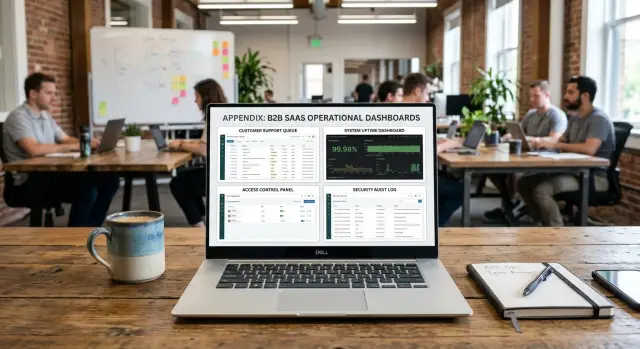
Table of Contents
Why demos stall on trust questions
A polished demo can still lose momentum fast. The turn usually happens when the buyer stops asking "What can it do?" and starts asking "Who supports this, how do you run it, and what happens when something breaks?"
That shift is normal in enterprise sales. Buyers do not judge features alone. They judge risk, because they know the product will go through security, procurement, IT, and operations.
Support questions often show up earlier than product questions. A buyer may like the product in the first ten minutes, then start worrying about response times, incident handling, access control, or who is on call on a Friday night. If those answers sound vague, confidence drops even when the demo itself went well.
Lean teams feel this more than large vendors. A small team can build excellent software and keep it stable, but buyers often read small headcount as fragility. They assume support is informal, monitoring is thin, and security review will turn into a long back-and-forth.
That doubt grows when the demo shows only the app. If buyers see screens, flows, and features but never see how the product is run, they fill in the blanks themselves. Usually, they imagine support living in one founder's inbox, alerts arriving late, and security checks happening only after a customer asks.
None of that has to be true for it to hurt the deal. The gap is enough.
A short trust appendix fixes that gap. Add it at the end of the deck or send it as a follow-up PDF. It should answer the practical worries without turning the meeting into a full security review.
The format matters. Long policy documents slow the conversation down. Four or five operational screenshots with plain captions can do more in two minutes than ten verbal reassurances. They show that support exists, monitoring exists, and someone runs the product with care.
That is often enough to get to the next step.
The four questions buyers want answered
Most enterprise buyers ask the same four things in different words: if something goes wrong, who notices, who responds, who had access, and where is the record?
Start with support ownership. Buyers want to know who picks up the issue when a customer hits a problem. A screenshot of a support inbox, ticket queue, or on-call schedule works better than a claim about "great support." They want to see that requests do not disappear into a shared mailbox.
Then show how your team catches trouble. One screenshot of live monitoring, recent alerts, or an error dashboard is usually enough. A clean alert history says more than a long explanation.
Next comes access. This is where many demos get fuzzy. Show a permissions screen, role matrix, or admin view with clear levels. Buyers do not expect zero access in every case. They expect limits, named roles, and a clear path for elevated access.
Last, show the record of change. A release log, deployment history, or incident note gives buyers a paper trail. One screenshot from GitLab or another CI/CD system, with timestamps visible, can settle a lot of doubt very quickly.
A lean team does not need a thick packet to answer these well. Four screenshots with tight captions can tell a simple story: problems get seen, people respond, access is limited, and changes leave a trace.
Screenshots that carry the most weight
Buyers trust plain operational proof more than polished product slides. The best images are often a little boring, and that is exactly why they work.
Start with support. A screenshot of a support inbox or ticket board shows how your team handles real problems after the sale. Remove names, email addresses, company names, and account details, but keep status, owner, and response timing visible. That tells buyers there is an actual process behind the product.
Next, show a dashboard from a normal week. An uptime graph, alert view, or error summary answers the quiet fear behind most enterprise questions: "What happens when something breaks?" A Grafana panel or Sentry view works well if it shows recent history instead of a perfect, hand-picked moment. In fact, a few small incidents with clear recovery often look more believable than a spotless chart.
Then show access controls. Enterprise teams care about who can see data, who can change settings, and who can get into admin tools. A screenshot of role settings, SSO setup, or admin permissions makes those boundaries visible fast.
After that, show change history. An audit log, deployment log, or release record proves that your team tracks what changed and when. For a lean team, this matters a lot. It makes a small operation look organized without pretending to be bigger than it is.
Keep backup checks and incident runbooks in reserve. They can help, especially with security or operations buyers, but they usually work better in a follow-up conversation. If you lead with them, you can bury the stronger proof under too much detail.
A simple rule helps: each screenshot should answer one buyer doubt in about ten seconds. If someone needs a long explanation to understand the image, pick a different one.
How to build the appendix fast
Start with call notes, not slides. Most teams hear the same trust questions again and again: who responds when something breaks, how you watch production, where support requests land, and who can access sensitive parts of the system. Write those down first. If the same question comes up on several calls, it belongs in the appendix.
Then match each question to one real screenshot. Do not hunt for perfect visuals. Pick the screen that gives a direct answer. A monitoring dashboard can calm uptime concerns. A support queue can show that real people handle problems. An access control screen can answer security doubts faster than a long explanation.
The best appendix usually comes from tools you already use. A lean team does not need custom design work for this. If your workflow already runs through Grafana, Sentry, GitLab, or a similar tool, pull images from there. Buyers trust operating proof more than mockups.
Crop each image hard. Cut out sidebars, menus, and empty space. Leave only the part that answers the question. If you want to show alert response, zoom in on the alert history. If you want to show role controls, zoom in on permission settings.
Add one short caption under each image. Keep it plain and specific. "Alerts go to one on-call rotation" says more than "Operations process." "Only approved team members can deploy" is better than "Security controls."
Keep the whole appendix small. Two to four slides is enough for most teams. That limit forces you to include only the screenshots that remove friction in sales calls.
The whole thing can take less than an hour to build. The hard part is not design. It is choosing the few trust questions that slow deals down most often.
Write captions that do real work
Most captions fail because they sound like legal text. During a live demo, nobody wants to decode policy language from a tiny screenshot. A good caption answers one doubt in one quick read.
Start with the buyer's question, not the tool name. "Who checks this every day?" is better than "Support dashboard." Then answer it in plain words: who owns it, how often they check it, and what happens if something goes wrong.
Short captions work best because people read them while listening. If the caption takes ten seconds to scan, it is too long. One or two short sentences is enough.
A simple pattern works well:
- "Who watches alerts after hours? The engineering lead gets phone alerts at night and checks the queue each morning."
- "How fast do you answer urgent support issues? We review the support inbox all day on weekdays and answer urgent reports within 2 hours."
- "Who can change production access? Only two admins can approve access, and both actions appear in the audit log."
- "How often do you check backups? The team reviews backup status every morning and tests restore steps each month."
These work because they name the concern first, identify the owner, and include timing when timing matters. They also avoid dressed-up language. Most buyers trust plain speech more than jargon.
Specifics calm people down. "Checked daily" is decent. "Checked every weekday by the founder and one engineer" is better. If your team is small, say that directly. Lean teams do not lose trust when they sound lean. They lose trust when the slide hides how the work actually gets done.
Match the caption to the image. If the screenshot shows an inbox with recent replies, write about response time. If it shows an alert screen, write about monitoring. Do not make viewers guess why the image is there.
If the caption feels almost boring, that is usually a good sign.
A lean team example
Imagine a founder on a call with a large buyer after a strong product demo. The product makes sense, the budget looks realistic, and then the meeting slows down. The buyer asks, "Who covers support on weekends if something breaks?"
Instead of answering with a promise, the founder opens a short appendix at the end of the deck. The first screenshot shows the alerting view from the monitoring stack, including recent alerts, who got notified, and how fast someone acknowledged them. The next screenshot shows the support queue with ticket status, owner, and a few requests that arrived outside business hours.
That lands better than a slide saying "we take support seriously." The buyer can see that a small team still has a real process.
A minute later, the buyer asks the next trust question: "How do you limit admin access?" The founder flips to three more screenshots: a roles screen that separates admin, support, and read-only access; the SSO setup used for internal logins; and a recent audit entry showing who changed a permission and when.
Those images do a lot of work in a small space. They show that access is limited by role, people do not share logins, and permission changes leave a trail. For an enterprise buyer, that removes a common fear fast.
That is why this appendix works so well for a lean team. You do not need a large support department or a long security packet in the first meeting. You need a few honest screenshots from the systems you already use.
Mistakes that weaken the appendix
A weak appendix usually looks too polished or too busy. Enterprise buyers do not need theater. They need proof that a small team can run, support, and secure a real product without drama.
The fastest way to lose trust is to use mockups when you could show the real thing. A plain screenshot from an actual tool beats a designed slide every time. Real timestamps, alert names, and deployment history feel credible because they are.
Another common mistake is volume. Teams dump in eight or ten dashboards and hope the buyer will find the signal. Most people will not. Four screenshots often do the job better than ten: one for monitoring, one for deployments, one for access control, and one for support or incident response.
Careless redaction creates a different problem. One visible token, customer name, email address, or internal hostname can shift the conversation immediately. Instead of proving you take security seriously, you show that you missed a basic step.
Readability matters more than design. Tiny text tells the buyer that the screenshot is there to decorate the deck, not answer a question. Zoom in before you capture. Crop tightly. Keep the one panel, log line, or settings block that proves the point.
Captions can hurt too. Sales copy sounds defensive. "Best monitoring for mission-critical systems" adds nothing. "Alert opened at 02:14, acknowledged at 02:17, resolved at 02:26" gives the buyer something concrete.
Before you keep any image, ask four things:
- Does this come from a real system?
- Can someone read it in five seconds?
- Did we remove private data?
- Does the caption explain why it matters?
If a screenshot fails one of those checks, cut it.
Quick check before the next demo
Run one last pass before you show the appendix to buyers. Every image should remove one doubt, not add a new one.
A good test is to read each slide like a buyer who joined late. Can they tell what they are seeing in five seconds? If not, the appendix may work in the room but fail later when the PDF gets forwarded to security, procurement, or an operations lead.
A short filter helps:
- Give each screenshot one job.
- Strip out anything that creates risk or noise.
- Make the presenter's explanation short.
- Export the appendix to PDF and read it on a laptop screen.
- Know which image answers each likely follow-up question.
This matters even more for lean teams. You may not have a large security team on the call, so the appendix has to carry more weight on its own. A clean screenshot of alerting, audit logs, or deployment history can calm a lot of concern without turning the demo into a long technical review.
One practical rule helps: if a buyer asks, "What happens when something fails?" someone on your team should know the exact image to show next. No searching through folders. No guessing which tab had the right proof.
What to do next
Treat the appendix like part of the demo, not an extra file you remember five minutes before the call. Keep it next to the main deck, use the same version name, and make sure the presenter can open it fast when support or security questions come up.
A simple routine works better than a polished one that nobody updates. When you change a tool, adjust on-call coverage, or change how incidents get handled, refresh the screenshots right away. Old proof does more harm than no proof.
After each demo, keep a short note on the questions that slowed the call down. If buyers still ask who gets paged or how you track incidents, your current screenshots are not answering the real concern. Add one better image or rewrite one caption instead of stuffing in five more slides.
An outside review can help before bigger enterprise calls. Someone who was not involved in building the pack will spot gaps faster than your own team. Oleg Sotnikov at oleg.is does this kind of Fractional CTO work for startups and smaller companies, especially when they need clearer support, observability, access control, and delivery practices before enterprise sales.
Done well, this appendix saves time in the room. You get fewer repeated objections, fewer follow-up emails, and a cleaner path to the next meeting.
Frequently Asked Questions
What is a trust appendix in a product demo?
A trust appendix is a short set of operational screenshots you add to your demo deck or send right after the call. It shows how you handle support, monitoring, access, and changes so buyers do not have to guess.
When should I show the trust appendix?
Show it near the end of the demo, right when buyers start asking about support or security. You can also send it as a follow-up PDF if the call runs short.
How many screenshots should I include?
Most teams only need two to four slides. If you add too many images, buyers stop scanning and miss the proof that matters.
Which screenshots carry the most weight?
Start with four areas: support ownership, live monitoring or alerts, access controls, and change history. Those four answer the usual buyer worries about who notices problems, who responds, who can get in, and what record you keep.
Should I use real screenshots or designed slides?
Use real screenshots from tools you already run. Buyers trust actual timestamps, owners, and alert history more than polished slides or mockups.
How should I write captions under the screenshots?
Write each caption as a direct answer to one buyer doubt. Name who owns the work, how often they check it, and what happens when something goes wrong.
What do I need to redact before I share screenshots?
Remove customer names, email addresses, tokens, hostnames, and any private account details before you share the file. Then zoom in so buyers can still read the part that proves the point.
Can a lean team still look credible to enterprise buyers?
Yes, if you show a real process instead of making broad claims. A small team looks reliable when buyers can see alerts, ticket ownership, role limits, and deployment records.
What mistakes weaken the appendix?
Mockups, tiny text, crowded dashboards, and vague captions hurt trust fast. Old screenshots cause trouble too, because buyers notice stale timestamps and start asking what else changed.
How do I keep the appendix useful over time?
Keep it next to the main deck and refresh it whenever your tools, access rules, or on-call setup change. After each demo, note the questions that slowed the call and swap in one better screenshot if buyers still hesitate.


