Edge mappers in frontend for safer backend changes
Learn how edge mappers in frontend isolate API changes, keep UI code steady, and make refactors easier with simple adapters and checks.
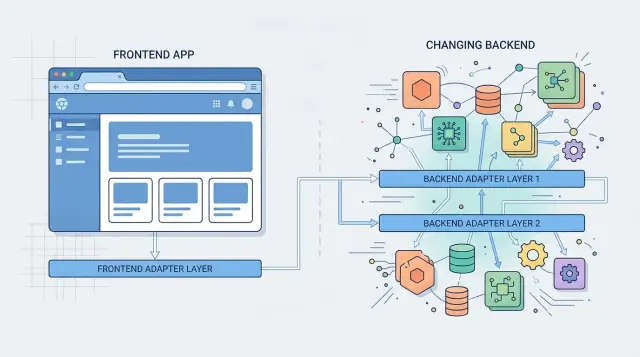
Table of Contents
Why backend changes keep breaking screens
Screens usually break when UI code reads raw API data directly. It feels fast at first, but every backend change spreads through components, hooks, forms, tests, and little helper functions people forgot were there.
A field rename is the obvious example. If full_name becomes displayName, every place that expects the old field stops working. The damage rarely stays in one file. A profile card, account menu, settings form, and search result row might all read that field in slightly different ways.
Missing values are worse. A backend team might stop sending a field for some users, or return null where the UI expects text. One screen shows a blank label, another throws an error, and a third falls into an empty state that makes no sense. Users see a broken product. The team sees three separate bugs, even though they came from one change.
The problem gets bigger when the same response feeds several parts of the product. A dashboard, detail page, mobile screen, and admin view can all depend on one raw payload. If every screen knows the server shape, one backend cleanup can turn into a day of patching.
Teams also waste time fixing the same assumption in several places. One developer adds a fallback in a card. Another adds a null check in a modal. A third updates a test fixture. The app works again, but the weak spot stays put.
That is where edge mappers help. They give the API one place to be messy, incomplete, or renamed. The rest of the UI keeps using the same simple shape, so fewer files change and bugs are easier to find.
Where the mapper belongs
Put the mapper next to the API call. If a profile screen fetches data through getProfile(), the mapper should live in that file or right beside it. Do not hide it inside the component, and do not drop it into a giant utils folder where it loses context.
That single choice keeps raw server data out of the UI. A component should not care whether the backend sends first_name, firstName, or user_name. It should receive the names the app uses and keep rendering.
Keep the boundary strict. The API layer can know server fields. The rest of the frontend should know app fields only. When the backend changes, you update one small mapper instead of touching every screen that reads the response.
In practice, the flow is simple: fetch the data, map it right there, return the mapped object, and reuse that same shape across screens. Rename fields once and move on. If the server sends avatar_url, convert it to avatarUrl in the mapper. If it sends created_at, convert it to createdAt there too. Mixed naming spreads fast, and a codebase starts feeling sloppy after only a few releases.
The mapper should also return the same shape every time the screen loads. That matters when the backend sends partial data, nulls, or odd defaults. If the profile page expects { name, avatarUrl, status }, return that shape on every successful fetch. Do not make the component guess whether status exists today.
A thin adapter is not a second business layer. It is a small piece of code at the edge that translates server output into data the UI can trust. Keep it close to the request and keep it boring.
What a thin adapter does
A thin adapter sits between the API response and the rest of the screen. It takes whatever the backend sends today and turns it into the shape your components expect every day. That sounds small, but it removes a lot of noise from UI code.
Say the server returns full_name, created_at, bio: null, and ten other fields. Your profile card should not care. The adapter can rename full_name to name, parse created_at into a real Date or a display-ready string, turn bio: null into "", and ignore the fields the card never reads. The component gets one clean object and stays simple.
This cleanup matters because UI code breaks easily when raw API data leaks into it. One component checks for null, another expects an empty string, and a third parses the same date differently. Small differences pile up. A thin adapter gives the whole screen one rule.
It also creates a clean boundary around change. If the backend team renames full_name to display_name, you usually update one function. The profile card, header, and settings form can keep using name.
In practice, a good adapter does four things. It renames awkward or unstable fields, converts raw types into safe app types, fills in defaults the UI can handle, and drops extra data that would tempt components to depend on it.
"Thin" matters. The adapter should translate and clean up, then stop. If you put pricing rules, permission checks, and formatting decisions in there, people stop trusting it.
A simple test helps: after the adapter runs, can a component render without defensive code everywhere? If the answer is yes, the adapter is doing its job.
How to add one without a big rewrite
Start with the screen that already hurts. Pick one endpoint that changes often, or one response that arrives in slightly different shapes depending on who touched the backend last. You do not need to apply this pattern across the whole app on day one. One noisy endpoint is enough.
Before you write the mapper, write the shape your screen actually needs. Keep it small and plain. If an account page only shows a name, email, plan, and renewal date, that is your app model. Leave out everything else, even if the API sends 40 more fields.
Then add one small mapper near the fetch code or inside the feature folder. It should take the raw response and return the screen model. Most mappers do a few simple jobs: rename fields, flatten nested data, set safe defaults, and convert awkward backend values into something the UI can use.
After that, switch the screen to read the mapped result instead of the raw response. Try not to change the component much. The goal is to move backend knowledge out of the UI, not rebuild the page. If the API later changes subscription.plan_name to plan.title, you fix one function and move on.
Add a small test. Save one real JSON payload as a sample, run it through the mapper, and check the exact output your screen expects. It is a cheap test, and it catches the annoying changes that slip through review.
A billing screen is often a good first target. Teams keep adding discounts, trial states, tax fields, and plan variants over time. Without adapters, those changes leak into several components. With one thin adapter, the screen keeps asking for the same fields every time.
A simple profile page example
A profile screen is a good place to see the pattern in action. Imagine the API returns raw fields like first_name and avatar_url, but the screen only wants name and avatar. The screen should not care how the backend names things.
This is where edge mappers make life calmer. You take the server response at the boundary, convert it once, and pass a stable shape into the rest of the UI.
type ProfileApi = {
  first_name: string
  avatar_url: string | null
}

type Profile = {
  name: string
  avatar: string
}

export function mapProfile(api: ProfileApi): Profile {
  return {
    name: api.first_name,
    avatar: api.avatar_url ?? "/default-avatar.png",
  }
}
Now the profile component stays simple. It receives one Profile object and renders it. No snake_case fields leak into the screen. No fallback logic gets copied into three different components.
const profile = mapProfile(apiResponse)
return <ProfileCard name={profile.name} avatar={profile.avatar} />
The benefit usually shows up later on an ordinary Tuesday. The backend team changes first_name to givenName, or moves the image into media.avatar. Without a mapper, every screen that touches those fields now needs edits. With a mapper, you change one file.
That file is also a good place for small decisions. If the API starts sending first_name and last_name, you can combine them into one name. If avatar_url is often empty, you can keep the default image rule in one spot instead of spreading it across the app.
That is the whole idea behind thin adapters and API adapters. They do one job: translate outside data into the shape your UI expects. Keep that job small, and your components stay steady even when the backend does not.
Mistakes that make mappers hard to trust
A mapper stops helping the moment people stop believing it. That usually happens when the file gets messy, the rules get blurry, or components start sneaking around it.
One common mistake is mixing fetch code and mapping code into the same long file. Network calls already have enough noise: headers, retries, error handling, auth, and loading state. If the same file also reshapes the payload, nobody knows what broke. A small pure mapper is easy to read and easy to test. A giant "load-and-convert-everything" module is neither.
Another mistake is slipping business rules into the mapper. A mapper should translate the API shape into the shape your UI expects. It can rename fields, flatten nested data, and fill simple defaults. It should not decide whether a user can upgrade, whether an order counts as overdue, or which plan deserves a badge. Put those rules where the team expects to find them.
Teams also make mappers too big by converting every field "just in case." That sounds safe, but it creates busywork. If the screen needs six fields, map six fields. When the backend adds twenty more, your UI should not care. Small mappers survive backend churn better because they expose less surface area.
There is one mistake that breaks trust faster than the rest: a component reaching back into the raw response for one missing value. Once that happens, the boundary is broken. The next backend rename spreads straight into the view layer again.
A mapper earns trust when it stays boring. Keep it small, keep it close to the API boundary, and let components read one clean shape.
A quick check before you ship
Release day gets calmer when each screen reads one clean shape instead of a raw response. Before shipping, check a few simple things:
- Each screen reads one stable object.
- Components never mention API field names.
- The mapper turns nulls, missing arrays, and odd older values into safe defaults.
- Tests cover a current payload and an older or partial one.
Also scan the component tree for rescue logic like user.photo || user.avatar || "". That code belongs in the mapper, not in presentational components. Components should decide how to display data, not how to repair it.
Tests do not need to be fancy. One current payload, one old payload, and one expected mapped result will catch a surprising number of release-day bugs.
If a screen can survive an API rename without touching its JSX, the boundary is in the right place.
When you can skip a mapper
Direct API use is fine in some cases. A mapper is a safety tool, not a rule you must apply to every request.
A tiny internal tool often does not need one yet. If two people use the screen, one developer owns it, and the backend shape is unlikely to move this month, a direct fetch can be the simpler choice. The same goes for a throwaway prototype. If the goal is to test an idea by Friday, extra structure may slow you down more than it helps.
A one-off admin screen can also work without a mapper. If support staff need a page that toggles one account flag and that data never gets reused anywhere else, a mapper for three fields may add more code than clarity.
Direct access is usually fine when the breakage stays cheap: one screen uses the data, one endpoint returns it, one person owns it, the API shape has stayed still, and you would delete the screen without regret.
Teams often wait too long, though. The moment the endpoint starts changing, the tradeoff flips fast. If the backend renames fields, adds nested objects, or returns different shapes for similar screens, direct API access starts leaking into your components.
That is when a thin adapter pays for itself. You do not need a big rewrite. Put the mapper next to the API call, keep the component props unchanged, and move on.
Next steps for a team under change
Teams under pressure usually fail when they try to fix everything at once. A better move is smaller and more ordinary: pick one endpoint that causes the most noise and put a mapper around it this week.
That endpoint is usually easy to spot. It is the one behind repeat UI bugs, rushed hotfixes, or messages like "backend changed the field again." If one screen breaks every other release, start there.
Agree on app-side names before the next backend change lands. If the backend sends user_name, fullName, and display_name in different places, the app should still use one name inside the UI. Decide that name once, put the translation in the mapper, and let components stay stable while the API moves around.
After a sprint, open a few mapper files and judge them like normal code. Are they still thin? Do they only rename, reshape, and set safe defaults? Did they make the UI easier to read? If a mapper starts pulling in feature flags, formatting dates, or calling other services, trim it back.
One small win is enough to build trust. If a backend field changes next month and only one mapper file needs an edit, people notice.
If your team needs help deciding where these boundaries should sit, Oleg Sotnikov at oleg.is works as a Fractional CTO and startup advisor. A short consultation can help you spot the endpoints where a thin adapter will save the most time first.
Frequently Asked Questions
What is an edge mapper in frontend code?
An edge mapper is a small function that sits next to an API call and translates raw server data into the shape your UI expects. It renames fields, fills simple defaults, and keeps backend naming out of your components.
Where should I put the mapper?
Put it right beside the fetch code or inside the same feature folder. Keep raw API data at that boundary so the rest of the UI only sees app-side fields.
What should the mapper return?
Return one clean, predictable object every time the request succeeds. If the screen expects name, avatarUrl, and status, always return those fields so components do not guess what exists.
What does a thin adapter actually do?
Keep it narrow. A thin adapter should rename fields, flatten awkward data, convert raw values into app-friendly ones, and set defaults for null or missing values. Stop there and leave business rules somewhere else.
How do I add a mapper without rewriting the whole app?
Start with one screen that keeps breaking or one endpoint that changes often. Write the small shape the screen needs, add one mapper near the request, and switch the screen to use the mapped result instead of the raw payload.
Should components ever read raw API fields directly?
No. Once a component reaches into raw fields like first_name or avatar_url, the boundary breaks and backend changes spread into the view layer again. Let the mapper handle that translation once.
What makes a mapper hard to trust?
Teams lose trust when the mapper grows into a dumping ground. If it mixes fetch logic, business rules, formatting, and extra fields nobody uses, people work around it and the old problems return.
Do I need tests for mappers?
Yes, and the test can stay small. Save a real payload, run it through the mapper, and check the exact result the screen expects. That catches renamed fields, nulls, and older payload shapes before release day.
When can I skip a mapper?
You can skip one for a tiny internal tool, a throwaway prototype, or a one-off admin page with a stable payload and one owner. If the endpoint starts changing or several screens reuse it, add the mapper before the breakage spreads.
Which screen should I refactor first?
Pick the screen that creates repeat bugs or hotfixes. Billing, profile, and account pages often make good first targets because backend changes there tend to leak into several components.


