Edge caching personalized content without leaking data
Edge caching personalized content gets risky when public, tenant, and user responses share one cache path. Learn how to split them safely.
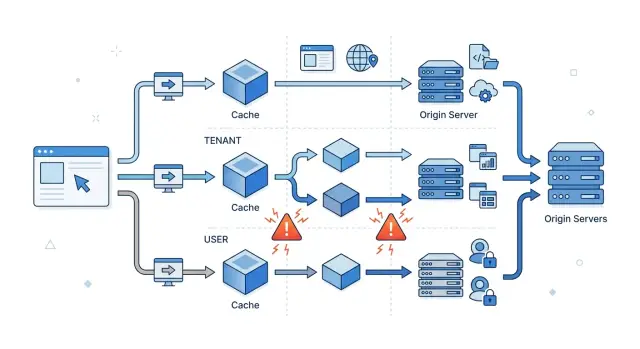
Table of Contents
Why personalized pages leak through cache
A CDN does not know your app the way your team does. It sees a URL, a method, a few headers, and the cache rule in front of it. If two requests look the same at that layer, the CDN can treat both responses as one cached object.
That is how leaks start. Your app may know that Alice and Ben are different users, but the edge cache only knows what you told it to vary on. If Alice opens /dashboard first and the CDN stores that HTML, Ben can get Alice's version if the rule says that page is safe to reuse.
Teams get caught by this because login signals do not fix a bad cache rule on their own. A cookie changes nothing if the CDN ignores cookies for that route. An Authorization header changes nothing if the cache key still uses only the URL. The rule wins.
Even a short mistake spreads fast. If you cache a personalized page for a few minutes, the CDN can deliver the wrong tenant name, account balance, recent orders, or admin menu to a lot of people before anyone notices. Edge speed cuts both ways.
The risk goes up when public pages, tenant pages, and user pages share the same route pattern or template. The difference in the UI may look small, maybe a greeting, a billing warning, or a list of recent projects. The cache stores the whole response, not just the part that feels sensitive.
So start with separation. Public content can usually live in shared cache. Tenant content needs tighter rules. User content needs the most care, and in many cases it should skip shared caching entirely.
Sort responses into three buckets
Most cache leaks begin with one bad assumption: logged in content is one thing. It is not. You need three clear buckets so the CDN knows what it can reuse and what it must keep apart.
- Public responses are safe to cache for everyone. Marketing pages, pricing, changelogs, and public docs fit here.
- Tenant responses are private, but shared inside one account or workspace. A billing page for one company or a team project board belongs here.
- User responses are personal. Profiles, carts, saved filters, private dashboards, drafts, and notification feeds fit this bucket.
A simple test helps: who should be able to receive the exact same response?
If the answer is everyone, it is public. If the answer is everyone in one customer account, it is tenant content. If the answer is one signed in person, it is user content.
Write down real examples before you touch CDN rules. Do not stop at labels like /app or /dashboard. List actual pages, API responses, and fragments. A team that writes pricing, workspace members, and my profile will make better decisions than a team that only writes public and private.
This step feels slow, but it saves time later. It also exposes awkward pages that mix shared and personal data in one response. When that happens, split the response first, then cache it.
Where the mix-up starts
Most leaks come from one quiet mismatch: the app knows two responses are different, but the CDN thinks they are the same.
A common example is /dashboard. Signed out visitors should get a generic view or a login prompt. Signed in users should get their own data. If both requests use the same URL and the CDN caches only by path, the first response can become the version everyone else sees for a while.
The same thing happens in less obvious ways. Your app may change HTML when a session cookie is present, but the CDN does not include that cookie in its lookup. The app may choose the right tenant from X-Tenant-ID, while the CDN still treats /reports as one shared object. A broad rule may cover both safe public HTML and private JSON, even though they should never share cache behavior.
These problems hide well in testing. A developer loads the page, sees the correct content, and moves on. The leak appears later, after the cache warms and reuses that response for another visitor with a different cookie, user, or tenant.
Deep personalization makes it worse. The page template may look public, but one small block shows the user's name, plan, unread count, or recent items. That tiny block turns the whole HTML response into private content.
The problem is plain: the app varies by user state, tenant, or both, but the cache key does not. If the CDN only sees /dashboard, it treats every visitor as the same person.
Separate responses before you cache them
Start by mapping every response your app can send. The risky part is rarely the CDN itself. Trouble starts when two different responses look identical to the cache because the app did not label them clearly enough.
A practical pass is simple. Write down every page and API route that can return account data, tenant data, or anything that changes after login. Classify each route into one bucket only: public, tenant, or user. Then decide what the cache must look at for that bucket, such as path, locale, host, tenant slug, or session state.
Be strict with the names. "Mostly public" is not public. A marketing page with a signed in header, a usage counter, or a "welcome back" block is already personalized. Mark it as mixed, then either split those parts out or keep the full response away from shared cache.
Each bucket needs different lookup inputs. Public pages often need only the URL and maybe locale. Tenant pages usually need the URL plus something stable that identifies the tenant, like the host or tenant slug. User responses need a user specific signal, and in many cases that means they should not live in shared CDN cache at all.
This is where teams get sloppy. They cache /dashboard by path alone, then wonder why one company sees another company's numbers. Or they cache /api/me because it looks fast in testing, but the cache never sees which user asked for it.
If a route mixes buckets and you cannot split it cleanly, skip edge cache for that route. If the app cannot prove which bucket a response belongs to, fail closed. Send the request to origin and return a response that shared cache will not store. That is slower, but slow is fixable. A data leak is not.
Run a final check with real accounts before rollout. Warm the cache as User A in Tenant A, then request the same routes as User B in Tenant B. Use a clean browser and repeat the flow. Check the page source and API responses, not just the visible UI. If names, quotas, invoices, or recent activity cross over even once, that route is in the wrong bucket.
Use cache signals that match the bucket
Cache signals should answer one question: who can safely reuse this response? If that answer is broader than the real audience, the CDN can hand one person someone else's page.
For truly shared responses, keep it simple. Use Cache-Control: public only when every visitor should get the same body, and strip cookies if they do not change the result. A marketing page with a stray session cookie should still cache like a marketing page, not like a private dashboard.
Tenant content sits in the middle. If each tenant sees different branding, plans, or account data, add a tenant identifier to the cache key. That can be the hostname or a tenant header, but only if it maps cleanly to one tenant view. If two tenants can ever share the same cache entry by mistake, the rule is too broad.
User content needs more caution. If the page changes for each signed in person, a shared CDN cache often does not help much unless you include a stable user input in the cache key. That lowers hit rate and grows cache size, so many teams are better off skipping shared cache for the full page and caching smaller shared fragments instead.
A simple pattern works well in many apps:
- Public page:
Cache-Control: public, s-maxage=300and no cookies in the cache key. - Tenant page: shared cache with a tenant identifier in the key.
- User page:
Cache-Control: privateor no shared cache.
Start new rules with a short TTL, often 30 to 120 seconds. If a rule is wrong, bad content expires quickly, and you can inspect logs, headers, and real responses without waiting an hour for the cache to clear.
A simple SaaS example
A SaaS app can place three very different response types behind the same CDN. If you blur them together, speed stops being a win and starts being a leak.
Take a product with a public pricing page, a tenant dashboard, and a personal inbox.
/pricing is the same for everyone, so the CDN can cache it as a public page. /t/acme/dashboard changes by tenant and sometimes by region, so the cache lookup must include the tenant slug and, when needed, region. /inbox belongs to one person, so it should skip shared cache or vary by a user specific signal.
The pricing page is easy. Every visitor should get the same content whether they are signed in or not. If your app adds user specific banners, trial status, or account names there, it stops being truly public and needs different rules.
The tenant dashboard is trickier. Alice from Acme opens it in the US region and sees her company's metrics, branding, and usage totals. Bob from Northwind opens the same product from Europe and should never receive Acme data, even if the page template looks almost identical.
The personal inbox is stricter. Alice and Bob may both belong to Acme, but their messages, alerts, and unread counts are still private. Most teams should bypass shared cache here.
You can catch bad rules with a simple test. Sign in as Alice in one browser profile and Bob in another, using different tenants. Load cold pages, refresh warm pages, and compare names, counts, logos, and region specific details. If Bob ever sees Alice's inbox count, or Northwind picks up Acme branding, the buckets are mixed.
Mistakes that cause leaks
One common mistake is caching logged in HTML with the same rule as the home page. That can look fine in testing, then fail as soon as real users arrive with different roles, invoices, names, or tenant data.
Special modes cause trouble even more often than normal sessions. Preview pages, admin views, support impersonation, and internal QA modes all change what a page shows. If those responses enter the same cache path as regular traffic, the wrong version can leak out.
Query strings are another trap. Developers may rely on ?tenant=a or ?preview=1, while the CDN ignores some parameters or normalizes them into one cache entry. The app thinks requests differ. The cache thinks they are the same.
Headers create quieter failures. Browsers, mobile apps, and server side clients do not always send the same cookies, authorization headers, or accept headers. A rule that looks safe for browser traffic can break when the mobile app sends a slimmer request and lands in a wider cache bucket.
Purging can also create false confidence. Someone clears one page, sees fresh content, and assumes the problem is gone. Meanwhile, stale variants may still sit on other cache nodes, under another host, or behind a different header combination. Users keep receiving old personalized data even after a purge.
The pattern is boring, but dangerous: the app knows which response is private, but the CDN does not. When those rules drift apart, leaks stop looking rare and start looking predictable.
Quick checks before rollout
A rollout can look fine in one browser and still leak in production. The safest test is to request the same route under different identities and verify that the CDN, the app, and the browser all see the right version.
A short test pass catches most bad setups:
- Request the same URL as a guest, a tenant admin, and a regular user, then save the request and response headers.
- Repeat the same requests in a second tenant and a second browser profile.
- Log out, reload the route, and confirm the response changes.
- Purge or deploy, then watch for stale variants for a few minutes.
Tenant switching is where many leaks show up. A route may vary by cookie or auth token, but the CDN may ignore the tenant identifier and reuse the first cached object. That mistake often stays hidden until someone belongs to two workspaces and switches between them.
Logging out is another useful test. If the page still shows account data after logout, the cache probably stored a user response as if it were shared. Even a small leftover, like a recent project name or avatar, means the separation is wrong.
After a purge or deploy, keep watching for stale content. Some edges update at different times, and some browsers keep their own copy. If the wrong page survives a purge, stop and find which layer kept it before you send more traffic.
What to do next
Start with the pages that can do real damage if the cache gets them wrong. Account dashboards, tenant admin screens, billing pages, and any endpoint that mixes shared layout with personal data should come first. Do not try to fix the whole site in one pass.
A small audit is usually enough. Pick the 10 to 20 routes where auth, tenant context, and cached HTML or JSON meet. If one user could see another user's name, balance, settings, or tenant branding, move that route to the front of the line.
Then write one short rule set for each bucket and make both the app team and the CDN team use the same names: public, tenant, and user. That simple split prevents a lot of confusion. It also makes code review easier because every route has one expected cache behavior instead of a vague "personalized" label.
Monitoring matters almost as much as the rules. Add response headers or logs that show the bucket, cache status, tenant context, and auth state for each sensitive request. Set alerts for patterns that should never happen, such as a shared cache hit on a user page or the same cached object reaching two tenants.
A small test script helps too. Request the same URL as User A, User B, Tenant A, and Tenant B. If the CDN returns the same cached object where it should not, you want to catch that in staging, not after customers do.
If you want a second review, Oleg Sotnikov at oleg.is does this kind of CDN, auth, and tenant boundary audit as part of his Fractional CTO advisory. That can help when the stack has grown messy and nobody is fully sure which layer owns the cache rules.
The safest next move is usually narrow and boring: review the highest risk routes, keep the public tenant user split clean, and add alerts that fire the moment the cache breaks that contract.


