Duplicate background jobs: cut noise and stop double runs
Duplicate background jobs often send the same import, retry, or report twice. Learn how to spot the extra task and remove it safely.
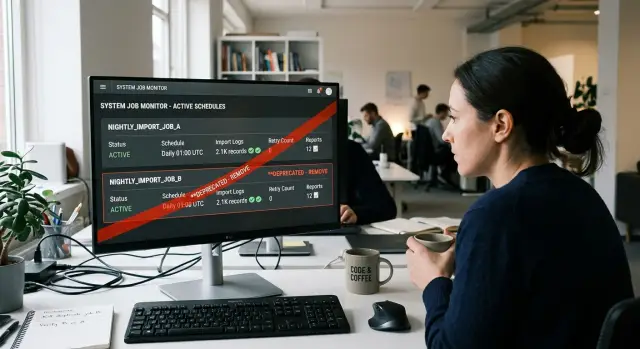
Table of Contents
Why one extra job causes trouble
Background jobs fail quietly when they overlap. One extra task can look harmless for months, then turn into a steady source of bad data, repeat alerts, and wasted time. The pain rarely comes from a big outage. It comes from small errors that pile up.
If two jobs import the same file or pull the same records, you can end up with duplicates in your database, duplicate emails, or stock counts that jump for no clear reason. A team may blame the API, the database, or a recent release, when the real problem is simpler: the same work ran twice.
Retries get worse fast. One failed job is annoying. Two jobs with their own retry rules can create a storm of repeat calls, repeated logs, and repeated alerts. A short network issue turns into dozens of failures, and nobody can tell which error matters. That noise slows down the person trying to fix the original problem.
Reports create a different kind of damage. If two scheduled reports pull data at slightly different times, both can be correct and still disagree. Finance sees one total, sales sees another, and the meeting shifts from decisions to arguments over whose spreadsheet is right. That is a high price for a job nobody notices when it works.
Trust drops after that. People stop believing the schedule, so they rerun tasks by hand, keep private exports, or ask engineers to check the numbers. Once that starts, the schedule stops saving time. It becomes something people work around.
That is why duplicate background jobs matter. They do not only burn CPU time or cloud budget. They damage confidence in the data, the alerts, and the workflow. During a scheduler audit, removing one extra cron job is often the cheapest fix because it cuts noise at the source.
Signs you already run the same task twice
A duplicate job rarely announces itself. It shows up as small, annoying messes that people start to treat as normal. After a while, the team works around the mess instead of fixing it.
One of the clearest clues is timing. The same email lands twice, five minutes apart, with nearly identical numbers. A report appears in two Slack channels, or the finance team gets two CSV files with the same date in the name.
Data problems are another giveaway. One order appears twice in the admin panel. A customer gets two confirmation messages. An import finishes, then a second job runs and creates the same records again, or retries work that already succeeded. If you see duplicate imports and retries, check the scheduler before you blame the app.
Trust breaks down fast when nobody knows which run to believe. People start rerunning tasks by hand
How to audit the schedule
Start with a plain inventory. Open every place where a task can run: cron, app schedulers, queue workers, cloud timers, CI pipelines, and any admin panel with its own schedule. Duplicate background jobs are usually easy to spot once everything sits in one view.
Build one audit sheet
Use a simple table or spreadsheet. Give each row one job, then fill in the same fields for every row so you can compare them fast:
- job name
- start time and frequency
- what starts it
- output type: import, retry, report, or cleanup
- owner and systems touched
"What starts it" matters more than many teams expect. One run may start from cron, another from a queue retry rule, and a third from a script a teammate added months ago. They can all hit the same process without sharing a name.
Add the owner even if the answer is "nobody right now." That tells you where risk sits. If a report breaks and no one owns it, the job already costs more than it should.
Check what overlaps
Now mark any rows that touch the same table, file, API endpoint, inbox, or export folder. This is where confusion hides. Two jobs do not need the same name to do the same work. One may say "nightly import" while another says "retry failed sync," yet both write into the same customer table at 2 a.m.
Look at outputs, not labels. If two jobs create the same CSV, resend the same email, or reprocess the same failed records, flag them. Also note timing gaps. A job at 01:00 and another at 01:10 may look separate, but the second one may only exist because nobody trusted the first.
A small note column helps. Write down facts like "same inbox as billing import" or "retries records already retried by queue." After one pass, patterns show up fast. You do not need a fancy tool. You need one honest map of what runs, who owns it, and what data it touches.
Decide which job should stay
When two jobs do the same work, keep the one that a real person owns. If nobody can answer "who watches this every week?" that job already costs too much. Ownership matters more than age. The newer job may be the better one if a current team still understands it.
Pick the boring job
Most duplicate background jobs survive for one simple reason: nobody wants to touch them. That is how extra retries, backup imports, and shadow reports pile up. When you choose one job to keep, boring usually wins.
Prefer the run with simpler logic, fewer steps, and fewer side effects. A job that imports one file and logs one result beats a job that imports, retries twice, sends three emails, and updates a backup table "just in case". Simple jobs fail in simpler ways, and people fix them faster.
Alerts should break the tie. Keep the job that tells you something useful when it fails. "Sales import missed 214 rows" helps. "Nightly task error" does not. Good alerts save time, especially in small teams where one engineer may handle three systems before lunch.
If nobody can explain why a job still exists, treat that as a warning sign. Ask what it produces, who reads it, and what breaks if it stops. When answers stay vague, that job usually adds more fear than safety.
If both jobs still matter
Sometimes each job has one part worth keeping. One run may have clean logic, while the other has the only alert people trust. Do not keep both just because each has one decent trait. Move the alert, archive step, or report format into the simpler job first. Then test that single flow and retire the other one.
A small example makes this choice easier. Say two nightly sales reports email finance every morning. Finance opens only one of them, but the ignored job still saves a CSV that accounting wants at month end. Fold that CSV step into the report people already use, then remove the extra schedule.
You picked the right job when one person can explain it in a minute: when it runs, what it does, how it warns you, and who fixes it.
Remove a job without breaking the workflow
Do not delete the extra job the moment you find it. First, pause it. Turn off its schedule, but keep the code and config for one full run window. That gives you a clean test: one job runs, one job stays quiet, and you can see what really depends on the duplicate.
With duplicate background jobs, the usual risk is not downtime. It is silent habits. Someone may have built a dashboard around the second report, or a retry script may expect two chances instead of one. A short pause exposes those habits before a permanent delete.
Watch the remaining job through one complete cycle. If it runs nightly, wait a night. If it runs every hour, give it an hour.
- Check the start time and finish time
- Compare row counts or output totals
- Watch how retries behave after a small failure
- Confirm who receives the final report or result
Then do one manual check yourself. Open the import log, confirm the retry queue, or compare the report totals with the source system. This takes a few minutes, and it catches the awkward cases where both jobs masked a bug by accident.
A small example helps. Say two sales report jobs run at 2:00 a.m. One writes a CSV, and the other emails the same numbers from a different query. Pause one job, let the other run, and compare the output by hand the next morning. If finance gets the same totals and no one asks where the second email went, you have your answer.
Tell the team exactly what changed and when. A short note in chat is enough: which job you paused, when the single-job test runs, and when you plan to remove the old entry. People do not need a long memo. They do need the timing.
Once the cycle passes, delete the old scheduler entry, remove old notes that mention it, and update any runbook that still lists both jobs. Old documentation causes the same confusion as the old cron entry. A week later, someone will try to "fix" the system by adding it back.
A simple example: two nightly sales reports
At one company, finance opened Monday's numbers and saw two different totals for Sunday sales. The app had emailed a report just after midnight. A small script on an old server sent another one at 1:15 a.m. The difference was only a few orders, but that was enough to start a long Slack thread.
The reports looked similar, so people assumed one of them was wrong. In fact, both were correct by their own rules. The app counted orders up to 12:00 a.m. in the company's local time. The script used UTC and also picked up a few late updates from the payment system. Same store, same day, different cut-off times.
That is how duplicate background jobs waste time. The numbers do not fail in a dramatic way. They drift just enough to make people stop trusting them.
By Monday afternoon, the team found the real issue. No one owned the script anymore. A developer had added it months ago after finance asked for a backup report during a billing problem. The billing problem was gone, but the job stayed.
The team kept the report that had one owner, one clear schedule, and one place to check if it failed. In this case, that was the report inside the app. They deleted the script, wrote down the report's cut-off time in plain language, and told finance which email to trust.
They also did one useful follow-up step. For the next week, one person compared the nightly total against the payment dashboard each morning. No one saw two totals anymore. No one asked which number was "the real one." Finance started the week with the same figure every day, and the argument disappeared.
Mistakes that create more noise
Teams often delete the obvious extra job first and call it done. That is how duplicate background jobs keep coming back a week later, usually with more confusion than before.
The first mistake is simple: nobody owns the workflow. One person removes a cron entry, another person thought the same task still belonged to finance, support, or the data team, and a third person had a backup copy running somewhere else. Before you delete anything, write down who owns the task, who reads the output, and who gets blamed when it fails.
Hidden reruns cause the next mess. A report may run every night, but someone also clicks a manual "run again" button each morning because they stopped trusting the schedule months ago. If you remove the scheduled job and leave the habit, the team still sees double data and assumes the cleanup failed.
Retries are another trap because they often live in a different tool. The app may retry imports on its own, while a queue worker, CI pipeline, or cloud scheduler retries the same work again. On teams with mixed setups, this happens a lot when one schedule lives in the app and another sits in GitLab CI or an external scheduler.
Check these before deleting anything
- Find every place that can trigger the task, not just the cron table.
- Check whether manual reruns became part of the routine.
- Look for retries in queue workers, CI, or vendor tools.
- Compare time zones across servers, dashboards, and reports.
- List every alert tied to the job.
Time zones create quiet bugs. A job that seems duplicated may actually run once at 1:00 AM UTC and once at 1:00 AM local time. Both runs look "correct" to different people, which is why this mistake lasts so long.
Alerts are the last thing teams forget. They delete the job, but old error alerts, success pings, and missing-run checks stay active. Then Slack fills with warnings for a job that no longer exists.
Cleanups work better when you remove the job, the manual habit, the extra retries, and the old alerts together. If any one of those stays behind, the noise usually stays too.
A quick check after the change
After you remove a job, watch the next few cycles closely. Most issues show up fast: an import stops, a retry never fires, or a report lands twice anyway. This short check tells you whether you fixed duplicate background jobs or only moved the confusion somewhere else.
Start with the next scheduled run, not with old logs. Pick one real cycle and follow it from trigger to result. If the task imports data, confirm that it starts once, finishes once, and writes one clear record of what happened.
Use a simple checklist:
- Check that one import starts at the expected time and creates one batch of new records.
- Force one small failure and confirm that a single retry path picks it up.
- Make sure the team gets one report, in one channel, with one timestamp.
- Compare totals against the source data so counts, sums, and dates still match.
- Watch support or internal chat for a few days and see if repeat questions drop.
The numbers matter more than the scheduler screen. If a sales import says 1,240 orders came in, your database and the source system should say the same thing. If they differ by even a small amount, look for hidden reruns, manual replays, or a leftover worker that still listens for the old trigger.
Reports deserve their own check. Teams often think a cleanup worked because they see fewer emails, but the real test is accuracy. One nightly report should reach the team once, with the same totals people see in the dashboard or source file. If someone asks, "Why did revenue drop by half today?", you probably removed the wrong job or left a timing gap.
Give it a week if the task runs daily, or a day if it runs hourly. You want fewer surprises, fewer "did this run?" messages, and fewer tickets about duplicate data. If support questions fall and the data still matches, the change worked.
What to do next
Pick one scheduled task this week and inspect it from trigger to outcome. Do not start with the safest job. Start with the one that can charge money twice, change stock counts, or send a customer message at the wrong time. Those jobs create real damage fast, and they often hide duplicate background jobs behind old retries, copied cron entries, or report scripts nobody trusts.
A short review usually tells you enough. Check when the job runs, what data it touches, who asked for it, and who would notice if it stopped. If two jobs do the same work in slightly different ways, keep the one that people actually use and remove the one that adds noise.
A simple rule helps more than a long policy:
- Give each scheduled task one clear owner.
- Write one short sentence for its purpose.
- Keep one source of truth for its schedule.
- Record what should happen if it fails or runs twice.
That rule cuts a lot of confusion. When nobody owns a task, extra retries pile up, imports overlap, and old report jobs keep running long after the team stopped reading them.
If you are choosing where to start, pick a workflow with an easy business result. A nightly sales report is one option. An invoice sync is even better. If finance sees duplicates, or support gets emails from customers who received the same message twice, you will know quickly whether the cleanup helped.
You do not need a big rewrite. One deleted cron job can remove false alarms, save support time, and make failures easier to spot. Small teams feel this first because every noisy alert steals attention from real work.
If your schedule feels tangled, get a second set of eyes on it. Oleg Sotnikov does this kind of cleanup in Fractional CTO work: review what runs, find overlap, and trim duplicate automation without slowing the business. Put one noisy task on the calendar this week, and decide whether it still earns its place.


