Domain language for AI coding: fix names before bugs spread
Domain language for AI coding keeps vague names from spreading from tickets to UI and schemas, helping teams ship clearer code and fewer mistakes.
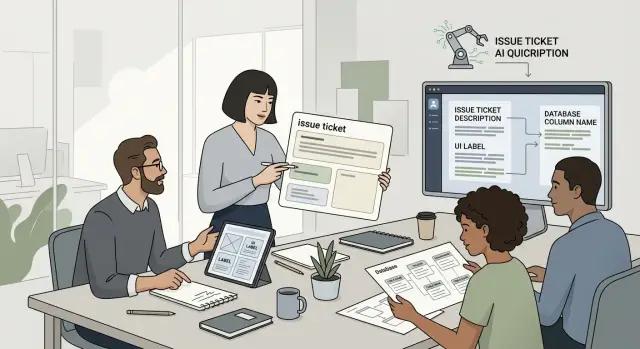
Table of Contents
Where the confusion starts
Naming problems usually begin before anyone writes code. A feature picks up two or three names as it moves through planning, design, and delivery. Product calls it a "workspace," the ticket says "account," and the database still has "organization" from an older version of the app.
At first, that mismatch feels harmless. People still understand each other well enough to keep moving. Then AI writes the glue code between the UI, API, validation, logs, and tests. It has to choose words from whatever it sees. If the source language is mixed, the output is mixed too.
The damage shows up in ordinary places. A ticket asks for "invite teammate," but the button says "add user." The schema stores member_id, and an older report still says "client." None of those names are absurd on their own. Together, they blur the real concept.
Old schema names often cause most of the trouble. Products change faster than databases do, so yesterday's label stays long after the feature means something else. Teams avoid renaming because it feels risky, or because nobody wants to touch old migrations. Then a new developer, or an AI assistant, treats that old name as the truth and spreads it into new code.
Different teams add their own layer. Support uses the words customers say. Sales uses the terms that explain pricing. Product follows the latest mockups. Engineering keeps whatever was in the first table and never got cleaned up. Soon, one concept has a small cloud of near-matches around it.
That is where shared domain language breaks down. AI is good at copying patterns. It is bad at deciding which of three similar names matches your business meaning. If terms drift across tickets, UI labels, and schemas, the confusion does not stay in planning. It reaches production, where fixing it costs more.
Why AI repeats the mess
AI does not clean up fuzzy language for you. It copies the words it finds in tickets, old code, screenshots, schema names, comments, and past examples. If your team uses three names for one thing, the model will often use all three in different places.
That is why naming mistakes spread quickly when AI writes glue code. A developer asks for a small change, the ticket says "customer," the UI says "account," and the database column says user_id. The model tries to make them fit together. Instead of stopping to ask which term is right, it fills the gaps with guesses.
Those guesses do not stay in one file. They show up in comments, tests, API payloads, form labels, migration scripts, and error messages. One small wording gap can turn into a real bug: the UI posts accountType, the backend expects customerType, and the schema still stores user_type. Everything looks close enough to pass a quick review, but the feature breaks in use.
Speed makes this worse. AI can write a lot of code in minutes, so one naming mistake can spread across the stack before anyone notices. A person might create one wrong field. A model can create the field, add validation for it, write tests around it, and mention it in helper text. Now the wrong name looks normal because it appears everywhere.
Models also trust whatever looks established. If an old example uses the wrong term, that term keeps coming back. If the prompt says "archive" but the product really means "hide," the model may add the wrong button, method, and status value. The code can still run, which makes the problem harder to catch.
Teams that build fast with AI run into this early. Better prompting helps, but it is not enough. You need cleaner source language. When one concept has one name across tickets, UI copy, schemas, and code, the model has less room to invent. That cuts rework and stops small wording mistakes from becoming system-wide confusion.
Find the words that cause trouble
Start with the words your team already uses, not the words you wish it used. AI will copy whatever appears most often. If your tickets say "account," the UI says "workspace," and the schema says "organization," the code will often mix all three.
Collect terms from the places where product language leaks into implementation: ticket titles and comments, button labels and form fields, database tables and columns, API requests and responses, error messages, test fixtures, and seed data. Put everything in one plain list. Do not clean it yet. First, get the mess on paper.
Two patterns usually show up fast.
The first is different words for the same thing. A team might use "client," "customer," and "account" almost interchangeably. A person can often guess the intended meaning from context. An AI tool often cannot, so it creates glue code that maps the wrong field or chooses the wrong name for a new endpoint.
The second is one word with two meanings. "Status" is a classic problem. In one ticket it means payment state. In the UI it means whether a user is active. In the schema it means sync progress. When one word carries multiple jobs, bugs spread quietly.
Mark both patterns as you review the list. Circle the synonyms. Flag the double-meaning words. Then add one more column called "stop using." Put any name there that confuses people or invites bad guesses from AI.
A simple example makes this clear. If one feature uses "project" in tickets, "app" in the UI, and "workspace" in the API, pick one term for that concept and retire the other two. If "project" already means something else in another part of the product, ban it here.
This work feels small, but it cuts a lot of rework. Once the team can point to a short stop list, prompts get cleaner, generated code matches the product better, and reviews move faster.
Choose one name for each concept
The fastest way to cut naming bugs is to give each business concept one approved name and use it everywhere. If the app says "account," the ticket should say "account," the database should say "account," and the API should say "account." Once a team allows two or three names for the same thing, AI starts copying that mess into handlers, forms, tests, and migrations.
Pick the word your customers already use. Internal terms often sound neat to the team, but they confuse everyone else. If customers say "invoice," do not rename it to "billing document" in the schema and "charge record" in tickets. AI will treat those as separate ideas, even when people mean the same thing.
This matters even more when AI writes glue code because models follow patterns, not intent. If your backlog says "workspace," your UI says "team," and your access rules say "organization," the model will guess. Sometimes it guesses right. Often it creates a half-mixed version that passes review because every name looks familiar.
Keep singular and plural forms boring. Use "user" and "users," not "member" in one place and "people" in another. Small shifts like that lead to odd condition names, awkward table names, and confusing empty-state text. Simple grammar saves cleanup later.
A short glossary is enough. Each approved term needs only a few pieces of information: the approved name, a plain definition, where it applies, and the names the team should stop using.
That tiny document gives writers, designers, developers, and AI tools the same source of truth.
Edge cases should not hijack the main term. If one customer has a special contract that changes how an "account" behaves, keep "account" as the main label and note the exception. Create a new term only when the business concept is truly different.
A common example is "lead," "prospect," and "contact." Many teams use all three loosely. Pick one for the stage you mean, define when it changes state, and stick to it. You will get cleaner tickets, cleaner UI copy, and schema names that still make sense six months later.
Clean up names step by step
A naming cleanup works best when you start small and fix the word causing the most damage. If one ticket says "customer," the UI says "account holder," and the schema says "client," AI will often join those terms as if they mean the same thing.
Do not try to rename everything at once. Pick the concept that creates the most rework, support questions, or bad assumptions in code review, and fix that first.
Start with tickets and acceptance notes. Those texts shape the first draft of code, tests, and prompts. If your team agrees on "billing contact," use that exact term in the title, description, edge cases, and expected result.
Then move to the UI. Labels, helper text, empty states, and error messages should use the same word people saw in the ticket. When the interface switches names, developers and AI tools start guessing.
After that, fix the data layer. Table names, fields, API payloads, and event names should point to the same idea, even if the exact syntax differs a little. A field like billing_contact_id is much clearer than keeping an old name nobody would choose now.
Next, add one short example that shows the term in context. A sample request, a realistic form message, or a note like "Use billing contact for invoices and payment notices" gives future prompts less room to drift.
Finally, record the decision in a small glossary. Keep it plain and easy to scan so writers, designers, developers, and AI tools all pull from the same source.
A simple rule helps: rename from the outside in. Human-facing language comes first, then technical names follow. That order reduces confusion because the product meaning is clear before anyone edits schemas or events.
This is where the work starts paying off. The model stops trying to translate between mixed labels and starts repeating the right term everywhere.
One warning: you do not need perfect purity. If a database column cannot change yet, note it in the ticket and prompt. Map the old field to the approved product term. That small bit of context can prevent a week of cleanup later.
A simple example from one feature
Naming problems get expensive fast when AI writes the glue code.
Picture a team adding a new onboarding form. The ticket says, "Add company details so sales can track each new customer." In the product UI, though, the same record already appears as "Client." The database schema uses account_id and accounts because that made sense in an older version of the product.
An engineer asks an AI tool to build the form from the ticket and match the existing schema. The tool does what it usually does: it copies the words it sees. It creates a form labeled "Company," writes validation errors that mention "company," and maps the submission to account_id because that is the closest field in the schema.
Now the mess spreads. Support opens the admin panel and sees "Client." Sales exports a report and sees "Account." The customer-facing form says "Company." All three point to one record, but nobody can tell that at a glance. A simple question like "Why does this company not appear in the client report?" turns into a long Slack thread.
Reports usually suffer first because report names and filters often reuse schema terms. Support suffers next because the UI uses the words customers see. AI makes it worse by repeating the mismatch in every patch, test, and helper function. It is not confused in a human way. It is just literal.
The fix is boring, and that is exactly why teams skip it. Pick one term for that concept and use it everywhere people work: tickets and acceptance notes, UI labels and help text, schema names, API fields, and report filters.
If the team agrees that "client" is the right word, then the next ticket says "client," the form says "client," and the schema either uses that name or at least documents account_id as the internal field for client records. AI now has one clear path to follow.
That single decision cuts rework in a very plain way. Support sees the same word that product sees. Reports match the screen. Engineers stop translating terms in their heads. Small bugs stop multiplying before they reach production.
Mistakes that keep showing up
Teams often rename a field in code, then forget the old ticket template, QA checklist, or support form. The code says "organization," the ticket still says "account," and the AI writes glue code that tries to connect both. Nobody notices until a report looks wrong or a form saves data to the wrong place.
That is why naming discipline matters before any model writes a handler, test, or migration. AI does not stop and ask, "Did they mean the same thing here?" It usually picks the nearest pattern and keeps going.
A common problem starts with internal shortcuts. Product or engineering teams say "org," "member," or "status" because those words are fast in daily work. Then the same shorthand leaks into customer-facing copy, admin screens, and API fields. Users read one meaning, the team means another, and the model copies both into comments, variable names, and UI text.
Vague words cause even more damage. "Item," "data," "record," and "info" feel safe because they fit almost anything. That is the problem. If a ticket says "show item data in the dashboard," one person imagines an order, another imagines a product, and the AI may invent a third meaning from nearby files.
Two teams can also split a term without noticing. Sales may use "customer" to mean a company. Support may use "customer" to mean one contact person. If both meanings appear in tickets and schemas, the model will mix them. You end up with code that stores a person in one table and labels it like a company everywhere else.
One small example shows how this spreads. A team changes "workspace" to "project" in the app because users understand it better. They update the UI, but old ticket templates still say "workspace," and the schema keeps a field named workspace_id. Later, someone asks AI to clean up wording across a batch of screens. The model changes labels to "project," leaves several backend names alone, and now support tickets, logs, and exports all use different terms for the same thing.
Asking AI to fix wording without a vocabulary list is usually a mistake. The model can polish text, but it cannot choose your product language for you. Give it a small approved glossary first. If you do not, it will recycle the confusion you already have.
Quick checks before you ship
Small naming gaps turn into shipped bugs fast when AI writes the connecting code. A model will copy the nearest term it sees, even if the UI says "customer," the ticket says "account," and the table says "user."
Use one short review pass with someone who did not build the feature. If that person pauses on a term or uses a different word, the model will likely do the same.
Ask a new teammate to explain each main term in simple words. If two people define "account," "workspace," or "member" differently, rename it before release.
Compare UI labels with the ticket text word for word. If the screen says "Archive project" but the ticket says "Deactivate workspace," you either have two concepts or one bad name.
Check schema and field names against the business meaning. A field called status is often too vague. invoice_payment_status tells people and tools what it means.
Review prompts, comments, and generation rules. Keep only approved terms in AI instructions so the wording stays consistent.
Search examples, fixtures, tests, and seed data for old aliases. One stale test can teach the model the wrong name and bring the confusion back.
This pass does not take long. On a small feature, it often takes 15 to 20 minutes and saves hours of cleanup later.
A simple test works well: pick one action in the product and trace its name across the ticket, button label, API field, and test case. If one step uses a different word, fix it now. Do not trust AI glue code to infer the intent. It usually mirrors the wording it sees.
Teams that move fast often skip this because the app still works. Then support tickets use one term, dashboards use another, and the next prompt spreads the mismatch into more files. Clean names are not polish. They stop small language errors from becoming production behavior.
What to do next
Pick one feature your team is already touching this week. A billing screen, signup flow, or refund rule is enough. Put the ticket, UI copy, API fields, schema names, test fixtures, and prompt text next to each other. You will usually find two or three names for the same thing in less than 30 minutes.
Then write down one approved term for each concept. Keep it simple: the name, a short definition, and any old names people should stop using. For AI-assisted development, that small shared list often helps more than a long style guide. It gives both people and models the same target.
Keep the first pass narrow. Audit one active feature. Pick one name for each repeated concept, even if old code still uses another term. Update prompts, comments, test data, and seed data in the same pass. Add the approved names to ticket templates so new work starts cleaner.
Do this review with the people who actually touch the feature. Product may say "plan," support may say "subscription," and the schema may still say "tier." If nobody settles that mismatch, AI will keep copying it into handlers, tests, and admin screens. A half-day cleanup can prevent weeks of tiny fixes.
You do not need to rename the whole product at once. Start with one feature, finish it properly, and use it as the example for the next team. Small wins tend to stick. A giant naming rewrite usually stalls.
If the problem spans teams, systems, and AI workflows, outside help can save time. Oleg Sotnikov at oleg.is does this kind of Fractional CTO and startup advisory work, especially where product language, architecture, and AI-assisted delivery are all tangled together.
A good first outcome is modest: one cleaned-up feature, one shared naming list, and fewer chances for the next ticket to teach the wrong words.
Frequently Asked Questions
What is domain language in a software team?
Domain language is the set of words your team uses for real business concepts, like account, invoice, or client. It works best when product, design, support, and engineering use the same term for the same thing.
Why do naming issues get worse when AI writes code?
AI copies patterns. If your ticket says customer, the UI says account, and the schema says user, the model often spreads all three across code, tests, and messages. That turns a small wording gap into real rework.
What counts as a naming mismatch?
A naming mismatch means one concept has several names, or one name means several things. Workspace, account, and organization for the same record is one kind of problem. Using status for payment state, user activity, and sync progress is another.
How do I find confusing terms quickly?
Start with what your team already uses. Pull terms from tickets, UI labels, API payloads, schema names, error messages, tests, and seed data, then put them in one plain document. The repeated conflicts usually show up fast.
How should we choose the right name for a concept?
Pick the word your customers already understand, then use that term everywhere. If customers say invoice, keep invoice in the UI, tickets, and code instead of mixing it with internal labels.
Do we need to rename database fields right away?
No, not always. Fix human-facing language first so everyone agrees on the meaning, then clean up technical names in a safe order. If an old column must stay for now, document the mapping clearly in the ticket and prompt.
What should go into a naming glossary?
Keep it short. Write the approved term, a plain definition, where the term applies, and which old names the team should stop using. That gives people and AI one place to check before they write anything new.
Can bad naming really cause production bugs?
Yes, very often. Mixed names can lead to wrong field mappings, broken validation, confusing reports, and UI text that does not match what the backend expects. The app may still look fine in review, which makes the bug harder to catch early.
What should we check before shipping a feature?
Run one fast wording review before release. Compare the ticket, screen labels, API fields, schema names, tests, and prompt text for one feature. If one step uses a different word for the same thing, fix it before you ship.
What is the best first step if our product already has mixed terms?
Start small. Take one feature your team already touches this week, pick one approved name for each repeated concept, update the prompt and test data, and record the decision in a small glossary. A narrow cleanup sticks better than a huge rewrite.


