Domain events without event sourcing for real systems
Learn how domain events without event sourcing let you trigger emails, jobs, and syncs from real business facts while keeping your current database.
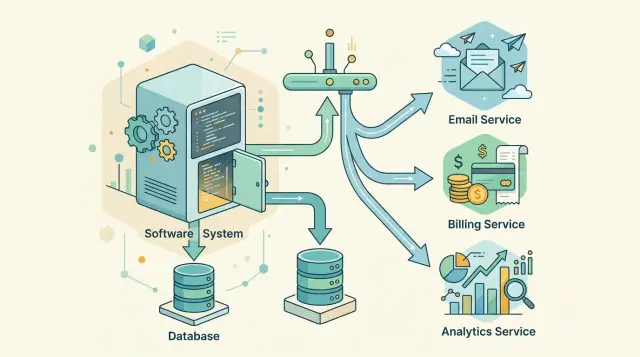
Table of Contents
Why teams need domain events
Most business actions do not end with one database write. A customer pays an invoice, creates an account, or changes a plan, and the system suddenly has more work to do. It needs to send a receipt, update billing, refresh a dashboard, notify support, and write an audit entry.
If all of that happens inside the same request, small problems turn into user-facing failures. A slow email provider can delay checkout. A reporting query can slow an API response. One broken integration can make the whole action look failed even when the main data change was correct.
Most teams want something simpler. Save the business change first, then let the follow-up work happen on its own path.
That is where a domain event helps. It records a business fact in plain terms: "invoice paid", "account activated", "subscription canceled". The event is not the email, the webhook, or the report update. It is the fact those actions react to.
This split matters in day-to-day operations. When support asks what happened, the team can check a clear record instead of guessing from logs. When a downstream worker crashes, the system can retry the follow-up without asking the user to repeat the original action. When another team needs the same fact later, they can subscribe to the event instead of adding more code to the main transaction.
That is why domain events without event sourcing fit many real systems. You keep your normal tables and normal writes. You do not rebuild storage around an event log. You publish business facts so other parts of the system can respond after the main transaction finishes.
A good event gives the rest of the system a clear statement to trust. "Payment received" is clear. "Run post-payment tasks" is not. The first says what happened. The second mixes the fact with the work, and that usually creates tight coupling.
Make this split early and requests stay faster, failures stay smaller, and the system gets easier to reason about when production is noisy.
What counts as a business fact
A domain event should say something that already happened in the business, not something your database happened to change. That sounds minor, but it changes everything. OrderPaid is a fact. OrderRowUpdated is just storage detail.
When teams treat table updates as events, downstream actions get messy fast. Another service cannot tell whether the change matters, whether it is final, or whether it was only part of internal cleanup. A business fact gives other parts of the system something they can trust and act on.
Good event names sound like plain language people would use in a meeting. If support, finance, or ops can read the name and understand it, you are usually close. InvoiceIssued, SubscriptionCanceled, and PasswordResetRequested are clear. UserStatusChanged is vague. RecordPatched is worse.
Each event should carry one fact. Pack several things into one message and consumers start guessing which part matters. That is how simple flows turn brittle. OrderPaidAndPacked saves one publish call, but it creates confusion the first time payment succeeds and packing fails.
A quick test helps. Say the event as a short past-tense sentence. Check whether a non-developer would understand it. Make sure it describes business meaning, not a table write, and make sure another service can react without knowing your schema. If the event contains more than one fact, split it.
The difference is easy to see in a small order flow. If a customer pays, the event is not payments.updated because a row changed in the payments table. The fact is OrderPaid or maybe PaymentCaptured, depending on what the business cares about. Shipping, email, and reporting can all react to that without reading your internal model.
This is where domain events without event sourcing stay practical. You keep your normal database model, but you publish facts that match real business moments. If the storage model changes later, the fact can stay the same. That stability is what makes the event useful.
When event sourcing is the wrong tool
Event sourcing makes sense when the event log is the record you trust and you want to rebuild state from it. Many teams do not need that. They need a dependable way to tell other parts of the system that something important happened, such as "order paid" or "account approved", so later jobs can react.
If your current database already stores the state your team trusts, keep it. Your app reads from it now. Support checks it. Finance exports from it. Replacing that with an event store changes the source of truth and the integration style in one move. That is a big bet when the real goal is much smaller.
Most teams looking at domain events without event sourcing want follow-up actions, not a new storage model. They want to send a receipt, notify shipping, update a CRM, or start a billing task after a business change succeeds. For that, your existing tables can stay exactly where they are.
The cost of event sourcing is not only writing events. You also need to rebuild how reads work, decide how to replay history, handle old event versions, and test a lot of edge cases. If the system is already live, that work lands on every create and update path at once. Small teams usually feel that cost fast.
A normal database plus business events is often the better fit. Save the state you already trust, then publish an event from the same transaction, often with the transactional outbox pattern. Downstream actions listen for facts that are already true in the database.
Take an order system. When payment succeeds, the order row changes to "paid". That row is still the company record. The event exists so email, fulfillment, or reporting can do their jobs. If one of those later steps fails, the order data stays correct, and you can retry the follow-up work without arguing about what the truth is.
Choose event sourcing when history itself must drive the whole system. Skip it when you mainly need reliable downstream actions and a change that fits the system you already have.
How the flow works step by step
The safest version starts with the database write you already trust. If an order changes from "pending" to "paid", your app saves that change in its normal transaction. You do not redesign storage or rebuild the whole app around an event log.
Then the same transaction inserts one extra row into an outbox table. That row is a business event, such as OrderPaid, with the order ID, a timestamp, and the small bit of data other parts need. Writing the order and the outbox row together matters. If one succeeds, the other succeeds too.
A common flow looks like this:
- The request updates the main record in the app database.
- The same commit adds an outbox entry that says what happened in business language.
- A background worker polls the outbox and publishes unsent events to a queue or broker.
- Other services handle the event later, on their own time, and the worker marks the outbox row as sent.
Many teams run that worker every second, sometimes faster. It can read rows in order, publish a small batch, then set a sent time or status. Even with one database, this removes most of the usual event loss problem.
That gap between "saved" and "published" is normal. It is also useful. Email, billing, search indexing, and audit logging should not hold up the original user action. If the order is paid, save that fact first. Send the receipt a moment later.
Failures still happen, so the outbox needs retries. The worker might lose its network, the broker might reject a message, or a consumer might be down for ten minutes. None of that should change the original order record. The worker retries delivery until it gets confirmation, and consumers should treat duplicate events as harmless by checking an event ID or another durable identifier.
That is the practical shape of domain events without event sourcing. You keep the database model that already runs the business, publish business events for downstream actions, and let each part react without sharing one fragile transaction.
Pick events that other parts can trust
Good events describe something that already happened and matters outside the current part of the system. OrderPaid works well. PaymentCheckStarted usually does not. Other teams can act on paid, shipped, refunded, or subscription canceled because those moments mean something to support, finance, and operations.
Trust starts with shared meaning. If one service says "paid" when a card is only authorized, while another team reads it as money captured, bugs follow fast. Give each event a short plain-English definition and name the team that owns that meaning. If billing owns InvoicePaid, everyone knows who decides the edge cases.
The event should carry enough detail for downstream actions without forcing a second lookup for basic facts. Most events need a stable event ID, the business record ID such as order_id, the time the event happened, any amount and currency if money changed, and a schema or event version.
Versioning is worth adding on day one. You may not need version 2 for months, but future you will be glad it is there. Try to evolve events by adding fields, not by changing what an existing field means.
Keep private data out unless someone really needs it to do the job. A shipping service does not need card details. A refund workflow may need the order ID, payment ID, amount, and reason, but not the full customer profile. Less data means less risk, fewer compliance problems, and fewer awkward arguments later.
A small order example makes this concrete. When a store captures payment, publish an event with the order ID, payment ID, amount, currency, captured timestamp, and version. Do not include internal fraud notes or raw gateway payloads. The warehouse can ignore what it does not need, finance can record it, and analytics can count it without guessing.
If an event name would confuse a support agent reading it late on a Friday, rename it before you ship it.
A simple order example
Picture a normal online order. A customer enters card details, the payment provider confirms the charge, and checkout changes the order from "pending" to "paid".
That status change is the business fact. Checkout updates the order row and, in the same database transaction, writes an OrderPaid record to an outbox table. That is the transactional outbox pattern, and it keeps the database change and the event in sync.
This is domain events without event sourcing in a form most teams can ship fast. You keep your usual tables, but you still publish business events that other parts of the system can trust.
The event does not need the full order history. It only needs the facts other parts can act on: the order ID, customer ID, amount paid, currency, and paid-at time.
A background worker reads the outbox and publishes the event. After that, other parts of the system react on their own schedule instead of joining one big transaction.
The receipt service sends the email. It does not ask checkout if payment "probably" happened. It sees OrderPaid, sends the receipt, and retries if the mail provider has a bad moment.
The warehouse system creates a packing task. It does not need to know which payment gateway handled the card or what happened on the checkout page. It only needs one clear fact: the customer paid, so the order can move to packing.
Finance records revenue in its own process. That separation helps more than people expect. Finance often has its own rules, reporting steps, and timing, so it should not sit inside checkout code.
If the email service fails for ten minutes, the order is still paid. If the warehouse queue slows down, finance can still record revenue. Each part does its own job, and checkout stays focused on the sale.
One trusted event can trigger several downstream actions without forcing you to rebuild your storage model around event sourcing.
Mistakes that break the model
With domain events without event sourcing, the model stays simple only if the events stay honest. Most failures start when a team publishes the wrong fact or publishes it at the wrong time.
The first mistake is sending an event before the database commit finishes. If your app emits OrderPaid and the transaction rolls back, other parts of the system may still send a receipt, reserve stock, or alert a customer. Now the event says something happened when it did not. The transactional outbox pattern fixes this by storing the event record in the same transaction as the business change, then delivering it after the commit.
Another mistake is using vague names like order_updated or customer_changed. Those messages have no clear business meaning. A payment confirmed, an address corrected, and an item removed are different facts with different results. If consumers must inspect the database to guess what changed, the event did not do its job.
Teams also break the model when they pack several facts into one event. A large payload with many optional fields looks flexible, but it pushes complexity onto every consumer. One team reads it as "paid", another reads it as "ready to ship", and a third ignores half the fields. Small, specific events are usually better because each one tells a single story.
Duplicate delivery causes quiet bugs when teams assume each consumer reads an event once. Real systems retry. Workers restart. Networks fail. A consumer should handle the same event twice without charging twice or sending two emails. Event IDs, deduplication records, or idempotent handlers usually solve this.
Field changes can hurt just as much. If one team renames a field or changes its meaning with no version plan, older consumers can break overnight. Keep event contracts steady. Add fields in a compatible way, keep old ones for a while, and version the event when you must make a hard change.
A quick smell test helps. The event should leave only after the commit succeeds. The name should describe one business fact. The payload should tell one story, not five. Consumers should process duplicates safely, and older consumers should still read the next event version. If any one of those breaks, downstream actions start drifting away from reality.
Quick checks before you ship
A small review now saves a messy cleanup later. With domain events without event sourcing, the hard part is rarely publishing the first event. The hard part is making sure other parts of the system can trust it when things go wrong.
Start with the event name. If someone who did not write the code reads OrderPaid or InvoiceSent, they should know what happened without opening the source. If the name needs a long explanation, it is probably mixing business facts with internal steps.
A useful event survives a crash. Save the business change and the event record together, then make sure you can publish that same event again if the worker stops halfway through. Teams often think the job is done when the database commit succeeds. It is not done until the downstream action can still happen after a restart.
Duplicates are normal. Networks fail, workers retry, queues time out. Consumers need a safe way to say, "I already handled this," and move on. That usually means keeping an idempotency check tied to the event ID or the business action.
Traceability matters more than people expect. Pick one event and follow it all the way through: database write, outbox row, publisher, queue or broker, consumer, final action. If you cannot trace that path in a few minutes, production debugging will be slow.
Keep the first rollout narrow. Ship one event and one consumer first. Test a crash between save and publish. Replay the same event and confirm nothing breaks. Check that logs show the same event ID from start to finish. That small scope forces clear decisions, and you will spot weak names, missing IDs, and retry bugs before they spread through the system.
A simple rule helps: if you cannot explain the event to support, product, or another engineer in one short sentence, do not ship it yet. Clean names, replay after failure, duplicate-safe consumers, and traceable flow matter more than adding five more events this week.
Next steps for a small rollout
A small rollout works best when it removes one annoying manual task right away. Pick a business fact that already creates follow-up work, such as invoice_paid or order_shipped. If someone still sends emails by hand, copies data into another tool, or checks a status page every morning, that event is a strong first candidate.
Keep the first version plain. One command updates your main record. In the same transaction, you write one outbox row. A worker publishes that row, and one consumer reacts to it. That is enough to test domain events without event sourcing in a real system without rebuilding your storage model.
Add monitoring before you add more business events. Silent failure hurts more than a visible bug. Measure outbox lag so the team sees how long events wait before publish. Count publish failures and retries, not just successful sends. Store dead-letter messages in one place people actually check. Alert on retry spikes, because they often appear before customers notice anything.
Write naming rules early. After the second or third event, cleanup gets expensive. Use past-tense names for facts, keep payloads small, and include durable IDs that other services can trust. If one event says user_registered and another says account_create_done, your team will waste time arguing about meaning instead of shipping.
Teams also need to separate commands from facts. ShipOrder tells part of the system what to do. order_shipped says what already happened. If people mix those up, review the command side and the event side together before you publish more messages.
If your team needs a second set of eyes on event boundaries, outbox design, or a gradual rollout plan, Oleg Sotnikov does that kind of Fractional CTO work for startups and smaller companies through oleg.is. It is the sort of review that helps early, when changing three events takes an afternoon instead of a rewrite later.
Frequently Asked Questions
What is a domain event?
A domain event is a plain statement that a business action already happened, such as OrderPaid or SubscriptionCanceled. Other parts of the system react to that fact later instead of joining the original request.
Do I need event sourcing to use domain events?
No. Most teams keep their normal tables and publish business facts after the main write succeeds. Pick event sourcing only when you want the event log to be the source of truth and rebuild state from it.
Why not do all follow-up work in the same request?
Because one slow or broken dependency can turn a successful business change into a user-facing failure. Save the main change first, then let email, reporting, and other jobs run on their own path.
When should I publish the event?
Publish it only after the business change commits. The usual fix is a transactional outbox: write the record change and the outbox row in one transaction, then let a worker publish after commit.
What makes a good event name?
Use plain business language in past tense. InvoicePaid tells people what happened. Names like row_updated or user_changed force every consumer to guess.
What should the event payload include?
Keep it small but useful. Include a durable event ID, the business record ID, the event time, and any facts another service needs right away, like amount and currency. Leave out private or internal data unless a consumer truly needs it.
How do I handle duplicate events?
Assume retries will happen. Give each event a stable ID and make consumers check whether they already handled it before they send another email, charge again, or create the same task twice.
Can this work with a single database?
Yes. Many teams start with one app database, one outbox table, and one worker that publishes events every second or faster. That setup solves a lot of real problems without changing the storage model.
What mistakes break this pattern?
Teams usually get hurt when they publish before commit, use vague names, pack several facts into one event, or change fields with no version plan. Keep each event honest, small, and steady.
How should a small team roll this out first?
Start with one business fact that already creates manual follow-up work, like OrderPaid or InvoiceSent. Ship one producer and one consumer, test a crash between save and publish, and trace the same event ID from the database to the final action.


