Document version history for retrieval sources that explain changes
Document version history helps retrieval systems keep old and new source copies, dates, and owners so teams can trace why answers changed.
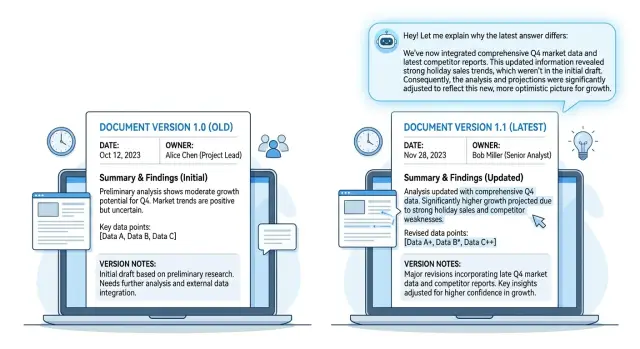
Table of Contents
Why answers change without a clear record
A retrieval system can start giving different answers overnight even when nobody touched the prompt. The usual cause is simpler: someone edited a source after approval, or a newer copy replaced the old one without a clear record.
The retriever indexes the freshest text and moves on. If the older version falls out of the index, the system loses the context it used yesterday. The answer changes, but the reason for the change disappears.
That gets messy fast. A policy PDF might say refunds take 30 days on Monday, then 14 days on Thursday after a quiet update from another team. Users notice the assistant now says something else and ask why. Support teams then spend hours digging through shared drives, chat threads, and ticket comments just to find who changed the file and when.
Without document version history, people guess. They compare filenames, upload times, and half-remembered approvals. They may find three copies named "final," "final-v2," and "final-latest," but none of those names prove which copy the retriever used for a past answer. That gap hurts trust more than the answer change itself.
It also makes reviews harder. If a customer reports a bad answer, the team cannot tell whether the model made a mistake or whether retrieval source tracking pulled a newer document with different wording. Those are different problems, but they look the same when the old source is gone.
A simple answer change audit trail removes most of that confusion. Keep the old and new versions side by side, attach dates, and assign one owner to each version. Then the system can explain the shift in plain language: it used the March document before, and it uses the April document now because the owner replaced it.
That saves time. It also stops the team from treating every changed answer like a mystery.
What each version needs
A retrieval system cannot explain a changed answer if every update keeps only the latest file. For document version history to work, each version needs enough detail to show what changed, when it changed, and who approved it.
Start with one stable document ID that never changes, even when the file does. That ID ties every version together, so the system knows version 4 of a pricing guide is still the same source as version 1. Without it, old and new files look unrelated, and the record falls apart.
Keep the full old text and the full new text, not just a summary of edits. Summaries help people scan, but the system needs exact wording if it must explain why one answer said "$49" last week and "$59" today. Full text also helps when a small line change flips the meaning of a policy.
Each update should store the stable document ID, source title, full previous text, full current text, effective date, upload date, one owner name, a short reason for the change, the file type, and the version number.
Those dates matter more than many teams expect. If a refund rule took effect on April 1 but someone uploaded the file on April 3, the system should know both. Then it can say the answer changed because the policy became active on one date and entered the retrieval system on another.
Use one clear owner name for each change. A team name is usually too vague. If "Support" made the update, nobody knows who to ask when the wording looks odd. One person can represent the team, approve the change, and answer follow-up questions.
The reason field should stay short and plain. "Price update," "policy edit," or "legal wording change" is enough in most cases. Long notes often turn into noise. Short reasons are easier for people to scan, and they work better when RAG document updates need to explain changes in a sentence or two.
Why dates and owners matter
When an answer changes, people ask two things right away: when did the source change, and who approved it? If your system cannot answer both in seconds, reviews get messy and trust drops fast.
In document version history, the date is not extra metadata. It tells the system which version applied at that moment. If a pricing rule changed on April 10, but a customer asked on April 7, the model should be able to explain that it used the older version because that was the active source at the time.
Without dates, every version looks equally valid. Then reviewers see two documents with different numbers, policy texts, or process steps, and nobody knows which one the model should have used. The answer looks inconsistent even when the system did the right thing.
Owners solve a different problem. A document often passes through many hands, but reviews work better when one person owns each version. When support, legal, or product teams need an answer, they should know exactly who can confirm it.
A short reason for the change helps too. People rarely need a long explanation. They need a note such as "policy corrected after legal review," "outdated pricing removed," "onboarding steps changed after product release," or "duplicate section merged into one source."
Those three fields do most of the work:
- active from date
- retired or replaced date
- single owner name
- short change reason
Teams that run AI-assisted support or RAG systems learn this quickly. If the source record is clean, the model can explain changed answers in plain language. If the record is vague, even a strong system sounds evasive.
It is a boring detail, and that is exactly why it pays off. A date tells you which source applied. An owner tells you who can confirm it. A short reason tells you why the answer moved.
Set up version history step by step
Start with one document collection that changes often. Policy pages, pricing rules, support notes, and internal process docs are common trouble spots because they cause answer drift. If you try to version everything at once, the project gets messy fast.
Give each source a stable ID before you split it into chunks. That ID should stay the same across every revision, even when the filename changes. A simple pattern like HR-Policy-014 or Pricing-202 works better than upload names.
Then store two things for every revision: the raw file and the extracted text your system actually reads. Save the version date, owner, and a short note about what changed with that pair. When an answer shifts later, you can check whether the cause was the source itself or the extraction step.
A clean setup is usually simple:
- Pick one folder or collection that updates often.
- Assign a permanent source ID to each document.
- Save every revision as a separate version with a date and owner.
- Reindex new chunks without deleting older chunks.
- Mark one version as current, but keep older ones for review.
That fourth step matters. If you delete old chunks too early, you erase the audit trail. Keep both versions in the index or in a connected store, and tag each chunk with the same source ID plus its version number.
Your retrieval layer should prefer the current version for normal answers. It should still be able to pull older versions when someone asks why an answer changed last week. That small design choice turns a vague dispute into a clear timeline.
Before you roll this out wider, test a few real changes. Update a document, run the same question against the old and current versions, and check whether the system can name the version dates, owners, and changed text. If that explanation feels fuzzy, fix the metadata now. It only gets harder once more documents pile up.
How the system should explain a changed answer
If a user asks why you said X last week and Y today, the system should answer with the exact source versions behind both replies. Vague wording creates more doubt. A short comparison builds trust much faster.
Start with the version behind the current answer. Then name the earlier version if the user is comparing an old reply, a saved answer, or a screenshot. This is the point where document version history stops being back-office paperwork and becomes part of the user experience.
A clear explanation stays narrow. Quote the sentence or paragraph that changed, not the whole file. Most people do not want a full policy dump. They want to see the line that changed, who changed it, when it changed, and why.
What the reply should include
Put the facts in one place. The reply should show the current source version, the earlier version if there was one, the exact sentence or short excerpt that changed, the date, owner, and reason, and whether the change was a policy change, a product change, or wording only.
That last part matters. If the answer changed because the product changed, say so. If legal or internal policy changed, say that. If the meaning stayed the same and only the wording changed, say that too. Users react very differently to those cases.
A simple response shape
A useful explanation can be this direct:
This answer uses the June 12 version of the refund policy, updated by Maya Chen. Your earlier reply used the May 3 version.
Changed text: "Refund requests must be submitted within 14 days" replaced "Refund requests must be submitted within 30 days."
Reason for change: policy update after a billing review.
Change type: policy change.
This format works well in support bots, internal knowledge tools, and RAG assistants. It also helps during later reviews. Teams can see which source answered the question, who owned it, and whether the system changed because the business changed or because the wording changed.
Skip one of those details and people start guessing. That is where confusion starts.
A simple example
A support bot answers refund questions from an internal policy document. In January, the published policy says customers can ask for a refund within 30 days of purchase. That version has an effective date of January 8, and finance owns it.
So when a customer asks in February, the retriever finds the January version and answers: the refund window is 30 days. That answer is correct for the version that was active at the time.
In March, the owner updates the policy. The new version changes the refund window to 14 days, and the record includes a short note: "Changed refund period from 30 days to 14 days." The January version stays in the system instead of getting overwritten.
Now the retriever gets a new question in April. It finds the March version first because that is the current approved source. The system answers with 14 days.
Then a customer asks the harder question: "Why did your system tell me 30 days before, but now it says 14?" If you keep document version history, the system can answer clearly instead of sounding confused.
It can say the earlier answer used the January policy version, effective January 8, owned by finance, which allowed refunds within 30 days. The current answer uses the March version, effective March 3, owned by finance, which allows refunds within 14 days. The owner note on the March update says the refund period changed from 30 days to 14 days.
That explanation matters more than the raw answer. The user can see that the system did not invent a new rule or forget the old one. It used the version that matched the timing of each question.
This also helps your team. Support does not need to argue with the customer or dig through old files. They can point to both versions, the dates, and the owner note. That is what document version history gives you: a clean record of what changed, who changed it, and why the answer changed too.
Mistakes that create confusion
Most teams do not lose trust in a retrieval system because one answer changes. They lose trust when nobody can say what changed, when it changed, and who approved it. That is usually where document version history breaks down.
A few habits cause most of the trouble. Deleting old source text after a reindex erases the evidence, so keep the previous version beside the new one. Using filenames as IDs breaks retrieval source tracking fast, because "policy-final.docx" soon turns into "policy-final-v2.docx," and the system may treat it as a different document. Storing dates in comments instead of proper fields makes them hard to filter, sort, and review. Letting several people edit without one clear owner creates confusion the first time something goes wrong. Mixing draft and approved copies in one collection is another common mistake, because drafts often contain half-finished rules, reviewer notes, or wording that should never reach users.
Another quiet problem is the word "latest." Teams create folders called latest, current, or final, then move files around by hand. A month later, nobody can tell whether "current" means approved for use or simply most recently uploaded.
This gets messy quickly in a small company. A manager edits a draft policy, someone else uploads a cleaned version, and a developer reindexes the folder that night. The next morning, the assistant gives a new answer, but no one knows which copy caused the change.
A clean setup feels a little rigid, and that is a good thing. Keep old and new versions side by side, assign one stable ID, store dates as fields, name one owner, and keep drafts away from approved sources. Then the audit trail points to one source, one version, and one date instead of starting an argument.
Quick checks for your setup
A setup can look tidy on paper and still fail the first time a customer asks, "Why did the answer change?" The real test is simple: can a person find the old source, the new source, and the reason for the switch without jumping across three tools?
Good document version history should answer that in minutes, not hours. If your team needs screenshots, Slack messages, or guesswork, the setup is still too loose.
Check one recent document update and ask a few plain questions. Can someone open one screen and see the previous version and current version together, with clear dates on both? Can the team rerun or review answers using a date filter, so they know what the system would have said last week versus today? Can they see who approved the latest version, not just who uploaded the file? Can they trace one answer back to one exact source version instead of a folder, tag, or mixed batch of files? Can a support person explain the change in under a minute, in plain language, using the record in front of them?
If any answer is "no," users will feel the gap fast. They do not care that retrieval source tracking exists in theory. They care that the system can show its work when an answer changes.
The fastest spot check is to pick one common question and run it twice: once against the old source set and once against the latest one. Then check whether the system shows the version date, the owner, and the exact document chunk behind each answer. If that trail is fuzzy, trust drops.
Approval history matters more than many teams expect. A file may have a recent upload date but still contain draft text that nobody approved. When approval is separate from upload, the system needs to show both.
Support teams are a strong reality check. Give them a changed answer and time how long it takes to explain it. If they cannot do it clearly and calmly, the setup is too hard to use.
A clean audit trail should feel boring. That is a good sign. People can find the facts and move on.
What to do next
Start with the documents that change often and cause the most confusion when answers shift. Pricing pages, policy files, product limits, and support rules usually have the biggest effect. If you build document version history for those first, you will see results quickly instead of trying to tag every file at once.
Set one simple rule and make the whole team use it. Each source version should include a stable document ID, a date for that version, one named owner, and a short reason for the change.
That rule sounds small, but it prevents a lot of trouble later. A stable ID keeps copied files and renamed pages from breaking the record. A named owner matters too, because someone should be able to answer why a document changed without digging through old chats.
Then make answer checks part of every source update. When a team member changes a source, compare a few sample answers before and after the update. Look for real differences, not just wording changes. If the answer changed, confirm that the new version explains the shift and that the older version still stays in the record.
Keep the user explanation short and factual. Most of the time, one sentence is enough: "This answer changed because the refund policy was updated by the owner in the newer version, and the previous rule no longer applies." Users do not need a long story. They need the reason, the source, and the timing.
If your team is setting this up in a live RAG workflow, Oleg Sotnikov at oleg.is works with startups and small businesses on retrieval design, versioning rules, infrastructure, and AI-first development processes. A short consultation can help if you need a clean setup that fits your current docs, team size, and rollout plan.


