Docker image signing in GitLab that teams keep using
Docker image signing gives GitLab teams a clear way to prove what shipped, add provenance checks, and keep the release path short enough to follow.
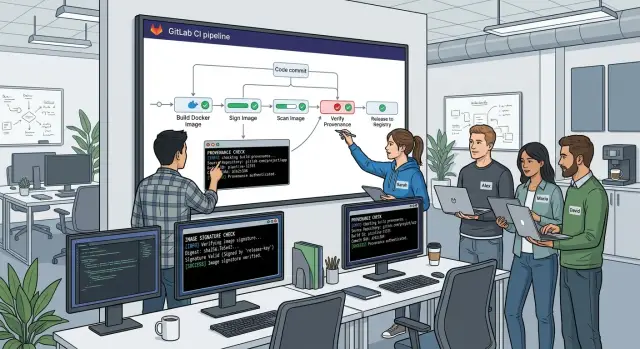
Table of Contents
Why teams lose track of what really shipped
Most release problems start with small shortcuts, not dramatic failures. A team pushes a fix fast, reruns a pipeline, retags an image, and moves on. Two weeks later, nobody can say with confidence what is running in production.
One common problem is rebuild drift. Teams build the same commit twice and expect the same image, but they get a different result. A base image may have changed, a package mirror may return a newer version, or a build step may pull fresh dependencies. The code did not change, yet the image digest did.
It gets worse when people fix things by hand. An engineer rebuilds locally because the pipeline is blocked. Someone patches a config value to hit a deadline. Another person pushes an image with the same tag so deploy can continue. The service may recover, but the release record now has a hole in it.
Tags add another layer of confusion because they look stable when they are not. Teams trust names like staging, prod, or even a version tag, but tags can move. If nobody watches digests closely, the tag changes and the team keeps talking as if it still points to the same image. Rollbacks get messy fast when the tag history is unclear.
During an incident review, this turns a technical problem into a tracking problem. People stop asking why the bug happened and start asking basic questions:
- Which commit produced this image?
- Which pipeline built it?
- Did anyone rebuild it outside GitLab?
- Is production running the same digest that passed tests?
If those answers take an hour to find, trust in the pipeline drops. Engineers stop believing the release record, so they create more side paths. That makes the next release harder to trace.
Docker image signing helps, but only when the path to release stays short and predictable. When teams can trace one image digest from commit to pipeline to deploy, they stop arguing about what probably shipped and start working with facts.
What signing and provenance actually prove
Docker image signing solves a basic trust problem. When your registry holds several tags that look valid, a signature tells your deploy job which image came from your approved build identity and which one did not.
A tag alone does not prove much. A person can reuse a tag, push from the wrong machine, or publish an image outside the normal GitLab release pipeline. The image may still look fine in the registry, but you no longer know if your team built it the usual way.
Provenance is the receipt. It records where the image came from: the commit, the pipeline run, the builder, and the build inputs. When you verify provenance, you can trace one running container back to one specific CI job instead of relying on naming rules or memory.
That gives you a clear answer to the question teams ask during releases and incidents: "Where did this image come from?" With signing and provenance in place, the answer takes seconds, not a long search through chat logs and old pipeline runs.
Verification should happen before deploy, not after a surprise. A simple policy can block images that do not match the identity you trust or the provenance you expect.
For example, verification can reject images that were:
- built outside CI
- rebuilt under the same tag
- copied from another project
- produced from the wrong branch or pipeline source
This is where cosign verification becomes useful. Engineers do not need to inspect metadata by hand every time. The pipeline checks the signature, checks the provenance, and stops unknown artifacts before they reach staging or production.
For a small team, that speed matters. If version 1.8.2 breaks after release, the team can confirm the exact commit and pipeline behind the image right away. They spend less time arguing about what shipped and more time fixing the problem.
Signing and provenance prove three things in plain terms: who built the image, where it came from, and whether your deployment should trust it.
Choose a release path people will keep using
Teams skip controls when the safe path feels longer than the old one. If a release needs local scripts, manual tags, and a separate signing command, people will work around it the first time they are under pressure.
For Docker image signing, the safest rule is also the easiest to live with: only GitLab CI should produce a release image. A developer laptop can build for testing, but it should never create the image that reaches your registry. CI has the commit SHA, job identity, and logs, so later checks mean something.
The release path should stay almost identical for every build. Normal branch builds and release builds should use the same Dockerfile, the same build job, and the same signing step. A release tag should change metadata, not create a second workflow. Two paths become two sets of bugs, and one of them usually gets ignored.
A simple starting shape works for most teams:
- Build the image in GitLab CI.
- Push it to one registry.
- Sign it in the same pipeline.
- Deploy it to one protected environment.
- Fail the pipeline if any check is missing.
That is enough for a small team. You can add more later, but many teams add too much too early. Two registries, three environments, and special rules for hotfixes may look sensible on paper. In practice, they make it harder to tell what shipped and why.
Clear failure messages matter more than most teams expect. "Job failed" tells nobody what to do. "Signature missing for image sha256:..." or "provenance does not match commit 8f3c..." gives an engineer something they can fix in minutes. A good GitLab release pipeline stops fast and says exactly what broke.
A small example shows why this works. A team merges to main, GitLab builds the image, signs it, pushes it to the only registry they use for releases, and deploys it to staging. When they tag a release, GitLab reuses the same path and promotes the same image. No one has to remember a second command, and no one has to trust that a laptop did the right thing.
Add image signing to GitLab step by step
If the pipeline rebuilds the same release twice, signing will not save you. Have GitLab build one image, push that exact artifact to the registry, and sign the digest that comes back from the push.
A clean release path usually looks like this:
- Build one image for the release commit.
- Tag it with a human tag like
1.8.2and a commit tag like the short SHA. - Push both tags to the GitLab container registry.
- Read the immutable digest from the pushed image.
- Sign that digest with cosign and save it with the release record.
The digest matters because tags move. A tag like latest can point to something else in ten minutes. A digest cannot. If your deploy job verifies registry.example.com/app@sha256:..., you know exactly what code you are running.
A small GitLab job can do the work without making the release flow painful:
release_image:
  stage: release
  script:
    - docker build -t "$CI_REGISTRY_IMAGE:$CI_COMMIT_TAG" -t "$CI_REGISTRY_IMAGE:$CI_COMMIT_SHORT_SHA" .
    - docker push "$CI_REGISTRY_IMAGE:$CI_COMMIT_TAG"
    - docker push "$CI_REGISTRY_IMAGE:$CI_COMMIT_SHORT_SHA"
    - DIGEST=$(docker inspect --format='{{index .RepoDigests 0}}' "$CI_REGISTRY_IMAGE:$CI_COMMIT_TAG")
    - cosign sign --yes "$DIGEST"
    - echo "$DIGEST" > image-digest.txt
  artifacts:
    paths:
      - image-digest.txt
Keep the signing identity simple. Many teams start with a cosign private key stored in protected GitLab CI variables. That works, but OIDC is better if you want less secret handling. With OIDC, GitLab proves the job identity at signing time, and you do not keep a long-lived private key in CI.
Whichever method you pick, lock it down. Only protected branches and tags should run the signing job. If every branch can sign, the signature stops meaning much.
Save the signed digest where people can find it during a release review. Put it in the GitLab release notes, attach image-digest.txt as an artifact, or write it into a small metadata file beside the version number. When an engineer gets paged later, they should be able to answer one question in under a minute: which exact image did we ship?
Docker image signing becomes useful only when the signed digest shows up in the same short path people already use to tag, review, and deploy releases.
Check provenance before deploy
Before any deploy job pulls an image, it should answer two questions: did our GitLab pipeline build this digest, and does the metadata match this release? A signature alone is not enough. It proves that someone signed the image. Provenance shows which commit, pipeline, runner, and base image produced it.
Generate that provenance in the same pipeline that builds the image. If a later job adds metadata, or someone signs from a laptop, trust drops fast. Keep the build, signing, and attestation close together so the digest, commit SHA, and pipeline ID all come from one path.
Record a small set of facts every time:
- the exact commit SHA
- the GitLab pipeline ID
- the runner that built the image
- the base image name and digest
- the final image digest
That is enough for most teams. You do not need a huge policy file on day one.
Your staging deploy should verify both the signature and the provenance before it starts. If you use cosign verification, check that the attestation points to the same digest you plan to deploy, then compare the recorded metadata with the release inputs. If the tag says it came from commit a1b2c3, the attestation should say the same. If your trusted runners built releases, the runner should match that allowed set. If the base image digest changed, treat that as a different build.
Run the same verify step again before production. Do not assume staging already proved everything. Tags move, people retry jobs, and manual fixes slip in when teams rush. Verifying the exact digest at each deploy keeps the rule simple and hard to bypass.
When a check fails, return one plain error message. Skip the wall of logs. A message like "Release blocked: image provenance check failed. Rebuild and sign this image in the GitLab release pipeline." gives engineers a clear next step.
That short path matters. Teams keep using Docker image signing when the rule is easy to follow and the failure message tells them what to do next.
A small team release example
A three-person team runs one web API from GitLab. They keep the release path short on purpose, because extra steps get skipped after a long week. Docker image signing stays in the flow only if shipping still feels simple.
Sara merges a change after two reviews and a green test run. Dan is on release duty that day, so he creates the release tag from the reviewed commit. GitLab builds the image, pushes it to the registry, signs the image with the pipeline identity, and stores the digest with the job record.
Their path is plain:
- a reviewed merge lands on the main branch
- one engineer creates the release tag
- the tagged pipeline builds and signs one image digest
- staging deploys only if the signature matches that project pipeline
That staging rule matters more than most teams expect. It blocks images built on a laptop, images retagged by hand, and images copied from an older job with the same version label. If the signature does not match the GitLab project and the expected workflow, staging says no.
After a quick smoke test, the team promotes the exact digest from staging to production. They do not rebuild. They do not pull latest. Production accepts only the digest that already passed staging, so everyone knows the running container is the same one they tested.
A week later, a customer reports a bad response from one endpoint. The team checks the digest running in production, then looks up the signing data and pipeline record tied to that digest. In a few minutes they can see the commit, the merge request, the test results, and who approved the change.
That speed changes the mood during an incident. Nobody argues about which image really shipped. Nobody wastes half an hour comparing tags across environments. One digest points to one pipeline, and one pipeline points to the exact code that went out.
For a small team, that is enough. They do not need a long approval chain or a pile of policy files on day one. They need one trusted path from reviewed merge to signed image to verified deploy, and they need it to work every time.
Mistakes that break trust in the pipeline
Trust drops fast when the pipeline says one thing and the cluster runs another. That usually starts with a small shortcut, not a dramatic failure.
A common mistake in Docker image signing is signing a tag like :latest or :release-1.4 instead of the image digest. Tags move. A digest does not. If your team signs a tag, then rebuilds or retags later, the signature no longer answers the only question people care about: "What exact image did we ship?"
Urgent fixes cause the next break. Someone pushes an image by hand because production is on fire, and now the GitLab release pipeline has a gap in the story. The fix may work, but nobody can prove where that image came from, what commit created it, or whether CI ran tests on it. A fast path is fine. A bypass is not.
Long-lived signing keys create quiet risk. Teams often keep one private key in a CI variable, give broad access to maintainers, and forget about it for months. That key spreads into too many places and too many jobs. If one runner, laptop, or project leaks it, every past and future signature feels suspect. Short-lived identity-based signing is usually the cleaner choice.
Manual approvals can also do damage when there are too many of them. If a release needs five clicks across three tools, people stop respecting the process. They start asking for exceptions, then they stop waiting for approvals at all. The better path is short: build once, sign the digest, attach provenance, verify, deploy.
Another mistake shows up later. Teams verify only in production, after staging already drifted. Then staging tests one image, production runs another, and cosign verification becomes a last-minute gate instead of a normal check. Container provenance checks should happen before each deploy step, not only at the end.
If you want engineers to keep using the process, keep one rule in view: the same digest should move from CI to staging to production, with the same signature and the same provenance attached. Once that rule breaks, trust usually breaks with it.
Quick checks before you tag a release
A release tag should point to one exact image, built once and traced back to one commit. For Docker image signing to mean anything, your team needs that chain to stay short and obvious.
If someone asks, "What did we ship?", the answer should take seconds, not a Slack thread and three GitLab tabs.
- Build and signing should happen in the same GitLab pipeline and refer to the same digest. Do not rebuild the image in a later job just to sign it.
- Deploy jobs should read an image digest, not a mutable tag like
latest. Tags help humans scan releases. Digests tell servers exactly what to run. - Staging and production should enforce the same verification rule. If staging skips
cosign verificationbut production requires it, your test path no longer matches your release path. - Signing credentials should be easy to rotate. If one person leaves or a key changes, the team should update the signer without rewriting half the pipeline.
- Release logs should show the commit SHA, image digest, and signer identity together. That record saves time when you need to confirm what went out.
One small mismatch can break trust fast. A developer tags v1.8.3, staging passes, then someone pushes a fresh image to latest before production deploys. If production reads the tag instead of the digest, you now have a release note for one build and a live system running another.
Credential rotation deserves a quick test before you need it. Teams often ignore it until a key expires on a Friday evening. Keep the signing setup boring: clear owner, clear process, one place to update the trusted signer, and one test release that proves the new signer works.
This does not need a heavy process. One build, one signature, one digest, and one verify rule in both environments is usually enough. When the logs show commit, digest, and signer in one place, release tags start to mean something again.
Next steps for a lean setup
Start with one service that changes often. Pick the API or worker your team touches every week, not the quiet service nobody wants to risk. Frequent releases show friction fast, and friction is what makes people skip Docker image signing.
If the new path adds too much work, engineers will fall back to old habits. That usually happens when someone has to sign locally, copy a digest by hand, or remember a separate command before deploy. Under time pressure, those steps disappear first.
Write the whole release path on one page. Keep it short enough that a new teammate can follow it without asking for help. For many teams, the page only needs four actions:
- build the image in GitLab
- sign it in the same pipeline
- verify digest and provenance before deploy
- tag the release from that pipeline run
Then test that page with the team, not just the person who wrote it. A good check is simple: ask one engineer to ship a small change while another engineer watches for confusion, delays, or missing access. If they stop to ask "which image did we sign?" or "where did this tag come from?", the process is still too loose.
Trim the parts people avoid
Anything people skip on a busy day should be removed, merged, or automated. Manual approval can stay if it protects production, but make it one click with clear context. Provenance checks should run in the deploy job, not live in a wiki that nobody opens.
A lean setup often looks better after subtraction than addition. One signing method, one source of tags, one place to verify, one clear failure message. That is usually enough for a small team.
A realistic first win is modest: one service, one protected branch, one release job, and cosign verification before deployment. Run that for a few weeks. If people keep using it without reminders, copy the pattern to the next service.
If your team needs help tightening CI rules, fixing infrastructure, or shortening the release flow without losing trust, Oleg Sotnikov at oleg.is works with startups and smaller companies as a Fractional CTO. His background includes GitLab-based production infrastructure, lean CI/CD, and practical AI-driven development workflows, so the goal stays simple: make the process easier to use, not heavier.
Frequently Asked Questions
Why should I deploy by digest instead of tag?
Use the image digest, not the tag. A tag like latest or v1.8.2 can move, but a digest points to one exact image forever.
If your deploy job reads image@sha256:..., you always know what code you shipped and what you can roll back to.
What does image signing actually prove?
Signing tells you who signed the image and whether your deploy job should trust it. It helps you block images that came from the wrong place, like a laptop build or a random retag.
It does not fix a messy release path by itself. You still need one build path in GitLab and one digest that moves through staging and production.
What is provenance, and why should I care?
Provenance records where the image came from. It ties the digest to the commit, pipeline, runner, and build inputs.
That gives you a quick answer during a release or incident. You can check one running image and trace it back to one specific CI job instead of guessing from tags or chat history.
Where should signing happen in a GitLab pipeline?
Build the image once in GitLab CI, push it to one registry, read the digest, and sign that digest in the same pipeline. Then make deploy jobs verify the signature and provenance before they pull the image.
Keep the path short. When engineers use the same flow for normal releases and tagged releases, they stop looking for side paths.
Should I use cosign with OIDC or a private key?
OIDC usually gives you a cleaner setup because GitLab proves the job identity at signing time. You avoid storing a long-lived private key in CI, which cuts down secret handling.
If you start with a private key, keep it in protected CI variables and limit who can run signing jobs. Then plan a move to OIDC when you can.
Do I need to verify in staging and production?
Yes. Verify before staging and again before production. Tags can move, jobs can get retried, and people can slip in a manual fix when they rush.
When both environments check the same digest, you know production runs the same image that staging tested.
Why is rebuilding the same release a problem?
Because two builds can produce two different images, even from the same commit. A base image can change, a package version can shift, or a build step can pull fresh dependencies.
Build once, sign once, and promote that same digest. That keeps your release record clean and your rollback story simple.
What should happen when signature or provenance checks fail?
Stop the deploy and return one plain error message that tells the engineer what to fix. Something like Signature missing for digest ... or Provenance does not match commit ... works better than a wall of logs.
Clear errors keep people inside the process. Vague failures push them toward manual workarounds.
How should we handle urgent hotfixes?
Do not let a laptop build go straight to production. If you need a fast fix, commit the change, run the GitLab release pipeline, and sign the new digest there.
Speed matters, but traceability matters too. A quick path inside CI beats a bypass every time.
What is a good minimal setup for a small team?
Start small. Pick one service, use one registry, let GitLab build and sign one image, and verify the digest before each deploy.
That setup gives a small team enough control without adding extra tools or a pile of rules. If people keep using it, copy the same pattern to the next service.


