Disposable dev sandboxes for safer assistant-led refactors
Disposable dev sandboxes let teams test assistant-led refactors in clean, short-lived branches without polluting shared data or breaking other work.
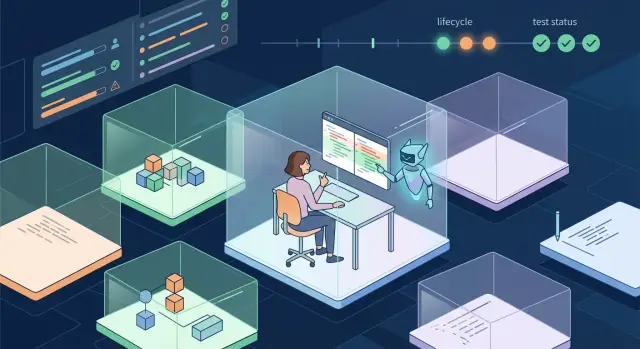
Table of Contents
Why shared dev setups break during big refactors
A shared dev setup works for small edits. It starts to fail when one branch changes a lot of code, database shape, background jobs, or service contracts at the same time.
The first problem is simple: one person's branch can poison everyone else's work. If an engineer changes auth, billing logic, or queue handling in a shared environment, other people run tests against code and data they did not expect. Their branch may be fine, but the shared setup makes it look broken. Teams lose hours chasing failures that belong to someone else.
This gets worse with assistant-led refactors. A coding assistant can rename files, update imports, rewrite tests, and touch config across dozens of directories in minutes. That speed is useful, but it also means mistakes spread fast. A bad migration, one wrong env var, or a silent API mismatch can affect far more than the branch that caused it.
Shared databases are another trap. They keep old records, half-finished test data, and weird leftovers from last week's experiments. That stale data can hide real bugs. A feature may seem to work only because the database already contains the right rows, flags, or cached values. Then the same code fails on a clean setup or in production.
Rollbacks are messy too. When everyone uses the same services, reversing a risky change is not just a git action. Someone has to undo schema changes, repair test data, clear queues, and figure out which failures came from the refactor and which came from other work. By then, people stop trusting the environment.
That is why disposable dev sandboxes make sense for risky code changes. Each branch gets its own short-lived copy of the app and data shape it needs. If the branch breaks, the damage stays inside that sandbox. The rest of the team can keep working without inheriting a problem they did not create.
What a disposable sandbox is
A disposable sandbox is a short-lived copy of your development setup for one branch and one purpose. If a refactor feels risky, that branch gets its own app, its own database, and its own config so the team can test freely without touching a shared dev environment.
Think of it as a private workbench. An engineer or coding assistant can rename models, change migrations, swap service calls, or rewrite a messy flow without breaking someone else's local work or leaving half-finished state behind.
A good sandbox usually includes a small set of things:
- one app instance tied to the branch
- one database or schema for that branch
- branch-scoped environment variables and secrets
- logs and test output that stay inside that branch
The point is isolation. If the branch creates bad data, noisy logs, or odd config changes, the mess stays inside that sandbox. Your shared systems stay clean, and other branches keep moving.
Speed matters too. Teams usually create these environments from a template, not by hand. The template can define the app, database, seed data, and basic observability so a sandbox appears in minutes instead of becoming its own project. That matters a lot when assistant-led refactors produce many edits quickly and you want a safe place to try them.
The "disposable" part matters just as much as the setup. You do not keep these environments around for weeks. After review, testing, or a rejected experiment, you delete the whole thing. That keeps stale databases, forgotten config, and mystery logs from piling up and confusing the next round of work.
Disposable dev sandboxes work best when they feel cheap and temporary. If creating one takes two hours, people skip it. If deleting one feels risky, old state lingers. The sweet spot is simple: clone the template, test the risky branch, inspect the results, then remove everything connected to that branch.
When to create one
Create a sandbox when a branch can break more than the screen you are looking at. If a change can alter data, block sign-in, charge the wrong customer, or jam a queue, a shared dev setup is too risky. That is when disposable dev sandboxes make sense.
Database migrations are an obvious trigger. Even in development, migrations can leave messy state behind, especially when people rerun seeds, rollback half a step, or test with realistic data. A fresh environment lets you see what the migration really does from start to finish, then throw the whole thing away.
The same goes for large assistant-led refactors. If an assistant rewrites routing, API handlers, tests, and config across dozens of files, you do not want those edits mixed with everyone else's work. A separate environment keeps the branch honest. If it boots, passes checks, and behaves the same way twice, you can trust the result more.
You should also create one when a branch touches sensitive flows. Auth is the clearest case. Billing and background jobs belong in the same group. These changes often fail in quiet ways: duplicate emails, missed retries, broken sessions, stale permissions. Shared environments hide those problems because old state lingers and other people keep changing the system around you.
Bug hunts are another good reason. If you need to reproduce one ugly issue, team noise gets in the way fast. A sandbox gives you a clean copy of the app, one branch, one dataset, and one set of logs. That makes weird bugs easier to pin down, especially race conditions and setup-dependent failures.
A simple rule helps: if the branch changes data shape, system behavior, or user access, create a sandbox. Teams running lean AI-first workflows often move fast enough that one risky branch can waste half a day for everyone else. Spending ten minutes on isolation is usually the cheaper choice.
How to set one up step by step
A good sandbox should feel boring. If engineers need half a day to build one, they will skip it and test risky code changes in the shared dev setup instead. The fix is a repeatable path that starts from the same base every time.
Start from one clean base
Pick one image or project template and treat it as the source for every sandbox. That base should already include the app runtime, the usual system packages, and the config files your team needs in development. If one branch uses a different starting point, you stop comparing like with like.
Name each sandbox after the branch or pull request. A name like refactor-auth-pr-184 makes logs, database copies, and test runs much easier to track. It also stops people from attaching to the wrong environment when several refactors are moving at once.
If your team already uses Docker Compose, Kubernetes, or GitLab CI, keep the same tools for this job. Reusing familiar tools saves more time than chasing a perfect new stack.
Load only the data you need
Most refactors do not need a full production copy. Load a small seed dataset that matches the tests you plan to run. If the branch changes billing logic, include a few customers, invoices, failed payments, and edge cases. If the branch changes search, include enough records to show indexing and ranking problems.
Then run the same startup sequence every time:
- Install dependencies.
- Apply migrations.
- Seed the sandbox data.
- Start the app and support services.
- Run a smoke test script.
That smoke test should stay short. It only needs to prove the sandbox works: the app boots, the database connects, login works, and one or two critical flows respond as expected.
Set an expiry time when you create the sandbox. A 24 to 72 hour limit is enough for most assistant-led refactors. After that, the environment should shut down and clean up its database, cache, files, and secrets on its own.
This last step matters more than people think. Old sandboxes pile up fast, confuse the team, and quietly burn money. A disposable dev sandbox should disappear as easily as it starts.
What to copy and what to fake
Disposable dev sandboxes should copy the parts that control behavior and fake the parts that can hurt users, leak data, or create messy side effects. If the branch changes how the app thinks, keep that real. If it sends something outside the sandbox, make it safe.
Start with source code, database schema, migration files, and the full app config shape. Keep the same environment variable names, feature flags, queue names, and job schedules your branch expects. That gives the sandbox the same pressure points as your normal app, so risky code changes fail early instead of passing in a toy setup.
Keep secrets out of the copy. Use masked values, test-only credentials, and limited-access accounts. A sandbox does not need the real email provider key or live payment token. It only needs enough access to prove the code can connect, authenticate, and handle errors.
Data needs the same discipline. Load sample records, generated fixtures, or a scrubbed dataset that keeps the same field shapes and edge cases. Do not pull in customer names, invoices, support threads, or anything else tied to a real person. If your refactor touches search, billing, or permissions, make the fake data slightly messy so you catch nulls, old formats, and duplicate values.
External actions should stay fake whenever you can. Send email to a local inbox viewer, not a real mailbox. Point payment flows at a test gateway, not a live processor. Replace webhooks with replayable mock events so you can trigger success, timeout, and bad payload cases on demand.
Sometimes you still need to see real outbound traffic. In that case, route calls through a recorder or proxy and save the request, response, status code, and timing. When an assistant-led refactor changes a header, drops a field, or sends the wrong body shape, the log makes the mistake obvious.
A checkout refactor is a simple example. Copy the checkout code, schema, and config. Use a test payment account, fake order emails, sample carts, and recorded webhook calls. The branch stays close to real life, but no customer gets charged twice and no one receives a broken receipt.
A simple example from a risky branch
A small team decides to refactor signup and billing in the same branch. That is a risky mix. One change touches how new users get created, and the other changes when billing starts. If they test this in a shared dev setup, they can leave half-finished data, broken webhooks, and confusing test results for everyone else.
So they create one of their disposable dev sandboxes just for that branch. The sandbox gets its own app instance, its own database, and a fake billing provider. They copy the schema, a few test accounts, and the usual app settings. They do not connect it to the shared dev database or the real billing service.
Then the assistant starts the refactor. It moves signup logic into a new service, updates the billing flow, rewrites a batch of tests, and adds a migration for a new customer status field. On paper, the diff looks fine. The tests pass on the assistant's first run too.
The problem shows up only when the team boots the full branch in the sandbox. Signup works, but the billing step fails right after account creation. The app expects an env value for the billing webhook secret, and that value never made it into the sandbox config. In a shared setup, someone might miss that until code review, or worse, after merge.
Because the sandbox is isolated, the fix is simple. The team adds the missing env value, reruns the migration, and checks the flow again with a fresh test user. This time the user signs up, the fake billing event arrives, and the new tests match what the app does.
After review and merge, they delete the whole sandbox. No leftover tables stay around. No one has to clean old test users out of the shared database. Main stays clean, and the risky branch gets real testing instead of guesswork.
That is the real benefit: the team gets a safe place to let the assistant make big moves, then throw the whole environment away when the branch is done.
Mistakes that waste time
Disposable dev sandboxes only help when they stay small, isolated, and easy to delete. Teams lose the benefit when they treat a sandbox like a second shared environment.
A common mistake is letting one sandbox serve several branches at once. That sounds efficient, but it creates mixed state fast. One branch changes a schema, another updates a job runner, and now nobody knows which change caused the failure. One risky branch should get one sandbox. Anything else turns debugging into guesswork.
Teams also waste hours by copying a full production database. Most refactors do not need every row, every attachment, and every old edge case. A huge clone makes setup slow, costs more to store, and creates privacy risk. In most cases, a trimmed dataset with masked records is enough to test migrations, permissions, and basic user flows.
Cleanup gets ignored more often than people admit. A sandbox without an expiry date tends to stay alive for days or weeks after review ends. Then you pay for idle compute, keep secrets around longer than needed, and confuse people who are not sure whether the environment is still valid. Set a clear time limit when you create it, not later.
Background jobs cause another mess. If workers, schedulers, or webhook consumers keep running after the review is over, they can keep writing data, sending messages, or calling outside services. That leaves behind side effects that have nothing to do with the branch you wanted to test. Shut those jobs down automatically when the sandbox expires.
Logs can make or break review speed. If app logs live in one tool, worker errors in another, and infrastructure events somewhere else, engineers waste time stitching together a timeline. Put sandbox logs in one place, or at least tag every event with the same sandbox ID.
Lean teams feel these mistakes faster because nobody has spare hours to clean up avoidable noise. A short-lived sandbox should disappear cleanly and leave behind one thing: a clear answer about the branch.
Quick checks before you merge
Disposable dev sandboxes only earn their keep when they prove the branch works from a cold start. If the branch needs a hand-edited config file, a secret copied from someone else's laptop, or a one-off shell command nobody wrote down, stop there. That branch is not ready.
Run the same short checklist every time. It catches the boring failures that turn into long afternoons after merge.
- Start the branch in a fresh sandbox and watch it boot without manual repair. Containers, seed data, env defaults, and background jobs should come up the same way each time.
- Point it at a brand-new database and run every migration in order. You want a clean pass on an empty state, not success on a database that already carries old tables and lucky leftovers.
- Test one real user path end to end. Pick something small but honest, like sign in, create a record, save it, and load it again. A smoke test that touches the UI, API, and database tells you more than ten tiny checks in isolation.
- Keep outside services fake, but keep them believable. Your email, payments, or CRM stubs should return the responses the app expects, including one or two common failure cases. Fake integrations that always say "200 OK" hide real bugs.
- Destroy the sandbox when you're done and confirm nothing sticks around. Old volumes, test buckets, dangling preview apps, and orphaned secrets all create noise, cost money, and confuse the next person.
This matters even more with assistant-led refactors. Generated changes often look tidy in a diff but fail on first boot because one rename missed a config file or one migration assumes old state. Disposable dev sandboxes make those mistakes obvious before they land in shared environments.
Oleg Sotnikov often pushes teams toward this kind of check because it keeps refactors honest. If a risky branch can start clean, migrate clean, pass one real flow, and disappear clean, merge feels a lot less like a gamble.
What to do next
Do not roll this out everywhere at once. Pick one workflow that already creates stress - a large rename, dependency upgrade, schema change, or assistant-led refactor that touches many files. Run that work in one sandbox next sprint and treat it like a trial, not a rule for the whole team.
Start small with disposable dev sandboxes. A short template is enough at first. Include how to create the environment, which seed data to load, which secrets to replace with fake values, and how to shut everything down. Then add one cleanup rule on day one, such as deleting the sandbox 24 hours after the branch closes.
A simple starter plan works well:
- Choose one risky branch type and give it its own sandbox recipe.
- Keep the template short enough to read in 2 minutes.
- Use fake services or test data unless real state is required.
- Delete the sandbox as soon as the branch merges or closes.
Then track three numbers for a few sprints. Measure setup time first. If engineers need 40 minutes to get a sandbox running, the process is too heavy. Measure bugs found before merge next. Even a few caught issues can justify the extra step on risky code changes. Then watch cleanup rate. Old environments pile up fast, and that turns a good idea into extra cost and confusion.
You do not need full automation right away. Manual steps are fine if the team writes them down and follows them the same way each time. Branch isolation testing only works when people can repeat it without guessing.
If you want help building AI-first dev workflows around safe refactors, testing, and lean infrastructure, book a consultation with Oleg Sotnikov. His Fractional CTO work includes AI-augmented development setups, practical automation, and production systems that stay small, fast, and easy to manage.


