Deployment freeze rules without vague caution or folklore
Deployment freeze rules work best when you tie them to support coverage, customer dates, and release risk instead of fear or habit.
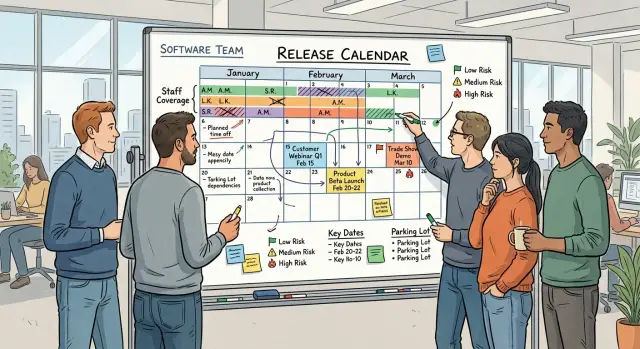
Table of Contents
Why vague freeze rules create more problems
Teams usually invent freeze rules after a bad release, a holiday outage, or one painful Friday night. The intent is reasonable. The trouble starts when fear turns into policy.
A rule like "no deploys before weekends" sounds safe, but it does not explain what actually makes a release risky. It gives people a habit, not a reason. After a while, nobody can explain the rule beyond "we've always done it this way."
Blanket no-release periods frustrate teams because they block safe work and risky work the same way. A text fix, a feature flag change, and a schema migration do not carry the same risk. If the rule treats them as equal, people stop trusting it.
Then the bargaining starts. One manager asks for an exception because the change looks small. Another delays a harmless fix for days because the calendar says "freeze." Both choices waste time, and neither makes the system safer.
Real risk signals are usually easy to name. Staff coverage is thin. A customer launch will drive more traffic than usual. The change touches billing, login, or data migration. The rollback path is messy. Those facts tell a clear story.
Compare that with the habit of always freezing before weekends. A weekend only matters if fewer people can respond or if customers will rely on the system more than usual. If your team has full coverage and the release is low risk, the day itself is not the problem.
People need rules they can explain in a minute. If someone asks, "Why are we freezing now?", the answer should point to coverage, customer impact, and release risk. It should not depend on team folklore.
A useful freeze rule does one job well. It slows teams down when the chance of harm is high and keeps work moving when the risk is low. That makes releases calmer, planning easier, and the rule easier to defend.
What should trigger a freeze
Start with staff coverage, not gut feeling. If the people who can deploy, monitor, and roll back are unavailable, that alone can justify a freeze. A change might look safe on paper, but it stops being safe when the only engineer who knows the database migration plan is off that day.
Small teams should be strict about this. If one absence cuts your response capacity in half, your rule should reflect it. A team with full coverage can ship a moderate change on Thursday. The same team should probably wait if two people are traveling and support is thin.
Customer events come next. Product launches, billing runs, sales demos, partner onboarding, and busy seasonal windows all raise the cost of even a short issue. A ten-minute slowdown on a quiet Tuesday may be annoying. The same slowdown during invoicing or a live demo can damage trust fast.
A freeze also makes sense when the change has a large blast radius. Look at how many systems it touches, how hard it is to test in production, and whether you can roll it back cleanly. Database schema changes, auth updates, payment logic, and infrastructure moves deserve more caution than a copy fix or a hidden UI tweak.
A practical rule usually comes down to four triggers:
- too few people available to deploy and support the change
- a customer event within the next day or two
- a change that touches shared systems or core workflows
- a rollback that is slow, manual, or uncertain
Not every change should hit the same wall. A low-risk fix with clear tests, a small code diff, and an easy rollback can often pass through a freeze window with approval. That keeps the rule sane. Otherwise, teams end up delaying harmless fixes while urgent risky work slips through under pressure.
Ask one direct question: if the change fails, who responds, how fast, and what do customers feel? If the answer is fuzzy, freeze it. If the answer is clear and the impact is small, shipping may be the safer choice.
How to build a simple risk score
Most teams make release risk harder than it needs to be. A good score takes less than two minutes, uses plain numbers, and gives the same answer no matter who applies it.
Use four checks and score each from 0 to 3. Keep the scale small so people do not argue over tiny differences that will not change the decision.
| Check | 0 | 1 | 2 | 3 |
|---|---|---|---|---|
| Blast radius | Internal only | One small feature or admin flow | One customer-facing area | Many users, billing, auth, or core flows |
| Change size | Tiny config or copy change | Small code change | Medium change across a few files or services | Large refactor, migration, or many moving parts |
| Rollback ease | One-click revert | Easy rollback with a short runbook | Rollback needs manual steps | Rollback is slow, risky, or unclear |
| On-call readiness | Full coverage and owner available | Coverage exists but handoff is thin | One person knows the change | No solid coverage or slow response expected |
Add the numbers and use the total to decide what happens next.
- 0 to 4: ship under the normal process
- 5 to 7: get a second review or schedule it for fully staffed hours
- 8 to 12: freeze until coverage, timing, or the rollback plan improves
This works better than vague rules because the team can see why a release moved from safe to risky. A medium-sized change with a weak rollback plan and no real on-call support should not ship just because nobody declared a freeze week.
Keep the score blunt. If people need a meeting to decide whether a change is a 1 or a 2, the model is too fancy. Small teams do best with rules that fit in a chat message or release template.
One habit helps a lot: write the score next to each planned release and add a one-line reason. For example, "7: customer-facing payment update, rollback needs a database step, only one engineer on call." Review gets faster, and you start seeing patterns you can fix later.
Put staff coverage and customer dates on one calendar
A freeze rule fails when it ignores who is actually around to deal with trouble. A small team can ship safely during a busy week if the right people are on call. The same change can be reckless if your only backend engineer is on leave and support is thin.
Keep one shared calendar for release planning. Do not split it across HR leave records, sales notes, and a vague memory that "someone is out next week." If people need three places to understand release risk, they will miss something.
That calendar should show time off and public holidays, gaps in on-call coverage, customer deadlines such as launches or migration dates, public moments like webinars or announcements, and recurring business dates such as month-end close, invoice runs, payroll, or reporting windows.
Once those dates sit together, patterns become obvious. A Thursday release might look fine until you notice finance runs invoices on Friday morning and the person who knows the billing code is away. That is a real reason to freeze. "It feels risky" is not.
Customer events deserve special care because they change the cost of failure. If a client plans a product launch, even a minor bug can turn into a support mess, missed revenue, or an embarrassing rollback in front of their users. That does not mean you freeze for every customer date. It means you mark the date, check coverage, and treat the release with the same seriousness the customer does.
A monthly review keeps the calendar useful. Put 15 minutes on the schedule near the end of each month. Update leave, confirm on-call rotations, add known customer events, and flag weeks that need stricter score limits.
Over time, the conversation gets better. Instead of arguing in general terms, teams ask clear questions: who is available, what customer moment is coming up, and what business process breaks if a rollback happens at the worst possible hour?
Set up the rule step by step
A freeze rule should fit on one page. If people need a meeting to decode it, they will ignore it when the week gets busy.
Write it like an operating note, not a policy manual. Name the trigger, the owner, the exception path, and what can still ship.
Keep the rule short enough to use
Start with plain language. List the events that can trigger a freeze, such as low staff coverage, a major customer event, or a release score above your agreed limit.
Then define the basics in one place: who can declare a freeze, who can lift it, which changes can still go out, how exceptions get approved, and when the team reviews the rule.
For a small team, this often means one engineering lead and one product owner. If you already work with a fractional CTO, that person can own the rule too. You do not need a committee.
Be direct about what still ships. Urgent security fixes, payment outages, broken sign-up flows, and other customer-facing failures usually should not wait. Most other changes can.
Make exceptions fast and boring
The exception path should take minutes, not half a day. A short path works better than a perfect one that nobody follows.
A simple setup is enough for most small teams. The person asking for the exception writes one sentence on the risk, one sentence on the rollback plan, and one sentence on customer impact. Then the release owner and one business owner approve or reject it.
More approvers usually create delay, not better judgment.
Review the rule every quarter. Remove steps nobody uses, fix edge cases that caused confusion, and check whether the freeze still matches your team size and release pace.
One team may need only two freeze levels. Another may need stricter rules during customer launches or holiday support gaps. Keep the rule current, or people will quote it without trusting it.
A simple example from a real release week
A small SaaS team had a launch on Thursday. Six people usually handled releases. That week, three were on leave. Support was thin, the product manager had customer demos booked, and finance had a billing run on Friday morning.
This is where a clear rule helps. The team did not freeze everything. They scored each change against the same rule and looked at staff coverage before making the call.
On Tuesday, two changes were ready. The first was a copy fix on the pricing page. It changed one line of text that had confused trial users. The second changed payment service logic for failed card retries and webhook handling.
The copy fix scored low. It touched one page, did not affect checkout, and the team could roll it back in minutes. They gave it a 2 out of 12: low customer impact, easy rollback, almost no support load, and no dependency on outside services.
The payment change scored high. It touched billing, third-party callbacks, and user access if something broke. With half the team away, the staffing penalty pushed the score higher. They gave it a 9 out of 12: wide impact, slower rollback, harder testing, and a real chance of support tickets at the worst time.
So one shipped and one waited. The copy fix went out Tuesday morning, while everyone was online and support had coverage. The payment change moved to the next Tuesday, after the demos, after the billing run, and after the missing engineers were back.
The final call came from the release owner. In this team, that was the engineering lead with input from product and support. If the change touched revenue or customer access, the fractional CTO also reviewed the score and could stop the release.
Communication stayed simple. Product posted the week's customer events. Engineering posted each release score in the team channel. The release owner wrote a short ship-or-hold note with the reason. Support knew what changed, what did not, and who was on call.
Nobody argued from instinct. The team looked at risk, coverage, and timing. That kept a small fix moving and stopped a risky change from landing in the worst possible week.
Mistakes that turn a freeze into superstition
A freeze stops helping when the rule starts with a feeling and ends with a habit. If someone says "this week feels risky" but nobody can point to staff gaps, customer impact, or a higher score, the team is guessing. Guessing can feel safe for a day or two. After that, it becomes delay with no clear payoff.
Another common mistake is treating every change as if it carries the same risk. A copy fix, a feature flag flip, and a database migration should not all face the same stop sign. Teams lose trust when tiny updates get blocked for the same reason as a deep backend change. Then people work around the rule instead of following it.
The calendar often causes more trouble than the code. Engineering may know about on-call coverage, but support, sales, and customer success often have their own busy dates. A freeze can make sense during a major customer rollout, a contract renewal week, or a planned event where fast answers matter. If those schedules stay outside release planning, teams freeze at the wrong time or miss the risky window completely.
Hidden exceptions are another bad habit. If one manager approves a release in a private chat, the rule stops being a rule. Other people only see that sometimes releases freeze and sometimes they do not. Write exceptions down in one visible place with the reason, the owner, and the rollback plan. That keeps the decision boring, which is exactly what you want.
A freeze should also end on purpose. Some teams start one before a holiday, then leave it in place because nobody wants to be the person who reopens releases. A few days later, low-risk fixes pile up, pressure builds, and the first post-freeze release gets bigger than it should be.
Most warning signs are easy to spot. The reason for the freeze is vague or emotional. Small fixes get blocked with high-risk changes. Customer-facing teams were not asked about timing. Exceptions live in chat and disappear later. Nobody set an end date or review point.
A good freeze has a clear trigger, a narrow scope, and an end time. Without those, it turns into folklore.
A short checklist before you freeze or ship
Most teams do not need a long meeting before every release. They need a fast check that matches the actual risk, the people on call, and what customers will see in the next few days.
The best version of this process is boring on purpose. If your team can answer the same few questions every time, you stop arguing from fear and start making clear calls.
- Who handles incidents if the change causes trouble?
- What customer event or business date is coming up in the next few days?
- What is the release score, and is the rollback plan real?
- Are monitoring, alerts, logs, and error tracking ready before the release starts?
- Is the decision clear right now: ship, delay, or ask for a fast second review?
This takes a few minutes and saves hours of cleanup. A small team can do it in chat or during a short standup, as long as one person owns the final call.
A simple example makes the point. Your team wants to push a payment update on Thursday afternoon. The code change looks small, but Friday morning has a customer webinar, the usual on-call engineer is off, and the rollback touches billing data. That is enough to delay the release, even if the code itself seems safe.
The reverse is true too. If the score is low, coverage is clear, customers have no visible event coming up, and monitoring is ready, you should probably ship. Freeze rules work best when they stop risky timing, not when they block routine work.
Next steps for a rule your team will actually use
Start small. Pick one service, one app, or one product area where releases already cause stress. That gives you a clean test case and keeps the rule from turning into a company-wide argument before you know whether it works.
Write the rule in plain English. A support lead, product manager, or founder should understand it without asking an engineer to translate it. The rule should say who can pause a release, what conditions trigger that pause, and when the team can ship anyway with approval.
After the first month, check whether the rule did its job. Teams often assume a freeze helped because nothing went wrong, but that is not enough. Look at a few simple measures instead: how many releases the rule delayed, how many delays avoided a real incident or messy rollback, how many delays turned out to be unnecessary, and how often people ignored the rule because it felt too broad.
That review matters. If a freeze blocks work every week and rarely prevents trouble, the rule is too blunt. If it catches risky changes during thin staff coverage or before an important customer event, keep it and tighten the wording.
Keep the language boring on purpose. Avoid phrases like "high-risk period" unless you define them. Say "freeze changes to billing during the last two business days of the month unless two engineers and one support owner are on call." People follow rules that sound concrete.
A small team can usually test and tune this in one quarter. Start with one area, keep notes on each delayed release, and adjust the rule based on real incidents, not nerves or habit.
If your team keeps circling around vague release habits, outside help can save time. Oleg Sotnikov at oleg.is works as a fractional CTO and startup advisor, and this is the kind of operating rule he helps small teams put in place. An outside pass can make the process simpler before caution turns into folklore.
Frequently Asked Questions
When should we freeze a deployment?
Freeze a release when coverage is thin, a customer event sits close, the change touches billing, auth, data, or another shared flow, or rollback looks messy. If you cannot name who will respond and what customers will feel, pause the release.
Do we really need a no-deploy Friday rule?
No. A weekend matters only when fewer people can respond or customers will rely on the system more than usual. If your team has solid coverage and the change is low risk, Friday is not the problem.
Can small fixes still ship during a freeze?
Yes, if the fix has low risk, clear tests, and a fast revert. A copy change, small config update, or hidden UI tweak often fits. Security fixes and outage repairs should move fast too.
How do we score release risk fast?
Use four checks: blast radius, change size, rollback ease, and coverage. Score each from 0 to 3, add them, and keep the rules simple enough that two people can score the same change in under two minutes.
What score means we should delay the release?
A total of 0 to 4 usually fits normal release flow. A 5 to 7 should get a second review or wait for fully staffed hours. An 8 to 12 should wait until coverage, timing, or rollback improves.
Who should make the final ship or delay call?
Give that job to one release owner, usually an engineering lead, with input from product and support. If the change affects revenue or customer access, add one business owner or a fractional CTO. One owner keeps the call clear.
How should we handle exceptions?
Keep exceptions short and visible. Ask for one sentence on risk, one on rollback, and one on customer impact, then let the release owner and one business owner decide. Write the decision in one shared place.
What should go on the shared release calendar?
Put leave, holidays, support gaps, launches, demos, billing runs, payroll, and other business dates on one calendar. When the whole team sees those dates together, bad timing shows up early.
How often should we review the freeze rule?
Review the rule every quarter, and update the calendar every month. Remove steps nobody uses, tighten vague wording, and adjust score limits if real incidents show the rule is too loose or too strict.
What makes freeze rules turn into superstition?
The rule stops helping when it starts from a feeling, blocks tiny fixes and risky migrations the same way, hides exceptions in chat, or never gets an end date. Then people stop trusting it and work around it.


