Deployment checklist: support steps before a risky release
A deployment checklist should cover support too: status page text, workaround steps, and escalation contacts to confirm before a risky release.
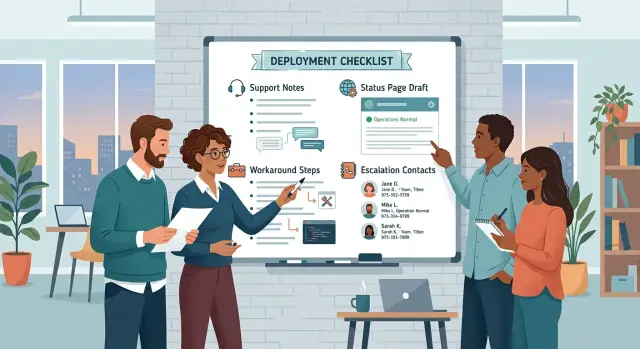
Table of Contents
Why service checks are not enough
A release can look safe on paper and still turn into a support mess. Teams often check CPU, memory, error rates, database load, and rollback scripts. Those checks matter, but they only cover the service itself. They do not cover what happens when real users hit a strange error, see stale data, or get blocked halfway through a task.
That gap creates pressure fast. If users do not know whether the problem is known, temporary, or serious, they start guessing. Some retry the same action five times. Some open duplicate tickets. Some message sales, account managers, and anyone else they can reach. A small incident suddenly feels much bigger because confusion spreads faster than the bug.
The support team feels that pressure first. If nobody has approved status page text, support agents write different explanations in different places. If nobody has clear workaround steps, each agent improvises. If nobody owns escalation contacts, time disappears while people ask who should respond. Ten lost minutes at the start of an incident often turn into an hour of noise.
A simple example shows the problem. A release changes billing logic, and the API stays up. Dashboards look fine. Then a few customers cannot download invoices. The system is technically online, but those users still cannot finish their work. If support has a short note ready, they can say what is happening, offer a temporary path, and send the issue to the right engineer. If they do not, every ticket becomes a fresh investigation.
A good deployment checklist covers people and words, not just servers and code. Before a risky release, confirm who writes the customer update, who approves it, what workaround support can offer, and who takes the first escalation. That prep does not remove every problem. It does stop a normal incident from turning into chaos.
What to confirm before the release
Before a risky release, support prep matters as much as service checks. If something breaks, people need a plain update, a usable workaround, and a real person to contact. A good deployment checklist covers all three.
Review these items before anyone starts the release:
- A status page draft in plain language. Write what users may notice, which parts of the product may fail, and when you will post the next update.
- Workaround notes that support can send right away. Keep them short, exact, and tested by someone who did not write them.
- A contact list with names, not team labels. Include the primary on-call engineer, the support lead, and a backup owner for each role.
- Business hours and coverage gaps. Decide who answers during office hours, who takes nights or weekends, and who owns updates if the issue lasts longer than one shift.
- Approval rules for public messages. If the release goes wrong, the team should know who can post immediately and who must review a message first.
Names matter more than titles. "Engineering" is not a contact. "Alex Kim, on-call until 02:00 UTC, backup: Priya Shah" is something a tired support agent can use at once.
This also matters more for small teams. One person may deploy the release, watch logs, and answer support at the same time. That setup can work, but only if you name a backup owner before the deploy starts. If you work with a fractional CTO or outside advisor, decide whether that person is the first escalation or backup only.
A short release support plan can save a lot of time when things go sideways. Check one last thing before you ship: can a support agent, a founder, or an on-call engineer open the document and know what to say, what to do, and who to call within 30 seconds? If not, the release is not ready.
How to prepare support notes step by step
Start from the user-facing change, not the code diff. Ask what a customer will notice if this release goes wrong. It might be a login loop, a failed payment, or a page that shows old data. Pick the most likely problem and write support notes for that first.
A good deployment checklist covers people as well as services. Support needs a short note they can use under pressure, not a long write-up that only makes sense to engineers.
Build the note in this order:
- Write the change in one plain sentence. Example: "New billing validation goes live for all accounts at 7 PM."
- Draft one status page message for the most likely issue. Keep it clear: "Some customers may see billing errors after today's update. The team is working on it."
- Add a workaround with exact steps. Tell support what to say and what the user should click, in order.
- Name the first contact, second contact, and final decision maker. Use names or roles your team already knows.
- Store the note where support and engineering can both open it fast.
Keep each part short. If a support rep has to stop and translate it, the note is too technical. Use the same words customers see in the product. Drop internal feature names unless support already uses them every day.
The workaround needs real steps, not vague advice. "Please try again later" wastes time. "Log out, wait 30 seconds, sign in again, then open the invoice page from Billing" gives support something useful right away. If the workaround only helps some users, say that too.
Contacts should remove guesswork. The first contact handles the first report. The second contact joins if the issue spreads or lasts more than a few minutes. The final decision maker approves rollback, pause, or customer-wide messaging. That small detail can save ten messy minutes during a bad release.
Put the note in a shared place your team already checks during releases, such as a release doc, runbook, or shared incident channel summary. Five minutes before deploy, ask one support person to read it once. If they stumble on any line, fix the note before you ship.
Status page text people can understand
Good status messages calm people down. Bad ones do the opposite. If your team writes for itself instead of for users, the update turns into noise.
Use plain words first. Skip internal names like "worker-queue lag" or "auth shard mismatch" unless users already know them. Most people want three things: what is broken, what they might notice, and when your team will speak again.
A short update usually needs four parts:
- what users may see
- when your team first noticed it
- what people can do right now, if anything
- when the next update will appear
That matters on any deployment checklist, especially before a risky release. Support should not have to rewrite engineer notes while users wait.
Be careful with cause. If you do not know why something broke, say that. Guessing makes the next update look sloppy. "We are investigating increased login errors" is better than naming a database, cache, or service before anyone confirms it.
Time matters more than many teams think. If users know the issue started at 14:10 UTC and the next update comes at 14:30 UTC, they can decide whether to wait, retry, or contact support. Silence creates more tickets than a short honest message.
It helps to prepare two versions before release day. One fits minor issues where people see delays or a few retries. The other fits major impact, where sign-in, checkout, or another core action stops working for many users.
For a minor issue, keep the tone calm and specific:
We are investigating slower than normal response times that started at 14:10 UTC. Some users may notice delays when saving changes. We will post the next update at 14:30 UTC.
For a major issue, say the impact more directly:
We are investigating an issue that started at 14:10 UTC. Some users cannot sign in or complete requests. If you already have an active session, do not sign out. We will post the next update at 14:20 UTC.
That last line often does more than teams expect. A simple next update time tells people someone owns the problem, and it gives support a stable message to repeat.
Workaround steps that help right away
During a risky release, a workaround only helps if a customer can do it on their own in two or three minutes. If support has to translate the instructions, the workaround is not ready.
Write each action in the exact order a user will take it. Use plain verbs and name the screen, button, or setting they will see. "Sign out, close the app, open it again, and sign in" works better than "refresh your session."
A good deployment checklist also checks whether the workaround matches real user access. If a step needs admin rights, a desktop browser, or a company VPN, say that up front. That saves time and stops support from sending people down a dead end.
One quick test makes a big difference:
- Try the workaround on a fresh account, not your daily test user.
- Repeat it on the device or browser your customers actually use.
- Time the steps. If it takes more than a few minutes, trim it.
- Remove any step that only an internal team member would understand.
Fresh testing catches a lot. Teams often write steps from memory and skip small details, like where a setting lives or when a page needs a full reload. Users get stuck on those missing parts first.
A simple example: after a release, some users cannot upload files in one browser. A usable workaround says, "Open the same page in Chrome, sign in again, and upload the file there." A bad one says, "Use the fallback flow while we investigate." The first tells people what to do now. The second only sounds helpful.
Keep limits visible. If the workaround only fixes new uploads and not files already stuck in queue, say so. Short, honest instructions calm people down faster than vague reassurance.
Escalation contacts without guesswork
A deployment checklist breaks down fast when support does not know who to call. During a risky release, every minute of confusion turns a small issue into a customer problem. Decide the contact order before you deploy, and write down how quickly each person should answer.
Start with a simple split. Support should not send every issue to the same person. Product questions, billing complaints, and a live outage need different paths. If a customer cannot log in, support should call the on duty engineer or incident lead right away. If a customer asks whether a changed button is expected, support can route that to product or the release owner in normal working hours.
Keep all contact details in one place that support can open in seconds. A shared doc, ticket template, or internal runbook is enough if everyone uses the same version. Each contact entry should include:
- name and role
- first contact method, such as chat or phone
- backup method if there is no reply
- expected response time
- when support should skip this person and move up
Customer impact needs its own handoff point. Support should know exactly when to involve the person who can approve service credits, refunds, or broader customer messaging. Do not leave this to case by case judgment when people are tired and the release is still moving.
After hours ownership matters just as much. Many teams plan the release itself and forget the hours after it. If the release goes out at 8 pm, someone must own status updates, customer replies, and the next escalation step until the risk window ends. If your company works with a fractional CTO or outside tech lead, include that person only if they truly own that decision path and can respond in time.
A good contact chain looks boring on paper. That is the point. Support opens one page, sees who to ping first, when to call, and when to wake the next person up. No guessing, no hunting through old chat threads, and no customer waiting while your team figures out who is in charge.
A simple release scenario
A team plans a Friday evening billing change. The code looks fine, tests pass, and the payment provider responds normally. Still, one small side effect slips through: some users hit login errors right after they update their card.
That issue creates two jobs at once. Engineers need to check logs, session tokens, and the billing flow. Support needs a clear answer for worried customers who now cannot sign in and assume the charge failed.
If the team prepared this before the release, the first hour stays calm. If they did not, support starts writing different replies, engineers get pulled into chat threads, and the same question lands five times in five places.
A simple deployment checklist covers the support side before any risky release goes live. In this case, the team confirms four things:
- one short status page message
- one workaround users can try right away
- one person who answers first
- one person who joins if the issue grows
The status message can stay plain: "We are investigating login errors affecting some customers after billing updates. Payments are still processing. If you cannot sign in, use your previous active session if available and wait 10 minutes before trying again."
That message does two useful things. It tells users what broke, and it stops support from guessing. It also avoids the worst support habit during an incident: long explanations that say very little.
The workaround should be just as simple. Support can tell users to avoid repeated password resets, keep any active session open, and retry after a short wait. If the team knows a safer backup path, such as updating billing later instead of right now, support should have that note ready too.
The first reply usually comes from support. They can handle the first wave if they have approved text. The on-call engineer joins when error counts rise or the workaround fails. If billing records look wrong, the product owner or finance contact steps in next.
That early prep cuts repeated questions fast. Customers see one clear message, support sends one consistent answer, and engineers spend more time fixing the problem instead of rewriting the same update in every channel.
Mistakes that create support chaos
A release can look fine on the service side and still turn into a mess for support. The usual problem is simple: the team checks servers, logs, and rollback steps, but nobody checks what customers will read or what support will say when something goes wrong.
One common mistake is pasting raw error text into customer messages. "HTTP 500" or a stack trace helps engineers. It does not help a customer who just wants to know if their work is safe and what they should do next. Plain language works better: say what is affected, what still works, and when you will post the next update.
Another mistake is leaving support to invent workaround steps in real time. That burns minutes when people are already under pressure. If the release might affect login, billing, exports, or mobile sync, write the fallback steps before deployment and test them once. A rough note is not enough. Support needs exact steps that work.
Teams also get into trouble when one person holds all the answers. If only the lead engineer knows the rollback plan, support stalls the moment that person is asleep, in a meeting, or offline. A good deployment checklist names a backup contact for each decision that might block a response.
Timezone gaps create their own problems. Many teams release in their local afternoon and forget that users elsewhere are just starting their day. A small team can still cover this, but only if someone owns the handoff and knows when to escalate.
These warning signs usually show up together:
- Customer updates sound like engineer notes.
- Support asks product or engineering what to say for every ticket.
- Nobody knows who can approve a workaround.
- The status page goes live without a next review time.
- The only person who can answer is offline.
That last point gets missed all the time. If you publish a status update, add the next review time even if you have no fix yet. People handle bad news better than silence. They get frustrated when the page goes quiet and support has nothing new to share.
Quick checks before you press deploy
Five minutes before a risky release, teams usually watch monitors and call it done. That misses the support side. If something goes wrong, confused messages and slow handoffs can hurt more than the bug itself.
Run one last pass through the deployment checklist with a support lens. It takes a few minutes, and it can save hours of ticket noise.
- Read the status page text out loud. If a customer cannot tell what broke, who is affected, and what to do next, rewrite it now.
- Test the workaround on a real account, or on a safe copy that behaves the same way. If it only works in a demo, it does not count.
- Open the escalation list and check every backup contact. One missing phone number or one person offline can stall the whole response.
- Make sure support knows exactly where to post updates. One shared place beats scattered notes in chat, tickets, and email.
- Set the next review time before you deploy. A clear check-in time stops long silent gaps when the team gets busy.
A small release shows why this matters. Say a payment change might delay invoice emails for 20 minutes. Support needs plain status page text, a tested manual resend step, a second contact if the billing owner is away, one update channel, and a time for the next check. Without those five items, the first customer complaint turns into internal searching.
Small teams miss this all the time, especially when one engineer or one CTO carries most of the release knowledge. That works until the release gets tense. Write the support notes down, test them once, and make the next review time visible to everyone. Then press deploy.
What to do next
Turn your notes into a one-page release template and keep it in the same place every time. If a release needs service checks, support notes, and clear owners, they belong in one document, not across chat, tickets, and someone’s memory.
A simple template is enough:
- release name and planned time
- status page text you will post if something breaks
- workaround steps support can send in plain English
- escalation contacts with names, roles, and backup owners
- the stop rule for rollback or pause
Then run one dry run before the next risky change. Pick a real release, walk through the template, and ask one support person and one engineer to use it as if the problem is already happening. This usually finds the weak spots fast. Maybe the status message is too vague. Maybe the workaround skips a step. Maybe nobody knows who to call after hours.
After each release, review what support learned while the details are still fresh. Keep it short. Ask what questions users asked first, which reply saved time, and where the team hesitated. Update the template right away so the next release starts with better notes instead of the same old guesses.
This is also a good place to trim noise. If a field never helps, remove it. If support keeps asking for the same missing detail, add it. A release process should be easy enough that people actually use it under pressure.
For small teams, this can be the difference between a rough hour and a lost day. If your team needs a release support plan that works in real life, a Fractional CTO such as Oleg Sotnikov can help set up the process, the template, and the escalation path without adding extra process for the sake of it.
Use the next risky release as the test case. Build the page, run the dry run, and fix the gaps before you press deploy.


