Deploying without downtime when you lack a platform team
Deploying without downtime gets easier when you use a load balancer, health checks, and slow traffic shifts. Learn a simple release flow small teams can run.
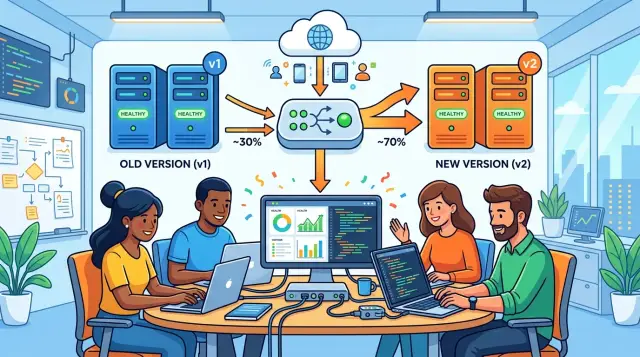
Table of Contents
Why deploys cause downtime
Most release outages come from timing, not bad code. The old app stops serving requests a few seconds too early, and the new app is not ready yet. That gap is enough for users to hit errors.
Small teams run into this a lot. One person runs a deploy script, the process restarts, and traffic keeps coming in the whole time. If the server needs 20 or 30 seconds to boot, every request in that window can fail.
Slow startup makes this worse. Many apps say "I'm up" before they can really do the job. The web server listens on a port, but the app still loads config, warms caches, opens database connections, or starts workers. Early requests arrive, the app chokes, and users see random 500s even though the release itself was tiny.
Database changes create another common failure. One migration can break both versions of the app if you run it at the wrong moment. If the new code expects a renamed column while the old code still writes to the old one, a single release step can break the whole service.
Even a short burst of errors does real damage. Users do not care which part failed. If checkout works for 99 percent of requests but login fails for 30 seconds, the site still feels broken. Those errors can also trigger retries, back up queues, and add load right when the app is already weak.
Teams that want to deploy without downtime usually learn the same lesson first: shipping files is not the risky part. Switching live traffic from one app copy to another is.
The simplest example makes it obvious. If you run one API server and restart it in place, nobody answers requests during the restart. Even with two servers, downtime still happens if both restart together or if the load balancer sends traffic to the new copy before it passes a real readiness check.
The smallest setup that works
If you change one thing, stop running a single app copy. One copy means every deploy is a restart, and every restart can drop requests. Two copies behind one load balancer is the smallest setup that gives you room to move.
The idea is simple. Start the new copy first and leave the old one serving traffic. When the new copy passes readiness, the load balancer can send requests to it. That is the basic pattern for deploying without downtime.
You do not need a big platform team for this. A reverse proxy or cloud load balancer, two app processes or containers, and one clear deploy script are enough for many teams. Keep the setup boring. Complex rollout logic usually creates more trouble than it solves.
A small, workable setup has:
- two app copies running all the time
- one load balancer in front of them
- a readiness check before any traffic shift
- a fast rollback path to the previous version
Readiness matters because "the process started" is not enough. The app should prove that it can handle real traffic before users hit it. If it still warms up, connects to the database, or loads config, the load balancer should wait.
Rollback should stay short and repeatable. Keep the previous version available until the new one survives real traffic for a while. If error rates jump or requests slow down, send traffic back and stop the release. You want rollback to take minutes, not a long debugging session in production.
For one API or web app, many teams never need more than this. Get these four pieces right first, and the rest becomes much easier.
Write health checks that tell the truth
A health check should answer one plain question: can this app copy handle a real request right now? If the answer is no, return failure. Soft or vague checks give your deploy process bad information, and bad information causes downtime.
Many teams use one /health endpoint for everything. That usually causes confusion. Split health checks into two jobs instead. Liveness tells you the process is still alive and not frozen. Readiness tells the load balancer whether this instance should receive traffic.
Readiness should fail while startup work still runs. If the app is loading config, warming caches, opening database connections, pulling secrets, or running boot tasks, it is not ready. A quick 200 OK from a half-started app looks good in logs, but users pay for it with errors.
A useful readiness check usually confirms a few basic facts. The app finished startup. It can reach the database or queue if requests depend on them. It loaded the config and secrets it needs. It has enough free resources to take traffic.
Keep liveness much simpler. If you make liveness depend on the database, a short database hiccup can make your orchestrator restart healthy app copies for no good reason. That turns a small problem into a bigger one.
Picture a small API that takes 12 seconds to start because it loads models and opens a PostgreSQL connection pool. During those 12 seconds, liveness can return success, but readiness should fail. The process is alive. It still should not get customer traffic.
One detail gets missed all the time: test health checks under normal traffic, not only in staging. A health endpoint that passes in a quiet test environment can still lie in production. Timeouts, slow queries, empty worker pools, and stuck background jobs often appear only when real users hit the system.
Treat health checks like production code. They should be strict, honest, and boring.
Use a load balancer as the traffic gate
A load balancer gives you one place to control traffic. That removes a lot of risk when you deploy with a small team.
Send users only to app copies that pass real checks. If a copy starts failing, the load balancer should stop sending requests to it quickly. You do not want a broken process to stay in rotation for another minute while users collect errors.
For lean setups, plain nginx or a cloud load balancer is often enough. The point is simple: the app should not decide whether it gets traffic. The traffic gate should decide.
A few settings matter more than the rest. Check each app copy every 5 to 10 seconds. Mark it unhealthy after 2 or 3 failed checks. Use short request timeouts so stuck copies drop out quickly. Drain connections for 30 to 60 seconds before shutdown.
Connection draining is what keeps releases smooth. Before you stop an old copy, tell the load balancer to stop sending new requests to it. Let active requests finish, then shut it down. If you kill the process first, some users will hit a reset connection or a half-finished response.
Short timeouts also protect you from slow failures. A bad copy does not always crash. Sometimes it hangs on the database, stalls during startup, or answers one request out of five. Long timeouts keep that bad copy in the pool far too long.
Sticky sessions should be the exception. If your app stores session state in memory on each copy, you might need them for a while. Even then, they make rollouts harder because users stay attached to old copies longer. If you store sessions in Redis or a database, turn sticky sessions off and keep traffic free to move.
That one change makes deploying without downtime much easier. The load balancer can shift traffic away from trouble before most users notice.
Roll out one copy at a time
If you run three app copies, replace only one on each deploy. That habit cuts risk fast because most users still hit the older copies while you test the new release under real traffic.
Say your API has three instances behind a load balancer. Start a fourth instance with the new version, or replace one old instance with one new one. Leave the other two alone.
Keep the new copy out of rotation until its readiness check passes. That check needs to prove the app can actually serve requests, not just start a process. If it still warms caches, waits for a database connection, or fails a startup task, keep traffic away from it.
Once the new copy is ready, let it take a small share of traffic. In a tiny setup, that may simply mean one instance out of three now runs the new version. That is often enough for a safe rollout without extra tooling.
Then pause and watch it for a few minutes. Look at error rate, response time, and the recent logs from the new copy. You are looking for obvious trouble: more 500s, slower queries, connection spikes, memory growth, or warnings that were not there before.
If the new copy stays healthy, replace the next old one and repeat. Keep the rhythm simple: one copy, one wait, one check. Teams that rush this step often create their own outage.
This method works well for smaller companies because it does not need release software or a dedicated platform group. You need a load balancer, honest health checks, and the patience to let each new copy prove itself before you move on.
Shift traffic slowly
A slow rollout beats a brave rollout. Do not send all users to the new version at once unless you are happy guessing under pressure.
A simple pattern works well for many teams. Start with 5 percent of traffic on the new version, then move to 25 percent, then 50 percent. If everything stays normal, send the rest.
The pause between steps matters as much as the percentages. Give each step enough time to show real user behavior, not just startup noise. On a busy service, five minutes may be enough. On a quieter one, you may need 15 minutes or more.
Watch signals users actually feel: error rate on live requests, response time on common endpoints, login or checkout success rate, and CPU or memory on the new instances.
If one of those moves in a clear way, stop and roll back right away. Do not wait for a perfect root cause analysis while users hit errors. Move traffic back to the old version first, then inspect logs, traces, and recent config changes.
Keep the old version running during the whole rollout. That gives you a safe place to send traffic if the new release starts failing after 10 minutes, not just in the first minute. Many teams shut down the old copy too early and turn a small issue into an outage.
A plain example makes this easy to picture. Imagine one API with four app instances behind a load balancer. Add one new instance and keep three old ones. That gets you close to a 25 percent shift with almost no special tooling. If it stays healthy, replace the second old instance. Then the third.
This takes longer than a full swap, but it is usually the better trade. You spend a few extra minutes on release day and avoid an hour of cleanup later.
A simple example with one API
A small startup has one API and a basic load balancer. Three app copies are enough for a safe rollout. On a normal day, two old copies handle all traffic while the third slot waits for the next release.
The team starts version 2 in the empty slot. While it boots, the two old copies keep serving requests, so users do not see a gap. The load balancer keeps the new copy out of rotation until its readiness check proves more than "the process is running."
For one API, a good readiness check can stay simple. It should confirm that the app finished startup, can answer normal requests, and can reach anything it needs on every request, such as the database or cache. If the new copy still warms up or fails a migration check, the load balancer should keep traffic away from it.
Once the new copy passes, the team gives it a small share of traffic, often 5 to 10 percent. That is enough to catch real problems without putting every user on the new version at once. For the next 10 minutes, they watch error rate, request latency, restart count, and CPU or memory spikes.
If those numbers stay normal, the team replaces one old copy with the new version and repeats the same check. After another quiet window, they replace the last old copy and return traffic weights to normal.
If the error rate jumps, they do not debate it for 20 minutes. They set the new copy's traffic weight back to 0, keep the old copies live, and inspect the logs. That rollback takes seconds because the old version never left the load balancer.
That is the whole pattern: keep the old copies serving, admit the new copy only after real checks pass, and shift traffic in small steps you can reverse quickly.
Mistakes that break the rollout
Most rollout failures come from small assumptions, not fancy infrastructure. A team adds a load balancer, sees green health checks, and thinks the release is safe. Then real users hit broken requests, lost sessions, or half-finished database work.
One common mistake is treating a health check like proof that the app works. Many checks only confirm that the process started and can answer on one endpoint. That is not enough. An app can return 200 on /health while it still cannot reach the database, cannot read a queue, or cannot serve real traffic fast enough.
Another mistake is changing app code and database rules in one jump. The new version expects a new column or stricter constraint, but the old version still handles part of the traffic. One version writes data the other version cannot read, or old requests fail halfway through. Safer rollouts split this into steps: add the database change first, release code that works with both old and new data shapes, then clean up later.
Sessions cause trouble more often than teams expect. If each app instance keeps sessions only in memory, users bounce between versions and get logged out. Gradual traffic shifts become messy because a user may land on one copy for login and another for the next request. Shared session storage, signed cookies, or stateless auth avoid that trap.
Shutdown behavior breaks plenty of otherwise good releases. The old version gets a stop signal, closes at once, and drops active requests. Users see random errors even though the new version is healthy. Give the old copy time to drain. Stop new traffic first, let current requests finish, and only then exit the process.
Rollback is another area teams ignore until release day. A team says it can roll back, but nobody has tried it under real timing. Then a bad release lands, the database already changed, caches use the wrong shape, and rollback takes longer than the deploy.
A short practice run helps. Start a new version behind the load balancer and watch real readiness, not just process startup. Keep old and new versions compatible with the same database for one release window. Drain traffic before shutdown and measure how long requests actually take. Rehearse rollback on a small release, even if it looks harmless.
If you do only one thing before the next deploy, test shutdown and rollback together. That is where many "safe" rollouts fail.
Quick checks before and after release
Most failed rollouts do not break on the first request. They break five minutes later, when background jobs start, caches warm up, or one slow endpoint gets real traffic.
Start with the most useful boring check: make sure the old version and the new one can run side by side. If both versions touch the same database, session store, or queue, they need to agree on formats and field names for a while. A release that works only when every copy updates at once is a risky release.
Then test the load balancer, not just the app. Remove one instance from traffic and watch what happens to active requests. Good behavior is simple: new requests stop going to that instance, open requests finish, and nothing hangs for 30 seconds and then fails.
A plain status page is not enough. Check one or two slow endpoints that do real work, such as login, search, report generation, or a write to the database. Those paths often fail before the health endpoint does.
Before traffic moves, ask four direct questions:
- Can old and new copies handle the same requests and data at the same time?
- Does the load balancer drain one copy cleanly?
- Do the slower endpoints stay healthy under light traffic?
- Is rollback ready, with the last version still available?
After traffic starts moving, watch error rate, latency, and restarts first. CPU and memory matter too, but users feel errors and delays first. If latency climbs while errors stay flat, you may still have a bad release.
Keep one person on rollback duty until traffic settles. Do not split that job across the team. One person should watch the graphs, check the logs, and decide quickly whether the new version stays or goes. Small teams usually do better when responsibilities stay clear.
What to do next
Pick one service that changes often and use it as the test case. A small API or internal app is enough. Trying to fix every deploy at once usually turns a simple job into a mess.
Before you change your deploy tool, add readiness checks that tell the truth. The new copy should report ready only after it can accept real traffic, connect to its database, and handle a normal request. That step does more for uptime than an elaborate pipeline ever will.
Write the rollout and rollback steps in plain language. If a teammate cannot follow them at 2 a.m., they are not clear enough. A first version can be as short as this:
- Start one new copy.
- Wait for readiness to pass.
- Send a small share of traffic to it.
- Watch errors, latency, and logs for a few minutes.
- Send traffic back if anything looks wrong.
Use numbers. Decide in advance how long you will watch, what error rate you will accept, and who can approve a rollback. When teams skip that part, they waste time arguing while users see failures.
If your current setup feels shaky, outside help can save time. A good advisor can spot weak readiness checks, unsafe load balancer defaults, or CI/CD steps that replace every copy at once.
That is also the kind of work Oleg Sotnikov does through oleg.is with startups and small companies. If you need a second pair of eyes on rollout design, lean infrastructure, or a practical Fractional CTO review, a short review can tighten the risky parts before the next release.
Keep the goal modest. One service. One honest readiness check. One written rollback path. Once that works a few times, repeat the same pattern on the next service.
Frequently Asked Questions
Do I need Kubernetes to deploy without downtime?
No. Most small teams can avoid downtime with two app copies, one load balancer, and a readiness check that tells the truth. If you can add a third copy, gradual rollouts get easier, but you do not need a big platform stack to start.
What is the difference between liveness and readiness?
Liveness answers, "Is the process still alive?" Readiness answers, "Can this copy handle real traffic right now?" Keep liveness simple, and make readiness strict so the load balancer waits until startup work, connections, and boot tasks finish.
How many app copies do I need at minimum?
Start with two copies behind one load balancer. That setup lets one copy serve traffic while the other starts or updates. Three copies give you more room for slow traffic shifts and easier testing under real load.
How do I know the new version is really ready?
Do not trust a port check alone. The app should finish startup, load its config and secrets, connect to the database or cache if requests need them, and answer a normal request without choking. Until then, keep it out of rotation.
What is the fastest rollback plan?
Keep the old version running while you release the new one. If errors rise or latency jumps, send traffic back to the old copies at once and stop the rollout. Rollback stays fast only when the previous version still sits behind the load balancer.
How should I handle database migrations during a rollout?
Split schema changes from code changes when you can. Add changes that both versions can handle first, release code that works with old and new data shapes, and remove old fields later. That gives old and new copies time to run together without breaking requests.
Do sticky sessions cause rollout problems?
They often do. When each app copy stores sessions in memory, users can bounce between versions and get logged out or lose state. Put sessions in Redis or a database, use signed cookies, or move to stateless auth so traffic can shift freely.
How long should I wait between traffic shifts?
On a busy service, five minutes per step often shows enough real traffic. On a quieter app, wait 15 minutes or more. Watch error rate, response time, and restarts, not just startup logs, before you move to the next step.
How do I shut down old copies without dropping requests?
Stop new traffic first, then let active requests finish before the process exits. A drain window of 30 to 60 seconds works for many web apps, but use a longer window if requests take longer. If you kill the process right away, users will see dropped requests.
What should I verify before I start the release?
Check that old and new versions can use the same database, session store, and queue for one release window. Test that the load balancer drains one copy cleanly, and hit one or two slow endpoints like login or a database write. Also pick one person to watch metrics and make the rollback call.


