Dependency update bots in CI without reviewer fatigue
Dependency update bots in CI save time when you group safe upgrades, auto merge small changes, and flag risky packages for review.
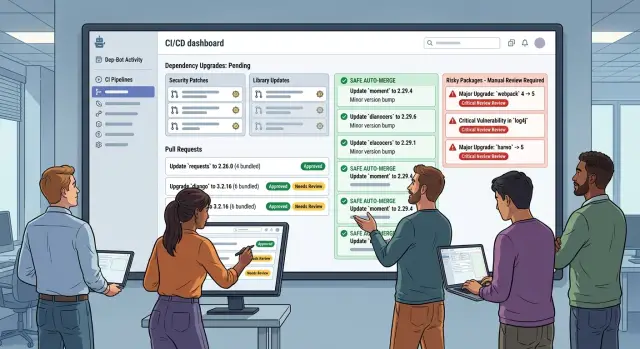
Table of Contents
Why update PRs wear teams down
Teams usually do not hate dependency updates. They hate the constant interruption.
When a bot opens ten small pull requests in two days, each one looks harmless. Together, they chip away at focus. A reviewer has to reload context, scan the diff, check the test run, and decide whether the change is safe. That reset often takes longer than the update itself.
After a few rounds, people stop reading closely. Release notes blur together, especially for patch and minor bumps with vague summaries like "bug fixes" or "internal cleanup." Reviewers learn the pattern and approve faster. That reaction is understandable, but it creates a blind spot. The one update with real behavior changes can slip through dressed up as routine maintenance.
Mixed risk makes this worse. A lint rule update, a test library patch, and a database driver upgrade do not carry the same downside. Yet bots often send them through the same queue in the same format. Safe updates train the team to lower its guard. Then a package that can break logins, billing, or background jobs gets the same quick review as a harmless dev dependency.
Fast merges add another risk. If CI rules push every passing update straight into main, breakage can move forward before anyone notices. Unit tests do not catch everything. Some problems show up later, when a cron job slows down, a deployment image grows, or a library quietly changes a default.
That is why update bots need limits, not just speed. Good automation cuts noise and makes risky changes easier to see. Bad automation spreads attention thin, rewards shallow review, and turns "just another update" into a production issue.
Sort packages by risk before you automate
Teams get better results when they sort packages by risk before they automate anything. If every update follows the same path, reviewers either waste time on harmless changes or miss the one upgrade that can break production.
A simple split is enough. Put low-risk packages in one group, medium-risk packages in another, and keep a short list of high-risk packages that always get extra review.
Low-risk packages usually shape code rather than run your product. Linters, formatters, type definitions, and similar developer-only tools often fit here. If Prettier or an ESLint plugin changes, you may get noisy diffs, but users usually will not notice.
High-risk packages sit closer to login, money, data, or the app shell. That usually includes auth libraries, database drivers, migration tools, billing SDKs, major framework packages, and libraries tied to queues or background jobs. A small change in one of these can do real damage. An auth update can block sign-in. A database driver can change connection behavior. A framework upgrade can alter routing, rendering, or build output in ways that only show up under real traffic.
Do not rely too much on semantic versioning. Some packages break things in minor releases, and some stay stable for years. Keep a short internal list of packages that have caused trouble before. If a package has broken tests twice in six months, treat every new update with caution even if the bump looks small.
Ownership matters too. Every package that can hurt production needs a named owner. That person does not have to review every update alone, but they should decide the rule for it: auto-merge, grouped review, manual approval, or a staging test. Without an owner, risky updates drift through the queue until someone merges them on a busy afternoon.
Do this early and the rest of the setup gets much easier. Safe updates move quickly. Risky ones get the attention they need.
Group upgrades into batches people can review
One giant update PR looks efficient until someone has to review it. Then the opposite happens. People skim, assume the bot did the hard part, and miss the one change that breaks a build or changes runtime behavior.
Grouping works best when each batch matches a real area of work. A reviewer should understand why the packages belong together after a quick glance. If they cannot, the PR is too broad.
A single PR for dev tools is usually a safe default. Linting packages, formatters, type checkers, test runners, and build helpers often move together and rarely change what users experience. That makes review faster without turning it into blind trust.
Runtime dependencies need more care. Group related libraries by area, such as UI, database access, API clients, or testing infrastructure. When a PR touches one part of the stack, the reviewer knows where to look and what could go wrong. A UI batch might affect snapshots and styling. A database batch might need migration checks and a closer read.
Keep major bumps separate
Major versions should almost always get their own PRs. Even small packages can hide breaking defaults, renamed options, or type changes that spread through the codebase. Patch and minor updates are better candidates for grouped PRs, as long as they stay in one area and remain easy to scan.
Size matters more than most teams admit. A good batch takes a few minutes to review, not half an hour. If one PR updates twelve packages across four unrelated parts of the app, split it. Two or three tidy PRs are easier to approve than one messy one.
Every grouped PR should pass the same basic checks before anyone merges it: a fresh install, a lockfile update, unit tests, a build or compile step, and a small smoke test for the affected area. That last check keeps the process honest. Grouping cuts noise, but it should not lower the bar.
When batches stay small, related, and consistent, reviewers can move quickly and still catch real problems.
Auto-merge only the changes you trust
Auto-merge should handle the boring updates, not the ones that surprise your team after lunch.
The best results usually come from narrow rules. Start with patch releases only. A move from 2.3.4 to 2.3.5 is usually a much safer first step than letting minor or major updates merge on their own.
A solid default is simple. Allow auto-merge only for patch updates. Require every test job to pass. Check that the lockfile diff is clean and matches the package change. Merge only during work hours, when someone can spot trouble quickly.
That lockfile check matters more than many teams think. If a bot updates one direct package but the lockfile suddenly rewrites half the tree, stop and look. Big lockfile churn can hide peer dependency changes, package swaps, or install behavior you did not expect.
Time windows help too. If an update merges at 2:00 p.m. on a Tuesday, someone can react within minutes if builds slow down or a deploy fails. If the same change lands at 1:00 a.m. on Saturday, a small issue can sit for hours and grow into a bigger one.
Some packages should never go through auto-merge, even for patch bumps. Skip anything with install scripts, native code, or a history of strange build failures. Image libraries, database drivers, browser automation tools, and low-level crypto packages often need a person in the loop. They can pass CI and still break on a different runner or production machine.
Keep a simple record of every auto-merge in the team log. One line is enough: package name, old version, new version, PR number, and merge time. It sounds minor, but it saves real time later. Oleg Sotnikov often recommends this kind of lightweight operational habit at oleg.is because it makes incident review much faster when a change goes sideways.
Protect risky packages from silent breakage
Some packages should never slide into main on green tests alone. The danger is not the obvious failure. It is the small change that passes unit tests, reaches production, and breaks login or billing an hour later.
Keep auto-merge off for packages close to money, data, or session handling. That usually means framework packages, auth libraries, identity SDKs, database drivers, ORM layers, migration tools, billing libraries, and anything that changes request routing, serialization, or background jobs.
Major versions need a person every time. Even good release notes can miss the one behavior your app depends on, and version labels are not perfect either. A minor auth SDK update can still change token refresh timing or cookie defaults.
Smoke tests help more than a giant test suite here. Run a few short checks on the paths people use every day: sign up, log in, reset password, check out, save a record, load a dashboard. If those paths fail, you want to know before the merge or right after deploy, not from support tickets.
Prepare rollback before you trust automation. Sometimes that is as simple as one clear step in your deploy process: revert the merge, redeploy the last known good build, and restore the package lockfile if needed. If database migrations are involved, be stricter. Many teams should block the merge until someone reviews the migration plan by hand.
Watch production right after these updates land. Error spikes, failed logins, slow queries, and checkout drop-offs usually appear fast. If your team already uses tools like Sentry and Grafana, put those dashboards in front of the person on review duty for the first 15 to 30 minutes after merge.
A calm rule works well: auto-merge low-risk patches, review every major version, and treat framework, auth, database, and billing updates like product changes rather than housekeeping.
Set up the workflow step by step
The setup matters more than the bot you choose. Teams get buried when they turn on every update for every package with the same rule.
Start small and widen the scope only after the bot proves it can behave. That gives you fewer surprises and much less review noise.
Begin with one bot and turn on version grouping. Batch low-risk updates into a small number of PRs on a schedule, maybe once or twice a week. Daily PRs can feel active, but they waste attention fast.
Next, split packages into three lists. Keep a safe list for tools like linters, test libraries, and type packages. Put auth, payment, database, build, and framework packages into a risky list. Put anything with a known migration path or a history of breakage into a blocked list so the bot reports it but does not push it forward on its own.
Then start with patch updates for dev dependencies. This is the safest place to test your rules. If the bot, labels, and tests work well there, expand later to minor updates or production dependencies.
Add gates before any merge happens. Run tests, check the lockfile, and add a small smoke test if your product has one. Let safe groups auto-merge only when every check passes. Keep risky groups on manual review, and use merge windows so updates land when someone is available to watch production.
After that, watch the results for two weeks. If one group fails often, split it into smaller batches. If a safe group passes every time, you can relax the review rule a little.
Simple setups often work better than clever ones. One PR for test tools, one for UI libraries, and one manual lane for risky packages is enough for many teams.
If you run a small product team, this approach keeps maintenance boring in the best way. People review fewer PRs, failures stay visible, and risky packages do not change quietly on a Friday night.
A realistic example from a small product team
A five-person product team gets about 40 dependency PRs a month. At first, every update looked the same in the queue, so reviewers had to open each one, skim changelogs, wait for CI, and make the same small decision again and again. The work was not hard. The volume was just annoying.
They fixed that by treating packages differently instead of sending every update down the same path. Their bot now sorts upgrades into a few review buckets that match real risk.
Test tools move together in one batch. Linters and formatters move together in another. Third-party SDKs get their own batch. Auth and database packages stay separate.
That small change cuts the noise quickly. Instead of ten tiny PRs for Jest, Vitest, ESLint, Prettier, and related plugins, the team reviews one batch. SDK updates also become easier to reason about because they land together rather than mixed with build tooling.
For low-risk changes, they use simple CI auto-merge rules. Patch updates for dev tools can merge on their own after the test suite passes. If the app builds, unit tests pass, and no lockfile conflict appears, nobody needs to spend time approving a Prettier update.
They draw a hard line around packages that can break production in quiet ways. Anything tied to auth, sessions, database drivers, or migrations always waits for a person. Those PRs need review even when the version bump looks small. A patch release in an auth library can still change cookie handling or token validation. A database update can change connection defaults and only show the problem under load.
Weekly routine
The team keeps one short session each week for everything that did not auto-merge. It usually takes 20 to 30 minutes. One developer checks grouped SDK changes, another looks at anything that touched build output, and the tech lead reviews auth and database updates.
That rhythm works because the team stopped pretending every dependency deserves equal attention. Some changes need a fast path. Some need human eyes.
Mistakes that create noise and hidden breakage
Most review pain starts with bad grouping. When one PR mixes a linter bump, a database driver update, a React package change, and a Docker image refresh, nobody can review it with confidence. If tests fail, the team wastes time guessing which package caused it.
Another common mistake is treating major versions like patch releases. A patch update often needs a quick check. A major update can rename options, drop old APIs, or change output in subtle ways. When both land in the same batch, reviewers either block everything or merge something risky because the rest looks harmless.
Teams also get buried when the bot opens PRs faster than humans can read them. Backlog changes behavior quickly. People stop reading titles, skip release notes, and trust a green pipeline more than they should. Too much volume trains the team to ignore the queue.
A few warning signs usually show up early:
- Open update PRs sit untouched for days.
- The same package breaks builds more than once.
- Reviewers merge based on CI alone.
- Minor and major updates keep landing together.
Some packages deserve extra suspicion because they have a bad history. Frontend build tools, auth libraries, SDKs, ORM layers, and anything close to deployment often need manual review. If nobody checks changelogs for those packages, silent breakage slips through. The app may compile and still fail in production because a default changed or a peer dependency moved.
Another quiet problem is stale rules. Teams set grouping and auto-merge once, then forget about them. Six months later the codebase has a new test setup, stricter type checks, different runtime images, or a monorepo split. Rules that felt safe before can become noisy or risky.
A simple fix helps: review bot rules on a schedule, not only after a bad incident. If a package caused trouble twice, pull it out of auto-merge. If the queue keeps growing, slow the bot down and shrink the batches. Small, boring PRs get reviewed. Huge mixed ones get ignored.
Quick checks before and after rollout
A dependency bot should lower noise, not move it somewhere else. The easiest way to tell is to track a few numbers before you turn new rules on, then check the same numbers two or three weeks later.
Start with volume. Count how many update PRs the bot opens in a normal week, how many get merged, and how many sit untouched. If the bot opens 30 PRs and the team only reviews 8, your setup already asks for more attention than people can give.
Then check what your tests actually catch. Look at recent dependency regressions and ask a plain question: did CI fail, or did the problem reach staging or production? If tests rarely catch bad upgrades, your auto-merge rules need tighter limits.
A small scorecard helps:
- PRs opened per week
- PRs merged within 24 or 48 hours
- Regressions caught by tests before merge
- Regressions found after merge
- Packages that always need manual review
Reviewers also need visual clues. When a PR lands, they should spot risky packages at a glance without reading every changed line. Clear labels, grouped names, and a short note like "runtime" or "build only" cut review time.
Watch merge delay after rollout too. Safe updates should not sit behind low-trust ones. If patch updates for linting, test tools, or docs still wait for a week, your grouping may be too broad or your approval rules may be too strict.
Keep one short manual-care list and treat it seriously. That list usually includes auth libraries, payment code, database drivers, framework majors, and anything tied to production boot or migrations. Teams usually know these packages from experience. Write them down so the bot does not turn that knowledge into guesswork.
When this setup works, the pattern is easy to spot: fewer PRs, faster merges for low-risk changes, and sharper attention on the handful of upgrades that can actually hurt you.
Next steps for a calmer update process
Most teams wait too long to fix this. Then every week brings a pile of tiny update PRs, nobody wants to read them, and one bad upgrade slips through.
Start with one small task today: write the first version of your package groups. Keep it simple and base it on how your product actually breaks, not on a perfect taxonomy.
A practical first pass is straightforward. Batch together low-risk tools like linters, formatters, and test helpers. Keep build tools, framework updates, and common SDKs in reviewable groups. Isolate auth, billing, database, infrastructure, and other sensitive packages. Mark a short list of packages that should never merge without human review.
That first draft does not need to be clever. It just needs to be clear enough that your team stops treating every dependency the same.
Then keep auto-merge narrow for a few weeks. Let trusted patch updates merge only after CI passes. Watch for noisy failures, flaky tests, and false confidence. If the workflow stays quiet, widen the rules a little. Add one more safe group. Expand slowly.
Risky packages need owners, not a general queue. If one engineer knows the payment flow, that person should review the payment SDK. If someone owns data migrations or auth, they should see those updates before merge. That cuts review fatigue because the right person checks the right change.
This is where update bots start to pay off. The bot handles routine maintenance, while people focus on packages that can hurt users or break deploys.
If your team wants help tuning CI rules, package groups, or review paths, Oleg Sotnikov offers that kind of hands-on advisory through oleg.is. It fits naturally for small and medium teams that need an experienced CTO view without adding more process than they need.
Frequently Asked Questions
Why do dependency update PRs wear teams down so quickly?
Because each small PR breaks focus. Someone has to reload context, read the diff, check CI, and decide if the change looks safe. That reset adds up fast, and people start approving routine updates without reading closely.
What is the safest place to start with auto-merge?
Start with patch updates for low-risk dev tools like linters, formatters, and test helpers. Let them merge only after CI passes, the lockfile looks normal, and the change lands during work hours so someone can react fast if something goes wrong.
How should I group dependency updates?
Group packages by the part of the stack they affect, not by whatever the bot finds first. A dev-tools batch usually works well, while runtime packages should stay in smaller groups like UI, database, or third-party SDKs so reviewers know where to look.
Which packages should always get manual review?
Keep auth, billing, database drivers, ORM layers, migration tools, framework packages, and queue-related libraries out of auto-merge. These updates can pass tests and still hurt sign-in, payments, background jobs, or production behavior.
Can I trust semantic versioning to judge update risk?
No. Version labels help, but they do not tell the whole story. Some minor releases break things, and some packages stay stable for years, so your own history with a package should shape the rule more than the version number alone.
Why should I care about big lockfile changes?
If one direct package update rewrites a large part of the lockfile, stop and inspect it. That kind of churn can hide peer dependency shifts, package swaps, or install behavior you did not expect from a small version bump.
Should major version bumps stay in separate PRs?
Yes, in most cases. A major bump can change defaults, rename options, or break types in ways that spread through the codebase, so it deserves its own review and its own test run.
Do risky dependencies need a named owner?
Give each risky package area a clear owner. That person sets the rule, watches problem updates, and makes sure nobody merges a sensitive change just because the team feels rushed that day.
What checks should run before a dependency update merges?
Run the usual CI checks, then add a short smoke test for the affected area. For sensitive packages, test real user paths like sign-in, checkout, record saving, or dashboard loading so you catch quiet runtime problems early.
How do I know the bot setup is actually working?
Look for fewer PRs, faster merges for safe updates, and fewer regressions after merge. If the queue still grows, reviewers ignore PRs, or the same package keeps causing trouble, tighten the rules, shrink the batches, or pull that package out of auto-merge.


