Definition of done for AI features in sprint review
Definition of done for AI features should cover refusal rules, cost limits, fallback UX, and clear sprint review checks before release.
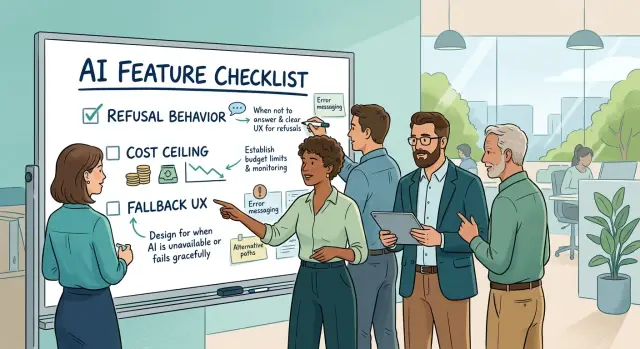
Table of Contents
Why AI stories leave review too early
AI work often looks finished before it is safe to ship. The demo works, the prompt returns a clean answer, and the happy path looks smooth. Then a real user asks something messy, the model refuses at the wrong time, or the answer takes three tries and costs more than anyone expected.
That gap shows up because sprint review usually favors what a team can see in a short demo. People check the screen, the wording, and whether the feature responds at all. They miss the parts that only appear under real use: odd refusals, rising spend, and the moment a user gets no useful answer.
A support assistant is a simple example. In review, it might handle five sample tickets well enough to pass. A few days later, customers hit policy refusals on harmless requests, the usage bill climbs, and the chat leaves people stuck because there is no clear next step when the AI cannot help.
That is where done usually falls apart for AI features. The story leaves review without three checks that should exist before approval: refusal behavior, a cost ceiling, and fallback UX. If those are missing, the feature is not done. It is only demo ready.
Sprint review also misses real AI behavior because demos are tidy and users are not. People paste broken text, ask vague questions, change their mind halfway through, and retry when they do not trust the first answer. A team that tests only the polished path will approve work that still fails users in production.
What done should mean for an AI feature
For regular software, teams often call a story done when the feature works the same way every time. AI does not behave like that. The same prompt can produce a clear answer once and a weak answer later, even if the code did not change.
So done needs a simpler meaning here: real users can use the feature without getting stuck, misled, or surprised. The answers are good enough to help. The weak spots are known. The product has clear behavior when the model gets things wrong.
That is why model output quality and product readiness are not the same thing. A team might prove that the model can write a solid summary, classify a ticket, or draft a reply. That only shows the model can do the task some of the time. It does not show the product is ready to ship.
Product readiness is wider than output quality. It asks whether the feature still feels safe and usable when people type messy input, ask odd questions, or push past the happy path. It also asks whether the team set limits before release instead of after a bad week in production.
A working demo hides this gap more often than teams like to admit. Demos use clean examples, short sessions, and a person nearby who can explain strange output. Users do none of that. They try vague requests, click fast, retry when nothing happens, and assume the product knows what it is doing.
If the only proof is "it worked in review," the story is not done. The team should be able to say, in plain terms, what good output looks like, what failure looks like, and what the product does next. If those answers are still fuzzy, the feature is still a test, not a release.
Put the rules in the story before review
A good definition of done starts in the story itself, not in the demo. If the team waits until sprint review to decide how the feature should fail, refuse, or cap spend, the story is still half written.
Before anyone approves an AI story, the team should answer a few plain questions. What should the feature do on a normal request? Which inputs are out of scope? When should it refuse, ask for clarification, or hand off to a human? What cost ceiling is acceptable per task, session, or day? What should the user see if the model is slow, wrong, or unavailable?
Those questions keep the team honest. They also prevent a common problem: a feature looks good in a neat demo, then breaks the first time a user pastes messy text, asks for something unsafe, or triggers a long chain of calls that costs far more than expected.
Write edge cases into the story with the same care as normal use. Include empty input, conflicting instructions, missing data, repeated retries, policy related requests, and low confidence outputs. Then add stop conditions. The model should stop after a set number of retries, token usage, tool calls, or seconds waiting for a response. "Try until it works" is not a rule.
Ownership matters too. Each rule needs a named owner after release. Product can own the message shown to users. Engineering can own limits, logging, and fallback behavior. Support can own the handoff path. Finance or the product lead can own spend alerts. If no one owns a rule, it usually disappears the moment real traffic arrives.
A story is ready for review when the team can clearly say what the AI does, what it refuses, when it stops, what it costs, and who keeps those rules in place.
Decide refusal behavior on purpose
Many teams test only the happy path. The model gives a clean answer, everyone likes the demo, and the story moves on. Then a real user asks something unsafe, unclear, or out of scope. If the team never chose how the feature should react, the AI makes that choice on its own.
A good story names three states: answer, refuse, or ask for more detail. Those are product decisions. They should not live only inside a prompt that one engineer understands.
A support assistant might answer a billing question when it can read account data. It might refuse to cancel a paid plan without a confirmed user action. If the request is vague, it might ask for an order number before going any further.
The refusal itself matters. "I can't do that" leaves the user stuck. "I can't change your subscription in chat, but I can show you the next step" gives them a path.
This matters even more in sprint review. A polite refusal can still fail if it sounds random, scolding, or vague. Review cases people will actually hit: missing context, unsafe advice, requests for restricted actions, and questions outside the product's scope.
Teams should review the exact wording, not just the rule behind it. Product, design, QA, and support should all agree that the refusal makes sense. If a refusal blocks the request, it should still move the user one step forward with a clear next action or a question that unlocks the answer.
When a story has no written refusal cases, it is usually not done yet.
Set a cost ceiling before release
AI features can look cheap in a demo and expensive in production. One long prompt, a retry loop, or a few large file uploads can turn a small estimate into a real bill. If cost is missing from the definition of done, the story is not done.
Set the limit at the level users actually trigger. That might be per request, per chat session, or per action such as "summarize this report" or "draft a reply." Pick one unit the team can reason about, then write the ceiling in plain language. "Keep this under $0.03 per reply" is much better than "reduce token usage."
The product also needs a defined response when the feature hits that limit. Maybe it switches to a cheaper model. Maybe it trims context and retries once. Maybe it stops the request and shows a short message. Maybe it offers a non AI path instead. The important part is choosing one before review instead of leaving it vague.
A support example makes this easy to judge. Say an agent uses AI to draft replies during one customer session. You might cap that session at $0.15. After the cap, the tool can stop generating full drafts and offer a short outline instead. The agent still moves forward, and the team avoids surprise spend.
Track cost in a form both product and engineering can read without translation. A chart with only tokens and latency is not enough. Show cost per action, retry rate, fallback rate, and total spend for the feature. Product can decide whether the result is worth the money. Engineering can see whether model choice, prompt size, or caching is pushing the bill up.
Cheap enough to run every day beats impressive and expensive. Teams that decide this early avoid painful cuts after launch.
Plan fallback UX before users need it
An AI feature should not trap people when the model fails. Models refuse requests, lose context, time out, or produce answers that are too shaky to trust. When that happens, the product still needs a usable path.
Put that path in the story before review. If the AI cannot complete the job, users might switch to a standard form, choose from fixed options, or send the case to a person. The fallback does not need to feel smart. It needs to help.
Keep the message short and direct. "I can't complete this request. Please pick one of the options below." That is usually enough. Skip long apologies and vague filler. Tell users what happened, what they can do next, and whether a human reply will take minutes or a day.
Most fallback UX needs to cover three moments: the model refuses for safety or policy reasons, the answer is too uncertain to show, or the service is unavailable or too slow.
Users should still be able to finish the task even if the AI cannot. If someone came to reset a password, update an order, classify a support issue, or draft a reply, give them another route on the same screen. Do not make them start over. Do not send them hunting through menus.
This belongs in the definition of done because failure is part of normal use. A small support team feels this fast. If the assistant cannot answer a billing question, the screen can offer a short contact form with the order number already filled in. That saves time and cuts repeat messages.
If the only fallback is "Try again later," the story is not done. The user still has a problem, and the product still owns it.
How to review an AI story
Start with the user task. Do not start with the model prompt, temperature, or vendor choice. Ask one plain question first: what is the user trying to finish, and what should happen if the AI cannot help?
That keeps the review tied to real work instead of a demo that looks good for two minutes.
A simple review flow works well. First, check the normal path with a real request and confirm the answer is useful, clear, and in the right format. Then check refusal behavior with prompts that should fail. The system should say no in a calm, direct way and guide the user to a safe next step. After that, check spend limits with a run that shows token use, model choice, and what happens when the request crosses the cost ceiling. Finally, force an error, timeout, or low confidence result and make sure the user still has a path forward.
Do not rely on clean sample inputs. Review logs, replay tests, or staged runs with messy requests, missing context, typos, repeated questions, and vague phrasing. AI features usually break there, not in the polished demo.
A support assistant makes this concrete. If a customer asks a clear billing question, the answer should be correct and short. If the customer asks for account access the bot cannot grant, it should refuse that action, explain why, and hand off to a human or a standard support form.
Only approve the story when the whole flow works from start to finish. A strong answer is not enough if the refusal is sloppy, the fallback is confusing, or the cost jumps every time someone writes a longer prompt.
A support team example
Picture a support team building an AI reply assistant for common tickets such as refunds, shipping delays, and login trouble. The assistant does not send messages by itself. It drafts a reply, shows the agent what it used, and waits for approval.
The team decides early how the assistant should act when a request is risky. If a customer asks to change account ownership, remove security checks, or share private data, the assistant does not try to be helpful anyway. It refuses in plain language and points the agent to the right manual process.
Unclear messages get a different response. If the ticket says, "It broke again" or "Why was I charged?", the assistant does not guess. It asks one short follow up question so the agent can get the missing detail before anyone sends a wrong answer.
They also set a cost ceiling before the story reaches review. If usage jumps and model spend crosses the daily limit, the tool switches to a cheaper model for simple tickets. If the draft still looks weak, it stops generating full replies and offers a short suggested next step instead.
Low confidence triggers a backup flow. The agent sees a note that the draft may be unreliable, then chooses one of three actions: ask a follow up question, use a saved reply, or hand the ticket to a specialist.
That handoff matters more than teams expect. If the customer is upset, mentions legal action, or the model cannot find enough context, the assistant creates a short summary for the next agent and exits. No guessing. No fake certainty.
That is a much better definition of done than "the prompt worked in a demo." The story is done when the team knows what the assistant should refuse, when it should get cheaper, and when it should step aside.
Mistakes teams repeat
Weak AI stories usually break in the same places. The team tests a clean prompt, gets a decent answer, and moves on. Real users do not act like that. They paste half a sentence from email, mix two requests into one message, add typos, and expect the system to recover.
That gap shows up fast. A feature can look fine in review and still fail on day one because nobody tried messy input, unclear intent, or a user who keeps changing the request. If the team only tests happy paths, they are reviewing a demo, not the product.
Cost gets hidden in the same way. Teams often share an average from a few short test runs and ignore the expensive cases: long chats, repeated retries, large context windows, tool calls, or users who keep asking follow up questions. One session can cost far more than the neat number shown in review. If nobody checks the upper limit, the budget problem arrives later and feels like a surprise.
Fallback UX also gets pushed to the end, which is where many rough launches come from. When the model refuses, times out, or gives a weak answer, users need a clear next step. Too many teams leave a generic apology on screen and call that enough. It is not enough. Users need a retry button, a simpler path, or a handoff to a human.
Another repeat mistake is approving prompts instead of outcomes. A prompt can sound clever in a team meeting and still leave users stuck. In review, ask a plain question: did the user finish the task, stay within cost, and recover when the model said no? If the answer is shaky, the story is not done.
A short approval checklist
A story is not done because the demo worked once. AI features often look fine with clean prompts and a calm network, then fail the first time a real user asks something messy, risky, or expensive.
A short review pass catches most of that. Check the story against real behavior, not the path the team already knows.
- The model refuses clearly when it should. Users should see plain language, not a vague error or a strange half answer.
- The task can still move forward after a refusal. If the AI says no, the screen should offer a manual step, a simpler option, or a way to contact a person.
- The story names a spend limit. That can be a cap per request, per session, or per user action, but it needs a number.
- The fallback path works on the same screen. Users should not need to start over, open another tool, or guess what to do next.
- The team tested real inputs. Use messy text, incomplete details, edge cases, and a few prompts from actual support logs or user interviews.
One small example: a support assistant can draft a refund reply, but it should refuse to promise money back when policy rules are unclear. On that same screen, the agent should still be able to pick a saved template and finish the reply in seconds.
If any item is missing, the story is not ready to leave review. Done means safe behavior, controlled cost, and a usable path when the model cannot help.
What to do next with your team
Pick one template and make every new AI story use it. Keep it short so people actually fill it in. Include the expected result, refusal behavior, cost limit, fallback state, and the check that proves each one works.
Use the same template across product, design, and engineering. Product defines what a good answer looks like. Design decides what users see when the model refuses, times out, or gives a weak answer. Engineering sets limits, logging, and tests. When all three groups review the same fields, sprint review gets much clearer.
A small rollout usually works better than a big process change. Add the template to your story format this week. Try it on the next few AI stories instead of the whole backlog. Ask reviewers to send back any story that skips refusal, cost, or fallback notes. After one sprint, remove fields nobody used and tighten the ones that caught real problems.
This habit matters more than a perfect document. Teams move faster when they stop arguing about what "done" means and start checking the same few things every time.
If your team wants an outside view, Oleg Sotnikov at oleg.is works as a Fractional CTO and startup advisor. He helps startups and smaller companies turn vague AI delivery standards into practical rules for product, infrastructure, and engineering teams.
Frequently Asked Questions
What should done mean for an AI feature?
Done means a real user can finish the task without getting stuck, surprised, or misled. The story should spell out what the AI answers, what it refuses, what it does when confidence drops, and how the product keeps the user moving.
Why is a working demo not enough?
A demo shows a neat path with clean input and someone nearby to explain odd output. Real users type vague requests, retry, change direction, and hit the edges fast, so review needs to test that mess too.
What refusal behavior should we define before sprint review?
Write three outcomes into the story: answer, refuse, or ask for more detail. Then name the cases that trigger each one, such as unsafe advice, restricted actions, missing context, or requests outside scope.
How do we set a cost ceiling for an AI feature?
Pick a unit your users actually trigger, like per reply, per session, or per action. Then write a plain limit such as "$0.03 per reply" so product and engineering can judge it without guesswork.
What should happen when the feature hits the cost cap?
Choose the fallback before release. You might switch to a cheaper model, trim context once, stop and show a short message, or offer a non AI path, but the team needs one clear rule.
What makes fallback UX actually useful?
Give users another route on the same screen. A good fallback tells them what happened, what they can do next, and how to reach a person or use a standard form without starting over.
Who should own these rules after release?
Product should own the user message and expected outcome. Engineering should own limits, logging, and stop rules, while support should own the handoff path and finance or the product lead should watch spend alerts.
How should we review an AI story in sprint review?
Start with the user task, not the prompt. Check the normal path, then force refusals, messy input, timeouts, low confidence, and spend limits to see whether the whole flow still works.
What mistakes make AI stories leave review too early?
Teams often approve prompts instead of outcomes, test only happy paths, hide expensive cases behind averages, and leave users with "Try again later." Those misses show up fast in production because users do not act like the demo.
What is the simplest template we can add to AI stories this week?
Add five fields to every AI story: expected result, refusal rule, cost limit, fallback path, and the proof you will test in review. Keep the template short so people use it on every story, not just the big ones.


