Deep link handling that keeps users in the right state
Deep link handling fails when auth, expired pages, and version checks interrupt the path. Plan routes that return each user to the right screen.
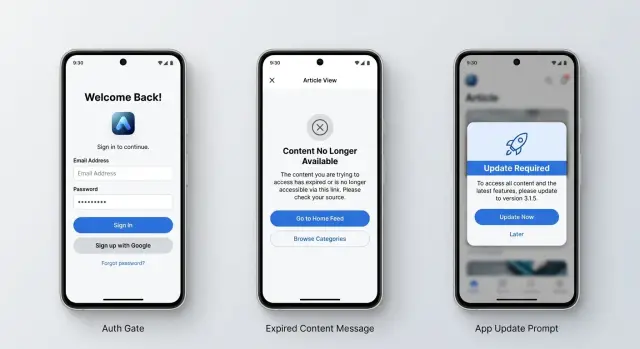
Table of Contents
Why users end up on the wrong screen
A link from an email or ad almost never lands in a clean, predictable app state. The person might already have the app open, or they might need to sign in first. They might tap the link on an old app version, or the offer in the link may already be gone. One URL can hit several different realities.
Teams often build each case on its own. Marketing adds a promo link. Product adds a sign in check. Mobile adds an update screen. Support asks for a fallback when content disappears. Each part makes sense alone, but together they create a messy chain of redirects that no one fully owns.
That is how people end up on the wrong screen. A user taps a discount in an email and lands on the home tab. Another taps an ad for a specific item, signs in, and sees a generic dashboard instead of that item. Someone else gets forced to update, opens the app again, and loses the original destination completely. It feels random. Worse, it feels broken even when the app did exactly what the code told it to do.
Bad deep link handling usually starts with one simple mistake: the team treats the link as a destination, not as a request that must survive state checks. The app asks several questions before it can show the right page. Is this person signed in? Does this content still exist? Can this app version open it? If each check sends the person somewhere different, the original intent gets lost.
A clear flow fixes more than one bug. It gives every incoming link one path, with rules for sign in, missing content, and version checks in the same order every time. That is less clever than a pile of special cases, and usually much more reliable. When the app remembers where the person meant to go, the experience stops feeling like chance.
The states every incoming link must account for
Deep link handling starts with a simple rule: a link points to an intent, not always to a screen. Before the app opens anything, it should check the user's state, the content's state, and the app's state.
If you skip those checks, people land in odd places. They tap a promo in email and see the home screen. They open an ad for a product and hit an error. They sign in, then lose the original destination.
A good flow usually accounts for five cases:
- The user is signed in and has access. Open the target right away.
- The user is signed out. Send them to sign in, then return them to the exact destination with the same parameters.
- The user does not have the app. Offer the right fallback, such as install, open in browser, or a landing page that keeps the same intent.
- The content changed. If it expired, moved, was deleted, or now needs special access, show a clear message and a useful fallback.
- The app version is too old. Stop the open if the screen cannot load safely, ask for an update, then retry the same destination.
Signed-in status is only part of the story. Access checks matter just as much. A user may still have an account but no longer belong to a workspace, no longer qualify for an offer, or no longer have permission to view a file.
The no-app case matters more than teams expect. Ad traffic often comes from first-time users. Email links often open on a different device, so even existing users may look signed out or may not have the app installed there.
Expired content needs a real fallback, not a dead end. If a sale ended, send people to the current offer page. If an item was removed, send them to the parent category or a search result that matches the original intent.
When these states are clear before release, each incoming link has one predictable path instead of five accidental ones.
Build one decision path for each link
A link only works if the user reaches the right destination in the right state. If someone taps a campaign link and lands on a home screen, a login screen with no return path, or an outdated app prompt that wipes the destination, the link failed.
Start with the target and the expected result. Do not begin with the channel. Email, ads, QR codes, and push campaigns should all feed the same resolver, because the user problem is the same: "Take me to this exact place, with enough context to use it."
A simple order keeps the flow predictable:
- Read and validate the target.
- Check whether the app is installed or whether the web fallback should open.
- Check whether the user must sign in.
- Check whether the content still exists and the user can access it.
- Check whether the current app version can handle that destination.
That order matters. If you ask for sign-in before you save the target, many users never get back. If you run version checks too early, you can send people to update without remembering why they came.
Save the original target before any redirect happens. Store the full destination and the minimum context needed to restore it, such as content ID, campaign parameters, and any mode flags. Keep that record through install, login, consent, and update screens.
Then make every gate return to the same resolver, not to a guessed screen. After sign-in, the app should reopen the stored target and continue the checks. After an update, it should do the same. This is how deep link handling stays consistent instead of turning into a chain of special cases.
Separate logic for email and ad links looks harmless at first. It usually drifts. One team adds a new auth check, another changes a fallback, and the same destination behaves differently depending on where the user clicked.
One shared decision path avoids that drift. Teams that build AI-first products often use this kind of strict flow control in other parts of the stack too, because a single source of truth is easier to test, easier to reason about, and much harder to break by accident.
Handle sign-in without losing the destination
Treat the first tap as user intent, not proof of access. When the app opens from an email or ad, read the full link right away and save the destination before any auth check starts. Good deep link handling depends on that first step.
Do not save only a screen name. Save the full state the user asked for:
- the route or screen
- the item ID or slug
- filters, sort order, and selected tab
- any token you need to finish the request safely
If the user is signed out, send them to sign-in with that return target attached to the auth flow. Keep it somewhere durable, such as secure local storage or a server-side session, so the app does not lose it during a refresh, app switch, or browser handoff.
A simple example shows why this matters. A user taps an email offer for a product list filtered to black shoes in size 9. After sign-in, they should land on that same filtered list, not the home screen, not their profile, and not a generic search page.
Session expiry needs the same care. If a user is already inside the app and the session runs out, keep the path short. Ask them to sign in again, then return them to the exact screen they were using. Do not send them through the full app start flow unless you have no other choice.
Access checks still matter after sign-in. A user may sign in successfully and still lack permission to open the content. In that case, do not bounce them between screens or silently swap in something else. Show a plain message such as "This content is not available for this account," then offer one clear action like "Go back" or "Switch account."
When this flow works, users barely notice it. They tap, sign in, and continue where they meant to go.
Deal with expired or missing content
Expired content is normal. Products sell out, promos end, posts get deleted, and ad campaigns keep running longer than expected. Good deep link handling checks whether the target still exists before the app opens the destination screen.
That check should happen early. If the item is gone, do not load a half-empty page and hope the user figures it out. Show a clear fallback instead.
A short message works best. One sentence is enough: "This offer has ended." or "That page is no longer available." Users do not need a long explanation. They need to know what happened and what they can do next.
Pick the nearest useful fallback
Sending everyone to the home screen is lazy, and users feel it right away. The fallback should stay close to the original intent.
If a promo link points to a product that is no longer active, send the user to the same category or to the current offer page. If an article was removed, send them to the topic page or author page. If a private item no longer exists, send them to the list where they would normally find similar items.
This matters even more for email and ad links. Keep the campaign context when you show the fallback screen. If the user came from a summer sale email, the fallback should still carry that campaign data so analytics, banners, and follow-up screens stay consistent.
Track expired links separately from broken links. They are not the same problem. An expired link means the URL was valid, but the content is gone on purpose or by age. A broken link means something failed: a bad ID, a bad route, or a bad redirect.
That split helps teams fix the right thing. Marketing can review expired campaigns. Product or engineering can fix broken flows.
A simple example: an ad opens a discount page for a plan that ended yesterday. Instead of dumping the user on the home screen, the app shows "This offer has ended" and opens the current pricing page with the original ad campaign still attached. The journey still makes sense, even though the original destination is gone.
Check app version without breaking the journey
A version check should be narrow. If a link opens a screen that older builds can still show, let people through. Stop the flow only when the destination depends on code, layout, or security rules the installed app does not have.
That sounds obvious, but many teams put a full app update wall in front of every marketing link. It wastes clicks. If an email points to a product page that old versions can open, send users there. If the same campaign also uses a newer checkout flow, gate only that part.
Gate only when needed
Treat the version check as a capability check, not a blanket rule. A promo link to a new rewards wallet might need version 6.2. A plain content page from the same email may work fine on 6.0 with a smaller layout.
In deep link handling, save the destination before you send anyone to the app store. Do it as soon as the app reads the link.
- Save the route and content ID
- Save campaign or referral parameters
- Save the minimum version the route needs
- Save a short expiry time for the pending target
If the app closes during the update, you still know where the user meant to go.
Make the return path reliable
After the update, the app should check for a pending target on launch and route the user straight back to it. Do not send them to the home screen first. People read that as a broken link, even if the app updated correctly.
Store returns are messy on some devices. Sometimes the store opens the app again. Sometimes users tap the icon themselves 10 minutes later. Plan for both. Keep the pending destination for a reasonable window, then show a clear resume prompt such as "Continue to your offer" if the automatic return does not happen.
You also need a fallback when the original content no longer works. If the ad campaign ended during the update, send users to the closest valid page and explain it in one short line. A related product page or the active promotion screen is usually enough.
Older versions should not lose access to content they can still open. That one rule cuts a lot of friction, especially for links from email and ads where every extra step costs attention.
An email promo link from start to finish
A good test for deep link handling is a promo email opened on a phone with an older app. The person taps an offer for one product and expects that exact offer, not a blank screen, not a dashboard, and not a generic home page.
The app should read the link first and save the destination before it checks anything else. That stored target can be simple: product ID, campaign ID, and a few safe values like a coupon code or source tag. Once that target is safe in local storage, the app can run app version checks.
If the installed version is too old to open the promo safely, the app sends the user to update. The important part is what happens next. After the update, the app must reopen and resume the same saved route instead of starting from scratch.
At that point, the app can check whether the user needs to sign in. If the promo is tied to an account, the sign-in screen appears, but the saved target stays unchanged. When the user finishes sign-in, the app should continue to the promo destination they tapped in the email. Many teams get this wrong and dump people onto a home screen because the auth step wipes the original route.
If the promo still works, the user lands on the product page or campaign page with the offer intact. If the promo expired during the update or sign-in flow, the app should fall back to the campaign page with a short note such as "This offer has ended, but you can still view the items in this campaign." That keeps the user oriented.
The broken version of this flow usually looks like this:
- the app checks version before saving the target
- the update clears the original promo route
- sign-in sends the user to a generic screen
- expired content returns a dead-end error
A clean flow feels almost invisible. The user taps the email, updates if needed, signs in if needed, sees the right item or a clear fallback, and never has to guess where the offer went.
Mistakes that break link flows
Most broken links fail before the app even decides where to send the user. A common mistake is checking the app version first and pushing people to an update screen before the app saves the original target. After the update, the app opens fresh, the target is gone, and the user lands somewhere random.
Good deep link handling starts with one rule: save intent on first touch. That means the destination, the content ID, and any campaign parameters that matter. If someone taps an email promo for a discounted plan, the app should still know that after sign-in, after an update, and after a cold start.
Another easy way to break the flow is dropping campaign data during auth. Teams often preserve the destination but lose the tracking values attached to the link. The user still reaches the page, but attribution is wrong, the promo may not apply, and support gets a vague complaint like "the offer disappeared after I logged in."
Sending every failure case to the home screen is also lazy, and users feel it right away. Expired content, deleted content, revoked access, and malformed links are different problems. They should not all end the same way. If a document expired, say that and offer the nearest useful action. If access was revoked, show that clearly. The home screen hides the reason and makes people think the app ignored them.
Different rules across iOS, Android, and web create another mess. If web keeps the target after sign-in but mobile drops it, your product feels unreliable. One routing spec should define the same states and fallbacks everywhere. Platform code can differ. The decision path should not.
A short test pass catches most of this:
- open a link while signed out
- open the same link on an old app version
- open content that has expired
- open content after access is removed
- confirm campaign data survives the whole trip
Teams skip those cases because the happy path works. That is usually where the trouble starts. If a link can come from email or ads, test it like a real user would: on the wrong version, in the wrong session, at the wrong time.
A short release checklist
A release checklist should catch state errors before users do. Deep link handling often looks fine in a demo, then fails when a real user opens an old email, taps an ad on a slow phone, or lands in the app after an update prompt.
Use the same small set of checks before every release. If one of them fails, users can end up on the home screen, in a login loop, or on content they should not see.
- Open every link in two states: already signed in and fully signed out. After sign-in, the app should return the person to the exact destination, not a generic dashboard.
- Try three content cases for each link target: normal live content, content that has expired, and content that needs permission. Each case needs its own clear fallback.
- Test three app states on real devices: app already installed, fresh install, and an older version that must update first. The path should stay intact across all three.
- Check analytics after each run. You want the original link, campaign data, and the final screen to match, or debugging gets messy fast.
- Give the flow to someone outside the team with no instructions. If they pause, back out, or ask what to tap, the flow still has rough edges.
A simple example makes this obvious. Say a user taps a promo email for a limited offer. If the offer expired, the app should say so and send them to the nearest valid page. If the app needs an update, the store page should open and the destination should survive the update. If they need to sign in, the app should bring them back to that offer page after login, even if the offer is no longer valid.
Teams often skip the outside test because they think the flow is obvious. It usually is not. Fresh eyes catch missing prompts, confusing copy, and timing issues that the team no longer sees.
When this checklist passes, deep link handling usually feels invisible to users. That is the goal.
Next steps
Most link bugs do not start in code. They start when nobody agrees on the order of checks, the fallback screens, or the exact message a user should see when something goes wrong.
Write the decision path for every incoming link on one page. Keep the order fixed: install state, sign-in state, content state, then app version. If two teams describe that order differently, users will feel it right away.
A short checklist is enough:
- Define what happens if the app is not installed.
- Define what happens if the user must sign in.
- Define what happens if the content is gone, expired, or not allowed.
- Define what happens if the app version is too old.
- Define the final success screen when everything passes.
Then list every fallback screen and give each one a plain message. "Please sign in to open this offer" is better than a blank loader. "This promotion has ended" is better than sending users to the home screen and hoping they guess what changed. If the app needs an update, say that first and keep the original destination so the user can continue after updating.
Review the full flow with product, marketing, and app teams before launch. Marketing knows where links appear. Product knows what should happen when content changes. The app team knows what the app can preserve across install, sign-in, and updates. A 30 minute review before release can save a week of cleanup after the campaign starts.
Test one real example end to end. Send an email link, open it on an old app version, sign in with a logged out account, and confirm the user still lands on the right screen. Then do the same for an ad link and for expired content.
If your team wants a second pair of eyes, Oleg Sotnikov can review deep link handling as part of Fractional CTO or startup advisory work. That kind of review is often less about code and more about removing the small gaps between teams that cause the wrong state in production.


