Debugging wrong answers in a federated stack step by step
Debugging wrong answers starts with a trace of retrieval, routing, tool calls, and reviewer edits so teams can find the first broken step.
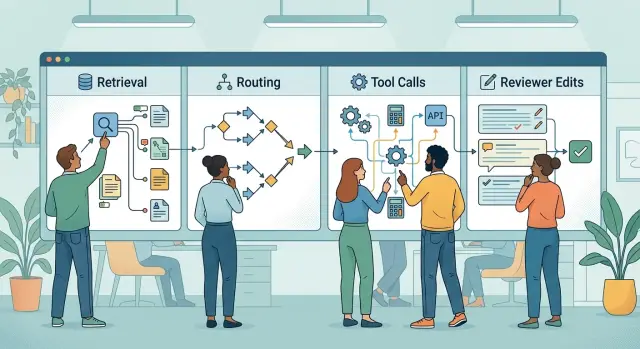
Table of Contents
Why teams blame the wrong step
When a team sees a wrong answer, they usually start with the last reply on the screen. It sounds sensible. The final model produced the words, so it gets the blame.
In a federated stack, that is often the wrong place to start.
A single answer passes through several steps before a user sees it. Retrieval pulls in source material. Routing picks a model, prompt, or workflow. Tool calls fetch live data or run actions, like checking an order or querying a database. A reviewer or post-processing step may rewrite the draft before it goes out.
So the visible mistake may have started much earlier. A support assistant can get a pricing question, pull an old pricing page, route the request to a general model instead of the billing flow, fail a tool call because the account ID is missing, and then smooth over the uncertainty in a final edit. The answer looks polished. It is still wrong.
Teams blame the last model first because it is the easiest thing to inspect. Retrieval logs, router decisions, and tool traces often live in different places. Reviewer edits may live somewhere else again. People go after the part they can see, not the step where the answer first went off course.
That changes the job. You are not trying to find the last visible error. You are trying to find the first broken step.
If retrieval pulled the wrong document, changing the prompt will not fix it. If routing picked the wrong path, the model never had the right context. If a reviewer removed an important warning, the draft may have been fine.
Once a team traces the answer in order, the discussion gets much clearer. Instead of saying "the model is bad," you can say, "this step broke the answer, and here is the evidence."
Map the answer path
If you are investigating wrong answers, start with a plain map of how one request becomes one reply. Do not begin with the final output. Begin with the user's message and write down every step in order, even the obvious ones.
Keep the map short and literal. This is not the architecture diagram from a slide deck. It is the actual path one request took. If a teammate cannot follow it in under a minute, it is too big.
For most systems, the path looks like this:
- The user sends a prompt.
- A router chooses a model or workflow.
- Retrieval, memory, or search adds context.
- Tools run and return data.
- A reviewer, guardrail, or editor changes the reply before it is sent.
Now replace generic labels with real names. Write the model version, the retriever name, the queue or job runner, the exact tool, and any human touchpoint. "LLM" is too vague. "Reviewer" is also too vague if that step could mean a rule engine, a support agent, or a cleanup script.
Then note where the proof lives. Next to each step, record the log source, trace ID, event name, or dashboard that shows the step happened. If the trail disappears after routing, say so. Missing logs are part of the bug. Many teams blame the last model because it is the only part that still leaves a readable trail.
A simple example makes this concrete. If a support answer passed through Claude for routing, PostgreSQL search for retrieval, a Python tool for account status, and a human reviewer in a queue, put those four steps on the page in that order. If the reviewer only saw a rewritten draft, include that too.
Keep the map to one page. One screen is even better. The goal is not to capture every branch in the system. The goal is to give the team one shared path they can inspect without guessing where the answer changed.
Trace one answer from start to finish
Pick one bad answer and stay with it until you find the break. Do not mix it with three other failures that look similar. Teams do that all the time, and then they start arguing about patterns that are not real.
Create one record that holds the full path of that answer. Put the user message, system prompt, retrieved context, router choice, tool inputs, tool outputs, reviewer edits, and final reply in the same place. If those pieces stay split across different tools, people miss the handoff where the error began.
Add timestamps to every step. Seconds matter. If retrieval returned the wrong document at 10:14:02 and a reviewer changed the tone at 10:14:09, the reviewer did not create the factual mistake. The timeline keeps everyone honest.
A useful trace only needs a few fields:
- step name
- time
- what the step received
- what the step returned
- any human edit or override
Then compare each step as an input-output pair. Read them side by side. Did the router send the request to the wrong tool? Did retrieval miss the one document with the right date? Did the tool return an empty result that the model turned into a guess?
Stop as soon as you find the first mismatch. Name it in plain language. "Retrieval returned a pricing article, but the user asked about refund policy" is far better than "model confusion" or "bad response quality."
Take a simple case. A user asks, "Can I export audit logs for March?" The final answer says exports are not available. At first glance, the model looks wrong. The trace shows something else: the retriever sent an old help article, the tool checked the wrong workspace, and the reviewer only shortened the reply. The error started before the last model wrote a word.
This kind of trace usually takes minutes. It can save days of pointless debate.
Check retrieval before you read the answer
Most teams start with the final reply. That is usually a mistake. If retrieval fed the model bad material, the answer never had much chance.
Open the retrieval log for one bad response and read the actual chunks in order. Ranking scores help sort results, but they do not tell you whether a chunk answers the user's question, repeats another chunk, or misses the one sentence that mattered.
A common failure is simple. A customer asks about a 30-day refund window, and retrieval returns last quarter's FAQ with the old 14-day rule. The model sounds confident because it did receive a policy. It just received the wrong one.
When you review retrieval, check a few basic things. Did the correct source appear at all? If it did, was it buried under weaker material? Did the results come from stale docs, archived notes, or the wrong product area? Did filters remove the right source because of tags, permissions, or date rules?
Duplicate chunks are another problem. Three similar snippets can repeat the same outdated sentence and make weak evidence look strong. The model then treats repetition like proof.
Timing matters too. Some systems retrieve in stages, or add more context after the first pass. If the right source arrives late, the model may already have started answering from weaker text. That looks like a reasoning problem, but the log shows a sequencing problem.
Too much context can hurt as much as too little. If the right chunk sits next to old tickets, meeting notes, and broad product docs, the model may answer the broad story instead of the exact question.
Before you judge the model, read the retrieved text. Mark which chunk should have answered the question, which chunks were noise, and which ones should never have been there. That first pass narrows the search fast.
Review routing and tool calls
A wrong answer often starts before the model writes a sentence. The router may send the request to the wrong model, skip a tool, or fall back to a weaker path after a timeout. If you only read the final reply, you miss the real cause.
Start with the route log and rebuild the sequence. Which model got the request? Which tools did the system call? How long did each step take? Did the stack retry, time out, or switch paths under load?
Read the route log like a timeline, not a summary. Many systems route by topic, cost, latency, or token size. That sounds fine until a finance question gets labeled as casual chat and sent to a general model.
Then inspect tool inputs, not just outputs. A tool can work perfectly and still return the wrong result if the model passed bad parameters. If a user asks for "open invoices from March" and the tool call requests all invoices, the break happened before the tool answered.
A short review usually tells you enough:
- read the router decision and the rule or score behind it
- match each tool input to the user's actual words
- note retries, timeouts, and fallback routes
- check whether the tool returned partial, cached, or stale data
- mark the first step where the trace stops matching the request
Here is a simple example. A user asks for today's inventory count. During peak load, the router picks a cheaper fallback model. That model calls the inventory tool with the right product ID, but the tool times out, retries once, and falls back to yesterday's cache. The final answer sounds clean and certain. The model is not the root problem. It answered from old data because the tool path failed.
One question helps separate causes: did the model misunderstand the request, or did it reason over bad inputs? If the tool returned incomplete or stale data, fix that path first. If the tool response was correct and the model still mangled it, then you have a model problem.
Compare drafts and reviewer edits
Sometimes the model does most of the work correctly, and the answer goes wrong later. If a person edits the draft, you need both versions side by side before you blame retrieval, routing, or generation.
Start with a plain diff. Put the model draft next to the final reply and mark every change. Small edits matter. One deleted sentence can remove the condition, warning, or limit that kept the answer accurate.
Most review errors fall into a few patterns. A reviewer adds wording that sounds more certain than the draft. They delete a qualifier to make the message shorter. They rewrite a sentence so it reads better but changes the meaning. Or they paste an internal note into the final reply by mistake.
The last two cause more damage than people expect. A rewritten sentence can sound cleaner and still lose the detail that made it true. An internal note like "double-check source" or "maybe old policy" can slip into the answer and confuse users.
Watch for missing scope. If the draft said, "This applies only to paid accounts created after the new billing rollout," and the reviewer cut that line for brevity, the final answer is now wrong for a large share of users. The model did not fail there. The review step changed the meaning.
Tag edits by type, not only by person. That helps you spot patterns quickly. If reviewers keep deleting caveats or replacing precise wording with broad claims, fix the review guide instead of tuning the model again.
It also helps to store reviewer notes separately from answer text. Internal comments, approval marks, and copy suggestions should never share the same field as the message that reaches the user.
If more than one reviewer touches the answer, keep the order of edits. The first person may add a useful correction, and the second may remove it by accident. Without that timeline, teams still blame the last model for a mistake a human introduced later.
A simple failure case
A customer asks a support bot a basic billing question: "What does the current Pro plan include, and how much does it cost each month?" The reply looks calm, polished, and sure of itself. One problem: it uses last year's plan details.
The first break happens before the model writes anything. Retrieval pulls an old pricing page from the archive instead of the current billing document. If nobody checks the retrieval logs, the final answer looks like a generation mistake even though the bad input came first.
The second break is routing. The system sends the question through a general support flow instead of the billing flow. That matters. A general model may answer from whatever context it gets, while a billing flow usually has tighter source rules and better filters for current pricing.
Then the answer reaches a reviewer. The reviewer smooths the tone, removes a rough sentence, and makes the message sound more helpful. They do not notice the monthly price is wrong. After that edit, the reply looks even more trustworthy, which makes the mistake harder to catch.
Then the complaint arrives. The team opens the last model output, sees the wrong number, and blames the last model. That is common, and it wastes time. The model did answer incorrectly, but it answered on top of stale retrieval and bad routing.
That is why the inspection order matters. Start with what the user asked, then what retrieval returned, then which route handled the request, then which tools ran, and only then what the reviewer changed. If you only audit the final text, you fix style and leave the real bug in place.
Mistakes that hide the real cause
Teams lose time because they inspect the prettiest artifact: the final answer. In a federated stack, a clean sentence can hide bad retrieval, a wrong route, a failed tool call, or a human edit that changed the meaning after generation.
One common mistake is mixing logs from different requests. A support chat, retry, background review, and manual rerun can all look related, especially when they happen within minutes. If the request ID changes, treat it as a different story.
Another trap is the green "success" label. The pipeline may have completed exactly as designed and still produced nonsense. Success often means "nothing crashed," not "the answer is correct."
Manual edits create false blame all the time. A reviewer may fix tone, remove a warning, shorten a paragraph, or paste older text from outside the app. Then the last model gets blamed for words it never wrote.
Teams also change prompts too early. They see a bad answer, rewrite instructions, and hope for the best before checking the inputs. If retrieval pulled the wrong document or routing skipped the right tool, prompt changes only add noise.
A simple habit cuts through most of this:
- match the request ID, timestamp, and user turn first
- compare raw inputs with the published answer
- mark any human edit that happened after generation
- treat "success" as a delivery signal, not a quality signal
Small discipline beats clever guesses. If the inspection order stays fixed, the real break usually shows up much faster.
Quick checks for your team
Good tracing should feel boring. If one bad answer turns into a long argument, your team probably cannot see the full request path in one place.
Pick one real request and force everyone to follow the same trail. Start at the user message. Move through retrieval, routing, tool calls, drafts, and human edits in the exact order they happened.
A simple team check works better than another giant dashboard. Ask:
- Can one person open a single request and see every step in order without jumping across five tools?
- Can the team match each output to the exact input, prompt, document chunk, and tool result that produced it?
- Do reviewer edits have timestamps, author names, and a clear before-and-after diff?
- Do logs mark fallback routes, retries, timeouts, and tool failures so nobody mistakes them for normal behavior?
- Can a new teammate repeat the trace in ten minutes and reach the same conclusion?
If the answer is "no" to any of those, your process invites blame. People will point at the final model because it is the last thing they can see, not because it caused the error.
One habit helps a lot: store the request as a timeline, not as a pile of logs. A timeline makes cause and effect obvious. You can see that retrieval returned an old document, the router picked a cheaper fallback model, or a reviewer softened a correct answer into a vague one.
Teams usually learn this the hard way. If the trace is messy, fixes get slow and expensive.
What to fix next
Do not try to trace every failure at once. Pick one failure type that hurts the team most, then add tracing around that path this week. A good starting point is a common miss: retrieval returning weak documents, a router choosing the wrong tool, or a reviewer changing a draft without leaving a reason.
Keep the scope small. One narrow fix gives you cleaner evidence, and it often exposes a few related issues you could not see before.
A shared trace template helps more than another dashboard. If every model, tool, and review step logs different fields, people waste time matching events by hand and guessing the order. Use the same minimum fields everywhere: request ID, timestamp, step name, model or tool used, and a short input-output summary.
Then review a few bad answers together. Three or four examples are enough. Read the trace in order and agree on the first bad step, not the loudest one at the end. If retrieval pulled the wrong source, say that. If routing skipped the needed tool, mark routing. If a reviewer introduced the error, record that too.
This changes the tone of the work. People stop arguing about which model "failed" and start fixing the part that actually broke the answer.
If your stack spans several models, tools, and human review steps, an outside view can help. Oleg Sotnikov at oleg.is works as a Fractional CTO and startup advisor for teams building AI-heavy products, and this kind of tracing problem sits close to his work on AI-first development and lean production systems.
The next useful move is simple: choose one failure, trace it end to end, and make the first bad step visible to everyone.
Frequently Asked Questions
Why is the last model often not the real problem?
Because the last model often writes from bad inputs. If retrieval pulled stale text, routing chose the wrong flow, or a tool returned old data, the final reply only shows where the error became visible.
What should I inspect first when an answer is wrong?
Open one bad request and map the full path from the user message to the final reply. Put each step in order so you can find the first mismatch instead of the last visible mistake.
What should a good request trace include?
Keep one record with the user message, router choice, retrieved text, tool inputs and outputs, reviewer edits, final reply, and timestamps. If those parts live in separate places, people miss the handoff where the answer drifted.
How do I tell if retrieval caused the error?
Read the actual chunks the system retrieved, not just the scores. Check whether the right source appeared, whether old or duplicate chunks pushed it down, and whether filters blocked the current document.
How can routing send a request down the wrong path?
Routing breaks answers when it sends a request to the wrong model, skips a needed tool, or falls back after a timeout. The route log should show why the system picked that path and when it switched.
What do I need to check in tool calls?
Match the tool input to the user's exact words before you judge the output. A tool may return the wrong result because the model passed the wrong account, date, workspace, or query.
How do reviewer edits turn a good draft into a bad answer?
Put the draft and final reply side by side and mark every change. Reviewers often remove scope, warnings, or conditions to make the text shorter, and that changes a correct draft into a wrong answer.
Why do success logs give teams false confidence?
A success label usually means the pipeline finished, not that the answer was true. You still need to compare the raw inputs, outputs, and edits to see whether the stack delivered nonsense without crashing.
How do I stop my team from arguing about the cause?
Use one shared timeline for each bad request and make everyone follow the same order every time. When the team reads the same evidence in sequence, blame drops and the first broken step gets easier to name.
What should I fix first in my stack this week?
Pick one common failure and add tracing there this week. A small fix, like better retrieval logs or clear diffs for reviewer edits, gives you cleaner evidence and usually exposes the next problem fast.


